Smart home control systems now streamline daily routines, boost security, and cut energy waste without adding complexity.
This roundup highlights nine setups that balance reliable connectivity, robust privacy controls, and practical features like energy monitoring and backup power.
Options support voice assistants, Zigbee, LoRa, or plain Wi‑Fi, plus choices that avoid lockouts and confusing privacy menus. Read on for clear guidance on which systems fit different needs and tech preferences.
| WiFi Tuya Smart Door Access Control Kit (Maglock) |

| Best For Door Security | Connectivity: 2.4GHz Wi‑Fi (Tuya/Cloud) | Mobile App Control: Tuya Smart app (remote unlock, user management) | Voice Assistant Compatibility: Works with voice via Tuya integrations (Alexa/Google possible) | VIEW LATEST PRICE | Read Our Analysis |
| X3 Hub Smart Home Gateway for YoLink Devices |

| Best Long‑Range Hub | Connectivity: 2.4GHz Wi‑Fi or Ethernet + LoRa (YoLink) | Mobile App Control: YoLink app (hub/device management & alerts) | Voice Assistant Compatibility: (Indirect) works with integrations supported by YoLink (voice possible) | VIEW LATEST PRICE | Read Our Analysis |
| Moen Matte Black Smart Shower Digital Controller (TS3302BL) |
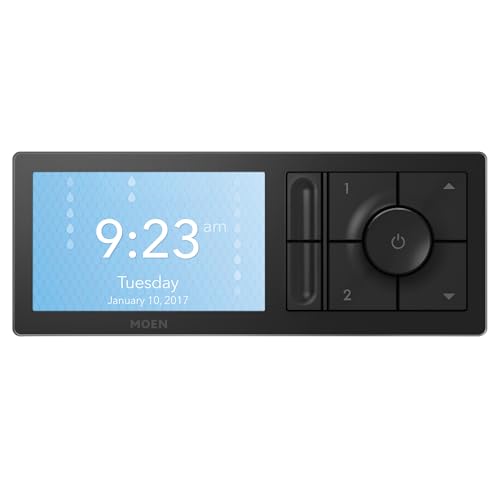
| Best Luxury Bath Control | Connectivity: Wi‑Fi + Voice ecosystems (HomeKit/Alexa/Google) | Mobile App Control: U by Moen app (remote control + voice integrations) | Voice Assistant Compatibility: Native support: Alexa, Siri/HomeKit, Google Assistant | VIEW LATEST PRICE | Read Our Analysis |
| Ring Alarm 14-Piece Wireless Smart Home Security Kit |

| Best Whole‑Home Security | Connectivity: Wi‑Fi (Ring app) / optional monitored cellular backup | Mobile App Control: Ring app (monitoring, notifications, arming) | Voice Assistant Compatibility: Alexa compatible (voice arming/disarming with subscription) | VIEW LATEST PRICE | Read Our Analysis |
| Kasa HS103P3 Smart Wi‑Fi Plug (3-Pack) |

| Best Budget Smart Plug | Connectivity: 2.4GHz Wi‑Fi | Mobile App Control: Kasa app (remote control, scheduling) | Voice Assistant Compatibility: Alexa and Google Assistant compatible | VIEW LATEST PRICE | Read Our Analysis |
| Smart WiFi Home Alarm System (9-Piece) |

| Best No‑Fee Alarm | Connectivity: 2.4GHz Wi‑Fi | Mobile App Control: Vendor app (remote arm/disarm, alerts) | Voice Assistant Compatibility: Compatible with Alexa and Google Assistant | VIEW LATEST PRICE | Read Our Analysis |
| Shelly Pro 1PM Wi‑Fi/LAN Smart Relay Switch |

| Best For Power Monitoring | Connectivity: Wi‑Fi and LAN (plus Bluetooth gateway) | Mobile App Control: Shelly Smart Control app (control, energy monitoring) | Voice Assistant Compatibility: Compatible with Alexa and Google Assistant | VIEW LATEST PRICE | Read Our Analysis |
| Smart Home 7″ Touch Control Panel with Dimmer |

| Best Centralized Control | Connectivity: Wi‑Fi (Tuya/Smart Life integration) | Mobile App Control: Smart Life / Tuya app (scene control, timers) | Voice Assistant Compatibility: Integrates with Smart Life/Tuya (works with voice assistants) | VIEW LATEST PRICE | Read Our Analysis |
| Sprinkler Controller with Protector 12 Zones (12 Zone) |

| Best For Yard Automation | Connectivity: App-controlled (smart controller via Wi‑Fi/app) | Mobile App Control: Controller app (zone scheduling and control) | Voice Assistant Compatibility: Works with app; likely voice integrations via platform (app-controlled) | VIEW LATEST PRICE | Read Our Analysis |
More Details on Our Top Picks
WiFi Tuya Smart Door Access Control Kit (Maglock)
Should you manage a small office, gated home, or rental property and need a simple, all-in-one solution, the WiFi Tuya Smart Door Access Control Kit is a solid pick: you get a complete kit—keypad, 280KG (600lbs) maglock, power supply controller, exit button, wired doorbell, and two remotes—for secure, convenient entry. The keypad reads 125KHz ID and 13.56MHz IC cards, supporting mixed access types. It connects via 2.4G WiFi to the Tuya Smart App so you can release remotely, manage users, set temporary PINs, and view logs. Built with IP68 ABS housing, it’s weatherproof for outdoor use.
- Connectivity:2.4GHz Wi‑Fi (Tuya/Cloud)
- Mobile App Control:Tuya Smart app (remote unlock, user management)
- Voice Assistant Compatibility:Works with voice via Tuya integrations (Alexa/Google possible)
- Remote Alerts / Notifications:Access records and notifications via Tuya app
- Local Hardware Component(s):Keypad access controller + magnetic lock + power supply, remotes
- App-Based Scheduling / Automation:Temporary passwords, user schedules, timed access via app
- Additional Feature:280KG (600lb) maglock
- Additional Feature:IP68 weatherproof housing
- Additional Feature:Built-in doorbell button
X3 Hub Smart Home Gateway for YoLink Devices
Who benefits most from the X3 Hub Smart Home Gateway? You will in case you need dependable, long-range control for YoLink devices across basements, porches, garages, and remote outbuildings. The X3 integrates seamlessly with YoLink gear, using LoRa for up to a quarter-mile receive range and offering exceptional coverage and performance. You can connect via 2.4GHz WiFi or Ethernet and set up plug-and-play through your router. An automatic backup battery provides up to eight hours of power and sends instant alerts once it switches to battery or goes offline over five minutes. Use the YoLink app for easy monitoring and remote management.
- Connectivity:2.4GHz Wi‑Fi or Ethernet + LoRa (YoLink)
- Mobile App Control:YoLink app (hub/device management & alerts)
- Voice Assistant Compatibility:(Indirect) works with integrations supported by YoLink (voice possible)
- Remote Alerts / Notifications:Instant battery/online status and device alerts via YoLink app
- Local Hardware Component(s):Physical hub (X3 Hub) with battery backup
- App-Based Scheduling / Automation:Automation and device customization via YoLink app
- Additional Feature:LoRa long-range support
- Additional Feature:8-hour battery backup
- Additional Feature:Plug & play setup
Moen Matte Black Smart Shower Digital Controller (TS3302BL)
In case you want precise, app- and voice-controlled showers that cut water waste, the Moen TS3302BL matte black digital controller is a strong pick, especially once paired with Moen’s S3102 thermostatic valve. You’ll get electronic controls for exact temperature and soft-touch buttons on a 5-inch non-touch LCD to manage two outlets, power, temperature, and presets. Use voice or app control via Alexa, Siri/HomeKit, Google Assistant, or U by Moen for remote start and adjustments. The system notifies you as soon as the set temperature’s reached and pauses flow until you’re ready, saving water. The matte black finish looks modern and includes a one-year limited warranty.
- Connectivity:Wi‑Fi + Voice ecosystems (HomeKit/Alexa/Google)
- Mobile App Control:U by Moen app (remote control + voice integrations)
- Voice Assistant Compatibility:Native support: Alexa, Siri/HomeKit, Google Assistant
- Remote Alerts / Notifications:Notifications for temperature ready / system status via app
- Local Hardware Component(s):Physical shower controller (digital faceplate) required valve
- App-Based Scheduling / Automation:Preset selections and scheduling via Moen app / voice
- Additional Feature:Requires S3102 valve
- Additional Feature:5-inch non-touch LCD
- Additional Feature:Auto-pause water flow
Ring Alarm 14-Piece Wireless Smart Home Security Kit
Should you live in a 2–4 bedroom home and want a quick, expandable security setup, the Ring Alarm 14-piece kit gives you a ready-to-go mix of devices—base station, two keypads, eight contact sensors, two motion detectors, and a range extender—to cover doors, windows, and common areas. You’ll find the keypad intuitive for arming and disarming, and contact sensors track openings. The system’s wireless design lets you add sensors later. Use the Ring app to monitor devices and get mobile notifications. Optional 24/7 professional monitoring and Alexa voice control are available with subscription; service can preserve connectivity in case Wi‑Fi fails.
- Connectivity:Wi‑Fi (Ring app) / optional monitored cellular backup
- Mobile App Control:Ring app (monitoring, notifications, arming)
- Voice Assistant Compatibility:Alexa compatible (voice arming/disarming with subscription)
- Remote Alerts / Notifications:Push notifications and alarm alerts via Ring app
- Local Hardware Component(s):Base Station, keypads, contact sensors, motion detectors, range extender
- App-Based Scheduling / Automation:Scheduling and routines via Ring app (with subscription/features)
- Additional Feature:Includes range extender
- Additional Feature:24/7 professional monitoring
- Additional Feature:Two wireless keypads
Kasa HS103P3 Smart Wi‑Fi Plug (3-Pack)
In case you want a simple, no-hub way to make lamps, fans, or humidifiers smart, the Kasa HS103P3 is a plug-and-play solution that works with Alexa, Google Assistant, and IFTTT. You’ll connect each compact, UL-certified plug to 2.4GHz Wi‑Fi through the Kasa app, then control devices remotely, on schedule, timer, or countdown. Setup’s guided, and you can also use the physical push button. Rated 120V, 15A, 1800W with copper contacts and polycarbonate housing, it supports parallel circuits and normally open wiring. The three-pack includes a quick guide, two-year warranty, and broad ecosystem compatibility for simple automation.
- Connectivity:2.4GHz Wi‑Fi
- Mobile App Control:Kasa app (remote control, scheduling)
- Voice Assistant Compatibility:Alexa and Google Assistant compatible
- Remote Alerts / Notifications:App push notifications for device control/status
- Local Hardware Component(s):Physical plug devices (3‑pack smart plugs)
- App-Based Scheduling / Automation:Timers, countdowns, schedules in Kasa app
- Additional Feature:15A / 1800W rating
- Additional Feature:UL certified safety
- Additional Feature:2-year manufacturer warranty
Smart WiFi Home Alarm System (9-Piece)
Should you want a no‑fee, DIY alarm that integrates with Alexa and Google Assistant, the Smart WiFi Home Alarm System (9‑Piece) is a strong choice thanks to its 2.4GHz WiFi connectivity and real‑time mobile alerts. You’ll get a siren, two motion sensors, four door/window sensors, and two remotes for flexible perimeter protection. Setup’s quick with pins, screws, or adhesive; no pro needed. Arm/disarm remotely, receive instant notifications, and trigger a 90dB siren on intrusion. Battery‑powered lithium‑ion operation, compact 4×3×5″ design, eco-friendly materials, 30‑day returns, and 24‑hour support round out a capable, subscription‑free option.
- Connectivity:2.4GHz Wi‑Fi
- Mobile App Control:Vendor app (remote arm/disarm, alerts)
- Voice Assistant Compatibility:Compatible with Alexa and Google Assistant
- Remote Alerts / Notifications:Real‑time alerts for door/window/motion events via app
- Local Hardware Component(s):Siren, motion sensors, contact sensors, remotes
- App-Based Scheduling / Automation:Arm/disarm schedules and sensor-based automation via app
- Additional Feature:90dB built-in siren
- Additional Feature:Pins/screws/adhesive mounts
- Additional Feature:No subscription fees
Shelly Pro 1PM Wi‑Fi/LAN Smart Relay Switch
Should you need precise per-circuit energy monitoring for a busy home or small business, the Shelly Pro 1PM delivers with two integrated precision power meters and dual 16A relay channels, so you can track and control each load independently through Wi‑Fi or LAN. You’ll mount it on a DIN rail inside a breaker box, use screw connectors, and rely on built-in protections against overvoltage, overpower, and temperature extremes. It supports Alexa, Google Assistant, Shelly’s iOS/Android app, and Bluetooth gateway mode. Set schedules, get notifications, and monitor consumption to cut costs. It’s CE/RoHS certified, small, and backed with a five-year warranty.
- Connectivity:Wi‑Fi and LAN (plus Bluetooth gateway)
- Mobile App Control:Shelly Smart Control app (control, energy monitoring)
- Voice Assistant Compatibility:Compatible with Alexa and Google Assistant
- Remote Alerts / Notifications:App notifications for events and power monitoring
- Local Hardware Component(s):DIN‑rail relay unit (Shelly Pro 1PM)
- App-Based Scheduling / Automation:Smart schedules and scenes in Shelly app (energy automation)
- Additional Feature:DIN-rail mounting
- Additional Feature:Dual power metering
- Additional Feature:5-year device warranty
Smart Home 7″ Touch Control Panel with Dimmer
Should you want a sleek, centralized command for lights, climate, and audio, the 7″ Touch Control Panel with rotary dimmer is a great fit—its main multi-touch LCD plus a tactile 1.2″ rotary switch gives you quick, precise control for scenes, dimming, and thermostat adjustments. You’ll control up to 100 USB smart devices via the built-in hub, run Smart Life (Tuya) timers, and play synced music through the integrated speaker with two-way intercom. The panel accepts apps on a 16GB TF card, replaces traditional dimmers in minutes, mounts speakers neatly, and removes clutter from multiple remotes and switches.
- Connectivity:Wi‑Fi (Tuya/Smart Life integration)
- Mobile App Control:Smart Life / Tuya app (scene control, timers)
- Voice Assistant Compatibility:Integrates with Smart Life/Tuya (works with voice assistants)
- Remote Alerts / Notifications:App notifications and scene/status updates via Smart Life
- Local Hardware Component(s):7″ touch control panel (wall‑mounted controller)
- App-Based Scheduling / Automation:Scene creation and timer functions in Smart Life/Tuya app
- Additional Feature:1.2″ rotary touchscreen
- Additional Feature:Built-in two-way intercom
- Additional Feature:16GB TF app support
Sprinkler Controller with Protector 12 Zones (12 Zone)
Should you require reliable, app‑based control for medium to large yards, the HiOazo Sprinkler Controller with Protector 12 Zones is a strong choice—its 12-zone capacity lets you tailor schedules across lawns, flower beds, and shrubs from your phone. You get a deep grey ABS unit tipping the scales at 0.91 kg, a power adapter, labels, four wire connectors and three screws for straightforward installation. The app-driven display simplifies programming and automated watering, and 285 reviewers give it a 4.4-star average. It fits Patio, Lawn & Garden setups as an automatic irrigation controller, and manufacturer warranty details are available should you need support.
- Connectivity:App-controlled (smart controller via Wi‑Fi/app)
- Mobile App Control:Controller app (zone scheduling and control)
- Voice Assistant Compatibility:Works with app; likely voice integrations via platform (app-controlled)
- Remote Alerts / Notifications:App notifications and scheduling alerts for zones
- Local Hardware Component(s):12‑zone irrigation controller (physical unit + adapter)
- App-Based Scheduling / Automation:Zone scheduling and automated watering via controller app
- Additional Feature:Controls 12 zones
- Additional Feature:Includes wire connectors
- Additional Feature:ABS deep-grey housing
Factors to Consider When Choosing a Smart Home Control System
Before you pick a system, I look at five essentials: device compatibility, connectivity and range, power and backup, security and privacy, and installation and wiring. I’ll explain how each affects daily use and long-term reliability so you can avoid surprises. Let’s walk through what matters most for your setup.
Compatibility With Devices
Compatibility is key every time I pick a smart home control system, so I always check that it integrates with a wide range of devices—lighting, locks, thermostats, sensors, and appliances—so I can manage everything from one place. I verify support for common protocols like Wi‑Fi (2.4GHz/5GHz), Ethernet, Zigbee, Z‑Wave, and any proprietary tech to guarantee reliable connections. I also confirm seamless operation with major voice assistants and mobile apps so remote and voice control work without fuss. I value systems that interface with multi‑frequency cards, remotes, and varied smart devices for flexible access. Finally, I make certain the hub can monitor and manage multiple device types concurrently, offering centralized control panels for streamlined daily use.
Connectivity And Range
Once I choose a smart home control system, I focus on connectivity and range because they determine whether devices actually work where I need them; I check supported protocols (Wi‑Fi, Ethernet, Bluetooth, Zigbee, LoRa), the wireless bands (2.4 GHz vs 5 GHz), and each technology’s real-world range and penetration so signals reach basements, patios, and outbuildings. I verify protocol support to match device types and prioritize wired backhauls for hubs where possible. I prefer 2.4 GHz for range and 5 GHz for bandwidth-sensitive devices, balancing interference and speed. I map signal coverage, assess link quality in weak areas, and choose systems with reliable remote access for smartphone control. I avoid setups that leave dead zones or unstable connections.
Power And Backup
Having mapped connectivity and patched dead zones, I also check a system’s power and backup capabilities because outages or router failures can render automation useless. I look for built-in batteries or supported external UPS units that keep the hub and key devices running; backup duration commonly ranges from a few hours up to about eight, which often covers short outages. Automatic switching to backup and real-time alerts are must-haves so I know at what point power changes. I favor systems that can use alternative power sources and maintain local control whenever Wi-Fi drops, reducing downtime for essential automation like lighting, locks, and garage openers. Prioritizing these features keeps your home functional and minimizes disruption during interruptions.
Security And Privacy
While I want convenience, I won’t sacrifice security or privacy for it; a solid control system uses strong encryption, offers multi-factor authentication, and keeps local control options so a breach or an internet outage doesn’t leave you locked out. I look for systems that encrypt data end-to-end and commit to regular security updates to patch vulnerabilities. Multi-factor authentication should be available for all accounts, not optional. Access logs and real-time alerts let me spot unusual activity and respond fast. I read privacy policies to confirm what data is collected and whether it’s shared; explicit consent should be required for any third-party sharing. These features together let me enjoy automation without trading away control of my home or personal information.
Installation And Wiring
Because installation affects cost, time, and long-term reliability, I prioritize systems that are straightforward to install and clearly document what’s required. I look for DIY-friendly options with app-guided setup so you don’t need professional help or deep technical knowledge. I check whether devices need extra wiring, support wireless connections, or integrate with existing home wiring—each choice changes complexity and timeline. Mounting flexibility matters: standard screws, adhesive strips, or DIN rails make placement easier in varied environments. I favor plug-and-play units over those needing intricate network configurations, since simpler setups save time and reduce troubleshooting. Finally, I verify compatibility with my home’s electrical infrastructure—voltage ratings and connector types—to guarantee safe, reliable operation after installation.
App And Automation
Although a solid app won’t make your system smart on its own, I expect a mobile interface that lets me manage devices remotely and see real-time status at a glance. I look for clear dashboards, push notifications for security or system events, and fast response times so I’m not waiting for commands to register. Automation matters equally: customizable schedules, scenes, and conditional triggers save time and adapt the home to my routines or changing conditions. I also value broad protocol and device support so everything lives in one app instead of scattered platforms. Finally, compatibility with major voice assistants and integration services gives me flexible control options—voice, app, or automated—without locking me into a single ecosystem.
Frequently Asked Questions
Can Smart Home Systems Work Without an Internet Connection?
Yes — they can. I’ll explain: many devices use local hubs and protocols like Zigbee, Z‑Wave, or Thread so I can control lights, locks, and sensors offline; cloud features and voice assistants just add extra convenience.
How Do Systems Handle Power Outages and Battery Backups?
About 60% of advanced hubs include UPS or battery backup; I’ll explain: they keep core controllers, locks, and alarms running for hours, I assess switchover times, and I’ll recommend capacity based on your device list.
Are There Recurring Subscription Fees or Cloud Costs?
Yes — some systems charge recurring subscription fees for cloud storage, advanced automation, remote access, or professional monitoring; I recommend checking features and pricing tiers so you don’t get surprised and can choose local-first options in case preferred.
Can Multiple Systems From Different Brands Integrate Seamlessly?
Sure — they can, though it’s like matchmaking for appliances: I’ll say yes, many brands interoperate via standards like Matter, Zigbee, or APIs, but I’ll warn you compatibility quirks and firmware updates still cause snarls.
What Are the Data Privacy and Local Storage Options?
You can choose local storage, edge processing, or cloud-only options; I recommend devices supporting local hubs and encrypted backups, and I’ll help you compare vendor policies and setup end-to-end encryption to keep your data private and accessible.