

MoCA adapters and gateway combos use existing coax wiring to create a fast, wired backhaul that improves 4K streaming, reduces gaming lag, and cuts dropped video calls.
They often outperform Wi‑Fi alone in homes with thick walls or large layouts.
Key features to watch are 2.5GbE ports for faster links, AES encryption for secure connections, and easy pairing for quick setup.
Practical tips on installation, splitter selection, and avoiding DOCSIS conflicts help pick the right setup for reliable whole‑home coverage.
| Hitron MoCA 2.5 Network Adapter 2-Pack |

| Reliable Starter | MoCA Version: MoCA 2.5 | Purpose: Ethernet over existing coax (network extender) | Ethernet Port Speed: 1 Gbps (Gigabit Ethernet) | VIEW LATEST PRICE | Read Our Analysis |
| Arris Touchstone DG3450 DOCSIS 3.1 Modem Router (Renewed) |

| All-in-One Gateway | MoCA Version: MoCA 2.0 (built-in) | Purpose: Cable modem + router with MoCA (gateway) | Ethernet Port Speed: Gigabit Ethernet LAN ports (1 Gbps) | VIEW LATEST PRICE | Read Our Analysis |
| ScreenBeam MoCA 2.5 Ethernet Over Coax Starter Kit |

| Whole-Home Kit | MoCA Version: MoCA 2.5 | Purpose: Ethernet over coax starter kit (network extender) | Ethernet Port Speed: 1 Gbps Ethernet port | VIEW LATEST PRICE | Read Our Analysis |
| Hitron HTEM5 MoCA 2.5 Network Adapter (2-Pack) |

| High-Speed Upgrade | MoCA Version: MoCA 2.5 | Purpose: Ethernet over existing coax (network extender) | Ethernet Port Speed: Up to 2.5 Gbps supported by MoCA but adapter marketed for 2.5 Gbps (note: typical device Ethernet port = 1 Gbps for some models) | VIEW LATEST PRICE | Read Our Analysis |
| goCoax MoCA 2.5 Adapter 2-Pack (2.5GbE) |
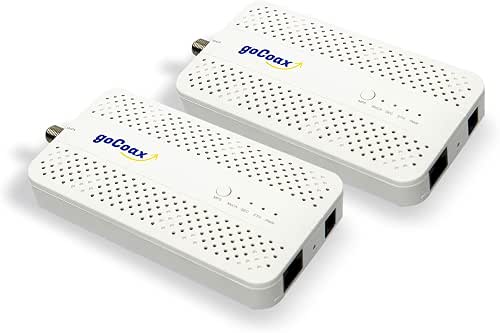
| 2.5Gbps Powerhouse | MoCA Version: MoCA 2.5 | Purpose: Ethernet over coax (2.5GbE backhaul) | Ethernet Port Speed: 2.5 Gbps Ethernet port | VIEW LATEST PRICE | Read Our Analysis |
| ScreenBeam MoCA 2.0 Network Adapter (Single Add-On) |
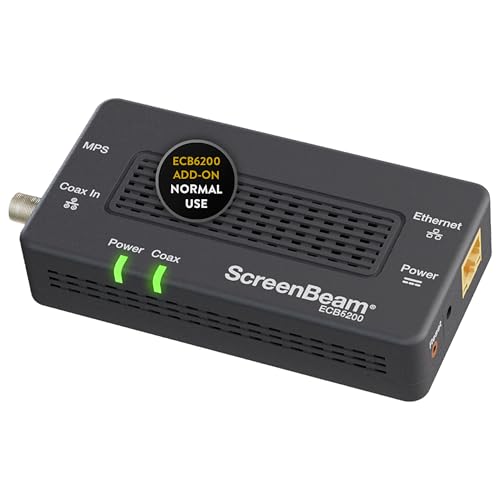
| Compatibility Add-On | MoCA Version: MoCA 2.0 | Purpose: Add-on Ethernet-over-coax adapter | Ethernet Port Speed: Up to 1 Gbps (MoCA 2.0) | VIEW LATEST PRICE | Read Our Analysis |
| ASUS 2.5Gbps Ethernet Over Coax Adapter Kit |

| Gamer’s Backbone | MoCA Version: MoCA 2.5 | Purpose: Ethernet over coax adapter kit (2.5Gb) | Ethernet Port Speed: 2.5 Gbps (MoCA 2.5 kit) | VIEW LATEST PRICE | Read Our Analysis |
| ScreenBeam MoCA 2.5 Network Adapter (ECB6250S02) |

| Single-Room Boost | MoCA Version: MoCA 2.5 | Purpose: Add-on Ethernet-over-coax adapter | Ethernet Port Speed: 1 Gbps (ECB6250S02 marketed for up to 1 Gbps over coax; supports MoCA 2.5 spec) | VIEW LATEST PRICE | Read Our Analysis |
More Details on Our Top Picks
Hitron MoCA 2.5 Network Adapter 2-Pack
If you want reliable wired speed without ripping out walls, the Hitron MoCA 2.5 Network Adapter 2-Pack is a smart choice for homes that already have cable coax wiring. You plug one adapter at your router and another where you need Ethernet, and the coax turns into up to 1 Gbps wired connections. You’ll get two adapters, two Ethernet cables, and power supplies, so setup is simple. Check that your coax outlets tie to a main splitter and aren’t for satellite TV. If you confirm wiring first, installation is plug and play, and support is available if you hit a snag.
- MoCA Version:MoCA 2.5
- Purpose:Ethernet over existing coax (network extender)
- Ethernet Port Speed:1 Gbps (Gigabit Ethernet)
- Kit / Pack Contents:2 adapters, 2 Ethernet cables, 2 power adapters, setup guide
- Compatibility Limitations (coax conflicts):Not compatible with DirecTV/Dish/AT&T U-verse; requires coax tied to main splitter
- Use Cases:Wired connections for 4K streaming, gaming, high-bandwidth devices
- Additional Feature:Converts coax to Ethernet
- Additional Feature:Includes Ethernet cables
- Additional Feature:Plug-and-play installation
Arris Touchstone DG3450 DOCSIS 3.1 Modem Router (Renewed)
You’ll appreciate the Arris Touchstone DG3450 if you want a simple way to turn your home coax wiring into a fast, reliable network backbone with built-in MoCA 2.0. You’ll get DOCSIS 3.1 speed plus backward compatibility, so your gigabit plan runs smoothly with less buffering and snappier video calls. It includes four gigabit LAN ports, dual-band Wi‑Fi 5, and MoCA for whole-home DVR or mesh backhaul. Renewed units arrive inspected with a 90-day warranty, power adapter, and Ethernet cable. Check ISP compatibility first since it won’t work with Xfinity, DSL, or fiber providers.
- MoCA Version:MoCA 2.0 (built-in)
- Purpose:Cable modem + router with MoCA (gateway)
- Ethernet Port Speed:Gigabit Ethernet LAN ports (1 Gbps)
- Kit / Pack Contents:Modem/router unit, power adapter, Ethernet cable
- Compatibility Limitations (coax conflicts):Not compatible with DSL/fiber providers; works with many cable ISPs; supports provider MoCA DVRs
- Use Cases:Gigabit cable modem/router for home internet and whole-home DVR/MoCA use
- Additional Feature:Built-in DOCSIS 3.1
- Additional Feature:Four Gigabit LAN ports
- Additional Feature:MoCA 2.0 integrated
ScreenBeam MoCA 2.5 Ethernet Over Coax Starter Kit
Think of the ScreenBeam MoCA 2.5 Starter Kit as the fast, steady bridge that turns your home coax cables into real Ethernet pipes, perfect when you need reliable wired connections for streaming, gaming, or working from home. You’ll plug one adapter into a MoCA router or use two adapters if your router lacks MoCA. It can push up to 1 Gbps per link and up to 2.5 Gbps across multiple MoCA devices, and supports 16 nodes. You get cables, splitters, and power supplies in the box. Check gateway compatibility, avoid certain TV and ISP coax systems, and expect speeds to vary with cable quality.
- MoCA Version:MoCA 2.5
- Purpose:Ethernet over coax starter kit (network extender)
- Ethernet Port Speed:1 Gbps Ethernet port
- Kit / Pack Contents:2 adapters, 2 power adapters, 2 Ethernet cables, 2 coax cables, 2 splitters, guide
- Compatibility Limitations (coax conflicts):Not compatible with DirecTV/Dish/AT&T U-verse; some DOCSIS 3.1 modems may conflict
- Use Cases:Backhaul for Wi‑Fi access points, switches, 4K streaming, gaming
- Additional Feature:Includes coax splitters
- Additional Feature:Two coax cables included
- Additional Feature:Supports up to 16 nodes
Hitron HTEM5 MoCA 2.5 Network Adapter (2-Pack)
For homes with cable internet and coax outlets already wired to a central splitter, the Hitron HTEM5 MoCA 2.5 adapter kit is a smart choice when you want faster, more reliable wired connections without running new Ethernet cable. You’ll use one adapter by the router and the other where you need Ethernet. It converts coax to up to 2.5 Gbps links, but your real speed follows your internet plan and wiring. Check that coax outlets tie to the main splitter and that you don’t have satellite or AT&T U-verse. The kit includes cables and power supplies and Hitron offers free setup help.
- MoCA Version:MoCA 2.5
- Purpose:Ethernet over existing coax (network extender)
- Ethernet Port Speed:Up to 2.5 Gbps supported by MoCA but adapter marketed for 2.5 Gbps (note: typical device Ethernet port = 1 Gbps for some models)
- Kit / Pack Contents:2 adapters, 2 Ethernet cables, 2 power adapters, setup guide
- Compatibility Limitations (coax conflicts):Not compatible with DirecTV/Dish/AT&T U-verse; requires coax tied to main splitter
- Use Cases:Provide wired Ethernet over coax for cable internet homes (streaming, gaming)
- Additional Feature:2.5 Gbps capable
- Additional Feature:Includes setup guide
- Additional Feature:Free technical support
goCoax MoCA 2.5 Adapter 2-Pack (2.5GbE)
If you want a simple, reliable way to boost home network speed without rewiring, the goCoax MoCA 2.5 Adapter 2-Pack is made for you. You plug one adapter near your router and another where you need fast Ethernet. The adapters use existing coax wiring to deliver up to 2.5 Gbps and support up to 16 devices on the same coax network. You’ll get low latency, around 3 ms for gaming, and enough bandwidth for multiple 4K or 8K streams. The coax shielding keeps signals stable. Each white adapter has a 2.5GbE port and comes in a two-pack with warranty options.
- MoCA Version:MoCA 2.5
- Purpose:Ethernet over coax (2.5GbE backhaul)
- Ethernet Port Speed:2.5 Gbps Ethernet port
- Kit / Pack Contents:2 adapters (2-pack)
- Compatibility Limitations (coax conflicts):Implied same coax limitations (MoCA 2.5) — requires coax network; not for satellite/AT&T U-verse
- Use Cases:Multi‑stream 4K/8K, low-latency gaming, high-speed backhaul
- Additional Feature:2.5GbE port per adapter
- Additional Feature:High path-loss resilience
- Additional Feature:16-device network support
ScreenBeam MoCA 2.0 Network Adapter (Single Add-On)
You’ll appreciate the ScreenBeam MoCA 2.0 add-on when you want rock-solid wired performance without running new cables, because it turns your existing coax wiring into a near-gigabit Ethernet link that’s ideal for 4K streaming, low-latency gaming, and large file transfers. You’ll plug the ECB6200 into a coax jack and your device, then enjoy far better speed and stability than Wi‑Fi. It supports up to 16 nodes, works with most routers and Ethernet devices, and includes cables and a power adapter. Check your coax plant and ISP compatibility, since some modems and satellite systems can conflict.
- MoCA Version:MoCA 2.0
- Purpose:Add-on Ethernet-over-coax adapter
- Ethernet Port Speed:Up to 1 Gbps (MoCA 2.0)
- Kit / Pack Contents:1 adapter, power adapter, Ethernet cable, coax cable, guide
- Compatibility Limitations (coax conflicts):Not compatible with DirecTV/Dish/AT&T U-verse; requires existing MoCA network or starter kit
- Use Cases:Add-on for 4K/HD streaming and gaming on existing MoCA network
- Additional Feature:Single add-on adapter
- Additional Feature:Includes coax cable
- Additional Feature:Designed for MoCA 2.0 networks
ASUS 2.5Gbps Ethernet Over Coax Adapter Kit
Gamers, streamers, and anyone tired of slow Wi-Fi will love the ASUS 2.5Gbps Ethernet Over Coax Adapter Kit because it turns your home coax wiring into a fast, low-latency network without running new cables. You get MoCA 2.5 speeds over active coax, so gaming stays smooth and streaming stays steady. The band mode switch helps avoid interference from DOCSIS 3.1 cable modems, and the kit gives Ethernet-like performance for mesh backhaul and TVs. Setup is simple with a button for secure pairing plus commercial-grade MPS security. The adapters are eco-friendly, wall-mountable, and the starter kit includes two MA-25 units.
- MoCA Version:MoCA 2.5
- Purpose:Ethernet over coax adapter kit (2.5Gb)
- Ethernet Port Speed:2.5 Gbps (MoCA 2.5 kit)
- Kit / Pack Contents:2 adapters (starter kit)
- Compatibility Limitations (coax conflicts):Band switch to reduce DOCSIS 3.1 interference; incompatible with satellite/AT&T U-verse
- Use Cases:Low-latency gaming, stable streaming, mesh backhaul
- Additional Feature:Band mode switch
- Additional Feature:Secure button pairing
- Additional Feature:Recycled-plastic housing
ScreenBeam MoCA 2.5 Network Adapter (ECB6250S02)
The ScreenBeam MoCA 2.5 Network Adapter (ECB6250S02) is a great pick when you want a simple plug and play way to turn existing coax wiring into a fast, reliable Ethernet connection for streaming, work, or online play. You’ll plug it into coax and Ethernet to add wired access in any room with a jack. It supports up to 1 Gbps real world speeds and up to 16 nodes on a MoCA 2.5 network. Check compatibility with your gateway and ISP, avoid certain satellite and AT&T systems, and use one adapter per room for low latency gaming and smooth 4K streaming.
- MoCA Version:MoCA 2.5
- Purpose:Add-on Ethernet-over-coax adapter
- Ethernet Port Speed:1 Gbps (ECB6250S02 marketed for up to 1 Gbps over coax; supports MoCA 2.5 spec)
- Kit / Pack Contents:1 adapter, power adapter, 2 Ethernet cables, coax cable, coax splitter, guide
- Compatibility Limitations (coax conflicts):Not compatible with DirecTV/Dish/AT&T U-verse; some DOCSIS 3.1 conflicts; verify gateway MoCA settings
- Use Cases:Improve gaming and 4K/HD streaming via low-latency wired links
- Additional Feature:1-year warranty
- Additional Feature:Includes coax splitter
- Additional Feature:Backward compatible with 10/100 Mbps
Factors to Consider When Choosing a MoCA Router
When I pick a MoCA router I first check that it works with my home coax wiring and matches the MoCA version my devices support. I also look at real throughput and latency figures alongside any limits my ISP or modem might impose, because fast numbers mean little if the rest of the chain slows down. Finally I think about how many nodes I need so the network stays reliable as I add more adapters and set a clear upgrade path.
Compatibility With Coax
Because I want you to avoid surprises, let’s start by checking whether your home coax network can actually carry MoCA signals. I walk you through practical checks so you’ll know what to expect. First, make sure every coax outlet ties back to a central splitter or panel. MoCA needs that shared path to talk between adapters. Next, confirm your coax isn’t devoted to satellite services or proprietary IPTV, since those will block or be disrupted by MoCA frequencies. Also look for conflict with your cable modem, especially DOCSIS 3.1; some modems need a PoE style filter or a config change at the entry point. Inspect cable quality and use RG6 and splitters rated for MoCA frequencies. Finally, count endpoints so you know how many adapters you’ll need.
Supported MoCA Version
If you want a MoCA router that won’t hold your home network back, start by matching the MoCA version to how you actually use the internet and how many devices share the coax. I pick a version that at least equals my ISP plan so the link won’t bottleneck streaming or gaming. Newer versions give better channel bonding and efficiency, so multiple rooms and many nodes perform better. One caution I share: mixing versions can drop everyone to the slowest device. Also check frequency bands to avoid overlap with cable modems and plan for filters or configuration if needed. For futureproofing, I lean toward higher MoCA versions to support multi gig plans and many simultaneous 4K streams.
Throughput And Latency
You already picked a MoCA version that matches your internet plan, and now I want to help you understand how that choice actually plays out in speed and delay across your home network. I recommend checking the MoCA version first, since versions like 2.0 versus 2.5 raise theoretical PHY rates from about 1 Gbps to 2.5 Gbps and set the ceiling for coax throughput. Next, look at the Ethernet port speed on your adapter or gateway. A 1 Gbps LAN port can bottleneck a 2.5 Gbps coax link. Real-world throughput will be lower than the PHY rate because coax quality, splitter loss, and multiple nodes reduce achievable Mbps. Also prioritize low packet latency and low jitter for gaming and calls. Avoid mixing versions or too many adapters, as that can drop speeds and increase delay.
ISP And Modem Limits
When I help people pick a MoCA router, I start by matching it to the limits the ISP and modem set, since those limits decide how much speed actually reaches your devices. First, confirm your ISP plan speeds so your MoCA backhaul and router aren’t wasted by a slower service. Also check whether your modem or gateway supports MoCA and which version it uses, because mismatches or an active gateway MoCA can reduce throughput or force changes. Look for DOCSIS and frequency conflicts that can interfere with in home MoCA unless you take steps to avoid overlap. Find out if you must rent a modem or can bring your own, and ask about provisioning, MAC whitelisting, or VLAN rules that may block third party gear.
Number Of Nodes
Capacity matters, and I want you to feel confident about how many devices your MoCA network can realistically support. I recommend thinking in nodes, since most MoCA setups allow up to 16 devices. Each adapter, MoCA router, or bridge joins the same coax backbone, so every added node shares available bandwidth. That means more nodes can lower per-device speeds and raise contention during heavy use. For multi-room installs, plan one adapter per coax outlet you convert, and add spare nodes for future gadgets or access points. Your network size will affect topology choices, like using a central MoCA router or multiple adapters with switches, because splitters and distribution gear at the main panel may be needed. If you expect many simultaneous high-demand activities, choose fewer nodes or a higher-capacity MoCA version.
Security And Encryption
You’ve planned how many nodes will share the coax, and now I want to make sure those connections stay private and under your control. I look for MoCA gear that uses 128-bit AES and turns it on by default. I check that the router and adapters support secure pairing and let me set a unique network name or Coax Security ID so strangers can’t join. I also want a Point-of-Entry filter to block outside access and cut eavesdropping risks. Firmware matters to me too; I pick devices with regular security updates and strong admin passwords. When I mix MoCA with Wi‑Fi, I isolate sensitive gadgets on VLANs or separate subnets to limit lateral movement if one device is breached.
Installation And Support
Because good installation makes a secure, reliable MoCA network feel easy, I start by checking the home’s coax layout and what gear I already have. I verify every coax outlet ties back to a single central splitter or distribution panel, since isolated jacks stop MoCA links from forming. I then confirm whether the gateway has built‑in MoCA and, if not, budget for at least two adapters and extras for more rooms. I also look for frequency conflicts with certain modems or satellite and contact the ISP or test the coax plant to avoid drops. Finally, I plan for point of entry filters when required and keep basic tools like a coax tester, spare splitters and F‑connectors or local tech support on call.
Frequently Asked Questions
Do Moca Adapters Interfere With Wi‑Fi Signals?
No. MoCA adapters use your home’s coaxial cable network rather than Wi Fi, so they do not interfere with wireless signals. By carrying traffic over coax they can reduce load on your Wi Fi network and improve overall performance.
Can I Use Moca With Fiber Internet Service?
Yes. You can use MoCA with a fiber internet connection if your optical network terminal or router has a coax output. If it does not, add a MoCA adapter and connect the adapter to the coax and to the Ethernet port on the ONT or router to bring the fiber connection into the MoCA network.
Do Moca Devices Increase Electricity Usage Noticeably?
Yes. MoCA adapters typically draw only a few watts so they add a very small amount to your electricity bill. In my experience the power consumption is minimal, throughput stays steady, the extra cost on monthly electricity is negligible, and I get reliable wired performance.
Are Moca Adapters Compatible With My Isp‑Provided Gateway?
Usually yes. I check whether your ISP gateway has a coaxial port and explicit MoCA support or can be configured to bridge mode. If it cannot, I either add a pair of MoCA adapters to create the link or contact the ISP to enable MoCA or replace the gateway with a compatible model.
Will Moca Work Through Splitters and Old Coax Wiring?
Yes. MoCA typically works through splitters and older coax. I will replace any splitters that are not MoCA rated, measure signal loss, and repair or replace degraded wiring to ensure reliable performance.
Final Thoughts
I’ve walked you through the eight best MoCA router options so you can pick what fits your home and budget. Think of choosing one like placing a strong bridge over your network traffic. It keeps signals steady, cuts lag, and protects streams and calls. If you want, I can help match a model to your ISP and layout, or walk you through installation step by step. You don’t have to do this alone.



