

Affordable desktops under $700 can deliver real power for work, light gaming, and creative tasks.
Refurbished business towers and budget new systems offer fast CPUs, solid RAM, and SSD storage.
Many models include upgrade paths and reliable components built for long service lives.
This guide highlights eight options that balance performance, expandability, and value so buying smart is straightforward.
| Dell OptiPlex 7050 SFF i7-7700 32GB 1TB SSD |

| Professional Workhorse | Processor: Intel Core i7-7700 (4 cores, 3.60 GHz) | Memory (RAM): 32 GB DDR4 (max 32 GB) | Primary Storage: 1 TB SSD | VIEW LATEST PRICE | Read Our Analysis |
| HP EliteDesk 800 G2 SFF Desktop PC (Renewed) |

| Reliable Office Pick | Processor: Intel Core i5-6500 (3.20 GHz) | Memory (RAM): 16 GB RAM | Primary Storage: 512 GB SSD | VIEW LATEST PRICE | Read Our Analysis |
| Dell OptiPlex 7040 SFF Business PC (i5 16GB) |
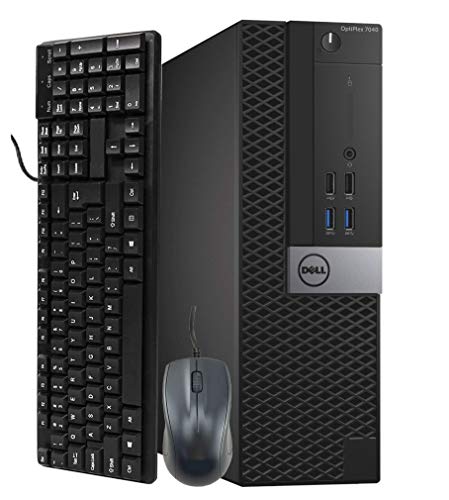
| Small-Business Essential | Processor: Intel Core i5-6500 (3.20 GHz) | Memory (RAM): 16 GB DDR4 RAM | Primary Storage: 256 GB SSD | VIEW LATEST PRICE | Read Our Analysis |
| Dell OptiPlex 7060 SFF i7-8700 Desktop (Renewed) |

| High-Performance Office | Processor: Intel Core i7-8700 (6 cores, up to 4.60 GHz) | Memory (RAM): 32 GB DDR4 RAM | Primary Storage: 512 GB M.2 NVMe SSD | VIEW LATEST PRICE | Read Our Analysis |
| Dell OptiPlex Tower Desktop – Intel i5-14500 vPro |
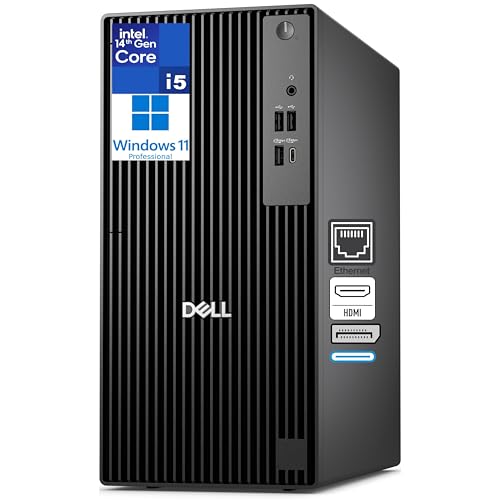
| Future-Proof Power | Processor: Intel Core i5-14500 vPro (14th Gen, up to 5.0 GHz) | Memory (RAM): 16 GB DDR5 (upgradeable to 64 GB) | Primary Storage: 512 GB PCIe NVMe SSD | VIEW LATEST PRICE | Read Our Analysis |
| Gaming Desktop PC Core i5 RTX 3050 16GB 512GB |

| Budget Gaming Rig | Processor: Intel Core i5-12400F (6 cores) | Memory (RAM): 32 GB DDR4 (3200 MHz) | Primary Storage: 1 TB NVMe SSD | VIEW LATEST PRICE | Read Our Analysis |
| White Ryzen 5 Gaming Desktop PC with RX 560 |

| Entry-Level Gamer | Processor: AMD Ryzen 5 3500X (6 cores) | Memory (RAM): 16 GB DDR4 RAM | Primary Storage: 512 GB SSD | VIEW LATEST PRICE | Read Our Analysis |
| Prebuilt Gaming PC Tower — Intel i7 GTX 1050Ti |

| Affordable Performance | Processor: Intel Core i7 (Core i7-4770 referenced, up to 3.9 GHz) | Memory (RAM): 16 GB RAM | Primary Storage: 512 GB SSD | VIEW LATEST PRICE | Read Our Analysis |
More Details on Our Top Picks
Dell OptiPlex 7050 SFF i7-7700 32GB 1TB SSD
If you want a reliable workhorse that won’t break the bank, the Dell OptiPlex 7050 SFF with an i7-7700, 32 GB of RAM, and a 1 TB SSD is a smart pick. You’ll get a compact, professionally renewed tower that boots fast and runs smoothly for years. The quad-core i7 and UHD graphics handle multitasking, office apps, light editing, and dual monitors. It includes Windows 11 Pro, DVD drive, plenty of USB ports, HDMI and DisplayPort, Ethernet, Wi‑Fi dongle, and Bluetooth. You’ll appreciate the verified warranty, bundled keyboard and mouse, and quiet air cooling.
- Processor:Intel Core i7-7700 (4 cores, 3.60 GHz)
- Memory (RAM):32 GB DDR4 (max 32 GB)
- Primary Storage:1 TB SSD
- Graphics Type:Integrated — Intel UHD Graphics 630
- Form Factor:Small Form Factor (SFF) desktop
- Operating System:Windows 11 Pro (64-bit)
- Additional Feature:Includes DVD+RW drive
- Additional Feature:Wireless USB Wi‑Fi dongle
- Additional Feature:Wired keyboard and mouse
HP EliteDesk 800 G2 SFF Desktop PC (Renewed)
You’ll appreciate the HP EliteDesk 800 G2 SFF if you want a reliable workhorse that stays compact and fast without costing a fortune. You get a 6th Gen Intel Core i5-6500 at 3.2 GHz that handles daily tasks, light editing, and multitasking smoothly. It comes renewed with 16 GB RAM and a 512 GB SSD, so apps launch fast and files load quickly. Integrated Intel HD Graphics 530 supports up to 4K and three monitors via DisplayPort, which helps productivity. Windows 11 Pro is preinstalled, though TPM 1.2 limits some security features. You’ll like the included Wi‑Fi and Bluetooth for easy setup.
- Processor:Intel Core i5-6500 (3.20 GHz)
- Memory (RAM):16 GB RAM
- Primary Storage:512 GB SSD
- Graphics Type:Integrated — Intel HD Graphics 530
- Form Factor:Small Form Factor (SFF) desktop
- Operating System:Windows 11 Pro
- Additional Feature:TPM 1.2 security chip
- Additional Feature:Supports up to 3 monitors
- Additional Feature:Renewed with warranty
Dell OptiPlex 7040 SFF Business PC (i5 16GB)
For people who need a reliable workhorse without paying for flashy extras, the Dell OptiPlex 7040 SFF is a smart pick because it combines a solid Intel Core i5 processor with roomy 16GB of RAM, so you can run many apps and browser tabs at once without feeling frustrated. You’ll notice fast startup and file access from the 256GB SSD, and Windows 11 Pro brings familiar productivity and security tools. The small form factor fits tight desks, yet offers HDMI and DisplayPort for dual monitors plus WiFi and a DVD-ROM. Renewed units come verified with a 90-day seller warranty, so you can buy with confidence.
- Processor:Intel Core i5-6500 (3.20 GHz)
- Memory (RAM):16 GB DDR4 RAM
- Primary Storage:256 GB SSD
- Graphics Type:Integrated — Intel HD Graphics (i5-6500)
- Form Factor:Small Form Factor (SFF) desktop
- Operating System:Windows 11 Pro
- Additional Feature:DVD-ROM included
- Additional Feature:Designed for virtual meetings
- Additional Feature:Professionally renewed/certified
Dell OptiPlex 7060 SFF i7-8700 Desktop (Renewed)
The Dell OptiPlex 7060 SFF with an Intel Core i7-8700 shines when you need a reliable workhorse that won’t eat up your budget, especially if you juggle spreadsheets, multitask with many browser tabs, or run productivity apps all day. You get six cores and up to 4.6 GHz boost, so apps feel responsive. Paired with 32 GB of DDR4 and a 512 GB NVMe SSD, boot and file tasks are fast. It includes Windows 11 Pro, WiFi, Bluetooth, dual DisplayPort, and multiple USBs. The small form factor fits tight desks, and a wireless keyboard and mouse are ready to use.
- Processor:Intel Core i7-8700 (6 cores, up to 4.60 GHz)
- Memory (RAM):32 GB DDR4 RAM
- Primary Storage:512 GB M.2 NVMe SSD
- Graphics Type:Integrated (no dedicated GPU listed)
- Form Factor:Small Form Factor (SFF) desktop
- Operating System:Windows 11 Pro
- Additional Feature:M.2 NVMe SSD storage
- Additional Feature:6‑core i7 (8th Gen)
- Additional Feature:5 × USB 3.0 ports
Dell OptiPlex Tower Desktop – Intel i5-14500 vPro
Pick the Dell OptiPlex Tower with the Intel i5-14500 vPro when you need a reliable business-grade desktop that won’t skimp on speed or manageability. You’ll get a 14th gen i5 with 14 cores, up to 5.0 GHz and 24 MB cache, plus vPro, TPM 2.0 and BitLocker for strong hardware security. It ships with 16 GB DDR5 and a 512 GB PCIe NVMe SSD, so you can run virtual machines, edit video, or analyze data without fuss. Integrated UHD 770 drives dual 4K displays, and PCIe slots let you add a GPU or extra storage later.
- Processor:Intel Core i5-14500 vPro (14th Gen, up to 5.0 GHz)
- Memory (RAM):16 GB DDR5 (upgradeable to 64 GB)
- Primary Storage:512 GB PCIe NVMe SSD
- Graphics Type:Integrated — Intel UHD Graphics 770
- Form Factor:Tower desktop
- Operating System:Windows 11 Pro (with Copilot)
- Additional Feature:Intel vPro remote manageability
- Additional Feature:TPM 2.0 hardware security
- Additional Feature:Dual 4K display support
Gaming Desktop PC Core i5 RTX 3050 16GB 512GB
You’ll love this gaming desktop if you want solid 1080p performance without spending a fortune, because it pairs an Intel Core i5-12400F with an NVIDIA RTX 3050 to handle mainstream games and everyday work smoothly. The white case looks clean and fits modern rooms, and five RGB fans add personality while improving airflow. With six cores and twelve threads, the CPU keeps apps and browser tabs responsive. The RTX 3050 delivers crisp 1080p gaming and speeds up video and design tasks. Fast 32GB RAM and a 1TB NVMe SSD erase slowdowns, and the prebuilt tower works right out of the box.
- Processor:Intel Core i5-12400F (6 cores)
- Memory (RAM):32 GB DDR4 (3200 MHz)
- Primary Storage:1 TB NVMe SSD
- Graphics Type:Dedicated — NVIDIA GeForce RTX 3050 (6 GB)
- Form Factor:Tower / gaming prebuilt
- Operating System:(Prebuilt — implied Windows; listing notes ready out of box) Windows 11 (implied)
- Additional Feature:RGB lighting fans
- Additional Feature:White-themed chassis
- Additional Feature:NVIDIA RTX 3050 GPU
White Ryzen 5 Gaming Desktop PC with RX 560
If you want a budget-friendly gaming PC that still handles everyday work and casual streaming, this white Ryzen 5 system fits the bill. You get a Ryzen 5 3500X with six cores and speeds from 3.6 to 4.1 GHz, so multitasking feels responsive when you switch between code, documents, and image edits. The RX 560 with 4 GB handles esports and light AAA games at medium to low settings, and it supports modern APIs for better compatibility. It ships with 16 GB DDR4 and a 512 GB SSD, has Wi‑Fi 6, room to upgrade, tidy cooling, and one-year support.
- Processor:AMD Ryzen 5 3500X (6 cores)
- Memory (RAM):16 GB DDR4 RAM
- Primary Storage:512 GB SSD
- Graphics Type:Dedicated — AMD Radeon RX 560 (4 GB)
- Form Factor:Tower gaming desktop
- Operating System:Pre-installed (implied) — Windows (prebuilt)
- Additional Feature:Built‑in Wi‑Fi 6
- Additional Feature:Custom air-cooling
- Additional Feature:Expansion-ready motherboard
Prebuilt Gaming PC Tower — Intel i7 GTX 1050Ti
For gamers who want strong performance without breaking the bank, this prebuilt tower with an Intel Core i7 and GTX 1050 Ti delivers a great entry point into modern gaming and everyday work. You’ll get a Core i7-4770 that boosts up to 3.9 GHz and a GTX 1050 Ti with 4 GB of GDDR5, enough to hit smooth frame rates on many titles. It ships with 16 GB RAM, a 512 GB SSD, and four RGB fans for cooling and style. Ports are plentiful, Wi‑Fi is built in, and a keyboard, mouse, and pad are included so you can jump in fast.
- Processor:Intel Core i7 (Core i7-4770 referenced, up to 3.9 GHz)
- Memory (RAM):16 GB RAM
- Primary Storage:512 GB SSD
- Graphics Type:Dedicated — NVIDIA GeForce GTX 1050 Ti (4 GB)
- Form Factor:Tower / prebuilt gaming PC
- Operating System:Windows 11 Home
- Additional Feature:Gaming keyboard and mouse
- Additional Feature:Multiple video outputs (DVI)
- Additional Feature:RGB cooling fans
Factors to Consider When Choosing a Desktop Computer Under 700
When you’re shopping for a desktop under 700, I focus first on performance and speed, memory and storage, and graphics and display so the machine handles my tasks without stalling. I also check connectivity and ports plus build quality and warranty, because a few good ports and a solid case can save a lot of frustration later. As we go through each factor, I’ll point out how they connect and trade off so you can pick the best balance for your needs.
Performance And Speed
Because I want you to get a smooth, responsive desktop without overspending, I’ll walk you through the key performance choices that matter most under a $700 budget. I recommend a CPU with at least four physical cores and a modern architecture. That gives you real multitasking power for apps, video chats, and light content creation. Also watch single core boost clocks and cache size for tasks that need snappy per task speed like many games and older programs. You’ll want at least 8 GB DDR4 RAM, though 16 GB feels noticeably better for heavy browser use and virtual machines. Pick an SSD of at least 256 GB, ideally NVMe, to cut boot and load times. Finally, consider integrated or entry discrete graphics if you plan light gaming or GPU work.
Memory And Storage
Memory and storage are the parts I care about most when I want a fast, reliable desktop under $700, because they determine how many apps I can run and how quickly files open. I aim for at least 16 GB of RAM so browsers and office apps stay snappy and don’t force the system to swap. I prefer DDR4 or newer at 2666 to 3200 MHz when possible since that boosts responsiveness and helps integrated graphics a bit. For storage I pick an SSD, NVMe if available, with 256 GB as a minimum for OS and apps and 512 GB when I can afford it. I check for free RAM slots and M.2 or drive bays so upgrades are easy. If I handle big media, I add a 1 TB HDD for bulk files alongside the SSD.
Graphics And Display
If you care about smooth video, crisp windows, and the option to game a little, I’ll help you pick the right graphics and display setup for a desktop under $700. For everyday work and streaming, I suggest integrated graphics that handle 1080p and hardware decode for H.264 and HEVC. That eases CPU load and keeps video smooth. If you want gaming, plan for a discrete GPU or a stronger iGPU that can hit 60 FPS in esports at 1080p, or accept lower settings or 720p for demanding titles. Check video outputs like HDMI, DisplayPort, and DVI and their versions so your monitor runs at the right resolution and refresh. Also confirm multi-monitor support and choose a case and motherboard with a PCIe x16 slot for future upgrades.
Connectivity And Ports
We talked about screens and graphics, and now I want to help you make sure your PC can actually connect to the things you care about. I look for at least one HDMI and one DisplayPort so you can plug modern monitors and run dual screens without adapters. I want a mix of USBs: two USB 3.0 for fast drives, several USB 2.0 for keyboards and mice, and a USB-C port to keep things future friendly. I check for gigabit Ethernet for rock solid wired internet, plus built-in Wi‑Fi 802.11ac or better and Bluetooth if you need wireless devices. I inspect audio jacks or SPDIF for speakers and confirm internal headers and PCIe and M.2 space so upgrades stay easy and cheap.
Build Quality And Warranty
When I’m picking a desktop under $700, build quality and warranty matter as much as the specs because they decide how long the PC will actually serve you. I want a metal or reinforced plastic chassis and tight case joints so the tower won’t flex and stress parts. Inside, I check screws on drive bays, solid expansion slot mounts, removable dust filters, and tidy cable routing to make service easy. I also look for standard drive bays and extra RAM slots so upgrades are simple later. For warranty, I verify length, whether parts and labor are covered, and if repairs are on site or require returns. I prefer sellers with at least 90 days, clear RMA steps, spare parts availability, and responsive support channels.
Frequently Asked Questions
What Warranty Options Are Typical for Refurbished Desktops Under $700?
Typical warranties are short term when sold by third party sellers often 30 to 90 days. Refurbishers and original manufacturers commonly offer 6 to 12 month warranties. Check the seller return policy, whether you can buy an extended warranty, and which parts are covered such as CPU, hard drive or SSD, RAM, power supply, and motherboard.
Can These Desktops Be Upgraded With Modern GPUS?
Yes. You can usually install a modern GPU, but first confirm the case has enough clearance, the power supply can deliver the required wattage and connectors, and the motherboard and firmware support the card; I will verify physical dimensions, PSU capacity, and compatibility before purchasing.
How Energy-Efficient Are These Small Form Factor PCS?
Small form factor PCs are generally more energy efficient than full tower systems. Models using mobile processors and integrated graphics typically draw noticeably less power under normal workloads. Systems with discrete graphics can still be efficient for everyday use but may produce short high power spikes during heavy GPU tasks. I recommend choosing a high efficiency power supply and configuring power management settings to balance performance and energy use.
Do These Systems Support Dual-Monitor Setups Out of the Box?
Yes. I confirm the model has at least two video outputs such as HDMI, DisplayPort, or DVI. If it only has one output, I install a discrete graphics card or a compatible adapter to support two monitors.
What Gaming Performance Can I Expect at 1080P Settings?
You can expect playable 1080p gaming. Esports titles and older AAA games should run at medium to high settings with frame rates above 60 FPS. For recent AAA releases, plan to reduce graphics quality to reach smooth performance around 40 to 60 FPS, depending on your GPU.
Final Thoughts
I’ve walked you through solid options that pack real punch without breaking the bank. Pick a business class model if you want reliability and upgrade paths. Choose a gaming prebuilt if graphics and frame rates matter most. Think about RAM, storage, and ports first, and check CPU generation for futureproofing. Picture your new PC as a dependable car that gets you where you need to go—sturdy, tuned, and ready to roll.



