

Could wall-mounting a monitor really make a desk feel instantly cleaner, or is that just smart cable hiding? I’ve looked at six options that tackle clutter from different angles, from dual-arm setups to slim, near-wall designs. Each one offers a different balance of motion, support, and fit, so the right choice depends on your screen and workspace. The details ahead might change how you set up your desk.
| VIVO Dual Monitor Wall Mount (MOUNT-TS38B) |

| Best for Ultrawides | Mount Type: Dual wall mount | Screen Capacity: 2 screens | Screen Size: 27–38 in | VIEW LATEST PRICE | Read Our Analysis |
| Mount-It! Full Motion Monitor Wall Mount (19-32″) |

| Best Value | Mount Type: Single wall mount arm | Screen Capacity: 1 screen | Screen Size: 19–32 in | VIEW LATEST PRICE | Read Our Analysis |
| HUANUO Dual Monitor Wall Mount for 17-32 Inch Screens |

| Dual Monitor Pick | Mount Type: Dual wall mount | Screen Capacity: 2 screens | Screen Size: 17–32 in | VIEW LATEST PRICE | Read Our Analysis |
| MOUNT PRO Dual Monitor Wall Mount for Screens |

| Best Full Motion | Mount Type: Dual wall mount | Screen Capacity: 2 screens | Screen Size: 13–32 in | VIEW LATEST PRICE | Read Our Analysis |
| Ergotron LX Single Monitor Arm VESA Wall Mount |
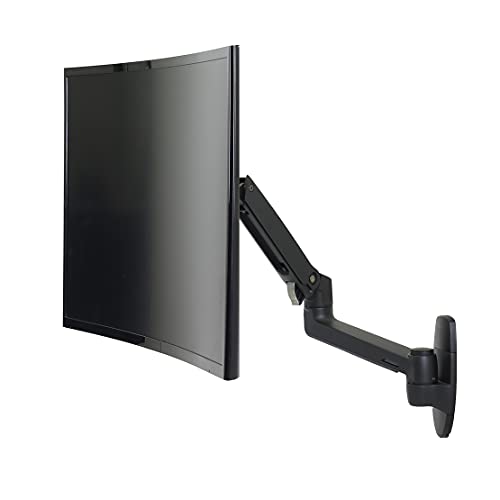
| Premium Choice | Mount Type: Single wall mount arm | Screen Capacity: 1 screen | Screen Size: Up to 34 in | VIEW LATEST PRICE | Read Our Analysis |
| Nuyoah Monitor Wall Mount for 14”-27” TVs |

| Best Low-Profile | Mount Type: Fixed wall mount | Screen Capacity: 1 screen | Screen Size: 14–27 in | VIEW LATEST PRICE | Read Our Analysis |
More Details on Our Top Picks
VIVO Dual Monitor Wall Mount (MOUNT-TS38B)
Should you need a sturdy way to mount two larger screens, the VIVO Dual Monitor Wall Mount (MOUNT-TS38B) is a strong fit for you. You can secure two 27- to 38-inch monitors, including ultrawides, with support for up to 22 pounds each. Its heavy-duty steel build and telescoping arms give you a flush, stable setup. You can tilt, swivel, and rotate each screen for portrait or horizontal use. Detachable VESA brackets, wood stud hardware, and cable clips help you install it neatly and keep your desk clear. It comes with a 3-year warranty.
- Mount Type:Dual wall mount
- Screen Capacity:2 screens
- Screen Size:27–38 in
- VESA Pattern:75×75 / 100×100
- Weight Capacity:Up to 22 lb each
- Material:Alloy steel
- Additional Feature:Telescoping arm design
- Additional Feature:Portrait/landscape rotation
- Additional Feature:Wood stud hardware
Mount-It! Full Motion Monitor Wall Mount (19-32″)
Should you need a wall-mounted monitor arm that frees up desk space while keeping your screen at the right ergonomic height, the Mount-It! Full Motion Monitor Wall Mount fits 19–32-inch monitors or TVs up to 33 lb. You can install it on a single stud or concrete wall, and the included hardware and guide make setup straightforward. Its full-motion arm tilts ±15°, swivels 330°, and rotates 180°, so you can cut glare and dial in your view for gaming, editing, or video calls. It retracts to 3.25 inches and extends 15 inches, giving you a clean, modern workspace.
- Mount Type:Single wall mount arm
- Screen Capacity:1 screen
- Screen Size:19–32 in
- VESA Pattern:75×75 / 100×100
- Weight Capacity:Up to 33 lb
- Material:Aluminum/steel
- Additional Feature:Concrete wall compatible
- Additional Feature:Retracts to 3.25 in
- Additional Feature:US-based technical support
HUANUO Dual Monitor Wall Mount for 17-32 Inch Screens
If you’re mounting two monitors between 17 and 32 inches, the HUANUO Dual Monitor Wall Mount is a smart fit for a cleaner, more ergonomic setup. You can support dual screens up to 32 inches each, with 4.4 to 17.6 pounds per arm and VESA 75×75 or 100×100 compatibility. It installs on wood studs, concrete, or brick, so you’ve got flexible mounting options. You’ll also get +/-90° swivel, +35°/-35° tilt, 360° rotation, and portrait or horizontal viewing. Built-in cable management helps clear clutter, while included hardware and instructions make setup quick.
- Mount Type:Dual wall mount
- Screen Capacity:2 screens
- Screen Size:17–32 in
- VESA Pattern:75×75 / 100×100
- Weight Capacity:Up to 17.6 lb each
- Material:Steel
- Additional Feature:Concrete and brick support
- Additional Feature:Quick assembly
- Additional Feature:Cable management built in
MOUNT PRO Dual Monitor Wall Mount for Screens
The MOUNT PRO Dual Monitor Wall Mount for Screens is a strong fit for anyone who wants a flexible, space-saving setup for 13–32 inch monitors. You can mount 13 to 32 inch displays with VESA 75×75 or 100×100 patterns, and each arm handles 4.4 to 19.8 pounds. You get +90°/-90° tilt, 180° swivel, 360° rotation, and up to 20.4 inches of reach. It frees desk space, hides cables, and uses aluminum for steady support. Install it on wood studs or solid concrete, not drywall alone, and finish in about 10 minutes.
- Mount Type:Dual wall mount
- Screen Capacity:2 screens
- Screen Size:13–32 in
- VESA Pattern:75×75 / 100×100
- Weight Capacity:Up to 19.8 lb each
- Material:Aluminum
- Additional Feature:20.4-inch arm extension
- Additional Feature:10,000-cycle durability testing
- Additional Feature:10-minute installation
Ergotron LX Single Monitor Arm VESA Wall Mount
Built for users who want a sturdy, space-saving setup, the Ergotron LX Single Monitor Arm VESA Wall Mount is a smart fit for single displays up to 34 inches and 25 lb. You can mount it on wood studs or other sturdy vertical surfaces, then fine-tune your screen with 25.7 inches of reach, 13 inches of lift, 360° rotation, and 75° tilt. It folds to within 4 inches of the wall, and integrated cable management keeps things neat. The matte black metal build looks clean, while theft-deterrent anchor holes, hardware, and a 10-year warranty add confidence.
- Mount Type:Single wall mount arm
- Screen Capacity:1 screen
- Screen Size:Up to 34 in
- VESA Pattern:75×75 / 100×100
- Weight Capacity:7–25 lb
- Material:Metal
- Additional Feature:25.7-inch extension
- Additional Feature:Theft-deterrent anchor holes
- Additional Feature:10-year warranty
Nuyoah Monitor Wall Mount for 14”-27” TVs
Nuyoah’s monitor wall mount is a strong pick whenever you need a clean, low-profile setup for a 14”–27” TV or computer monitor. You can use it with VESA 75×75 and 100×100 displays from brands like Samsung, LG, Sony, Vizio, TCL, and more. Its two-piece steel design makes installation simple: you attach the wall plate initially, then slide the screen plate into place. The fixed mount sits just 0.39″ from the wall, supports up to 33 lbs, and keeps your screen tidy, secure, and eye level. It’s built from welded SPCC steel with a black powder finish.
- Mount Type:Fixed wall mount
- Screen Capacity:1 screen
- Screen Size:14–27 in
- VESA Pattern:75×75 / 100×100
- Weight Capacity:Up to 33 lb
- Material:Heavy-gauge steel
- Additional Feature:0.39-inch wall distance
- Additional Feature:Quick-release installation
- Additional Feature:Load tested 2x limit
Factors to Consider When Choosing Wall Mount Monitors
As soon as I help you choose a wall mount monitor, I initially check the monitor size range, VESA mount pattern, and weight capacity so the fit is safe and secure. I also look at wall compatibility to make sure your surface can support the setup. Whenever you want flexibility, I consider motion and adjustability so you can tilt, swivel, or extend the screen as needed.
Monitor Size Range
I always start by checking the monitor’s diagonal size against the wall mount’s supported range, because that range can vary a lot—from 13–32 inches to 27–38 inches or similar. I make sure the smallest and largest limits both fit my screen, since a monitor outside that window may not attach securely or move the way it should. If I’m mounting an ultrawide or another large display, I look for a bracket rated for bigger screens and higher weight. For dual arms, I confirm each monitor falls within the stated size limit, often up to 32 inches per arm. I also check size alongside VESA pattern and weight, because the right diagonal alone won’t guarantee compatibility.
VESA Mount Pattern
After checking the monitor’s size, I always verify the VESA mount pattern next, because the hole spacing on the back has to match the wall mount exactly. I look for common standards like 75×75 mm or 100×100 mm, since those fit many wall mounts. Provided the pattern doesn’t line up, the screen won’t attach securely unless I use an adapter. I also check whether the mount supports just one pattern or several, especially while I’m planning a dual-monitor or full-motion setup. Both screens need the same mounting standard. Provided a monitor has a curved back or a nonstandard layout, I know I might need a special bracket, or I might have to choose another model that’s fully VESA-compatible.
Weight Capacity Limits
Next, I check the mount’s weight capacity to make sure it can safely support the monitor, because the per-screen rating has to exceed the display’s actual weight. I look for a clear limit, usually anywhere from about 4.4 lb to 33 lb per arm, and I keep dual-monitor setups separate by confirming each arm’s rating. Some mounts handle 22 lb per screen, while others stop at 17.6 lb or 19.8 lb. If I’m mounting an ultrawide or a larger 27- to 38-inch display, I choose a sturdier option, especially when the arm needs to extend farther. I also stay comfortably under the maximum instead of matching it exactly, since hardware and movement add stress.
Wall Compatibility
Wall compatibility is just as essential as weight capacity, so I initially check that the wall can actually support the mount and the screen. I look for wood studs, or I confirm that the mount’s instructions allow concrete or brick, because drywall alone usually isn’t enough. I also match the included hardware to the wall material; some kits rely on stud screws, while others provide concrete anchors. Then I verify the total load, since a monitor plus mount can add up fast, especially with heavier displays that reach 22 lb, 33 lb, or more each. Finally, I make sure the wall space fits the mount style and planned placement, so I don’t choose a design that conflicts with the area I’ve got.
Motion And Adjustability
When I choose a wall mount monitor, I pay close attention to motion and adjustability because they control how easily I can tilt, swivel, rotate, and extend the screen for a better view and less glare. I look for a tilt range of about ±15° to ±90° so I can angle the display up or down and keep my neck comfortable. Swivel matters too; a 180° to 330° range lets me turn the screen for shared workspaces without remounting it. When I need portrait mode for coding, documents, or content creation, I want full 360° rotation. I also value arm extension that retracts close to the wall but reaches 15 to 25.7 inches, giving me flexible placement at the right distance.
Frequently Asked Questions
Are Wall Mount Monitors Safe for Drywall Installation?
Yes, wall mount monitors can be safe on drywall if you attach them to studs or use the right anchors. Avoid mounting on bare drywall alone because heavier screens can loosen and damage the wall.
Can Wall Mounts Support Ultrawide Monitors?
Yes, many wall mounts can support ultrawide monitors if the VESA pattern and weight rating match your display. Check the arm’s reach and tilt range so the screen stays level and does not droop.
Do Wall Mounts Work With Curved Screens?
Yes, they do. Wall mounts can work with curved screens if the mount matches the VESA pattern and supports the screen’s weight. Check the mount depth and clearance for the curve first so the monitor fits securely and sits properly.
How Much Cable Management Do Wall Mounts Offer?
Usually, wall mounts provide decent cable control, not a perfect solution. You can route cords behind the arm or through built in channels, but for a truly tidy setup, you will still want clips, sleeves, or in wall routing.
Can I Mount a Monitor Above a Standing Desk?
Yes, I can mount one above a standing desk if the wall structure and mount can support it. I’d check the height, viewing angle, and cable reach so the screen sits at a comfortable level and does not strain your neck.
