

Gaming desks with shelves are a smart way to keep your setup clean, organized, and ready for long sessions.
The best ones in 2026 give you extra space for consoles, speakers, collectibles, and everyday gear without crowding your main desktop.
Some focus on compact layouts, while others add hutches, charging ports, LEDs, and wide surfaces for multi-monitor setups.
This guide covers seven solid picks that bring together storage, comfort, and style in one setup.
| ODK 48 Inch L-Shaped Gaming Desk Black |

| Best Overall | Dimensions: 31.5 x 48 x 34.6 in | Shelving: 2 shelves + cabinet | Desk Shape: Reversible L-shaped | VIEW LATEST PRICE | Read Our Analysis |
| Cyclysio Gaming Desk with Hutch and Shelves |

| Best for Small Spaces | Dimensions: 19.7 x 39.7 x 58.1 in | Shelving: Hutch + reversible 5-tier shelves | Desk Shape: Rectangular | VIEW LATEST PRICE | Read Our Analysis |
| Armocity Gaming Desk with Hutch and LED Lights |

| Best for Streamers | Dimensions: 22.84 x 47.25 x 54.33 in | Shelving: Hutch + 4 shelves + enclosed shelf | Desk Shape: Rectangular | VIEW LATEST PRICE | Read Our Analysis |
| Teraves L-Shaped Gaming Desk with Shelves |
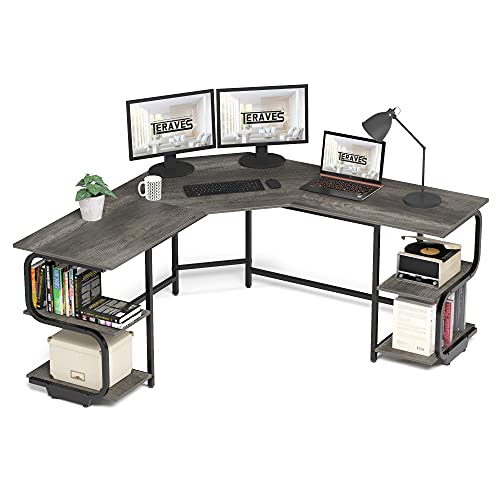
| Best Heavy-Duty Pick | Dimensions: 64.84 x 21.65 x 29.6 in | Shelving: 4-tier open shelves | Desk Shape: L-shaped | VIEW LATEST PRICE | Read Our Analysis |
| JOISCOPE L-Shaped Gaming Desk with Shelves & USB |
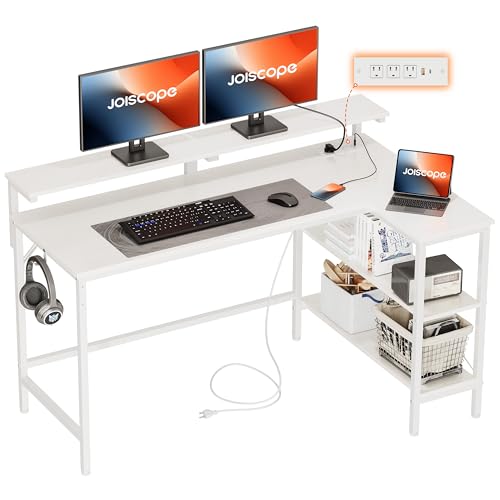
| Best Value | Dimensions: 47.24 x 30.71 x 29.53 in | Shelving: 2 shelves | Desk Shape: Reversible L-shaped | VIEW LATEST PRICE | Read Our Analysis |
| 31.4in Gaming Desk with Bookshelf and Pegboard |

| Best Compact Pick | Dimensions: 31.4-inch desk; 23.6-inch desktop area | Shelving: 3-tier shelf + bookshelf + display shelf | Desk Shape: Straight desk | VIEW LATEST PRICE | Read Our Analysis |
| Maihail L-Shaped Gaming Desk with LED Lights |

| Best Feature-Rich Pick | Dimensions: 31.5 x 47.5 x 56.5 in | Shelving: 3-tier shelves + 2 drawers | Desk Shape: L-shaped | VIEW LATEST PRICE | Read Our Analysis |
More Details on Our Top Picks
ODK 48 Inch L-Shaped Gaming Desk Black
Should you need a gaming desk with shelves that keeps your setup tidy and your devices powered, the ODK 48 Inch L-Shaped Gaming Desk Black is a smart fit. You get three outlets, two USB ports, and a handy hook for gear. The reversible L-shape slides neatly into a corner, while the 48-inch surface supports up to three monitors and your laptop. Underneath, two shelves, a cabinet, and a side bag keep essentials close. Then the LED strip adds color, comfort, and focus with lively modes. You’ll also appreciate the carbon fiber top, sturdy metal frame, labeled parts, easy assembly, and responsive support.
- Dimensions:31.5 x 48 x 34.6 in
- Shelving:2 shelves + cabinet
- Desk Shape:Reversible L-shaped
- Materials:MDF board + metal frame
- Power/Lighting:3 outlets, 2 USB, LED strip
- Assembly:Required; instructions/tools included
- Additional Feature:Reversible corner layout
- Additional Feature:Side storage bag
- Additional Feature:Holds three monitors
Cyclysio Gaming Desk with Hutch and Shelves
If you need a compact gaming desk that still gives you serious storage, the Cyclysio Gaming Desk with Hutch and Shelves is a smart fit for small rooms, student spaces, and shared home offices. You get a 39-inch workspace, a top hutch, and five adjustable shelves that you can place on either side.
That flexibility helps you fit a CPU, PS4, books, files, or even a small plant without crowding your setup. You also get LED lights with music sync, a timer, and 60,000 color options. Plus, three outlets and two USB ports keep devices charged. The monitor stand supports better posture, while the metal frame and X-braces add steady durability.
- Dimensions:19.7 x 39.7 x 58.1 in
- Shelving:Hutch + reversible 5-tier shelves
- Desk Shape:Rectangular
- Materials:Wood top/hutch + metal frame
- Power/Lighting:3 outlets, 2 USB, RGB LED
- Assembly:Required; instructions/tools included
- Additional Feature:Top hutch storage
- Additional Feature:Reversible 5-tier shelves
- Additional Feature:Monitor stand included
Armocity Gaming Desk with Hutch and LED Lights
For gamers, students, or anyone working in a small bedroom or home office, the Armocity Gaming Desk with Hutch and LED Lights fits especially well because it gives you storage, lighting, and a solid work surface in one compact setup. You get a 47-inch surface, a hutch, four shelves, a cabinet, and a pegboard with four hooks for keeping gear tidy. The raised monitor stand helps your neck, while the front arch supports your arms. Better yet, the reversible side rack and headphone hanger match your layout. RGB lights, USB charging, and sturdy Z-shaped metal legs make gaming, studying, and daily work feel easier and more organized.
- Dimensions:22.84 x 47.25 x 54.33 in
- Shelving:Hutch + 4 shelves + enclosed shelf
- Desk Shape:Rectangular
- Materials:Carbon fiber top + metal legs
- Power/Lighting:USB port, charging tower, RGB LED
- Assembly:Required; tools included
- Additional Feature:Ergonomic front arch
- Additional Feature:DIY pegboard hooks
- Additional Feature:Headphone hanger included
Teraves L-Shaped Gaming Desk with Shelves
Its L-shaped layout gives you a wide 86.6-inch diagonal workspace, while four open shelves keep books, a printer, décor, and your PC tower close. You can even detach the shelves should your setup changes. The monitor arm hole helps you free more surface space, too. A metal frame, 1-inch engineered wood top, and powder-coated finish keep it steady, and adjustable leg pads help on carpet or uneven floors. You’ll need assembly, ideally with another person.
- Dimensions:64.84 x 21.65 x 29.6 in
- Shelving:4-tier open shelves
- Desk Shape:L-shaped
- Materials:Engineered wood + metal frame
- Power/Lighting:No built-in power or lighting listed
- Assembly:Required; tools not included
- Additional Feature:Detachable open shelves
- Additional Feature:Monitor arm hole
- Additional Feature:300 lb desk bearing
JOISCOPE L-Shaped Gaming Desk with Shelves & USB
Gamers and remote workers who need to make the most of a tight corner will feel right at home with the JOISCOPE L-Shaped Gaming Desk with Shelves & USB. Its 48-inch L shape fits snugly, and the reversible rack lets you choose the left or right side. You also get a clean white finish and a roomy 66.9-inch diagonal workspace.
That smart layout supports your setup with two open shelves, hooks, and a monitor stand that holds 40 pounds. Better yet, the built-in station gives you three outlets, USB, and Type-C charging. With double diagonal supports, adjustable feet, and a 370-pound capacity, you’ll feel steady every session.
- Dimensions:47.24 x 30.71 x 29.53 in
- Shelving:2 shelves
- Desk Shape:Reversible L-shaped
- Materials:Particle board + metal frame
- Power/Lighting:3 sockets, USB, Type-C
- Assembly:Required; installation guide included
- Additional Feature:Monitor stand riser
- Additional Feature:Headphone accessory hooks
- Additional Feature:370 lb capacity
31.4in Gaming Desk with Bookshelf and Pegboard
Anyone who wants a compact setup with smart storage will appreciate this 31.4-inch gaming desk with a bookshelf and pegboard, especially as you’re working with a small room and still need every inch to count. You get a thick wooden top, a reinforced metal K frame, and open knee space that keeps you comfortable. The 23.6-inch desktop fits your monitor, keyboard, and mouse, while cable holes help keep cords under control. Then the storage really helps: a three-tier shelf, a railed bookshelf, a display shelf, and a rear pegboard. It suits gaming or office work, and assembly feels easier with a helping hand nearby.
- Dimensions:31.4-inch desk; 23.6-inch desktop area
- Shelving:3-tier shelf + bookshelf + display shelf
- Desk Shape:Straight desk
- Materials:Wood tabletop + metal frame
- Power/Lighting:No built-in power or lighting listed
- Assembly:Required; manual included
- Additional Feature:Built-in cable holes
- Additional Feature:Safety rail bookshelf
- Additional Feature:Reinforced metal K-frame
Maihail L-Shaped Gaming Desk with LED Lights
If you want a compact setup that still gives you room to spread out, the Maihail L-Shaped Gaming Desk with LED Lights fits especially well in a bedroom, dorm, or small home office. You get a smart L-shaped layout, three open shelves, and two fabric drawers for books, files, a printer, or your CPU. Better yet, the shelves reverse left or right and adjust in height.
That flexibility pairs nicely with gamer-friendly extras. You get LED lights with app or remote control, seven colors, 30 modes, music sync, and a timer. A keyboard tray, headphone hook, cup holder, cable tray, monitor arm, and power station keep everything tidy.
- Dimensions:31.5 x 47.5 x 56.5 in
- Shelving:3-tier shelves + 2 drawers
- Desk Shape:L-shaped
- Materials:Wood construction
- Power/Lighting:4 outlets, 2 USB, LED lights
- Assembly:Required; instructions included
- Additional Feature:Two fabric drawers
- Additional Feature:Keyboard tray included
- Additional Feature:Cup holder included
Factors to Consider When Choosing Gaming Desks With Shelves
As I choose a gaming desk with shelves, I first look at the size and layout so it fits your room and your setup without making either feel cramped. Then I check the shelf space, built-in power and lighting, and the general build quality, because I know you need something that keeps gear organized and stays steady during long sessions. I also pay close attention to assembly and flexibility, since a desk should make your life easier, not test your patience.
Desk Size And Layout
Before I look at colors, lights, or cup holders, I always check desk size and layout, because those two details decide whether a gaming desk with shelves feels smooth to use or like a daily squeeze.
I measure my room first, then compare it with the desk’s full footprint. These desks can run about 39 to 64.8 inches wide and 19.7 to 31.5 inches deep, so small differences matter. Next, I match the shape to the room. I pick an L-shaped desk for corners and multi-monitor setups, while a rectangular desk works better in narrow spaces. I also check height, since some stay near 30 inches, but others rise past 54 and can crowd a wall. Finally, I look at the desktop diagonal and shelf side placement, because both affect comfort, movement, and cables.
Shelf Storage Capacity
A smart shelf setup can save me from desktop clutter fast, so I always look past the main surface and count how much storage the desk really gives me. I check how many shelves come built in and whether they’re open, enclosed, or stacked in tiers, because that makes it easier for me to separate books, gear, and small extras.
Next, I look at shelf weight limits and full shelf dimensions. When a shelf holds 35 to 40 pounds, I feel better placing a printer, PC case, or speakers there. Height and depth matter just as much, since big items need real clearance, not wishful reasoning. I also like adjustable or reversible shelves, plus drawers, cabinets, hooks, or pegboards. Those extras give me more places to store things without stealing precious desk space.
Power And Lighting
Storage helps me stay organized, but power access and lighting shape how smooth the whole setup feels once I actually sit down to play or work. I look for desks with 3 to 4 AC outlets and 1 to 2 USB ports, because that lets me charge my headset, phone, controller, and speakers without dragging extra cords everywhere.
Then I check the lighting features. Good LEDs do more than look cool. I want static colors, moving modes, and brightness control so I can ease eye strain during long sessions. Better yet, memory settings, timers, or app and remote controls save my favorite setup. Music-sync lighting can be fun too, especially whenever the controls stay easy to reach. Most significantly, I make sure all of this fits cleanly without stealing shelf or monitor space.
Build Quality And Stability
Once power and lighting are dialed in, I pay close attention to build quality, because a desk can look great and still feel shaky the second I start typing or bump it with my chair. I look for metal frames, reinforced tops, or strong engineered wood, since these hold firm under monitors, PCs, and shelf storage. From there, I check weight capacity closely. Desks can range from about 100 to 450 pounds, and higher ratings usually signal a steadier choice for heavier setups. I also trust designs with cross bars, double diagonal braces, or K-shaped legs, because they cut wobble fast. If your floor is uneven, adjustable foot pads help level the desk and stop annoying rocking. Finally, I inspect shelf strength, load ratings, and bracing, especially for printers, CPUs, or accessory bins.
Assembly And Flexibility
Even the strongest desk can test your patience while the setup feels like a weekend puzzle, so I always check assembly and flexibility before I buy. I look for desks with labeled parts, included tools, clear instructions, and hardware that doesn’t fight me for an hour. If a model needs two people or extra tools, I want to know that sooner.
That matters even more while I need the desk to fit my room, not the other way around. I prefer reversible shelves and racks, adjustable shelf heights, detachable storage, and L-shaped designs that switch sides. Those features help me adapt the layout as my gear changes. If I expect to move the desk, modular pieces and stable leveling feet or pads make setup easier on corners, carpet, and uneven floors during future rearrangements.
Frequently Asked Questions
Can Gaming Desks With Shelves Support Dual-Monitor Arms Safely?
Gaming desks with shelves can support dual monitor arms safely if the desktop can handle the combined load, the surface is thick enough for a secure clamp, and there is enough clearance around the shelf. A rigid frame matters because monitor arms add leverage and can expose wobble quickly. Check the desk specifications carefully and confirm that the shelf placement does not block proper mounting.
Are Gaming Desks With Shelves Suitable for Carpeted Floors?
Yes, gaming desks with shelves can work on carpeted floors, but stability matters. Choose a model with adjustable leveling feet or a wide base to reduce wobbling, support the desk evenly, and help prevent wear on carpet fibers during daily use.
How Difficult Is Assembly for One Person Without Power Tools?
Assembly alone without power tools is usually manageable, but it calls for patience. Plan on about 60 to 120 minutes, depending on how clearly the instructions are laid out. Sort the hardware before you begin, tighten pieces a little at a time, and get another person to help when lifting shelves.
Do Gaming Desk Shelves Interfere With Wall-Mounted Acoustic Panels?
Yes, they can, but I have found that the idea they always interfere is not accurate. If you place the panels above the shelf line or leave enough clearance behind the desk, you can still improve acoustics without limiting access or reducing panel effectiveness.
What Warranty Coverage Is Typical for Gaming Desks With Shelves?
Gaming desks with shelves often come with warranties ranging from one to five years. Coverage commonly includes frame defects, faulty hardware, and manufacturing flaws. Check the exclusions closely, since scratches, misuse, excessive weight, and everyday wear are frequently left out. If the desk includes lighting, charging ports, or other built in electronics, those parts may follow a separate warranty period.
Final Thoughts
A gaming desk with shelves does more than hold a monitor and keyboard. It helps me keep the whole setup clean, easy to reach, and comfortable for long sessions. That matters more than ever in 2026, during many of us use the same desk for gaming, work, school, and streaming.
The best models now do a lot in one footprint. I’m seeing shelves for speakers and books, hooks for headsets, charging ports for devices, and LED lights for a better mood. Some desks also flip into different layouts, which is a huge help in small rooms.
In order to make this easier, I picked seven strong options that stand out for storage, layout, durability, and everyday comfort.
ODK 48 Inch L-Shaped Gaming Desk Black
Should you need to make the most of a corner, this desk is a smart place to start. The ODK 48 Inch L-Shaped Gaming Desk gives me two connected work surfaces, which makes it easier to split my setup. I can keep a monitor and keyboard on one side, then place notebooks, a second screen, or a console on the other.
The shelves add real value here. Instead of stacking items under the desk or letting them eat up desktop space, I can store a PC tower, books, small storage bins, or decor on the side shelves. That simple change makes the whole room feel less crowded.
What stands out:
- L-shaped design fits corners well
- Open shelves keep gear easy to grab
- Compact size works in apartments and bedrooms
- Clean black finish blends with most setups
- Good pick for gaming and homework or office tasks
This desk is best for someone who wants a simple, affordable corner setup with enough storage to stay organized without adding bulk.
Cyclysio Gaming Desk with Hutch and Shelves
In case vertical storage matters more than floor space, the Cyclysio desk deserves a close look. Its hutch design lifts storage above the desktop, which helps me keep the main surface open for gaming.
That upper shelf space is useful for speakers, collectibles, books, or a printer. Below it, I still get room for a monitor and keyboard, so the desk feels layered without feeling cramped. This layout works especially well during I want storage but don’t have room for a separate bookcase.
Why it works:
- Hutch adds storage without taking more floor space
- Shelves help separate gaming gear from school or office items
- Desktop stays cleaner and more focused
- Great for smaller rooms that need vertical organization
- Easy to style for gaming or mixed use
This is a strong option for students, remote workers, and gamers who want a desk that feels tidy and functional right away.
Armocity Gaming Desk with Hutch and LED Lights
The Armocity desk leans into both function and atmosphere. I like that it combines practical shelving with built-in LED lighting, because that means I don’t need to add as many extras later.
The hutch gives me space to display speakers, figures, books, or storage boxes. Then the LED lights add personality without taking up desktop space. For many gamers, that matters. A setup can work well and still feel fun to sit at.
Key strengths:
- Hutch increases storage and display space
- LED lights add a modern gaming look
- Helps create a more immersive setup
- Good for keeping accessories off the main surface
- Useful for gaming, streaming, and content creation
This desk makes sense should you want your setup to feel polished and personal while still staying organized.
Teraves L-Shaped Gaming Desk with Shelves
Now, in case you need a bit more room to spread out, the Teraves L-Shaped Gaming Desk is a great step up. It offers the same space-saving corner shape as other L-shaped desks, but it feels more generous for people with larger setups.
I find this style especially helpful for dual-monitor users. One side can hold the main gaming gear, while the other can support a laptop, mic arm, books, or paperwork. The shelves keep the setup grounded through giving larger items a home.
Notable benefits:
- Spacious L-shape supports multitasking
- Shelves help reduce desktop clutter
- Strong choice for dual-monitor setups
- Corner-friendly design saves room
- Fits gaming, streaming, and office work well
This is one of the better choices for anyone who switches often between gaming and productive work.
JOISCOPE L-Shaped Gaming Desk with Shelves & USB
The JOISCOPE desk adds something many people now expect: built-in charging. That feature could sound small at the outset, but in daily use, it saves a lot of hassle. I don’t have to crawl under the desk as often or stretch cords across the surface just to charge a phone, controller, or tablet.
The shelves also help this desk stay useful beyond gaming. I can store a PC tower, extra gear, or books while keeping the charging area within reach. And because it uses an L-shaped frame, it still makes smart use of a corner.
Why it stands out:
- Built-in USB charging adds convenience
- L-shaped layout improves room flow
- Shelves support gear storage and organization
- Helps reduce cable mess on top of the desk
- Good fit for modern multi-device setups
For anyone with lots of accessories, this desk feels practical in a way that you notice every day.
31.4in Gaming Desk with Bookshelf and Pegboard
Not every gamer has a big room. That’s why this 31.4-inch desk earns a place on the list. It’s compact, but it doesn’t give up on storage. In fact, the bookshelf and pegboard make it one of the smartest small-space designs here.
The pegboard is the feature I like most. It keeps smaller accessories visible and easy to grab. I can hang headphones, cables, tools, or controllers instead of letting them pile up. The bookshelf adds vertical storage, which helps this smaller desk stay surprisingly capable.
Best features:
- Compact footprint for tight spaces
- Bookshelf adds useful upper storage
- Pegboard organizes small accessories well
- Great for bedrooms, dorms, and small offices
- Makes a small setup feel more intentional
This desk is ideal in case you need a real gaming station but only have a narrow wall to work with.
Maihail L-Shaped Gaming Desk with LED Lights
The Maihail desk blends practical shape with a more playful style. Like other L-shaped models, it gives me better use of corner space. But the built-in LED lights give it extra personality and a setup-ready feel right out of the box.
I like this desk for people who want both room and mood. There’s enough surface area for monitors and gear, while the shelves help support a cleaner layout. So instead of feeling like the desk is doing one job, it feels like it supports the full setup.
Highlights:
- L-shaped design supports larger setups
- LED lights add style without extra accessories
- Shelves improve storage and organization
- Works well in gaming rooms and home offices
- Balances function with a modern look
This is a strong fit should you want your desk to feel useful during the day and fun at night.
Factors in order to Consider During Choosing Gaming Desks With Shelves
After looking at the top picks, the next step is choosing the one that fits your room and your routine. A desk can look great online but still feel wrong in case the size, storage, or layout doesn’t match how you actually use it.
Desk Size and Room Fit
I always start with room size. Before anything else, I measure the wall, corner, or floor area where the desk will go. That helps me avoid buying a desk that overwhelms the room or blocks movement.
Think about:
- Desk width and depth
- Whether the chair can move freely
- Door and drawer clearance
- Space for a PC tower
- Nearby outlets for lighting and charging
Should the room is small, a compact desk with vertical shelves often works better than a wide desk with no upper storage.
Shelf Placement and Storage Style
Not all shelves help in the same way. Some sit below the desktop for heavier gear, while others rise above it in a hutch style for books and decor.
I ask myself:
- Do I need storage for a PC tower?
- Will I keep books or school supplies nearby?
- Do I want open shelves for display?
- Do I need fast access to controllers and headphones?
- Would a pegboard help with small items?
The best shelf design depends on what you use every day.
Shape and Layout
This is where the desk starts to affect comfort. Straight desks work well along a wall. L-shaped desks are better whenever I want to use a corner or split tasks across two surfaces.
Choose based on how you work:
- Straight desk for simple setups
- L-shaped desk for multitasking
- Reversible layout for flexible room design
- Hutch desk for vertical storage
- Compact desk for narrow spaces
In case you game and work at the same station, an L-shaped desk often gives more freedom.
Built-In Features
Some desks now come with extras that can save money and reduce clutter. These features are not just for looks. They can make the setup easier to live with.
Useful extras include:
- USB charging ports
- Power outlets
- LED lights
- Headphone hooks
- Cup holders
- Monitor stands
- Cable management holes
I focus on features I’ll actually use instead of chasing every extra.
Build Quality and Stability
A desk should feel steady, especially in case it holds multiple monitors or a heavy PC. Wobble gets annoying fast. So I check the frame material, shelf support, and weight capacity before I buy.
What matters most:
- Steel frame or reinforced supports
- Durable desktop surface
- Solid shelf brackets
- Adjustable feet for uneven floors
- Reliable weight rating
A sturdy desk feels better every time I sit down, and it usually lasts longer too.
Style and Daily Use
A gaming desk doesn’t need to look loud to feel fun. Some people want LED lighting and bold details. Others want a clean desk that blends into a bedroom or office.
I think about:
- Color and finish
- Whether it matches the room
- How easy it is to clean
- In case it looks good on camera for streaming
- Whether it still feels right for school or work
That balance matters during the desk will be part of daily life, not just weekend gaming.
Which Type of Gaming Desk With Shelves Is Best?
The answer depends on your space and habits.
In case you have a corner to use, the ODK, Teraves, JOISCOPE, and Maihail L-shaped desks offer better spread and flexibility. If vertical storage matters more, the Cyclysio and Armocity hutch desks make great use of upward space. And should your room is tight, the 31.4-inch desk with bookshelf and pegboard proves that small desks can still feel complete.
The best choice is the one that helps you stay comfortable, keeps your gear within reach, and makes your room feel easier to live in.
Very Short Final Result
I think the best gaming desk with shelves is the one that makes your space feel calm, useful, and fun at the same time. That’s a bigger deal than it sounds. One study found that clutter can cut productivity by up to 15%, and I’ve felt that stress myself. A desk with smart shelves helps you focus, breathe easier, and enjoy your setup more. During everything has a place, gaming and daily life both feel smoother.
