

If you work in the field, you know your drive has to handle more than storage. You need something that can survive drops, dust, water, and rough travel without slowing you down. The six rugged external hard drives below cover a range of sizes, speeds, and protection levels, so you can match one to your workflow. But the best choice isn’t always the toughest-looking one, and the difference matters.
| LaCie Rugged Mini 2TB Portable External Hard Drive |

| Compact Rugged Pick | Capacity: 2 TB | Interface: USB 3.0 | Read Speed: 130 MB/s | VIEW LATEST PRICE | Read Our Analysis |
| Seagate Rugged STFR5000800 5 TB External Hard Drive Portable |

| Best Capacity | Capacity: 5 TB | Interface: USB-C | Read Speed: 130 MB/s | VIEW LATEST PRICE | Read Our Analysis |
| LaCie Rugged Mini 4TB Portable External Hard Drive |

| Best Midrange | Capacity: 4 TB | Interface: USB 3.0 | Read Speed: 130 MB/s | VIEW LATEST PRICE | Read Our Analysis |
| LaCie Rugged Raid Shuttle 8TB External Hard Drive |
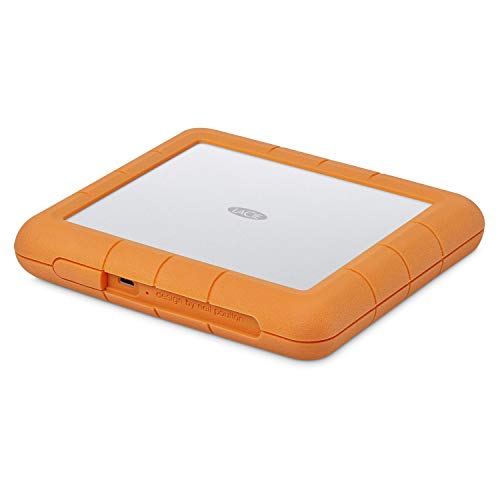
| Pro Workflow Pick | Capacity: 8 TB | Interface: USB-C | Read Speed: 250 MB/s | VIEW LATEST PRICE | Read Our Analysis |
| LaCie Rugged Thunderbolt USB 3.0 1TB External Hard Drive |
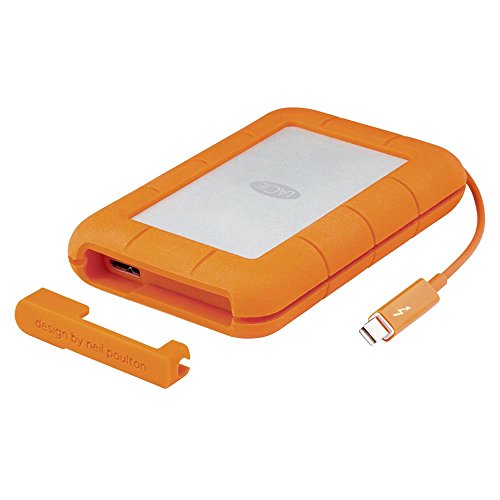
| Portable Thunderbolt Pick | Capacity: 1 TB | Interface: Thunderbolt/USB 3.0 | Read Speed: 110 MB/s | VIEW LATEST PRICE | Read Our Analysis |
| SanDisk Professional 5TB G-Drive ArmorATD Portable Hard Drive |

| All-Terrain Backup | Capacity: 5 TB | Interface: USB-C | Read Speed: 130 MB/s | VIEW LATEST PRICE | Read Our Analysis |
More Details on Our Top Picks
LaCie Rugged Mini 2TB Portable External Hard Drive
If you need a travel-ready backup drive that can take a beating, the LaCie Rugged Mini 2TB is a strong pick for you. You get a compact 2.5-inch portable drive with USB 3.0, and it still works with USB 2.0. It reads and transfers data at up to 130 MB/s, so you won’t wait long. Its orange rugged enclosure resists shocks, drops up to 4 feet, dust, water, and crushing. You can use it with PC, Mac, iPad, and iPhone. It also includes password protection, Data Rescue Service, and a 2-year warranty.
- Capacity:2 TB
- Interface:USB 3.0
- Read Speed:130 MB/s
- Durability:Shock/dust/water resistant
- Compatibility:PC/Mac/iPad/iPhone
- Warranty:2-year limited
- Additional Feature:4-foot drop protection
- Additional Feature:Password protection
- Additional Feature:Data Rescue Service
Seagate Rugged STFR5000800 5 TB External Hard Drive Portable
The Seagate/LaCie Rugged USB-C STFR5000800 5 TB Portable External Hard Drive is a strong pick for you if you need a durable, high-capacity drive that can travel anywhere. You get a 2.5-inch mechanical drive in a tough plastic shell, and it resists drops, crushing, and rain. Its USB-C connection, included USB 3.0 adapter, and USB 2.0 backward support make setup easy on Windows or macOS. You can move files at up to 120 MB/s, and the 7200 RPM mechanism helps keep transfers quick. It’s portable, plug-and-play, and backed by a 2-year limited warranty.
- Capacity:5 TB
- Interface:USB-C
- Read Speed:130 MB/s
- Durability:Drop/crush/rain resistant
- Compatibility:Windows/macOS
- Warranty:2-year limited
- Additional Feature:USB-C reversible cable
- Additional Feature:7200 RPM drive
- Additional Feature:Adobe Creative Cloud trial
LaCie Rugged Mini 4TB Portable External Hard Drive
Built for travel and rough handling, the LaCie Rugged Mini 4TB gives you a 2.5-inch portable drive with USB 3.0 speed, 4TB of storage, and drop, shock, dust, and water resistance in a bright orange enclosure. You can use it with PC, Mac, iPad, and iPhone, though Mac may need reformatting. It reaches up to 130 MB/s, and its password protection helps keep files secure. Backed by a 2-year limited warranty and Data Rescue Service, it’s a practical pick for all-terrain use when you need dependable storage on the move.
- Capacity:4 TB
- Interface:USB 3.0
- Read Speed:130 MB/s
- Durability:Shock/dust/water resistant
- Compatibility:PC/Mac/iPad/iPhone
- Warranty:2-year limited
- Additional Feature:4-foot drop protection
- Additional Feature:Password protection
- Additional Feature:Troubleshooting guidance included
LaCie Rugged Raid Shuttle 8TB External Hard Drive
LaCie’s Rugged Raid Shuttle 8TB is a strong pick for photographers, videographers, and mobile creative teams who need fast, portable, and extra-secure storage on the go. You get RAID 0 for speed or RAID 1 for redundancy through a simple wizard, plus up to 250 MB/s read speeds. It connects with USB-C to USB-C or USB-C to USB-A and works with Mac and PC systems. Its rugged shell resists drops, shock, dust, and water, while the flat shape slides into tight bags. You also get password protection, Rescue Data Recovery, and a three-year warranty.
- Capacity:8 TB
- Interface:USB-C
- Read Speed:250 MB/s
- Durability:Drop/shock/dust/water resistant
- Compatibility:Mac/PC
- Warranty:3-year limited
- Additional Feature:RAID 0/1 modes
- Additional Feature:Self-encrypting password system
- Additional Feature:Flat transport-ready design
LaCie Rugged Thunderbolt USB 3.0 1TB External Hard Drive
If you need a compact 1TB drive that can handle travel, field work, or daily commuting, the LaCie Rugged Thunderbolt USB 3.0 Portable External Hard Drive is a strong fit. You get a 5,400 RPM HDD in a black aluminum shell with a rubber bumper, plus drop, dust, and water resistance. Its integrated Thunderbolt cable wraps around the enclosure, and USB 3.0 compatibility keeps it flexible across systems. You can move files at up to 130 MB/s, and the 0.32-pound build won’t weigh you down. It also includes a three-year warranty and Adobe Creative Cloud access.
- Capacity:1 TB
- Interface:Thunderbolt/USB 3.0
- Read Speed:110 MB/s
- Durability:Drop/dust/water resistant
- Compatibility:Thunderbolt/USB systems
- Warranty:3-year limited
- Additional Feature:Integrated Thunderbolt cable
- Additional Feature:Aluminum rubber bumper
- Additional Feature:64 MB cache
SanDisk Professional 5TB G-Drive ArmorATD Portable Hard Drive
SanDisk’s Professional 5TB G-Drive ArmorATD is a strong pick if you need a rugged portable hard drive that can travel from the field to the studio without much fuss. You get 5TB of storage in a 2.5-inch aluminum body with an easy-grip bumper and IP54 splash and dust resistance. It connects through USB-C, works with Thunderbolt and USB 3.0, and reaches up to 130 MB/s for backups and file transfers. It works with macOS out of the box, and you can reformat it for Windows. A 3-year warranty adds reassurance.
- Capacity:5 TB
- Interface:USB-C
- Read Speed:130 MB/s
- Durability:IP54 splash/dust resistant
- Compatibility:Mac/Windows
- Warranty:3-year limited
- Additional Feature:IP54 splash protection
- Additional Feature:Anodized aluminum enclosure
- Additional Feature:Easy-grip bumper
Factors to Consider When Choosing Rugged External Hard Drives
When you choose a rugged external hard drive, start by checking its durability ratings so you know it can handle drops, dust, and water. You’ll also want the right storage capacity, connection type, and transfer speed for your files and workflow. Make sure it’s compatible with your devices so you can use it without hassles.
Durability Ratings
Durability ratings help you compare rugged external hard drives before you buy, so check the IP code first to see how well the drive resists dust and water. An IP54 drive blocks most dust and handles splashes, while IP65 offers stronger sealing against particles and jets. Next, review the stated drop height; portable models often survive 1 to 4 feet, which tells you how well they’ll handle field bumps. If you’ll stack gear or pack tightly, look for crush or pressure ratings in kilograms or newtons. You should also note shock-absorbing, rubber-bumpered, or aluminum-bodied enclosures, since they signal better impact control. Finally, confirm the operating temperature range and any military-spec or IEC/EN shock and vibration certifications for tougher environments.
Storage Capacity
Capacity matters just as much as ruggedness, so pick a drive that fits your workload now and leaves room to grow. If you edit photos or video, you’ll often need 2–8 TB just to keep raw files and project versions handy without constant cleanup. Add 25–50% above your current usage so you don’t outgrow the drive too fast. Also, remember that advertised capacity isn’t fully usable; formatting and system overhead trim a little off the top. If you’ll use RAID, plan for the space you’ll lose to mirroring or other redundancy, since RAID 1 cuts usable capacity in half. For portable work, balance size and power needs too, because bigger mechanical drives usually weigh more and draw more power than leaner SSD options.
Connection Types
Connection type can make a rugged drive feel either seamless or frustrating, so choose an interface that matches how you work. If you move files between modern laptops, USB-C is a smart pick because it’s reversible, easy to plug in, and supports strong throughput for backups and creative projects. If you still use older desktops or office machines, USB 3.0 or 3.1 Type-A can be safer since it’s broadly compatible and works well with matching ports. For heavier media work, Thunderbolt gives you far more bandwidth and lower latency, so you can edit directly from the drive with less hassle. Also check for backward compatibility and make sure you get quality cables or adapters, since they affect convenience and reliability on the go.
Transfer Speed
Speed can make or break how useful a rugged external hard drive feels in daily use, so look first at the interface and the drive’s rated sustained read/write rates. You’ll usually get far better performance from USB 3.x or Thunderbolt than from USB 2.0, which can feel painfully slow. Check the quoted sustained speeds, but don’t assume you’ll always hit them; your port, cable quality, and file sizes can cut real-world throughput. If you’re buying a mechanical drive, higher RPM and a larger cache often improve sequential transfers. For big backups, that matters. For lots of small files, expect much lower speeds than the spec sheet promises, so compressing data or choosing a workflow built for small-file I/O can help you move information faster.
Device Compatibility
Even the fastest rugged external hard drive won’t help much if it doesn’t work cleanly with your devices. Check the interface first: USB-C, USB 3.0/3.1, and Thunderbolt all perform differently, so your drive’s protocol should match your laptop, desktop, or tablet ports if you want full speed. Next, verify operating system support. Some models need reformatting or drivers before they’ll behave on macOS, Windows, iPad, or mobile gear. You should also confirm power needs; certain high-performance drives won’t run reliably from every port and may need a powered connection or adapter. Finally, make sure the right cable is included and that the drive supports the file system and encryption options you need for smooth, secure, cross-platform access everywhere.
Portability Size
Portability matters when you’re choosing a rugged external hard drive, because size and weight affect how easily you can actually take it with you. Look for a 2.5-inch portable model if you want something easy to slip into a camera bag, backpack, or laptop sleeve. These drives often measure about 5.3 by 3.4 inches and weigh roughly 0.3 to 0.9 pound, so you can carry one-handed without much strain. Heavier, thicker enclosures can offer extra bump and crush protection, but they’re less pocket-friendly. If you travel light, choose a drive under 1 pound with a compact shape. Also check the cable: a short USB-C lead saves space, reduces tangles, and keeps your setup neat when you’re moving around.
Security Features
Security features matter just as much as durability when you choose a rugged external hard drive. You should prioritize hardware-based encryption, ideally a self-encrypting drive with AES-256, so your data stays protected at rest without burdening your computer’s CPU. Make sure the drive includes password protection and secure key management, letting you create, change, and recover credentials without exposing plaintext keys. Check for support for trusted standards such as AES, TPM integration, or FIPS validation if you need to satisfy enterprise or regulatory rules. Also, look for secure erase or crypto-erase options that can permanently destroy encryption keys when you retire the drive. Finally, confirm the firmware supports authenticated updates and that the vendor patches security flaws quickly.
Warranty Coverage
Once you’ve narrowed down security features, check the warranty coverage just as carefully, because it tells you how much support you’ll actually get if the drive fails. Look for a limited warranty of one to three years, and make sure it matches how long you plan to rely on the drive. Confirm whether it includes data recovery or a Rescue service, since replacement alone won’t bring files back. Read the damage terms closely: some warranties cover only defects, while others exclude drops, water, dust, or crush damage, especially during rugged use. Also check whether repairs or replacements are offered, how fast turnaround is, and if you’ll pay shipping or diagnostics. Finally, register on time so you don’t lose coverage or bundled recovery benefits.
Frequently Asked Questions
Can Rugged Drives Survive Accidental Drops From a Moving Vehicle?
Yes, rugged drives sometimes survive drops from moving vehicles, but survival depends on factors such as vehicle speed, drop height, the hardness and shape of the impact surface, and the drive enclosure design. Do not rely on a single device for critical data; maintain regular backups to separate storage locations.
Are Rugged External Hard Drives Waterproof in Deep Water?
No. Most rugged external drives tolerate splashes or short accidental drops into shallow water, but they are not designed to function in deep water. Water pressure at depth can force moisture past seals and damage internal components. Consult the drive’s IP rating and the manufacturer specifications for the maximum submersion depth and duration before exposing it to water.
Do Rugged Drives Work With Gaming Consoles and Smart TVS?
Yes. Many rugged drives work with gaming consoles and smart TVs. Before connecting, check which file systems the device recognizes for external storage and whether the console or TV requires the drive to be formatted in a specific way. Also confirm the drive’s power requirements because some portable drives need more power than a single USB port provides. Additionally verify the USB version supported by the console or TV to ensure proper transfer speeds and compatibility.
Can I Repair a Rugged Hard Drive After Physical Damage?
Sometimes, yes. If the damage is minor you may be able to recover data, but severe physical damage is usually beyond do it yourself repair. Immediately stop using the drive, copy any files you can still read, and contact a professional data recovery service as soon as possible.
Are Rugged Hard Drives Allowed in Airline Carry-On Luggage?
Yes. Rugged hard drives are permitted in carry-on bags. Expect them to be screened by security scanners, so keep the drive accessible for inspection. Use a padded case or wrap to protect against impacts, and verify your airline’s carry-on size and weight limits before traveling.
Final Thoughts
When your work takes you from rain-soaked trails to dusty sets, you need a drive that won’t flinch. Like a knight’s shield in a storm, the right rugged external hard drive protects your files and keeps you moving. Choose the size, speed, and toughness that fit your workflow, and you’ll spend less time worrying about damage and more time creating. In the end, reliability isn’t optional—it’s the quiet hero behind every great shot.
