

A smoother 3D print starts with the right motor.
Quieter motors cut vibration and help your printer stay steady.
Better torque keeps motion consistent during long prints.
This guide covers six motor picks, from compact NEMA 17 options to a Voron-ready kit.
| Nema 17 Stepper Motor 42x38mm for 3D Printers |
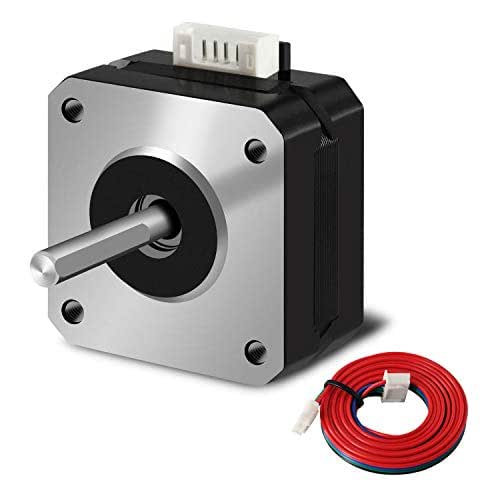
| Best Overall | Type: Stepper motor | Size: 42 x 38 mm | Phase Count: 2-phase | VIEW LATEST PRICE | Read Our Analysis |
| Nema 17 Stepper Motor for 3D Printer |

| Best Value | Type: Stepper motor | Size: 42 x 38 mm | Phase Count: 2-phase | VIEW LATEST PRICE | Read Our Analysis |
| 42-40 Stepper Motor for Anycubic 3D Printer |

| Best for Anycubic | Type: Stepper motor | Size: 42 x 40 mm | Phase Count: 2-phase | VIEW LATEST PRICE | Read Our Analysis |
| Voron 3D Printer Motors Kit (LDO-42STH40-1684AC) |

| Best Kit | Type: Stepper motor kit | Size: 42STH40 motors | Phase Count: 2-phase motors | VIEW LATEST PRICE | Read Our Analysis |
| 42 Stepper Motor for 3D Printers |

| High-Torque Pick | Type: Stepper motor | Size: 42-size | Phase Count: 2-phase | VIEW LATEST PRICE | Read Our Analysis |
| Balacoo Stepper Motor Driver for 3D Printer |
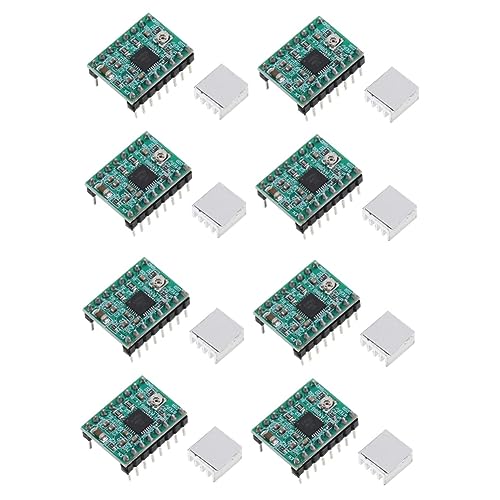
| Best Drivers | Type: Stepper driver modules | Size: 2.0 x 1.5 x 1.0 cm | Phase Count: Bipolar | VIEW LATEST PRICE | Read Our Analysis |
More Details on Our Top Picks
Nema 17 Stepper Motor 42x38mm for 3D Printers
Should you need a reliable replacement or upgrade for a 42x38mm extruder or axis motor, the iMetrx Nema 17 Stepper Motor 17HS4401 is a strong fit for Creality CR-10, 10S, Ender 3, and other FDM printers that call for a Nema 17 4-wire motor. You get a 1.8-degree, 2-phase design with 1.5A rated current, plus higher torque that can improve motion control. Its alloy steel body, durable bearings, and lower resistance help reduce heat and noise. It also includes a 1-meter cable for easier installation.
- Type:Stepper motor
- Size:42 x 38 mm
- Phase Count:2-phase
- Step Angle:1.8°
- Current:1.5 A
- Noise:Low noise
- Additional Feature:High torque output
- Additional Feature:1 meter cable included
- Additional Feature:Low resistance design
Nema 17 Stepper Motor for 3D Printer
The Nema 17 stepper motor for a 3D printer is a solid pick should you need a compact, reliable motor with a 1.8° step angle, 1.2 A phase current, and 0.42 Nm holding torque. You get a 42 mm frame, 38 mm height, and a D-shaped shaft that fits many printer setups. Its two-phase design and 5.0 Ω resistance support steady motion, while the 1 m HX2.54 cable makes wiring easier. At just 50 g, it won’t add much load. Should you desire a budget-friendly motor for smoother motion, this one’s worth considering.
- Type:Stepper motor
- Size:42 x 38 mm
- Phase Count:2-phase
- Step Angle:1.8°
- Current:1.2 A
- Noise:Not listed
- Additional Feature:D-shaped shaft
- Additional Feature:0.42 Nm holding torque
- Additional Feature:1 m HX2.54 cable
42-40 Stepper Motor for Anycubic 3D Printer
Need a reliable swap for an Anycubic Mega series machine? This 42×40 mm, 2-phase stepper motor gives you a 1.8° step angle, 42 N·cm holding torque, and low self-inductance for steadier motion. You can use it on Anycubic Mega S, Mega X, and other Mega series printers, plus some XYE and Vype Y axes. It’s built for high-speed, responsive prints and needs no firmware change on supported machines. Keep in mind, you get the motor only, so you’ll need to handle wiring yourself. It doesn’t fit Kobra extruder printers.
- Type:Stepper motor
- Size:42 x 40 mm
- Phase Count:2-phase
- Step Angle:1.8° ± 0.09°
- Current:1.5 A/phase
- Noise:Not listed
- Additional Feature:Anycubic Mega compatible
- Additional Feature:No connecting cable
- Additional Feature:Low self-inductance
Voron 3D Printer Motors Kit (LDO-42STH40-1684AC)
Built for Voron builds, this motor kit gives you the core stepper set you need: three LDO-42STH40-1684AC motors plus one LDO-36STH20-1004AHG motor. You get reliable, easy-to-use parts with stable characteristics and high reliability, so your printer can run smoothly and stay easy to service. Since it’s an item type motor kit from NQWNAJJE, you should check the size carefully before ordering, because manual measurements can vary on 1–5 mm. In case you require a straightforward replacement set for your Voron, this kit keeps setup simple and confident.
- Type:Stepper motor kit
- Size:42STH40 motors
- Phase Count:2-phase motors
- Step Angle:Not listed
- Current:1A peak
- Noise:Stable
- Additional Feature:Includes four motors
- Additional Feature:Voron kit bundle
- Additional Feature:Replaceable motor set
42 Stepper Motor for 3D Printers
Should you want precise motion control in a 3D printer, a 42 stepper motor is a strong fit. You can use it in 3D printers, CNC machines, and other printing applications because it works with universal motor drivers. It gives you steady open-loop control, even speeds, strong stability, and low noise, so you won’t deal with step loss during operation. Its high torque and compact size help in tight spaces, and it’s a practical replacement for older 42 phase motors. Built from steel with a reinforced PCB, it’s durable. Don’t connect it directly to power; use proper drivers.
- Type:Stepper motor
- Size:42-size
- Phase Count:2-phase
- Step Angle:Not listed
- Current:Not listed
- Noise:Low noise
- Additional Feature:Reinforced PCB board
- Additional Feature:Universal driver compatible
- Additional Feature:Steel construction
Balacoo Stepper Motor Driver for 3D Printer
Should you’re looking for a compact, quiet stepper motor driver for 3D printer projects, Balacoo’s 1A peak driver set is a strong fit. You get four green PCB modules in the package, so you can outfit multiple axes or keep spares ready. The driver supports bipolar steppers in full, half, 1/4, 1/8, and 1/16 steps, and its mixed-decay control helps cut noise while improving accuracy. You’ll also benefit from low power loss, solid temperature stability, and simple pulse-driven control. At just 0.02 pounds, it’s easy to fit.
- Type:Stepper driver modules
- Size:2.0 x 1.5 x 1.0 cm
- Phase Count:Bipolar
- Step Angle:Stepping modes
- Current:1A peak
- Noise:Super-silent
- Additional Feature:4 driver modules
- Additional Feature:Mixed decay control
- Additional Feature:Full to 1/16 microstepping
Factors to Consider When Choosing 3D Printer Motors
If you choose 3D printer motors, make sure the motor size fits your printer and the torque can handle your machine’s load. You’ll also want to check step angle precision plus the current and voltage requirements so the motor runs correctly. Don’t forget noise and heat, since both can affect print quality and long-term reliability.
Motor Size Compatibility
To keep your upgrade or replacement straightforward, make sure the motor’s frame size matches your printer’s mounting pattern and motor bay—for example, a NEMA 17’s 42 mm square flange should fit without adapter work. Then check motor length, since compact 38–40 mm units often clear tighter brackets, while taller motors might crowd enclosures or mounts. Next, verify the shaft type and diameter, whether round or D-shaped, and confirm shaft length so pulleys, gears, or extruder adapters slide on cleanly. You should also match the connector style, cable length, and pinout with your controller board to avoid custom wiring. Finally, consider the motor’s mass on moving axes; extra weight can raise inertia and affect motion balance, so plan accordingly in your setup.
Torque Requirements
Torque requirements are about making sure the motor can handle both the static load and the demands of motion, so you need to estimate what each axis must move, including belt friction, lead screw efficiency, and print head mass, then add a safety margin; in many consumer FDM printers, Cartesian axes typically need about 0.3–0.6 Nm for dependable operation. You should also check that your driver and power supply can deliver enough current, because rated holding torque assumes a specific current. Don’t rely on holding torque alone: torque drops as speed rises, so review the torque-speed curve for travel moves. Match torque to your transmission, since belts, gears, and lead screws multiply it. For long prints, pick a motor with thermal headroom so it can sustain torque without overheating.
Step Angle Precision
Step angle sets the motor’s native positional resolution, so it’s a key factor whenever you want cleaner layer placement and tighter motion control. A common 1.8° motor gives you 200 steps per revolution, while a 0.9° motor doubles that to 400 steps per revolution. That finer geometry can improve layer alignment and reduce how much you rely on microstepping for precision. Microstepping, like 1/16 or 1/32, still helps smooth motion and raise effective resolution, but it won’t magically add proportional torque or perfect accuracy. You should match the motor’s step angle with your printer’s belts or lead screws and your controller’s ability to keep up. Smaller steps also raise pulse rates at a given speed, so you need enough bandwidth to maintain reliable motion.
Current And Voltage
Current and voltage matter just as much as step angle while you choose a 3D printer motor. You should match the motor’s rated current to your driver’s current limit, and 1.2–1.5 A per phase is common for NEMA 17s. That keeps microstepping stable and helps you avoid losing torque or overloading the driver. Check the motor’s rated voltage, phase resistance, and inductance too, because steppers are current-driven. Lower resistance can let current build faster at higher speeds, while a stronger power supply voltage helps the motor reach top speed more reliably. Make sure your driver can handle the peak current, and set microstepping correctly. Should you be retrofitting, verify the motor’s specs so your existing driver and PSU can support it safely.
Noise And Heat
Whenever you pick 3D printer motors, don’t ignore noise and heat, because higher-current, lower-resistance motors usually run hotter and need proper cooling to avoid overheating or even demagnetization. You should also weigh how microstepping and quiet driver modes lower audible noise, since they can increase RMS current and raise temperature. Should you choose lower-inductance motors, you’ll get faster response and less resonance at high step rates, but they might produce more heat during demanding moves. Reduce vibration with rigid mounts, good bearings, and solid shaft couplers, because mechanical noise often matters as much as motor noise. Finally, use current limiting, set idle current carefully, and tune acceleration and jerk in firmware to cut wasted power, keep motors cooler, and make prints quieter.
Driver Compatibility
To get the best performance from 3D printer motors, you need a driver that matches both the motor’s electrical demands and its wiring. Check that the motor’s rated current per phase fits within the driver’s adjustable range; a 1.5 A motor should run on a driver you can tune to at least 1.5 A without overheating. Make sure the wiring matches too: bipolar 4-wire motors need bipolar drivers, while unipolar setups need compatible wiring or adapters. Then confirm the driver supports your controller’s interface and desired microstepping, whether step/dir, SPI, or UART. Higher microstepping smooths motion, but it also raises processing load and heat. Finally, verify voltage, current, and cooling limits so the driver can handle continuous duty, preserve torque, and avoid shutdown.
Frequently Asked Questions
How Do I Reduce Stepper Motor Vibration in My Printer?
Lower the motor current, tighten the motor mounts, inspect and tension the belts, enable stealthChop or interpolation if your driver supports them, and adjust acceleration and jerk settings. Keep the motors cool and verify belt and pulley alignment for smoother motion.
Can Quieter Motors Improve Print Quality?
Yes, motors that run more quietly can improve print quality, but mostly in an indirect way. If you replace a rattling Y axis motor with a smoother one, you can often reduce vibration, lessen ringing, and produce cleaner walls with sharper details.
Do I Need Motor Dampers for All 3D Printers?
No, motor dampers are not necessary for every 3D printer. They help most on older machines that produce noticeable stepper noise. Newer printers with quiet drivers often work well without them, so it is best to test your printer first before buying.
How Often Should 3D Printer Motors Be Replaced?
3D printer motors usually keep working for years without replacement. Replace one only if it starts overheating, skipping steps, making grinding noises, or showing visible damage.
What Causes Stepper Motor Overheating During Long Prints?
Stepper motors overheat when the driver sends excess current, the motor sits in weak airflow, the microstepping setting does not match the driver configuration, or an axis binds and forces the motor to work harder. During long prints, rising enclosure temperature, sustained load, and repeated motion increase the heat even more.
Conclusion
As you choose the right motor, your printer doesn’t just move—it settles, hums, and begins to reveal what it can really make. The best NEMA 17 options balance torque, heat, and speed, so you get smoother layers and quieter nights. But the real difference shows up over time: less vibration, fewer skips, better results. In the end, your next print isn’t just cleaner—it’s waiting to surprise you.
