

A fixed frame screen can turn your projector setup into a stage with a sharp, steady spotlight. If you want a flat, high-contrast image with cleaner edges and less wavering, you’ve got several strong options here, from compact 120-inch models to a massive 220-inch display. Each one handles brightness and viewing angles a little differently, and the best fit may not be the one you’d expect.
| Valerion 120-inch Fixed Frame Projector Screen |

| Best Ultra-Short Throw | Screen Size: 120-inch diagonal | Aspect Ratio: 16:9 | Frame Type: Fixed frame | VIEW LATEST PRICE | Read Our Analysis |
| Akia 120-Inch Fixed Frame Projector Screen (AK-FF120WH2) |
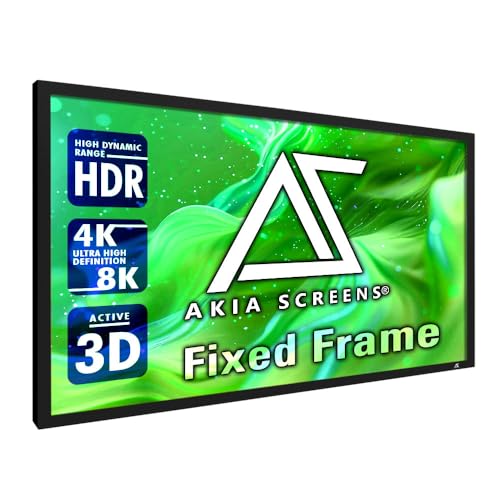
| Best for Accuracy | Screen Size: 120-inch diagonal | Aspect Ratio: 16:9 | Frame Type: Fixed frame | VIEW LATEST PRICE | Read Our Analysis |
| Elite Screens Sable Frame 2 Projector Screen (ER165WH2) |

| Best Premium Size | Screen Size: 165-inch diagonal | Aspect Ratio: 16:9 | Frame Type: Fixed frame | VIEW LATEST PRICE | Read Our Analysis |
| Silver Ticket 220″ Fixed Frame Projector Screen (STR-169220) |

| Best Large Format | Screen Size: 220-inch diagonal | Aspect Ratio: 16:9 | Frame Type: Fixed frame | VIEW LATEST PRICE | Read Our Analysis |
| VEVOR 120-inch Outdoor Projector Screen 16:9 Fixed Frame |

| Best Outdoor Option | Screen Size: 120-inch diagonal | Aspect Ratio: 16:9 | Frame Type: Fixed frame | VIEW LATEST PRICE | Read Our Analysis |
| ShowMaven 120″ Fixed Frame Projector Screen |

| Best Value Pick | Screen Size: 120-inch diagonal | Aspect Ratio: 16:9 | Frame Type: Fixed frame | VIEW LATEST PRICE | Read Our Analysis |
More Details on Our Top Picks
Valerion 120-inch Fixed Frame Projector Screen
If you want a clean, theater-style setup that works with long throw, short throw, and ultra short throw projectors, the Valerion 120-inch Fixed Frame Projector Screen is a strong fit. You get a 16:9 matte white PVC surface with 1.3 gain and a 170° half-gain viewing angle, so your image stays bright, vivid, and clear. It supports 4K, 8K, and 3D content, and its wrinkle-free, fixed-frame design keeps visuals smooth. You can wall-mount it for a stable install. The 120-inch size, 1-year warranty, and 30-pound build make it practical and durable.
- Screen Size:120-inch diagonal
- Aspect Ratio:16:9
- Frame Type:Fixed frame
- Wall Mount:Wall mount
- 4K/8K Ready:4K/8K Ultra HD, 3D support
- Viewing Angle:170° half-gain
- Additional Feature:1.3 gain surface
- Additional Feature:170° half-gain
- Additional Feature:Wrinkle-free viewing surface
Akia 120-Inch Fixed Frame Projector Screen (AK-FF120WH2)
The Akia 120-Inch Fixed Frame Projector Screen (AK-FF120WH2) is a strong choice for anyone building a dedicated home theater, classroom, or conference room setup that needs a permanently mounted, high-quality display. You get a 120-inch, 16:9 image with a 104.6 x 58.8-inch viewing area and a 180-degree viewing angle. The CINEWHITE UHD-B surface delivers 1.1 gain, supports 4K, 8K, HD, and active 3D, and the black backing helps preserve contrast. Its 2.4-inch aluminum frame and velvet border keep the image flat and clean. Mounting hardware, warranty, and support are included.
- Screen Size:120-inch diagonal
- Aspect Ratio:16:9
- Frame Type:Fixed frame
- Wall Mount:Wall mount
- 4K/8K Ready:4K/8K and HD, active 3D ready
- Viewing Angle:180°
- Additional Feature:ISF Certified material
- Additional Feature:Black-backed design
- Additional Feature:Velvet-wrapped border
Elite Screens Sable Frame 2 Projector Screen (ER165WH2)
Need a large, cinema-style display for a dedicated room? The Elite Screens Sable Frame 2 ER165WH2 gives you a 165-inch, 16:9 viewing area with CineWhite UHD-B material and 1.3 gain for bright, accurate images. You get ISF-certified color, 4K Ultra HD and active 3D support, plus a 180° viewing angle. Its black-backed surface works with standard, short-throw, and UHD/HD projectors. The 2.4-inch velvet-wrapped aluminum frame looks clean, absorbs overshoot, and mounts easily with included hardware. You can also count on US-based lifetime tech support and a solid warranty.
- Screen Size:165-inch diagonal
- Aspect Ratio:16:9
- Frame Type:Fixed frame
- Wall Mount:Wall mount
- 4K/8K Ready:4K Ultra HD, active 3D ready
- Viewing Angle:180°
- Additional Feature:2-year warranty
- Additional Feature:Lifetime tech support
- Additional Feature:Soap-and-water cleanable
Silver Ticket 220″ Fixed Frame Projector Screen (STR-169220)
With its massive 220-inch 16:9 viewing area, the Silver Ticket STR-169220 is a strong pick for anyone building a true home theater and wanting a clean, wall-mounted screen that handles 4K, HDR, and even 3D content with ease. You get a 1.1-gain white surface, a 160° viewing angle, and compatibility with long-throw, short-throw, and ultra-short-throw projectors. Its 4-inch beveled aluminum frame is wrapped in black velvet to reduce shadowing, while the tension-rod design helps you assemble a flat, wrinkle-free screen quickly.
- Screen Size:220-inch diagonal
- Aspect Ratio:16:9
- Frame Type:Fixed frame
- Wall Mount:Wall mount
- 4K/8K Ready:4K, 8K, HDR, Active 3D
- Viewing Angle:160°
- Additional Feature:80 lb weight
- Additional Feature:Tensioning rod system
- Additional Feature:Black velvet frame
VEVOR 120-inch Outdoor Projector Screen 16:9 Fixed Frame
VEVOR’s 120-inch outdoor fixed-frame screen is a strong pick if you want a large, stable 16:9 display for home theaters, classrooms, meetings, or outdoor movie nights. You get a 104.5 x 58.9-inch viewing area, a thick aluminum alloy frame, and black velvet-covered edges that help focus attention on the picture. The nm-level optical coated PVC surface boosts color, stays flicker-free, and works with 3D, 4K, and HDTV sources. You can wall-mount it with the tension rod system, clean it with water, and rely on it for long-term use.
- Screen Size:120-inch diagonal
- Aspect Ratio:16:9
- Frame Type:Fixed frame
- Wall Mount:Wall mount
- 4K/8K Ready:4K, 3D, HDTV compatible
- Viewing Angle:120°
- Additional Feature:Outdoor-friendly design
- Additional Feature:Water-washable surface
- Additional Feature:Flicker-proof viewing
ShowMaven 120″ Fixed Frame Projector Screen
If you want a sharp, theater-style image in a dedicated indoor space, the ShowMaven 120″ Fixed Frame Projector Screen is a strong fit. You get a 16:9, 120-inch display with a 1.1 gain glossy PVC surface, black backing, and a 160-degree viewing angle. It’s ready for 4K Ultra HD and Active 3D, so your movies and games look vivid and crisp. The black velvet-wrapped aluminum frame helps block stray light, while the six-piece split frame makes setup simple. Use it in your home theater, classroom, or conference room. It’s easy to clean, too.
- Screen Size:120-inch diagonal
- Aspect Ratio:16:9
- Frame Type:Fixed frame
- Wall Mount:Wall mount
- 4K/8K Ready:4K Ultra HD, Active 3D ready
- Viewing Angle:160°
- Additional Feature:1.1 gain
- Additional Feature:6-piece split frame
- Additional Feature:Damp-cloth cleanable
Factors to Consider When Choosing Fixed Frame Projector Screens
When you choose a fixed frame projector screen, start by matching the screen size and aspect ratio to your room and projector setup. You’ll also want to factor in gain, brightness, and viewing angle so everyone gets a clear, consistent image. Finally, pick a material and surface that support the picture quality you want without adding glare or distortion.
Screen Size Selection
Choosing the right fixed frame projector screen starts with matching the screen’s diagonal and aspect ratio to your projector’s native resolution and the content you watch, so your 4K or HD image fills the frame without awkward scaling or black bars. Next, measure your seating distance and use the 1.5–3x screen-height rule, or aim for roughly 1–1.5x the diagonal for a more immersive view. Check that your wall can handle the screen’s outer frame dimensions and leave clearance for brackets and alignment. If you’ve got multiple seats, go larger so viewers in the back still see a clear image. Finally, confirm your projector’s throw range and lens shift can support the size you choose without distortion or placement compromises.
Aspect Ratio Match
Once you’ve narrowed down screen size, the next thing to check is aspect ratio, since the screen should match what you watch most often. If you mainly watch HDTV, 4K movies, or play games, a 16:9 fixed frame screen usually fits best. If you rely on legacy presentations or older video, 4:3 may make more sense. Matching the screen to your projector’s native output, like 1920×1080 or 3840×2160, helps you use every pixel and keeps the picture sharp. When you mix wide films with older 4:3 material, choose the ratio that best suits your typical viewing so you don’t waste image area. A mismatch can force scaling or cropping, so plan your seating and room layout around the screen’s framed shape.
Gain And Brightness
Gain and brightness shape how vivid your image looks, and you’ll want to match screen reflectivity to your projector and room. Screen gain tells you how reflective a surface is compared with a 1.0 white reference. If you use a low-lumen projector or fight ambient light, a 1.1 to 1.3 screen can push more light toward you and lift center brightness. Just know that higher gain can create hot-spotting, where the middle looks brighter than the edges. Matte, low-gain screens give you the most even image and work well for larger groups. To estimate output, multiply projector lumens by screen gain. Also consider contrast: black-backed or high-contrast surfaces can deepen blacks without extreme gain, while very high-gain materials may hurt color accuracy and off-axis contrast.
Viewing Angle Range
Viewing angle matters just as much as brightness because it determines how consistently your image holds up from different seats in the room. You should check the screen’s half-gain or full-angle spec to see how wide the usable viewing area is. A wider range, like 160° to 180°, helps everyone see steady brightness and color, even if they sit off-center. Remember that gain and viewing angle usually move in opposite directions: higher-gain screens can look punchier straight on but narrow the sweet spot, while low-gain matte screens spread light more evenly. If your room has side seating or a wide layout, choose broader angles so the image doesn’t dim or shift. Ambient light can make these limits more obvious, too.
Material And Surface
After you’ve narrowed down the right viewing angle, the screen’s material and surface become the next big factors. You should look at PVC, vinyl, or specialized coated fabrics, because each one changes reflectivity, durability, cleanup, and wrinkle resistance. Pay attention to gain, too: around 1.0 to 1.3 works well for most home theaters, while higher gains can brighten specialty setups but may create hotspotting. A matte finish usually gives you better ambient-light control, less glare, and wider off-axis performance. Glossy or coated surfaces can add brightness and color punch in controlled rooms. If you’ll place seating off-center, check the half-gain angle. Black-backed or blackout-backed screens also help by blocking rear light and improving contrast.
Frame Construction Quality
When you inspect a fixed frame projector screen, start with the frame itself, because strong construction keeps the surface flat and the image clean. You should favor extruded aluminum frames about 2 to 4 inches wide, since they resist flexing and help prevent warping across long spans. Check for a real tensioning system, such as pocket-and-rod or tension rods, so the screen stays wrinkle-free. Look for a bezel wrapped in dense black velvet or another light-absorbing material to cut overshoot and improve contrast. Make sure the corners use reinforced hardware, and confirm that the design offers easy leveling or sliding brackets. Corrosion-resistant finishes and split-piece construction also matter, because they simplify shipping and installation without sacrificing strength or durability.
Projector Compatibility
Projector compatibility starts with matching the screen to your projector’s output and setup. You should choose an aspect ratio that fits your projector’s native signal, like 16:9 or 4:3, so you don’t get letterboxing or a stretched picture. Make sure the screen size and viewing area suit your throw distance and lens type, whether you use a long-throw, short-throw, or ultra-short-throw model. Match screen gain to your projector’s brightness and seating layout; higher gain can help brightness, but it also narrows viewing angles. Check that the surface supports your resolution and features, including 4K, 8K, or active 3D. Finally, confirm the screen stays flat and aligns well with your projector to avoid keystone, soft edges, or uneven light.
Installation Requirements
Before you buy a fixed frame projector screen, make sure your wall and room can handle it: measure the available space and viewing distance so the visible screen size, including the frame, fits comfortably and doesn’t crowd your sightlines. Check that wall studs or rated anchors can support the screen’s weight and the stress from fixed-frame brackets. Confirm the frame depth and bracket style match your wall, whether you need a flat mount or recessed setup, and leave room for throw distance and cabling. During installation, use adjustable brackets or shims to level and center the screen so the surface stays tight and wrinkle-free. For larger models, plan on a two-person lift, keep tools handy, and follow the manufacturer’s torque and fastening instructions to avoid damage.
Frequently Asked Questions
How Do I Clean a Fixed Frame Projector Screen Safely?
Use a clean microfiber cloth to remove loose dust, working from top to bottom with light pressure. For spots, dampen a soft lint free cloth with warm water mixed with a few drops of mild dish soap, wring it so it is only slightly damp, and gently blot or sweep the stain without scrubbing. Never apply cleaning solutions directly onto the screen; instead moisten the cloth before use. Allow the screen to air dry fully before rolling or covering it.
Can Fixed Frame Screens Be Mounted on Textured Walls?
No. Do not mount them directly on textured walls since the surface irregularities will distort the image. Use a flat backing board, adjustable shims, or a separate mounting frame to keep the screen perfectly flat.
What Ceiling Height Works Best for a Large Screen?
For a large screen, aim for a ceiling height of at least 8 feet, with 9 to 10 feet being ideal. This provides better sightlines, makes speaker placement easier, and gives seated viewers room to avoid feeling cramped.
Do Fixed Frame Screens Improve Brightness in Daylight?
Yes. Fixed frame screens deliver brighter, sharper images in daylight because their fabric remains consistently flat, which minimizes wrinkles and surface undulations. You will still need a high-output projector, and reducing ambient light in the viewing area will improve perceived contrast and color saturation.
How Long Do Projector Screens Typically Last?
A projector screen typically lasts about five to ten years, and can often remain usable longer with light use. To prolong its lifespan avoid prolonged exposure to direct sunlight clean it gently with a soft brush or microfiber cloth and store it in a cool dry place when not installed.
Final Thoughts
When you’re ready to turn any room into a true theater, the right fixed frame screen can change everything. You’ve seen the options, but the best choice depends on what you value most: size, gain, durability, or that ultra-smooth picture. Pick carefully, because the difference between good and breathtaking is often hidden in the frame. And once you see that first flawless image, you won’t want to go back.
