

Dead zones can ruin a good Wi‑Fi setup, but a mesh system can fix that with one network across your whole home.
It swaps out scattered routers and extenders for smoother coverage room to room.
The best picks vary in speed, range, and setup style.
Some fit tight budgets, while others handle heavy streaming and newer Wi‑Fi 6 devices.
| TP-Link Deco M5 Mesh WiFi System 3-Pack |

| Best Value | Wi‑Fi Standard: Wi‑Fi 5 (802.11ac) | Band Type: Dual-band | Coverage: 5,500 sq. ft. | VIEW LATEST PRICE | Read Our Analysis |
| Linksys Velop Tri-Band AC6600 Mesh System (3-Pack) |
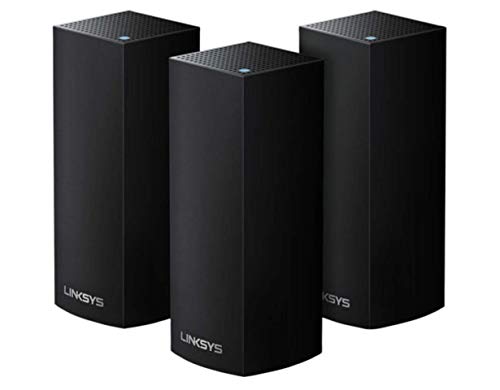
| Best Coverage | Wi‑Fi Standard: Wi‑Fi 5 | Band Type: Tri-band | Coverage: 6,000 sq. ft. | VIEW LATEST PRICE | Read Our Analysis |
| Google WiFi Mesh Router System for Home 2-Pack |

| Best for Simplicity | Wi‑Fi Standard: Wi‑Fi 5 (802.11ac) | Band Type: Dual-band | Coverage: 3,800 sq. ft. | VIEW LATEST PRICE | Read Our Analysis |
| TP-Link Deco X20 WiFi 6 Mesh System |

| Best Wi-Fi 6 | Wi‑Fi Standard: Wi‑Fi 6 (802.11ax) | Band Type: Dual-band | Coverage: 5,800 sq. ft. | VIEW LATEST PRICE | Read Our Analysis |
| TP-Link Deco M5 Mesh WiFi System (2-Pack) |

| Best Budget Mesh | Wi‑Fi Standard: Wi‑Fi 5 | Band Type: Dual-band | Coverage: 3,800 sq. ft. | VIEW LATEST PRICE | Read Our Analysis |
| TP-Link Deco X55 AX3000 WiFi 6 Mesh System |

| Best Performance | Wi‑Fi Standard: Wi‑Fi 6 (802.11ax) | Band Type: Dual-band | Coverage: 6,500 sq. ft. | VIEW LATEST PRICE | Read Our Analysis |
More Details on Our Top Picks
TP-Link Deco M5 Mesh WiFi System 3-Pack
The TP-Link Deco M5 Mesh WiFi System 3-Pack is a strong choice provided you want whole-home coverage without dead zones, especially in larger homes or busy households. You get up to 5,500 square feet of coverage and support for 100+ devices, so your network can keep up with streaming, gaming, and smart-home gear. The mesh design replaces your old router-extender setup and keeps one name and password everywhere. Each unit handles Wi-Fi on its own, and adaptive routing sends traffic through the fastest path. You can set it up with the Deco app and use Alexa too.
- Wi‑Fi Standard:Wi‑Fi 5 (802.11ac)
- Band Type:Dual-band
- Coverage:5,500 sq. ft.
- Unit Count:3-pack
- Ethernet Ports:2 per unit
- App Control:Deco app
- Additional Feature:HomeCare lifetime included
- Additional Feature:Adaptive routing technology
- Additional Feature:Alexa compatible
Linksys Velop Tri-Band AC6600 Mesh System (3-Pack)
Linksys Velop Tri-Band AC6600 Whole Home WiFi Mesh System is a strong pick should you want wide, reliable coverage for a larger home, providing up to 6,000 sq. ft. from a 3-pack of Wi‑Fi 5 nodes. You get tri-band performance with 6,600 Mbps combined bandwidth, and each node delivers AC2200 speeds for smoother streaming and gaming. The Linksys app lets you set it up fast, manage Wi‑Fi remotely, and support your smart home devices. With WPA2-PSK security, modem compatibility, and black finish, it fits everyday use well.
- Wi‑Fi Standard:Wi‑Fi 5
- Band Type:Tri-band
- Coverage:6,000 sq. ft.
- Unit Count:3-pack
- Ethernet Ports:1 per unit
- App Control:Linksys app
- Additional Feature:Tri-band AC6600
- Additional Feature:WPS support
- Additional Feature:512 MB RAM
Google WiFi Mesh Router System for Home 2-Pack
Google WiFi Mesh Router System for Home 2-Pack is a smart pick should you want whole-home coverage without a complicated install, especially for homes or small offices that need reliable Wi‑Fi 5 performance and simple app-based control. You’ll get up to 3,800 square feet of dual-band coverage, with total throughput up to 2.2 Gbps. The mesh router and point work with gaming consoles, PCs, printers, and smartphones. You can manage everything in the app, set parental controls, and rely on WPA2-PSK or WPA3 security. It’s router-only, so you’ll still need a modem.
- Wi‑Fi Standard:Wi‑Fi 5 (802.11ac)
- Band Type:Dual-band
- Coverage:3,800 sq. ft.
- Unit Count:2-pack
- Ethernet Ports:2 per unit
- App Control:Google WiFi app
- Additional Feature:WPA3 security
- Additional Feature:Parental controls included
- Additional Feature:Basic firewall
TP-Link Deco X20 WiFi 6 Mesh System
Need to cover a large home with fast, reliable Wi‑Fi? The TP-Link Deco X20 3-pack gives you Wi‑Fi 6 mesh coverage up to 5,800 sq. ft. and supports 150 devices. You get dual-band AX1800 performance, seamless roaming, Beamforming, and BSS Color for smoother gaming, streaming, and video calls. Each unit can act as a router, and you can use wired Ethernet backhaul through six Gigabit ports. Manage everything in the Deco app, add parental controls, and use HomeShield security. It works with Amazon Alexa too.
- Wi‑Fi Standard:Wi‑Fi 6 (802.11ax)
- Band Type:Dual-band
- Coverage:5,800 sq. ft.
- Unit Count:3-pack
- Ethernet Ports:2 per unit
- App Control:Deco app
- Additional Feature:HomeShield security features
- Additional Feature:Beamforming technology
- Additional Feature:Alexa voice control
TP-Link Deco M5 Mesh WiFi System (2-Pack)
The TP-Link Deco M5 Mesh WiFi System is a smart pick should you want to blanket a larger home with reliable Wi‑Fi, since a 2-pack can cover up to 3,800 sq. ft. and support 60+ devices without the usual dead zones. You get one seamless network name and password, plus smooth roaming as you move around. TP-Link Mesh picks the fastest path for each device, and Ethernet backhaul can enhance speeds. Setup’s simple in the Deco app, and HomeCare adds antivirus, parental controls, and QoS. It’s Alexa-compatible and works with most ISPs.
- Wi‑Fi Standard:Wi‑Fi 5
- Band Type:Dual-band
- Coverage:3,800 sq. ft.
- Unit Count:2-pack
- Ethernet Ports:2 per unit
- App Control:Deco app
- Additional Feature:Free HomeCare
- Additional Feature:Eliminates dead zones
- Additional Feature:All Deco interoperable
TP-Link Deco X55 AX3000 WiFi 6 Mesh System
TP-Link’s Deco X55 AX3000 is a strong pick should you want to wipe out dead zones in a larger home without juggling a router and extender. You get a 3-pack Wi‑Fi 6 mesh system that covers up to 6,500 square feet and handles as many as 150 devices. Each unit offers three Gigabit Ethernet ports, so you can wire in TVs, consoles, or a PC, and even use Ethernet backhaul. The Deco app makes setup easy, while WPA3, HomeShield, guest mode, and AI-driven optimization help keep your network fast and secure.
- Wi‑Fi Standard:Wi‑Fi 6 (802.11ax)
- Band Type:Dual-band
- Coverage:6,500 sq. ft.
- Unit Count:3-pack
- Ethernet Ports:3 per unit
- App Control:Deco app
- Additional Feature:WPA3-Personal security
- Additional Feature:AI-driven mesh
- Additional Feature:Guest mode
Factors to Consider When Choosing Mesh Wi Fi Systems
Whenever you choose a mesh Wi-Fi system, start with your coverage area and make sure it can reach every room you need. You’ll also want enough device capacity and Wi-Fi speed to handle your household without slowdowns. Check the band selection and Ethernet ports too, since they can enhance performance and give you more flexible connections.
Coverage Area
Coverage starts with your space: measure the total square footage you need to blanket, including multiple floors, and pick a mesh system rated for at least that size to reduce dead zones. Then adjust for your home’s layout. Thick concrete, brick, metal studs, and even big appliances can weaken Wi-Fi fast, so choose extra range when those materials show up. Place nodes centrally and aim for line of sight whenever possible; that helps each hop carry farther. Keep nodes away from microwaves, cordless phones, Bluetooth hubs, and large aquariums, which can interfere with signal strength. Provided your rooms already have Ethernet wiring, use wired backhaul to extend coverage and keep performance steady without depending on extra wireless links.
Device Capacity
Next, match your mesh system to the number of devices you actually plan to run at once, not just the size of your home. Check how many simultaneous devices it supports; many systems handle about 50 to 150 or more. That number matters whenever you’re connecting phones, smart TVs, laptops, cameras, and IoT gadgets together. Also, consider what those devices do. A network full of 4K streamers and gaming consoles will strain capacity more than a set of sensors or speakers. Look for per-node and total device limits so you can size your mesh with room to grow. Wi‑Fi 6 models usually support more clients than Wi‑Fi 5, and features like MU‑MIMO, OFDMA, and QoS help each node serve multiple devices more efficiently.
Wi-Fi Speed
Speed matters, but the number on the box only tells part of the story. Whenever you compare mesh systems, check the stated aggregate throughput, like AX3000 or AC6600, to gauge peak capacity across bands, but bear in mind real speeds will be lower. Choose newer Wi‑Fi 6 systems provided you want better efficiency, lower latency, and stronger performance with many devices. Look at whether each node is dual-band or tri-band; tri-band models often keep a band free for backhaul, which helps maintain client speed. Also verify WAN and LAN port rates, plus support for wired Ethernet backhaul, so nodes don’t slow each other down. Lastly, review device limits and features like MU-MIMO and OFDMA, since they help preserve speed under load.
Band Selection
Once you’ve checked speed, the next big choice is band selection, since it affects both range and how well the system handles traffic. Dual-band mesh systems give you one 2.4 GHz band and one 5 GHz band. You’ll get better wall penetration and longer reach on 2.4 GHz, whereas 5 GHz delivers faster speeds and less interference. Tri-band systems add a second 5 GHz band, often reserved for backhaul or busy devices, so your network keeps moving whenever many gadgets connect. For a large home, look for separate backhaul bandwidth to protect client speed. Make sure your mesh supports older 2.4 GHz devices and can run both bands at once. Don’t trust aggregate throughput alone; check each band’s speed and whether one band stays dedicated.
Ethernet Ports
Count the Ethernet ports on each mesh node and across the whole kit so you know how many devices you can wire directly without adding a switch. Check for Gigabit ports on every unit, since extra ports let you plug in a NAS, game console, or smart-home hub with no hassle. Make sure one port is dedicated WAN, or at least auto-senses WAN/LAN, so you can connect your modem and still keep LAN ports free. Should you desire faster, steadier inter-node links, choose a system that supports wired Ethernet backhaul. Also verify whether the ports are 10/100/1000 or multi-gig, because slower links can bottleneck fast internet plans and local transfers. Should you require more wired connections, pair the system with an unmanaged switch.
Security Features
After you’ve checked the ports and backhaul options, turn to security features, because a mesh system should protect both the traffic on your network and the way you manage it. Choose a model with WPA3, or at least WPA2, so wireless data stays encrypted and harder to intercept. Look for built-in security tools that can detect intrusions, block malware, and install automatic updates once vulnerabilities appear. You’ll also want guest network isolation and VLAN or subnet separation, which keep visitors and IoT gadgets away from your main devices and files. Strong parental controls and QoS rules help you set safe browsing limits and prioritize approved use. Finally, confirm the vendor offers regular firmware updates, a clear policy, and secure management with two-factor authentication.
App Controls
Whenever you compare mesh Wi‑Fi systems, check whether they come with a dedicated mobile app for setup and day-to-day control, since app-based management usually makes installation easier and lets you adjust settings remotely. Make sure the app works with your phone’s operating system, including current Android or iOS versions, so you can manage updates without hassle. You should also look for useful controls like parental filters, QoS, guest networks, and device-level management, which help you shape bandwidth and access for each user. Confirm that the app sends firmware and security alerts, so you can patch issues quickly. Also decide if you want remote cloud access or local control; cloud apps let you manage the network from anywhere, though they might require account registration.
ISP Compatibility
Once you’ve checked app features, make sure the mesh system will actually work with your internet service. You should confirm it supports your ISP’s connection type, because most providers still expect a separate modem and want the mesh unit to act as a router. Next, check the WAN speed rating so the system can match your plan; for gigabit service, look for 1 Gbps WAN and LAN ports. You’ll also want support for your ISP’s authentication, including PPPoE or other login methods. In the event your provider gave you a gateway combo, see whether you can enable bridge mode or turn off its Wi‑Fi to prevent double-NAT and interference. Finally, verify gigabit ports and auto-sensing WAN/LAN for wired backhaul.
Frequently Asked Questions
Can Mesh Wi-Fi Systems Work With Existing Routers?
Yes, you can use a mesh Wi Fi system with your current router, and it often extends coverage. In most setups, the router stays the main gateway while mesh nodes expand the signal from room to room.
How Many Nodes Do I Need for My Home Size?
You’ll typically need one node for every 1,500 to 2,000 square feet. A small home may need two nodes, while larger homes or homes with more than one floor often need three or more. Add an extra node if thick walls or an awkward layout interfere with the signal.
Do Mesh Systems Support Wired Ethernet Backhaul?
Yes, you can use wired Ethernet backhaul. It links mesh nodes directly through cables, which usually gives more stable speeds, lower latency, and stronger coverage if your home wiring is set up for it.
Will Mesh Wi-Fi Improve Outdoor Signal Coverage?
Yes, you will usually get better outdoor coverage if you place a mesh node near an exterior wall or use weatherproof extenders, but you will not reach far yards automatically because walls, distance, and interference still weaken the signal.
Are Mesh Systems Compatible With All Internet Providers?
Yes, in most cases mesh systems work with any internet provider. You connect the main unit to your modem, and if your service uses special settings, you may need to enter provider specific details during setup.
Conclusion
Should your home has dead zones, a mesh Wi‑Fi system can fix them fast. For example, a two-story family using a TP-Link Deco X20 could stream 4K upstairs while working downstairs without dropouts. The best part is that you don’t have to fight with extenders or multiple network names. Pick the system that fits your space, speed needs, and budget, and you’ll keep every room connected with less hassle and better performance.
