

If you want free over-the-air TV to feel simpler, the right tuner can change how you watch on phones, tablets, home screens, and older TVs. Some models plug straight into Android devices, while others bring network streaming or HDMI output to the mix. The real question is which one fits your setup best, and the answer isn’t always the one you’d expect.
| MyGica Type-C USB TV Tuner Card |

| Mobile TV Pick | Tuner Type: ATSC digital | Connection: USB Type-C | Device Support: Android phones/tablets | VIEW LATEST PRICE | Read Our Analysis |
| SiliconDust HDHomeRun Flex Duo 2 x ATSC Tuners – HDFX-2US |

| Best Whole-Home | Tuner Type: 2 ATSC 1.0 | Connection: Ethernet RJ45 | Device Support: Multi-device home network | VIEW LATEST PRICE | Read Our Analysis |
| Digital ATSC Aerial TV Tuner for Android Tablet Smart Phone |

| Portable Android Pick | Tuner Type: ATSC digital | Connection: Micro USB / USB-C | Device Support: Android phones/tablets/TV boxes | VIEW LATEST PRICE | Read Our Analysis |
| SiliconDust HDHomeRun Flex 4K ATSC 3.0 NextGen TV: 2/4 Tuners HDFX-4K |
| Best NextGen TV | Tuner Type: 2 ATSC 3.0 / 4 ATSC 1.0 | Connection: Ethernet RJ45 | Device Support: Multi-device home network | VIEW LATEST PRICE | Read Our Analysis |
| ZJBOX Digital TV Converter Box with HDMI Output |

| Best Converter Box | Tuner Type: ATSC digital | Connection: Coaxial / HDMI / USB | Device Support: TV, monitor, projector | VIEW LATEST PRICE | Read Our Analysis |
| MyGica USB TV Tuner for Android Type-C Devices |
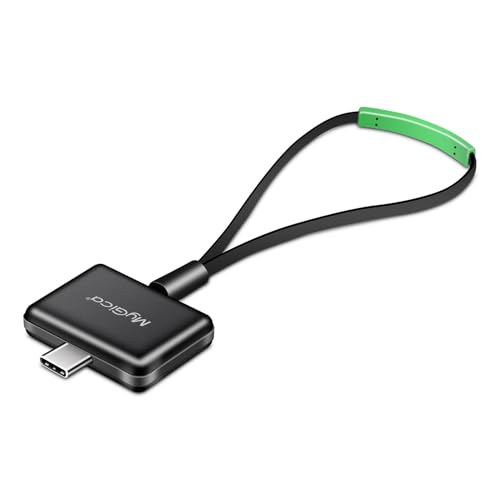
| USB-C Favorite | Tuner Type: ATSC digital | Connection: USB Type-C | Device Support: Android phones/tablets | VIEW LATEST PRICE | Read Our Analysis |
More Details on Our Top Picks
MyGica Type-C USB TV Tuner Card
If you want to watch free ATSC digital TV on your phone or tablet without using Wi‑Fi, mobile data, or a driver install, the MyGica Type-C USB TV Tuner Card is a strong fit. You plug in the mini Type-C stick, connect the rope antenna, and start watching air signals right away. You can pause, record, and replay live TV with the PAD TV HD app, plus use EPG, PIP, sharing, and parental controls. It works with many Android phones and tablets, including Android 10, but not Samsung phones. Watch sports and live broadcasts anywhere.
- Tuner Type:ATSC digital
- Connection:USB Type-C
- Device Support:Android phones/tablets
- Live TV:Yes
- Recording:Pause/record
- Antenna Use:Rope antenna
- Additional Feature:Pause and record
- Additional Feature:EPG and PIP
- Additional Feature:Parental control
SiliconDust HDHomeRun Flex Duo 2 x ATSC Tuners – HDFX-2US
The SiliconDust HDHomeRun Flex Duo is a smart pick for cord-cutters who want over-the-air TV streamed across their home without tying up a single television. You get two ATSC 1.0 tuners, Ethernet connectivity, and access on Android, Fire TV, Apple TV, Roku, Sony, Xbox, iPhone, iPad, Windows 10/11, and Mac devices. You can add whole-home DVR storage with a USB hard drive, and you won’t need a subscription. If you want advanced auto-record features, you can choose a paid TV guide. It’s compact, black, and backed by a two-year warranty.
- Tuner Type:2 ATSC 1.0
- Connection:Ethernet RJ45
- Device Support:Multi-device home network
- Live TV:Yes
- Recording:USB DVR
- Antenna Use:External antenna
- Additional Feature:Two ATSC 1.0 tuners
- Additional Feature:Whole-home DVR support
- Additional Feature:No subscription required
Digital ATSC Aerial TV Tuner for Android Tablet Smart Phone
For Android users who want portable live TV without relying on Wi‑Fi or a data plan, this Digital ATSC aerial tuner is a strong fit, because it turns a tablet, smartphone, or Android TV box into a free over-the-air TV viewer. You get North American ATSC channels with no internet needed, as long as your device runs Android 5.1 or newer and supports USB OTG. Plug in the built-in micro USB connector or included USB-C adapter, scan channels, and watch or record HD shows. You can pause, rewind, and save files, while the compact tuner runs on your phone’s power.
- Tuner Type:ATSC digital
- Connection:Micro USB / USB-C
- Device Support:Android phones/tablets/TV boxes
- Live TV:Yes
- Recording:Record/save files
- Antenna Use:Built-in antenna
- Additional Feature:USB OTG support
- Additional Feature:Built-in DTV decoder
- Additional Feature:Closed-caption support
SiliconDust HDHomeRun Flex 4K ATSC 3.0 NextGen TV: 2/4 Tuners HDFX-4K
Need a whole-home tuner that can feed multiple devices at once? SiliconDust’s HDHomeRun Flex 4K HDFX-4K gives you 4 tuners, including 2 ATSC 3.0 and 4 ATSC 1.0 access, so you can watch live TV across Android, Fire TV, Apple TV, Roku, Xbox, iPhone, iPad, Windows, and Mac. It connects by Ethernet, includes the cable and power adapter, and works as a multi-room network tuner with no subscription. You can add a USB hard drive for whole-home DVR. It won’t handle DRM-protected channels, but for DRM-free NextGen TV, it’s a strong black, 2-year-warranty pick.
- Tuner Type:2 ATSC 3.0 / 4 ATSC 1.0
- Connection:Ethernet RJ45
- Device Support:Multi-device home network
- Live TV:Yes
- Recording:USB DVR
- Antenna Use:External antenna
- Additional Feature:NextGen TV certified
- Additional Feature:2 ATSC 3.0 tuners
- Additional Feature:2-year warranty
ZJBOX Digital TV Converter Box with HDMI Output
If you want a simple over-the-air ATSC converter that can breathe new life into an older TV, monitor, or projector, the ZJBOX Digital TV Converter Box with HDMI Output is a solid fit. You’ll get 1080p output, HDMI and composite connections, closed captions, auto tuning, and USB media playback for photos, MP3s, and movie files. You can also record TV, set timers, manage favorites, and use parental controls, but you’ll need external storage. It won’t boost reception or replace cable, so pair it with an antenna.
- Tuner Type:ATSC digital
- Connection:Coaxial / HDMI / USB
- Device Support:TV, monitor, projector
- Live TV:Yes
- Recording:TV recording
- Antenna Use:External antenna
- Additional Feature:1080p output resolution
- Additional Feature:USB media playback
- Additional Feature:1-year warranty
MyGica USB TV Tuner for Android Type-C Devices
MyGica’s USB TV Tuner PT682C is a solid pick when you want to watch ATSC digital TV on an Android phone or tablet with USB Type-C support. You plug it into compatible Android devices from major brands, and it lets you tune live over-the-air channels through USB antenna connectivity. This external tuner includes a remote, so you can control playback more easily. Its portable design makes it handy when you’re on the move. The green unit is made by Geniatech, carries Amazon return support, and has 3.6 stars from 419 ratings.
- Tuner Type:ATSC digital
- Connection:USB Type-C
- Device Support:Android phones/tablets
- Live TV:Yes
- Recording:Not specified
- Antenna Use:USB antenna
- Additional Feature:Green color
- Additional Feature:Portable use anywhere
- Additional Feature:Voluntary 30-day return
Factors to Consider When Choosing TV Tuners
When you’re choosing a TV tuner, start with the tuner type and make sure it matches the signal you want to receive. Check signal compatibility, device support, and connection options so it works with your setup. If you want extra convenience, look for recording features that let you save shows to watch later.
Tuner Type
Tuner type is the first thing to check because it determines which broadcast standard your device can receive. You’ll see options like ATSC 1.0, ATSC 3.0, and analog-to-digital conversion, and each one serves a different purpose. If you want over-the-air TV, an ATSC tuner is what you need; it’s not the same as a cable, satellite, or internet streaming receiver. ATSC 3.0 tuners let you access next-generation broadcasts, though some channels may still use DRM restrictions. You should also look for a unit with multiple tuners if you want to watch one channel while recording another. Pick the right standard for your region, because a tuner made for one broadcast system may not work with another.
Signal Compatibility
Signal compatibility is the next thing to check, because a tuner has to match the signal you actually receive. You should confirm that it supports your broadcast standard, such as ATSC 1.0 or ATSC 3.0, since a mismatch can block channels entirely. Also, make sure it’s built for over-the-air digital TV if that’s your source, because many tuners won’t decode cable or satellite feeds. Check the connector and signal path you have, whether that’s an antenna input, Ethernet network tuner, or USB/USB-C connection. Regional limits matter too, so verify the tuner works in your country and with your broadcast system. If you need DRM-protected channels, choose a model that explicitly supports them, because DRM-free-only tuners won’t open those streams.
Device Support
Once you’ve confirmed the tuner matches your broadcast signal, the next step is making sure it works with your devices. Check the supported operating system and version first, because a tuner that runs on Android 5.1+ may not suit Windows 10/11, Mac, iPhone, iPad, or your smart TV platform. Next, verify that it fits your device category, whether you’re using a smartphone, tablet, Android TV box, desktop, or networked streamer. Don’t assume every model in a brand works; some tuners only support certain Android devices. If you want TV on the go, pick a tuner built for direct mobile use. If you want coverage across your home, choose a network tuner that can serve multiple devices at once.
Connection Options
Connection options can make or break a TV tuner match, so check how it plugs into your device before you buy. You’ll see USB Type-C, Micro USB, HDMI, composite video, and Ethernet models, and each one fits a different setup. If you want to watch on a phone or laptop, a USB tuner usually gives you the simplest direct link. If you’re building a home network viewing setup, Ethernet lets you share access across multiple devices. On Android, confirm USB OTG support, because some tuners won’t work without it. You can also look for adapters or dual-connector designs, like Micro USB with USB-C support, to widen compatibility. Even then, many over-the-air tuners still need a separate antenna connection to receive signals clearly.
Recording Features
After you’ve checked how a tuner connects, look at how it handles recording, since that can shape how useful it is day to day. You should see whether it lets you pause, rewind, and fast-forward live TV, because those time-shift tools make watching far more flexible. If you want to capture something on the fly, confirm that it supports instant recording, so you don’t miss a show that starts before you can set a timer. Also check where it saves files: local device storage, a mobile device, or an external drive all affect capacity and access. For hands-off use, pick a tuner with scheduled recording and, ideally, an electronic program guide. Finally, verify storage limits, including any external drive, file system, or size requirements, so your recordings don’t run out of room.
Portability Needs
If you need to carry a tuner with you, choose an ultra-compact, cable-powered model that can run directly from your phone or tablet without a separate power supply or battery. For real mobility, make sure it supports USB Type-C, micro USB, or USB OTG, so you can watch live TV on phones and tablets while you travel. You’ll also want over-the-air reception that doesn’t rely on Wi‑Fi, internet, or mobile data, because that keeps viewing available wherever the signal reaches. A built-in or bundled antenna can cut down on gear and make transit use easier. If you move around while watching, pick a tuner with strong reception and live pause or record features, so short signal dips don’t break your stream or interrupt the show.
Setup Simplicity
When you want the easiest setup, choose a plug-and-play tuner that does not require driver installation, since that usually gets you watching fastest. You’ll save time when the tuner uses a built-in antenna input and a simple app-based setup instead of extra network configuration. Check compatibility with your device’s operating system and connector type, whether that’s USB-C, micro USB, Ethernet, or OTG, so you don’t run into avoidable connection issues. A model with auto channel scan and guided channel setup helps you find available broadcasts quickly. You’ll also have an easier time if the tuner includes built-in decoding and keeps external hardware to a minimum, especially when it doesn’t need a separate power supply or storage.
DVR Availability
Beyond easy setup, DVR support can make a tuner far more useful day to day. You can pause, rewind, fast-forward, and record live TV, so you won’t miss key moments. Check whether the tuner offers full whole-home DVR through an external USB hard drive or only basic on-device recording. Also confirm if DVR features work without a subscription, because some advanced tools depend on a paid TV guide service. Pay attention to where your recordings are saved: on the tuner, on your mobile device, or on both. If you plan to record often, look for scheduled timers and auto-record options. Make sure playback works on the same device you use to record, and ideally across multiple devices too.
Frequently Asked Questions
Which TV Tuner Works Best With Older Non-Smart Televisions?
A digital ATSC converter box is the most reliable choice. It connects to your TV’s antenna input, scans for available over the air channels, and includes a remote for straightforward setup and control.
Can a TV Tuner Improve Reception in Weak Signal Areas?
Yes. Choose a tuner with high sensitivity, use a properly matched quality antenna, and place the antenna where it has the clearest line of sight to broadcast towers. That combination can significantly improve reception in weak signal areas, though it cannot overcome strong sources of interference or complete signal blockage.
Do All TV Tuners Require an Internet Connection to Work?
No. Most TV tuners receive over the air broadcast signals directly and do not require an internet connection to view channels. Internet access may be needed only for optional features such as interactive program guides, software updates, or built in streaming services depending on the model.
How Do I Know if My Antenna Is Compatible With a Tuner?
Confirm the tuner accepts the antenna’s connector type and supports the antenna’s operating frequencies. If the antenna physically plugs into the tuner and its frequency coverage includes the VHF and UHF bands you plan to use, the pair should work together. Think of it like matching a key to a lock: the connector and frequency coverage must align so the signal passes without obstruction.
Can One TV Tuner Support Recording While Watching Live TV?
Yes. If the tuner supports two channels or has built-in DVR functionality, it can record one broadcast while you watch a different live program. Single-tuner units generally cannot record one channel and play a separate live channel simultaneously; they may only pause the live feed while recording.
Final Thoughts
When you pick the right tuner, you’re really choosing how you want your home to listen to the world. Some devices travel with you like a pocket lantern, others gather every signal into one bright hearth. Whether you want a simple scan on your phone or a whole-house stream, the best tuner turns scattered broadcasts into easy moments. In that small act, you’re not just watching TV—you’re shaping access, freedom, and connection.
