

If your storage needs are exploding, the right eSATA enclosure can feel like a lifesaver. You’ll find compact single-bay options, roomy multi-bay DAS units, and RAID-ready picks that balance speed, cooling, and flexibility. From StarTech to Mediasonic, each model serves a different setup, but one choice can change how you manage your drives—if you know what to look for next.



More Details on Our Top Picks
StarTech.com 3.5″ External SATA Hard Drive Enclosure (S351BMU33ET)
If you need a compact, trayless enclosure for 3.5-inch SATA drives, the StarTech.com S351BMU33ET is a strong fit—especially if you’re an IT pro who values fast, simple drive changes. You can swap drives without tools, connect through USB 3.0, and move data at up to 5 Gbps with UASP support. It works with SATA I and II drives, so you get broad compatibility. The fanless design keeps things quiet, while the slim body saves desk space. You also get plug-and-play convenience, a 2-year warranty, and lifetime multilingual support from StarTech.com.
- Bay Count:1-bay
- Drive Size:3.5-inch
- Interface:USB 3.0
- RAID Support:No RAID
- Cooling:Fanless
- Warranty:2-year
- Additional Feature:Trayless drive swapping
- Additional Feature:UASP support
- Additional Feature:Fanless operation
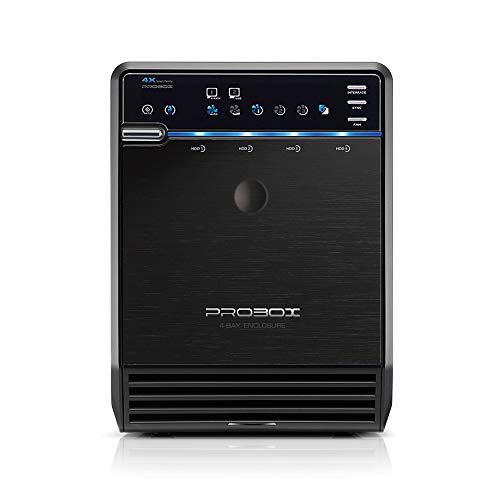
Mediasonic PROBOX 4-Bay SATA Hard Drive Enclosure (HF2-SU3S3)
The Mediasonic PROBOX 4-Bay SATA Hard Drive Enclosure (HF2-SU3S3) is a strong fit for anyone who wants a compact, metal-clad 4-drive DAS that presents each drive individually and supports both USB 3.0 and eSATA. You can install up to four 30TB 3.5-inch SATA drives, or 2.5-inch SSDs and HDDs with an adapter. The enclosure handles SATA III at 6.0Gbps, and its smart fan helps control heat. You’ll get Windows 10, Windows 11, and macOS support, plus a one-year warranty and a handy interface switch.
- Bay Count:4-bay
- Drive Size:3.5-inch
- Interface:USB 3.0/eSATA
- RAID Support:No RAID
- Cooling:Smart fan
- Warranty:1-year
- Additional Feature:Temperature sensor built in
- Additional Feature:Auto/manual fan modes
- Additional Feature:One-button interface selection
Mobius™ 2-Bay FireWire 800 eSATA USB 3.0 RAID Hard Drive Enclosure
Need a versatile 2-bay RAID enclosure with fast connectivity and simple setup? You’ll like Oyen Digital’s Mobius 2-Bay RAID enclosure. It supports USB 3.0, eSATA 6G, and FireWire 800, so you can connect it to Windows, Mac, or Linux systems with ease. Load two 3.5-inch SATA HDDs or SSDs, then pick RAID 0, RAID 1, JBOD, or SPAN with a simple switch—no software needed. RAID 1 rebuilds automatically. The aluminum body, quiet fan, trayless design, key lock, and status LEDs make it practical. It ships with cables, a power cord, keys, and a 2-year warranty.
- Bay Count:2-bay
- Drive Size:3.5-inch
- Interface:USB 3.0/eSATA/FireWire 800
- RAID Support:RAID 0/1/JBOD/SPAN
- Cooling:Quiet fan
- Warranty:2-year
- Additional Feature:FireWire 800 support
- Additional Feature:Key lock design
- Additional Feature:Automatic RAID 1 rebuild
CENMATE 4 Bay Hard Drive Enclosure with Cooling Fan
With four bays, dual USB 3.0 and eSATA connectivity, and support for up to 80 TB, the CENMATE 4 Bay Hard Drive Enclosure with Cooling Fan is a strong pick for users who want a high-capacity desktop storage solution without RAID or NAS complexity. You can mix 2.5-inch and 3.5-inch SATA drives, and plug-and-play support works across Windows, Mac, and Linux. The aluminum body and 2-inch fan help manage heat, while the DC 12V adapter keeps transfers stable. Expect up to 5 Gbps speeds, but the fan isn’t quiet for noise-sensitive setups.
- Bay Count:4-bay
- Drive Size:2.5/3.5-inch
- Interface:USB 3.0/eSATA
- RAID Support:No RAID
- Cooling:Cooling fan
- Warranty:1-year
- Additional Feature:Aluminum-alloy enclosure
- Additional Feature:DC 12V power adapter
- Additional Feature:USB A/C cable
StarTech.com 3.5″ External Hard Drive Enclosure with eSATA Cable
StarTech.com’s 3.5″ External Hard Drive Enclosure with eSATA Cable is a smart pick if you want a trayless, fanless enclosure that makes swapping 3.5″ SATA drives quick and easy. You can use it for backups, archives, or recovery work on PCs, laptops, and servers. It supports SATA I, II, and III drives, plus USB 3.0 and eSATA for speeds up to 6 Gbps. The steel body feels solid, the LED shows activity, and the included 3 ft shielded cable helps you connect securely.
- Bay Count:1-bay
- Drive Size:3.5-inch
- Interface:USB 3.0/eSATA
- RAID Support:No RAID
- Cooling:Fanless
- Warranty:Lifetime/cable
- Additional Feature:Shielded eSATA cable
- Additional Feature:LED power/activity indicator
- Additional Feature:RoHS compliant
Mediasonic USB 3.0 8-Bay SATA Hard Drive Enclosure (H82-SU3S3)
The Mediasonic H82-SU3S3 suits you best if you need an 8-bay DAS enclosure with both USB 3.0 and eSATA, especially when you want quick interface switching for a multi-drive setup. You get a metal, black enclosure that works with Windows, Mac, Linux, and desktop or laptop systems. It supports 3.5-inch SATA drives up to 30 TB each, plus 2.5-inch SSDs or HDDs up to 18 TB with an adapter. The smart fan helps manage heat, and you can choose Auto or Manual speed levels. Note that 4Kn Native and Power Disable drives aren’t supported.
- Bay Count:8-bay
- Drive Size:3.5-inch
- Interface:USB 3.0/eSATA
- RAID Support:No RAID
- Cooling:Smart fan
- Warranty:1-year
- Additional Feature:4Kn not supported
- Additional Feature:Power Disable unsupported
- Additional Feature:Three fan speeds
Factors to Consider When Choosing Esata Hard Drive Enclosures
When you choose an eSATA hard drive enclosure, make sure it supports your drive capacity and matches your system’s interface. You’ll also want to decide between RAID and non-RAID, since each setup offers different levels of speed and protection. Finally, check the cooling, noise, build quality, and warranty so you get a reliable enclosure that fits your needs.
Drive Capacity Support
Check the enclosure’s maximum single-drive capacity first, since you need it to support modern HDDs and SSDs at the size you plan to use, whether that’s 8TB, 16TB, or even 30TB. Next, confirm the bay count, because a single-bay unit caps your total space differently than a multi-bay model. Multiply per-drive support by the number of bays to estimate usable capacity. You should also verify 3.5″ and 2.5″ fitment, since smaller drives may need adapters. Make sure the enclosure’s controller firmware handles Advanced Format and drives above 2TB, or you might see limits. If you want RAID, check whether it shows each drive separately or combines them onboard, since RAID overhead lowers usable space.
Interface Compatibility
For best performance, make sure your enclosure’s eSATA port and cable match the same spec, such as eSATA with SATA III at 6.0 Gbps, so you get the fastest native transfer rates. You should also confirm your host controller supports port multiplier if the enclosure shares multiple drives through one eSATA link; without it, you may only see one drive. Check power next: eSATA doesn’t deliver drive power, so your computer’s port must supply it internally, or the enclosure needs its own 12V adapter. Then verify your operating system has the right eSATA drivers and supports your HDD or SSD standards. If you’ll use RAID or hot-swap setups, confirm the controller and connection handle those modes too.
RAID Versus Non-Raid
Choosing between RAID and non-RAID eSATA enclosures comes down to whether you want redundancy, speed, or simplicity. With RAID, you can mirror drives for protection or stripe them for faster transfers. RAID 0 boosts sequential performance, while RAID 1 cuts usable capacity in half. RAID 5 and RAID 6 preserve more space, but you’ll still lose one or two drives’ worth to parity. They can improve reads, yet writes often slow because the enclosure must calculate parity. If you use large drives, rebuilds can take hours, and that longer window increases failure risk. Non-RAID enclosures keep each drive independent, making recovery easier and avoiding controller dependence, but you’ll need solid backups because one failed drive can still wipe data.
Cooling And Noise
After you’ve decided on RAID or non-RAID, the next big factor is how well the enclosure manages heat and noise. If you’ll run drives for long periods, active cooling usually protects them better than fanless designs, often cutting HDD temperatures by 5–15°C. That matters more when you stack several spin-drives in one bay or use the enclosure in a warm room. But fan noise counts too: small, fast fans can reach 40–50 dB(A) at 1 meter, which may bother you in a quiet office or bedroom. Passive enclosures stay silent, yet they can run hotter. Choose a model with temperature monitoring and auto or adjustable fan modes so airflow ramps up only when drives hit about 40–50°C. Also leave clear space around the enclosure.
Build Quality And Warranty
Build quality matters because a solid eSATA enclosure does more than just hold your drives—it helps protect them and keep them running reliably. You should look for steel or aluminum construction, since it can improve heat dissipation and better shield your drives from bumps. Check the cooling design too: if a model claims fan or passive cooling, verify those specs and see whether it includes temperature sensors or adjustable fan speeds. Make sure the tray design fits your workflow; trayless, keyed, or tool-free options can reduce wear and accidental removal. Don’t skip the warranty. Aim for at least two years, with clear coverage for HDD failures and enclosure electronics. Finally, confirm support response times and RMA steps so you’re not stuck waiting if something goes wrong.
Frequently Asked Questions
Does eSATA Support Hot-Swapping on All Computers?
No. eSATA supports hot swapping only when the system has a compatible SATA controller, BIOS that enables hot-plugging, and an operating system or drivers that recognize it. Consult your motherboard or controller documentation and only connect or disconnect drives when those components explicitly state hot-swap support.
Are eSATA Enclosures Compatible With SSDS?
Yes. Many eSATA enclosures accept SSDs as long as the enclosure supports the SSDs physical size and SATA interface. You will get fast access, but actual performance depends on the enclosure controller.
What Cable Length Works Best for eSATA Enclosures?
For best eSATA enclosure performance use a cable shorter than 2 meters, with 0.5 to 1 meter being ideal. Shorter cables reduce signal loss so transfers are more reliable and less prone to dropouts.
Do eSATA Enclosures Need External Power?
Generally yes. Most 3.5-inch eSATA enclosures require an external power adapter; I had a portable 3.5-inch enclosure that only spun up after I connected its power brick. Some 2.5-inch eSATA enclosures draw enough power from the host and do not need external power.
Can I Use an eSATA Enclosure With Usb-Only Laptops?
You cannot connect an eSATA enclosure to a laptop that has only USB ports unless the enclosure includes a USB port. Use a USB to SATA adapter, a docking station that supports USB, or swap the drive into a USB-capable enclosure to access the drive.
Final Thoughts
So, if you want fast, flexible storage, these eSATA enclosures give you plenty of solid choices. Whether you need a compact single-bay unit or a roomy multi-bay setup, you can match the enclosure to your workflow like a key fitting a lock. Pick the one that fits your capacity, cooling, and RAID needs, and you’ll get reliable performance without the hassle. In the end, you’re buying convenience, speed, and peace of mind.
