

If you’re looking at Intel Core i7 8th Gen laptops, you’ve got more than a few strong options to weigh. Some focus on portability and battery life, while others push harder on display quality, durability, or graphics performance. The right pick depends on how you work, travel, and spend your time. These six models stand out for different reasons, and a few of them may surprise you.
| Dell Latitude 5300 2-in-1 Touchscreen Laptop (Renewed) |

| Best Convertible | Processor: Intel Core i7-8665U | RAM: 16GB DDR4 | Storage: 512GB SSD | VIEW LATEST PRICE | Read Our Analysis |
| Lenovo ThinkPad X1 Carbon 14-Inch Laptop (Renewed) |

| Best Business | Processor: Intel Core i7-8550U | RAM: 16GB DDR4 | Storage: 512GB SSD | VIEW LATEST PRICE | Read Our Analysis |
| Dell Latitude 7400 Business Laptop (Renewed) |

| Best Lightweight | Processor: Intel Core i7-8665U | RAM: 16GB DDR4 | Storage: 512GB SSD | VIEW LATEST PRICE | Read Our Analysis |
| Dell Latitude 7300 Business Laptop (i7 16GB RAM) |
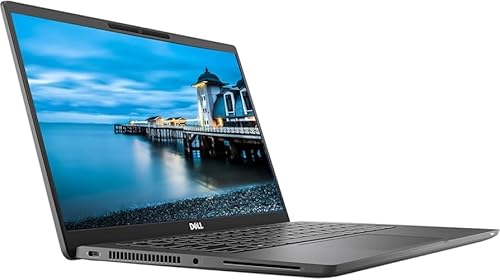
| Best Balanced | Processor: Intel Core i7-8665U | RAM: 16GB DDR4 | Storage: 500GB NVMe SSD | VIEW LATEST PRICE | Read Our Analysis |
| HP Envy 13-inch Laptop with Intel Core i7 (13-ah0010nr) |
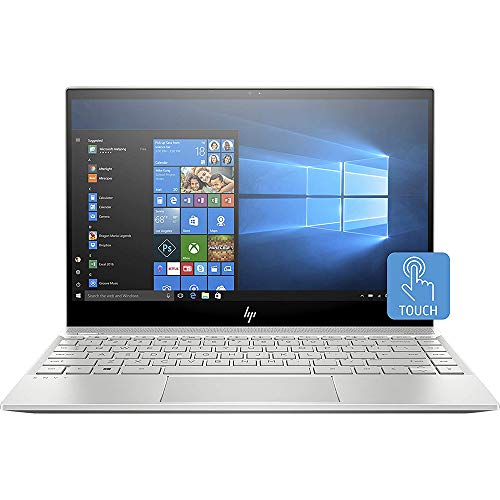
| Best Ultraportable | Processor: Intel Core i7-8550U | RAM: 8GB LPDDR3 | Storage: 256GB NVMe SSD | VIEW LATEST PRICE | Read Our Analysis |
| Dell XPS 9570 Laptop (XPS9570-7996SLV-PUS) |

| Best Performance | Processor: Intel Core i7-8750H | RAM: 16GB DDR4 | Storage: 512GB PCIe SSD | VIEW LATEST PRICE | Read Our Analysis |
More Details on Our Top Picks
Dell Latitude 5300 2-in-1 Touchscreen Laptop (Renewed)
The Dell Latitude 5300 2-in-1 Touchscreen Laptop (Renewed) is a smart pick if you need a flexible Intel Core i7 8th Gen laptop for work, school, or travel. You get an Intel Core i7-8665U, 16GB of DDR4 RAM, and a 512GB SSD, so apps open fast and multitasking stays smooth. Its 13.3-inch Full HD touchscreen and 360-degree hinge let you switch between laptop, tablet, tent, and stand modes. You can connect with Wi-Fi, USB-C, and HDMI, while the backlit keyboard and Windows 11 Pro help you work anywhere.
- Processor:Intel Core i7-8665U
- RAM:16GB DDR4
- Storage:512GB SSD
- Screen Size:13.3-inch
- Touchscreen:Yes
- Operating System:Windows 11 Pro
- Additional Feature:360° convertible hinge
- Additional Feature:Backlit keyboard
- Additional Feature:USB-C and HDMI
Lenovo ThinkPad X1 Carbon 14-Inch Laptop (Renewed)
If you want a lightweight business laptop that still packs serious performance, the renewed Lenovo ThinkPad X1 Carbon is a standout pick. You get an Intel Core i7-8550U, 16GB RAM, and a 512GB SSD, so everyday multitasking feels fast and responsive. Its 14-inch FHD display keeps work sharp, while the 3.88-pound chassis makes it easy to carry. You also get a backlit keyboard, fingerprint reader, Wi-Fi 5, Bluetooth 4.2, HDMI, Thunderbolt, and USB ports. Since it’s Grade A refurbished, you may notice minor wear, but the 90-day warranty helps.
- Processor:Intel Core i7-8550U
- RAM:16GB DDR4
- Storage:512GB SSD
- Screen Size:14-inch
- Touchscreen:No
- Operating System:Windows 10 / Windows 11 Pro
- Additional Feature:Fingerprint reader
- Additional Feature:Thunderbolt port
- Additional Feature:90-day limited warranty
Dell Latitude 7400 Business Laptop (Renewed)
Dell’s Latitude 7400 renewed business laptop stands out for professionals who want an ultra-portable 14-inch machine with an Intel Core i7-8665U, 16GB of RAM, and a fast 512GB NVMe SSD. You’ll get a 1920 x 1080 IPS display, Windows 11 Pro, and a clamshell design that’s easy to carry. It handles office work, editing, and media tasks well, while HDMI, three USB ports, Bluetooth, and dual-band Wi-Fi keep you connected. The built-in webcam, microphone, and quality speakers suit meetings, and the 45Wh battery plus included adapter help you stay productive.
- Processor:Intel Core i7-8665U
- RAM:16GB DDR4
- Storage:512GB SSD
- Screen Size:14-inch
- Touchscreen:No
- Operating System:Windows 11 Pro
- Additional Feature:IPS LED display
- Additional Feature:Built-in HD webcam
- Additional Feature:45 Wh battery
Dell Latitude 7300 Business Laptop (i7 16GB RAM)
Built for professionals who need a compact, dependable work machine, the Dell Latitude 7300 pairs an 8th Gen Intel Core i7-8665U with 16GB of DDR4 RAM and a 500GB NVMe SSD for smooth multitasking and fast load times. You get a 13.3-inch Full HD display, Intel UHD Graphics 620, and a backlit keyboard that helps in low light. Windows 11 Pro comes preinstalled, and Wi‑Fi, Bluetooth 5.1, HDMI, DisplayPort, and three USB ports keep you connected. Its slim 12.07-inch frame travels easily, and the 4-cell battery supports your workday well.
- Processor:Intel Core i7-8665U
- RAM:16GB DDR4
- Storage:500GB NVMe SSD
- Screen Size:13.3-inch
- Touchscreen:No
- Operating System:Windows 11 Pro
- Additional Feature:DisplayPort output
- Additional Feature:Bluetooth 5.1
- Additional Feature:4-cell battery
HP Envy 13-inch Laptop with Intel Core i7 (13-ah0010nr)
The HP Envy 13-ah0010nr is a strong pick if you want a thin, portable laptop that can still keep up with everyday work, streaming, and light multitasking. You get an 8th Gen Core i7-8550U, 8GB RAM, and a 256GB NVMe SSD, so apps open fast and Windows 10 Home feels responsive. Its 13.3-inch FHD touchscreen looks sharp, and the 53.2Wh battery can last up to 14 hours. At just 2.9 pounds, you can carry it easily. Wi‑Fi, Bluetooth 5.2, HDMI support, and Alexa add convenience too.
- Processor:Intel Core i7-8550U
- RAM:8GB LPDDR3
- Storage:256GB NVMe SSD
- Screen Size:13.3-inch
- Touchscreen:Yes
- Operating System:Windows 10 Home
- Additional Feature:Amazon Alexa integration
- Additional Feature:Gorilla Glass NBT
- Additional Feature:53.2 Wh battery
Dell XPS 9570 Laptop (XPS9570-7996SLV-PUS)
With its 8th Gen Core i7-8750H, 16 GB of RAM, and GTX 1050 Ti graphics, the Dell XPS 9570 (XPS9570-7996SLV-PUS) is a strong fit if you want a slim 15.6-inch laptop that can handle work, media, and light gaming without feeling bulky. You get a sharp 1080p InfinityEdge IPS display with 100% sRGB, 400 nits, and an anti-glare finish, plus a 512 GB SSD for fast launches. Its silver aluminum body weighs 4.4 pounds, and the 97 Wh battery helps you stay mobile. You also get Thunderbolt, HDMI, Wi-Fi 5, and Windows 10 Home.
- Processor:Intel Core i7-8750H
- RAM:16GB DDR4
- Storage:512GB PCIe SSD
- Screen Size:15.6-inch
- Touchscreen:No
- Operating System:Windows 10 Home
- Additional Feature:GTX 1050 Ti
- Additional Feature:100% sRGB display
- Additional Feature:97 Wh battery
Factors to Consider When Choosing Intel Core i7 8th Gen Laptops
When you choose an Intel Core i7 8th Gen laptop, start with CPU performance, since it affects speed and multitasking. You’ll also want enough RAM and storage, plus a display that fits your work and viewing needs. Don’t overlook battery life and port selection, because they shape how practical the laptop feels every day.
CPU Performance
CPU performance in Intel Core i7 8th Gen laptops depends on how you plan to use it, so check core and thread counts first: U-series chips usually offer 4 cores and 8 threads, while H-series models can reach 6 cores and 12 threads for smoother multitasking, video encoding, and other parallel workloads. You should also look at base and turbo clocks, because higher boost speeds help when apps need quick single-thread bursts. Cache size matters too; 6–9 MB of L3 cache can keep repeated tasks feeling snappier. Watch TDP ratings as well, since 15W chips save power but 45W models sustain performance longer. Integrated Intel UHD Graphics can handle basic media tasks, but you’ll want discrete graphics for demanding 3D work or gaming.
RAM And Storage
RAM and storage can make or break how fast an Intel Core i7 8th Gen laptop feels in daily use, so aim for at least 16 GB of DDR4 RAM if you multitask heavily or run virtual machines. You’ll also benefit from dual-channel memory, such as 2×8 GB, because it boosts bandwidth for code compilation and media editing. For storage, choose an NVMe PCIe SSD instead of SATA if you want quicker boot times and faster app launches. A 512 GB drive is a smart baseline if you keep photos, videos, or projects locally, while 256 GB can work with cloud or external backup. Before you buy, check whether the RAM is user-upgradeable and whether the laptop includes a spare M.2 slot for future expansion.
Display Quality
A laptop’s display shapes how productive and comfortable you’ll be, so on an Intel Core i7 8th Gen model, start with at least a Full HD 1920 x 1080 panel on 13–15-inch screens for crisp text and clean visuals. Pick IPS or another wide-viewing-angle panel instead of TN so colors stay accurate and contrast stays steady when you tilt the screen or share it. Aim for at least 250–300 nits of brightness for everyday use, and choose around 400 nits if you’ll work in bright spaces. Check color gamut too: 70%+ sRGB works for general tasks, while near-100% sRGB suits photo and video work. If you want touch or a convertible, make sure the glass feels durable and responsive.
Battery Life
Battery life on Intel Core i7 8th Gen laptops often comes down to a few key trade-offs: battery capacity, CPU variant, and display choices. You should check the battery’s watt-hour rating, because a 45 Wh model can last far less than a 97 Wh version, even with the same processor. If you want better endurance, pick a U-series chip like the i7-8550U or i7-8665U; H-series parts usually draw more power. Screen specs matter too: a smaller FHD IPS panel at moderate brightness will sip less energy than a bright high-resolution or OLED display. RAM, storage, and GPU choices also affect drain. Finally, compare real-world runtime tests, since power plans, screen dimming, and app management can shift battery life by hours.
Port Selection
When you’re choosing an Intel Core i7 8th Gen laptop, ports can matter just as much as CPU performance. You should make sure it includes at least one USB-C port, ideally Thunderbolt 3, so you can move data quickly, connect docks or eGPUs, and charge with less clutter. Aim for 2–3 USB-A ports too, since they keep your mice, drives, and flash keys working without adapters. A full-size HDMI or DisplayPort output lets you hook up monitors or projectors fast. If you work with photos or video, an SD or microSD card reader saves time. Don’t overlook a headphone jack, and verify you’ve got Ethernet or a solid adapter option for dependable wired networking and professional calls.
Frequently Asked Questions
Can Intel Core i7 8th Gen Laptops Handle Modern Gaming Smoothly?
Yes. An 8th Gen Core i7 laptop can run games, but frame rates and visual quality depend primarily on the laptop’s graphics card, the amount and speed of RAM, and how effectively the cooling system prevents thermal throttling. Expect smooth performance in esports titles; demanding modern AAA games will typically require reduced settings to maintain playable frame rates.
How Long Does the Battery Last on Average for These Laptops?
Typical battery life ranges from about 4 to 8 hours. Expect 2 to 3 hours under heavy gaming, and up to roughly 10 hours with light browsing on the most efficient models.
Are Refurbished Intel Core i7 8th Gen Laptops Reliable?
Yes, refurbished Intel Core i7 8th gen laptops are a reliable choice when purchased from reputable sellers. Before buying, verify the battery health, confirm a warranty and a clear return policy, and inspect the device for physical wear. These steps reduce the chance of hidden problems and ensure you receive good value.
Which Ports Are Most Important for Daily Laptop Use?
You will most often use USB-C, USB-A, and a headphone jack. Prioritize ports that provide charging, high-speed data transfer, and external display output rather than simply counting how many ports there are.
Is 8th Gen Core i7 Still Good for Video Editing?
Yes. An 8th generation Intel Core i7 remains capable for video editing, particularly for 1080p timelines. Expect longer export times and reduced responsiveness with 4K footage. For best results use 16 GB of RAM, an SSD for project and media files, and a dedicated graphics card.
Final Thoughts
When you choose one of these Intel Core i7 8th Gen laptops, you’re getting a balance of speed, portability, and everyday reliability. Whether you need a 2-in-1, a business-ready ultrabook, or a machine for heavier tasks, there’s a fit for you. Think of it like picking the right tool for the job: the best one isn’t always the biggest, but the one that works smoothly for your needs and won’t slow you down.
