

As I look for a 2-in-1 business laptop, I want speed, battery life, and a design that keeps up with real work. In this guide, I’m breaking down six models that balance performance, portability, and flexibility without wasting your time. Some stand out for their displays, others for their durability or pro-level features. The differences matter, and one of them could fit your work better than you expect.
| HP OmniBook X Flip 2-in-1 Business Laptop |

| Best Overall | Screen Size: 14″ | Display Type: OLED touchscreen | Processor: Intel Core Ultra 7 256V | VIEW LATEST PRICE | Read Our Analysis |
| Lenovo Yoga 7i 2-in-1 AI Business Laptop |
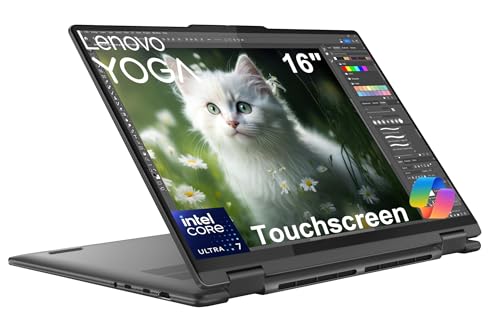
| Best for AI | Screen Size: 16″ | Display Type: FHD+ touchscreen | Processor: Intel Core Ultra 7 155U | VIEW LATEST PRICE | Read Our Analysis |
| Dell Inspiron 2-in-1 Laptop with Windows 11 Pro |

| Best for Power Users | Screen Size: 14″ | Display Type: FHD+ touchscreen | Processor: AMD Ryzen 5 8640HS | VIEW LATEST PRICE | Read Our Analysis |
| Lenovo Yoga 7i 16 2-in-1 Convertible Laptop |

| Best Large Display | Screen Size: 16″ | Display Type: 2.5K IPS touchscreen | Processor: Intel Core i5-1240P | VIEW LATEST PRICE | Read Our Analysis |
| Lenovo ThinkPad L13 Yoga Gen 5 Laptop |

| Best for Portability | Screen Size: 13.3″ | Display Type: IPS touchscreen | Processor: Intel Core Ultra 5 125U | VIEW LATEST PRICE | Read Our Analysis |
| Lenovo Flex Business 2.5K 16″ 2-in-1 Laptop |

| Best 16-Inch Option | Screen Size: 16″ | Display Type: IPS touchscreen | Processor: Intel Core i7-1255U | VIEW LATEST PRICE | Read Our Analysis |
More Details on Our Top Picks
HP OmniBook X Flip 2-in-1 Business Laptop
Should you want a premium 2-in-1 business laptop that balances performance, portability, and polished visuals, the HP OmniBook X Flip is a strong fit. You get a 14-inch OLED touchscreen with 500 nits, 100% DCI-P3 color, and 100% sRGB-like accuracy for sharp presentations and creative work. The Intel Core Ultra 7, 16GB LPDDR5 memory, and 1TB SSD help you handle multitasking smoothly. You can rely on Wi-Fi 6E, Thunderbolt 4, Windows 11 Pro, and a backlit keyboard for daily productivity. At 3.05 pounds, it stays easy to carry.
- Screen Size:14″
- Display Type:OLED touchscreen
- Processor:Intel Core Ultra 7 256V
- Memory:16GB LPDDR5
- Storage:1TB SSD
- Operating System:Windows 11 Pro
- Additional Feature:OLED 500 nits
- Additional Feature:Intel Arc Graphics
- Additional Feature:Thunderbolt 4 port
Lenovo Yoga 7i 2-in-1 AI Business Laptop
The Lenovo Yoga 7i 2-in-1 AI Business Laptop is a smart pick should you want a flexible work machine that can keep up with meetings, travel, and multitasking. You get a 16-inch FHD+ touchscreen, a 360-degree hinge, and laptop, stand, flip, and tablet modes for real versatility. The Intel Core Ultra 7, 16GB DDR5 RAM, and 1TB SSD help you handle demanding apps fast. AI Copilot and the NPU support smarter workflows. With Thunderbolt 4, Wi-Fi 6E, a backlit keyboard, fingerprint reader, and MIL-STD-810H durability, it’s ready for business.
- Screen Size:16″
- Display Type:FHD+ touchscreen
- Processor:Intel Core Ultra 7 155U
- Memory:16GB LPDDR5x
- Storage:1TB SSD
- Operating System:Windows 11 Home
- Additional Feature:AI-powered Copilot
- Additional Feature:Fingerprint reader
- Additional Feature:MIL-STD-810H durability
Dell Inspiron 2-in-1 Laptop with Windows 11 Pro
With Windows 11 Pro, a 360° hinge, and a powerful AMD Ryzen 5 8640HS processor, the Dell Inspiron 14 2-in-1 is a strong pick should you need a flexible business laptop that can handle work on the go. You get 64GB of DDR5 RAM, a 2.5TB storage setup, and a bright 14-inch FHD+ touchscreen for fast multitasking and crisp visuals. Wi-Fi 6E, Bluetooth 5.3, and plenty of ports keep you connected. You’ll also appreciate the included dock, wireless mouse, external drive, and lifetime Office 2024.
- Screen Size:14″
- Display Type:FHD+ touchscreen
- Processor:AMD Ryzen 5 8640HS
- Memory:64GB DDR5
- Storage:2.5TB total
- Operating System:Windows 11 Pro
- Additional Feature:64GB DDR5 RAM
- Additional Feature:500GB external drive
- Additional Feature:Free Office 2024
Lenovo Yoga 7i 16 2-in-1 Convertible Laptop
Should you desire a roomy, portable 2-in-1 for presentations, multitasking, and everyday business work, the Lenovo Yoga 7i 16 stands out thanks to its 16-inch 2.5K touchscreen and versatile convertible design. You get a 12th Gen Intel Core i5-1240P, 8GB LPDDR5 memory, and a 2TB PCIe SSD that helps apps open fast and keeps performance responsive. Wi-Fi 6, Bluetooth 5.2, USB-C, USB-A, HDMI, and an SD card reader cover your connections. You also get a backlit keyboard, fingerprint reader, Dolby Atmos audio, and a 4.18-pound build for flexible business use.
- Screen Size:16″
- Display Type:2.5K IPS touchscreen
- Processor:Intel Core i5-1240P
- Memory:8GB LPDDR5
- Storage:2TB SSD
- Operating System:Windows 11 Home
- Additional Feature:2TB PCIe SSD
- Additional Feature:Dolby Atmos speakers
- Additional Feature:Fingerprint reader
Lenovo ThinkPad L13 Yoga Gen 5 Laptop
Lenovo’s ThinkPad L13 Yoga Gen 5 is a strong pick should you desire a business-ready 2-in-1 that’s easy to carry and flexible enough for work on the move. You get a 1.32 kg chassis, a 360-degree hinge, and MIL-STD-810H durability, so you can switch between laptop, tent, tablet, and presentation modes with confidence. The Intel Core Ultra 5 125U, 16GB DDR5 RAM, and 512GB SSD keep your workflow smooth, while Windows 11 Pro adds security. Its 13.3-inch WUXGA touchscreen, Dolby Voice mics, Wi-Fi 6E, Thunderbolt 4, and fast charging round it out.
- Screen Size:13.3″
- Display Type:IPS touchscreen
- Processor:Intel Core Ultra 5 125U
- Memory:16GB DDR5
- Storage:512GB SSD
- Operating System:Windows 11 Pro
- Additional Feature:Integrated NPU
- Additional Feature:TrackPoint pointing stick
- Additional Feature:Expandable to 3 monitors
Lenovo Flex Business 2.5K 16″ 2-in-1 Laptop
The Lenovo Flex Business 2.5K 16″ 2-in-1 Laptop is a strong fit should you want a roomy, touch-friendly convertible that handles everyday business work with ease. You get a 16-inch 2.5K IPS display, 300-nit brightness, and a 16:10 layout that gives you more space for documents and spreadsheets. The Core i7-1255U, 16GB of RAM, and 512GB SSD keep multitasking smooth. Wi-Fi 6, Thunderbolt, HDMI, and USB-A ports help you stay connected. You’ll also appreciate the backlit keyboard, fingerprint reader, and 1080p webcam with privacy shutter.
- Screen Size:16″
- Display Type:IPS touchscreen
- Processor:Intel Core i7-1255U
- Memory:16GB DDR4
- Storage:512GB SSD
- Operating System:Windows 11 Pro
- Additional Feature:Thunderbolt USB-C
- Additional Feature:1080p FHD webcam
- Additional Feature:Privacy shutter
Factors to Consider When Choosing 2 in 1 Laptops for Business
Whenever I choose a 2 in 1 laptop for business, I initially look at display quality, performance needs, and battery life because they shape how well it handles my workday. I also check the port selection so I know I can connect the devices I use without extra adapters. Finally, I make sure it has strong security features to help protect my data on the go.
Display Quality
For business use, I look at display quality as more than just screen size: a sharp 1920 x 1200 or 2560 x 1600 panel makes text cleaner and visuals more detailed, which helps with everything from presentations to editing work. I also check brightness, because a screen with at least 300 nits stays usable in bright offices and even outside. Touch support matters too, since it lets me tap, sketch, and annotate with ease during meetings. Should you need accurate visuals, I’d pay attention to DCI-P3 coverage for better color fidelity. Anti-glare coating is another plus, because it cuts reflections and helps me work longer without eye strain.
Performance Needs
Performance matters just as much as portability in a business 2 in 1, so I start with the processor, looking at core count and turbo speed to judge how well it handles multitasking and heavier apps. I also want at least 16GB of DDR4 or LPDDR5 RAM, because that gives me enough headroom for spreadsheets, browsers, meetings, and other multi-threaded work without slowdown. For storage, I prefer a PCIe NVMe SSD since it speeds up boot times, file access, and app launches. I match graphics to my workload too: integrated graphics cover everyday office tasks, while dedicated graphics help with editing, design, or other demanding visuals. Whenever I choose a system this way, I get a 2 in 1 that feels fast, responsive, and ready for serious business use.
Battery Life
Battery life matters just as much as speed in a business 2 in 1, because a fast laptop still falls short whenever it needs the charger at midafternoon. I look for models with larger batteries, often around 59 Whr to 80 Whr, because that extra capacity can keep me working longer away from an outlet. I also pay attention to the processor, since efficient chips stretch runtime without sacrificing responsiveness. In case I travel or sit through long meetings, I want a device that can last 12 hours or more on a charge. Rapid charging helps too, since 15 minutes plugged in can buy me hours back. I keep brightness in check and limit active connections whenever I need every possible minute.
Port Selection
Whenever I choose a business 2-in-1, I make sure the port lineup can handle my everyday gear without extra adapters. I look for a mix of USB-C and USB-A ports, because I still connect external drives, mice, and docking stations all the time. Thunderbolt 4 matters too, since it moves data quickly and can drive multiple external displays while I’m working at a desk. I also want HDMI output so I can plug into projectors or monitors fast during meetings. A headphone/microphone combo jack keeps virtual calls simple, and I appreciate a microSD card reader while I’m moving files from a camera or phone. Whenever the ports are right, I spend less time hunting for dongles and more time getting work done.
Security Features
Once I’ve got the right ports, I shift to security, because a business 2-in-1 has to protect the data I carry every day. I look for a fingerprint reader or IR camera so only I can access it quickly. I also want a TPM chip, since it helps safeguard encryption keys and sensitive files in hardware. A webcam privacy shutter matters to me too, because I’d rather block the lens than question who’s watching. I check that the laptop runs Windows 11 Pro or another business-focused OS with BitLocker and secure boot support. Should a model also meet MIL-STD-810H standards, I know it’s built for tougher conditions and better overall protection.
Build Durability
Build durability is a big deal for me, because a business 2-in-1 has to handle daily travel, constant mode changes, and the occasional bump or spill. I look for models that meet MIL-STD-810H standards, since that tells me they can stand up to real-world abuse. I also prefer aluminum or magnesium alloy builds, because they resist bending better than plastic. A sturdy hinge matters just as much; I want one that opens smoothly and stays solid after years of flipping between laptop and tablet modes. Spill-resistant keyboards and reinforced corners add another layer of protection. I don’t chase toughness at the expense of quality, but I do want a machine that feels dependable every time I open it for work.
Weight And Portability
Every time I’m choosing a business 2-in-1, weight and portability matter almost as much as performance, because I need a machine that’s easy to carry all day without feeling like extra baggage. I look for models around 1.32 kg, because lighter laptops make travel, commuting, and meetings less tiring. A slim profile, ideally under 0.75 inches, also helps the device slide into my bag without bulk. I pay attention to battery life too, since rapid charge support lets me keep working while outlets aren’t nearby. Convertible designs are a big plus, because I can switch between laptop, tablet, and presentation modes without sacrificing portability. I also prefer aluminum or magnesium builds, since they keep weight down while still feeling sturdy enough for everyday business use.
Frequently Asked Questions
Which Business Software Runs Best on 2-In-1 Laptops?
Microsoft 365, Slack, Zoom, Salesforce, and QuickBooks perform well on 2 in 1 laptops because they are cloud based, responsive, and work well with touch screens. OneNote and Adobe Acrobat also feel smooth and easy to use on this type of device.
Are 2-In-1 Laptops Durable Enough for Daily Travel?
Yes, if you handle it with care, a well built 2 in 1 can handle daily travel. Look for reinforced hinges, a solid chassis, and a strong warranty, especially if it will spend time in backpacks, on trains, and in busy cafés.
Can a 2-In-1 Replace a Desktop for Office Work?
Yes, a 2 in 1 can replace a desktop for most office tasks if you rely on cloud software, a docking station, and an external display. It is not a good fit for demanding editing or large scale multitasking.
Do Stylus Pens Usually Come Included With Business Models?
Usually not; stylus pens are often sold separately. Some business models include one, but it is best to check each package carefully before you buy.
How Often Should Business Users Upgrade a 2-In-1 Laptop?
I would replace a business 2 in 1 every 3 to 5 years, or earlier if battery health declines, system speed drops, security updates end, or your job requires more from it. I would upgrade when it no longer keeps up with daily work.
