

Budget laptops are better than ever in 2026. Plenty of models under $600 now offer solid speed, good screens, long battery life, and useful ports.
Still, some cheap laptops look great on paper and disappoint in daily use.
This guide covers the best budget laptops worth your money and points out the ones to skip.
| HP 14 Laptop (14-dq0040nr) | Most Affordable | Processor: Intel Celeron N4020 | RAM: 4GB DDR4 | Storage: 64GB eMMC | VIEW LATEST PRICE | Read Our Analysis | |
| 15.6-Inch Laptop with AMD Athlon Processor |
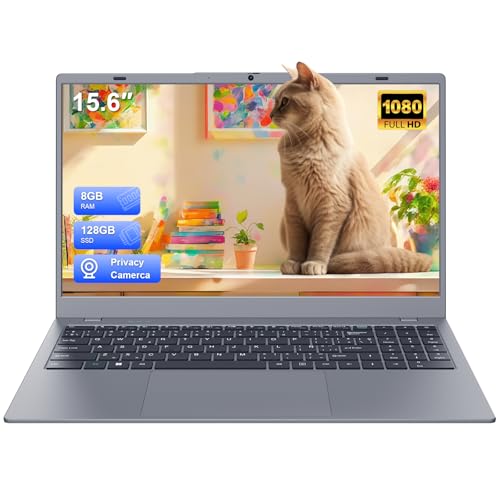
| Student Value Pick | Processor: AMD Athlon 3020e | RAM: 8GB LPDDR4 | Storage: 128GB SATA3 SSD | VIEW LATEST PRICE | Read Our Analysis |
| Phatom 15.6-inch FHD Laptop Computer |
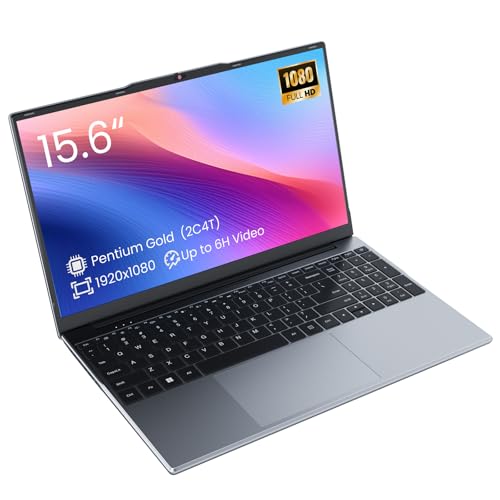
| Basic Essentials | Processor: 1.6GHz dual-core processor | RAM: 4GB DDR3L | Storage: 128GB M.2 SATA SSD | VIEW LATEST PRICE | Read Our Analysis |
| 16-inch AMD A9 Laptop 8GB/256GB SSD |

| Big Screen Budget | Processor: AMD A9-9400 | RAM: 8GB DDR3 | Storage: 256GB SSD | VIEW LATEST PRICE | Read Our Analysis |
| Acer Aspire 3 Slim Laptop (A315-24P-R7VH) |

| Best Overall | Processor: AMD Ryzen 3 7320U | RAM: 8GB LPDDR5 | Storage: 128GB NVMe SSD | VIEW LATEST PRICE | Read Our Analysis |
| ASUS Vivobook Go 15.6” Laptop (E1504FA-AS33) |

| Best Design | Processor: AMD Ryzen 3 7320U | RAM: 8GB DDR5 | Storage: 128GB SSD | VIEW LATEST PRICE | Read Our Analysis |
| ASUS 15.5″ Full HD Laptop (Renewed) |

| Renewed Value | Processor: Intel Celeron | RAM: 4GB LPDDR4 | Storage: 128GB SSD | VIEW LATEST PRICE | Read Our Analysis |
| 15.6-Inch Celeron N4000 Laptop with Office 2024 |

| Best Features | Processor: Intel Celeron N4000 | RAM: 8GB DDR3 | Storage: 256GB SSD | VIEW LATEST PRICE | Read Our Analysis |
| 15.6-Inch Lightweight Laptop 8GB RAM 128GB SSD |

| Travel-Friendly Pick | Processor: 6500Y Pentium-series processor | RAM: 8GB DDR3 | Storage: 128GB SSD | VIEW LATEST PRICE | Read Our Analysis |
| Morostron 16-inch Laptop Computer 8GB/256GB AMD A9 |
| Desktop Replacement | Processor: AMD A9-9400 | RAM: 8GB DDR3 | Storage: 256GB SSD | VIEW LATEST PRICE | Read Our Analysis |
More Details on Our Top Picks
HP 14 Laptop (14-dq0040nr)
Most Affordable
View Latest PriceShould you need a basic, ultra-affordable laptop for web browsing, schoolwork, and everyday office tasks, the HP 14-dq0040nr fits that role well. You get a 14-inch HD BrightView display with slim micro-edge bezels, a light 3.2-pound design, and up to 10 hours of battery life for easy portability.
Inside, it pairs an Intel Celeron N4020 with 4GB of DDR4 memory and 64GB eMMC storage, so you should expect modest speed, not heavy multitasking. You can handle documents, email, streaming, and video calls with the 720p webcam. Wi-Fi 5, HDMI, USB ports, stereo speakers, and a Microsoft 365 subscription add practical everyday value.
- Processor:Intel Celeron N4020
- RAM:4GB DDR4
- Storage:64GB eMMC
- Display:14-inch HD 1366 x 768
- Battery:41Wh, up to 10 hours
- Wireless:Wi-Fi 5, Bluetooth 4.2
- Additional Feature:Microsoft 365 included
- Additional Feature:HP BIOS Protection
- Additional Feature:720p HD webcam
15.6-Inch Laptop with AMD Athlon Processor
If you need a budget laptop for schoolwork, basic business tasks, and everyday browsing, this VIGSENUP model stands out through pairing an AMD Athlon 3020e processor with 8 GB of LPDDR4 RAM and a 128 GB SSD. You get a 15.6-inch FHD IPS display with thin bezels, a clear 1920 x 1080 resolution, and a practical clamshell design.
You can connect your accessories easily through USB 3.2, USB-C, HDMI, USB 2.0, and a microSD reader. WiFi 5 and Bluetooth 5.0 keep you connected, while the webcam and speakers support remote classes or meetings. Expandable storage, a 37Wh battery, and solid support add value.
- Processor:AMD Athlon 3020e
- RAM:8GB LPDDR4
- Storage:128GB SATA3 SSD
- Display:15.6-inch FHD IPS 1920 x 1080
- Battery:37Wh, 5000mAh
- Wireless:Wi-Fi 5, Bluetooth 5.0
- Additional Feature:FHD IPS display
- Additional Feature:USB-C port
- Additional Feature:Lifelong technical support
Phatom 15.6-inch FHD Laptop Computer
The Phatom 15.6-inch FHD Laptop Computer fits students, remote workers, and everyday users who want a low-cost machine for basic tasks without giving up screen quality. You get a 1.6GHz dual-core, four-thread processor that handles browsing, documents, and light multitasking, plus Windows 11 compatibility.
Its 15.6-inch IPS display delivers 1920 x 1080 resolution, wide angles, and vivid color for study or presentations. You also get a 128GB M.2 SATA SSD and 4GB RAM, with upgrades to 16GB through dual SO-DIMM slots. A 38.5Wh battery supports up to five hours of video, while USB 3.0, USB-C, HDMI, Bluetooth 5.0, and dual-band WiFi add flexibility.
- Processor:1.6GHz dual-core processor
- RAM:4GB DDR3L
- Storage:128GB M.2 SATA SSD
- Display:15.6-inch FHD IPS 1920 x 1080
- Battery:38.5Wh, up to 5 hours
- Wireless:Dual-band WiFi, Bluetooth 5.0
- Additional Feature:Dual SO-DIMM slots
- Additional Feature:4K@24Hz HDMI
- Additional Feature:microSD up to 1TB
16-inch AMD A9 Laptop 8GB/256GB SSD
Need an affordable large-screen laptop for schoolwork, basic office tasks, or streaming? This 16-inch LeadBook T15 gives you a Full HD IPS display, slim 1.5 cm profile, and light 1.4 kg build. You get Windows 11 Pro, a full-size keyboard with numeric keypad, webcam, and useful ports including HDMI and USB 3.0.
Inside, the AMD A9-9400 processor with Radeon R5 graphics handles everyday tasks at up to 3.2 GHz. You also get 8GB DDR3 RAM and a 256GB SSD, plus TF expansion up to 1TB. Dual-band WiFi, Bluetooth, and one-year coverage with lifetime technical support add practical value for budget buyers.
- Processor:AMD A9-9400
- RAM:8GB DDR3
- Storage:256GB SSD
- Display:16-inch FHD IPS 1920 x 1080
- Battery:38Wh
- Wireless:Dual-band WiFi, Bluetooth
- Additional Feature:16-inch IPS display
- Additional Feature:Numeric keypad
- Additional Feature:Windows 11 Pro
Acer Aspire 3 Slim Laptop (A315-24P-R7VH)
Students and everyday users who want a lightweight 15.6-inch laptop for schoolwork, browsing, and streaming will get the most from the Acer Aspire 3 A315-24P-R7VH. You get a sharp Full HD IPS display with narrow bezels, a matte finish, and a slim 3.9-pound design that travels easily.
Its Ryzen 3 7320U processor, 8GB LPDDR5 memory, and 128GB NVMe SSD keep everyday tasks moving smoothly. You can handle documents, video calls, and media playback without much fuss. Wi‑Fi 6, HDMI, USB ports, and Bluetooth cover the basics, while the backlit keyboard helps at night. Expect up to 11 hours of battery life daily.
- Processor:AMD Ryzen 3 7320U
- RAM:8GB LPDDR5
- Storage:128GB NVMe SSD
- Display:15.6-inch FHD IPS 1920 x 1080
- Battery:48Wh, up to 11 hours
- Wireless:Wi‑Fi 6, Bluetooth
- Additional Feature:Wi‑Fi 6
- Additional Feature:Backlit keyboard
- Additional Feature:AI noise reduction
ASUS Vivobook Go 15.6” Laptop (E1504FA-AS33)
Shoppers who want a low-cost laptop for everyday work will find the ASUS Vivobook Go 15.6” especially appealing, since its Ryzen 3 7320U processor, 8GB of DDR5 memory, and 128GB SSD handle browsing, documents, and light multitasking without fuss.
You also get a 15.6-inch NanoEdge display with slim bezels, a 60Hz refresh rate, and 250 nits of brightness. The thin, 3.59-pound chassis stays portable, while the 180° hinge, ErgoSense keyboard, and precision touchpad improve comfort. Wi-Fi 5, Bluetooth 5.1, SonicMaster audio, and a privacy-shutter webcam cover daily basics. USB-C, HDMI, and fast charging add flexibility, and military-grade durability enhances peace of mind.
- Processor:AMD Ryzen 3 7320U
- RAM:8GB DDR5
- Storage:128GB SSD
- Display:15.6-inch display
- Battery:Fast charging battery
- Wireless:Wi-Fi 5, Bluetooth 5.1
- Additional Feature:180° hinge
- Additional Feature:Privacy shutter
- Additional Feature:Military-grade durability
ASUS 15.5″ Full HD Laptop (Renewed)
Should you want an affordable everyday laptop for web browsing, streaming, and light school or office tasks, this renewed ASUS 15.5-inch model makes a practical pick. You get Windows 11 Home, an Intel Celeron processor up to 2.76GHz, Intel Graphics, 4GB LPDDR4 memory, and a 128GB SSD for responsive basics.
The 15.5-inch Full HD display delivers a sharp 1920 x 1080 image, while the lightweight build, backlit keyboard, and Star Black or Dark Gray finish keep it portable and stylish. You’ll also have USB-C, two USB-A ports, Bluetooth, fast WiFi, an HD webcam, a headphone jack, and the included ASUS AC charger for convenience.
- Processor:Intel Celeron
- RAM:4GB LPDDR4
- Storage:128GB SSD
- Display:15.5-inch FHD 1920 x 1080
- Battery:Not specified
- Wireless:WiFi, Bluetooth
- Additional Feature:Backlit keyboard
- Additional Feature:HD webcam
- Additional Feature:Lightweight build
15.6-Inch Celeron N4000 Laptop with Office 2024
For buyers who want a big-screen budget laptop for basic work, the BWPED 153 stands out with its 15.6-inch Full HD display and Microsoft Office 2024 pre-installed. You get a sharp 1080p panel with anti-glare coating, 300-nit brightness, and solid color coverage for study, streaming, and documents.
Inside, the Intel Celeron N4000, 8GB RAM, and 256GB SSD handle web browsing, remote learning, and everyday productivity without fuss. Windows 11 Pro adds a secure, familiar experience. You’ll also appreciate Wi-Fi 5, Bluetooth 5.0, USB 3.0, microSD, HDMI, Ethernet support, and up to five hours of battery life in a portable 1.5kg design.
- Processor:Intel Celeron N4000
- RAM:8GB DDR3
- Storage:256GB SSD
- Display:15.6-inch FHD 1920 x 1080
- Battery:38Wh, up to 5 hours
- Wireless:Wi-Fi 5, Bluetooth 5.0
- Additional Feature:Office 2024 pre-installed
- Additional Feature:100% sRGB
- Additional Feature:Supports two monitors
15.6-Inch Lightweight Laptop 8GB RAM 128GB SSD
Students and home users who need a larger screen on a tight budget will get the most from this 15.6-inch lightweight laptop. You get a Full HD IPS display with anti-glare coating, quiet operation, and a slim clamshell design that travels easily.
The Pentium 6500Y reaches up to 3.4GHz and handles browsing, online classes, office tasks, and streaming without fuss. You also get 8GB DDR3 RAM and a 128GB SSD, which keeps Windows 11 responsive for everyday work. WiFi 5, Bluetooth, HDMI, USB-A, Type-C, and a TF card slot cover your basic connections. Expect up to 6 hours of battery life, plus a webcam and warranty.
- Processor:6500Y Pentium-series processor
- RAM:8GB DDR3
- Storage:128GB SSD
- Display:15.6-inch FHD IPS 1920 x 1080
- Battery:38Wh, up to 6 hours
- Wireless:WiFi 5, Bluetooth
- Additional Feature:Anti-glare IPS display
- Additional Feature:Type-C port
- Additional Feature:Quiet operation
Morostron 16-inch Laptop Computer 8GB/256GB AMD A9
Morostron’s LeadBook T15 makes the most sense for budget shoppers who want a large 16-inch 1080p display and a roomy keyboard with a numeric keypad for everyday work. You get an AMD A9-9400 processor, integrated Radeon R5 graphics, 8GB of DDR3 memory, and a 256GB SSD, with storage expandable to 1TB.
You can handle schoolwork, browsing, documents, streaming, and basic business tasks in Windows 11 Pro. Wi-Fi ac, Bluetooth, HDMI, two USB ports, and a webcam cover essential connectivity. The 38Wh battery and 3.2-star rating suggest modest endurance and mixed satisfaction, but the one-year warranty adds some reassurance for careful buyers.
- Processor:AMD A9-9400
- RAM:8GB DDR3
- Storage:256GB SSD
- Display:16-inch FHD 1920 x 1080
- Battery:38Wh, 9000mAh
- Wireless:Wi-Fi 802.11ac, Bluetooth
- Additional Feature:16-inch display
- Additional Feature:Numeric keypad
- Additional Feature:Windows 11 Pro
Factors to Consider When Choosing Budget Laptops Reviewed
When I choose a budget laptop, I first look at the processor and memory because they shape everyday speed and multitasking. I also check storage and upgradeability, then weigh display quality, battery life, and portability to see how well the laptop fits real use. Finally, I make sure the ports and connectivity match what you’ll need for work, school, or travel.
Processor And Memory
Two specs shape how a budget laptop feels day to day: the processor and the memory. I look first at the CPU, because even in cheap laptops, a newer generation chip with higher clock speeds usually makes browsing, documents, and light multitasking feel quicker. A dual-core processor can still cover basic work, but I wouldn’t expect much headroom.
I also pay close attention to RAM. I see 4 GB as the minimum for very simple use, while 8 GB is the smarter target for schoolwork, office apps, and lots of tabs. I prefer DDR4 or DDR5 over older DDR3, since they’re typically more efficient. I also check the maximum supported RAM, because fixed 4 GB or 8 GB limits can shorten a laptop’s useful life over time.
Storage And Upgradeability
Beyond the processor and RAM, I pay close attention to storage and upgradeability because they have a huge effect on how usable a budget laptop feels over time. I always favor an SSD over eMMC or an HDD, because even a 128GB SSD usually boots faster and opens apps much quicker than a 64GB eMMC drive.
I also check whether I can expand storage later. Some budget models add value with an extra M.2 slot, microSD or TF expansion up to 1TB, or support for a larger SSD. I look at RAM upgrades too, since many cheap laptops start with 4GB or 8GB and cap out prematurely. Whether memory is soldered or storage is fixed, I’d buy more capacity upfront. For better long-term value, I want 128GB SSD minimum and clear upgrade paths.
Display Quality
Display quality shapes how pleasant a budget laptop feels to use every day, so I look closely at resolution, panel type, brightness, and screen finish before I recommend anything. I usually steer you toward a Full HD 1920 x 1080 screen because it delivers sharper text and more working space than a basic 1366 x 768 panel.
I also prefer IPS displays, since they keep colors and contrast more consistent whenever you view the screen off-center. Brightness matters too. I find roughly 250 to 300 nits much more comfortable indoors than dimmer panels around 220 nits. For screen finish, matte or anti-glare coatings cut reflections and help in bright rooms, while glossy panels can look punchier but reflect more light. Narrow bezels also make a laptop feel more modern and immersive in total.
Battery And Portability
While I judge battery life and portability in a budget laptop, I focus on how long it can last away from an outlet and how easy it is to carry every day. In this price range, batteries around 37 to 48 Wh usually deliver about 5 to 11 hours, but brightness, wireless use, and heavier workloads can shorten that quickly.
I also pay close attention to size and weight. Models around 1.4 to 1.7 kg feel much easier to carry for school, commuting, or travel. Slim laptops near 0.7 to 0.8 inches thick slip into backpacks more easily too. I usually find a 14-inch laptop more travel-friendly than a 15.6- or 16-inch one, although bigger screens feel nicer for longer sessions. Fast charging and efficient hardware also improve real-world freedom.
Ports And Connectivity
How a budget laptop connects to your gear can shape your day-to-day experience just as much as its speed. I always check port selection initially, because some budget models give you only two USB ports, while others offer as many as six. In the event that you plan to hook up a monitor, TV, or projector, I’d look for an HDMI output so you won’t need a dongle.
I also pay close attention to wireless support. For mice, earbuds, and other accessories, I want modern Bluetooth, which can range from 4.2 to 5.1 in this class. Wi‑Fi 5 is common and usually fine, though newer wireless hardware can improve speed and stability. I also like extras such as USB‑C, a microSD card reader, or a combo audio jack for daily convenience and flexibility.
Frequently Asked Questions
Are Budget Laptops Covered by Accidental Damage Protection Plans?
Many budget laptops qualify for accidental damage protection plans, but the exact coverage depends on the manufacturer, retailer, and plan level. Review whether the plan includes spills, drops, deductibles, exclusions, and limits on how many claims you can file before you decide.
Can I Upgrade RAM or Storage After Purchase?
Yes, I can often upgrade RAM or storage after purchase, but I check the laptop’s specifications first. Some models have accessible slots, while others use soldered components or restrict upgrades, so I confirm this before buying.
Do Budget Laptops Support Dual-Monitor External Display Setups?
Many budget laptops support dual external monitors if they have HDMI and USB C with DisplayPort Alt Mode, or if they work with a DisplayLink dock. Check the laptop’s graphics limits, supported refresh rates, and whether the USB C port can carry video.
How Long Do Software and Security Updates Typically Last?
Software and security updates usually last around 3 to 5 years on many budget laptops. Chromebooks often receive support for 8 to 10 years. Check the manufacturer’s update policy before buying.
Are Refurbished Budget Laptops Reliable for Everyday Use?
Refurbished budget laptops can work well for everyday tasks if you buy from a trusted seller, review battery condition, and make sure a warranty is included. They are a practical choice for web browsing, writing documents, streaming video, and basic schoolwork.
Final Thoughts
After reviewing these budget laptops, I’d say the sweet spot isn’t about chasing bells and whistles; it’s about finding a machine that handles life’s little surprises without making your wallet feel too light. I’d lean toward models with SSD storage, 8GB RAM, and useful ports, since they’ll age more gracefully. In the end, a modest laptop can still punch above its weight, giving you just enough polish, speed, and staying power to make everyday tasks feel easier.
