

A 3D projector screen can sharpen depth, color, and motion for movie night. The right gain, viewing angle, and ALR surface can make a big difference.
Fixed-frame, motorized, and portable screens each solve different room setups. In this list, we’ll look at six standout picks, including the Elite Aeon CineGrey.
| Elite Screens Aeon CineGrey 3D Projector Screen AR135DHD3 |

| Best Overall | Screen Type: Fixed frame | Screen Size: 135 inch | Aspect Ratio: 16:9 | VIEW LATEST PRICE | Read Our Analysis |
| 3D Wall Mounted Projector Screen 72 Inch |

| Budget-Friendly Pick | Screen Type: Wall mounted | Screen Size: 72 inch | Aspect Ratio: Not specified | VIEW LATEST PRICE | Read Our Analysis |
| 4:3 HD 3D Projector Screen 60 Inch |

| Portable Pick | Screen Type: Roll-up | Screen Size: 60 inch | Aspect Ratio: 4:3 / 16:9 | VIEW LATEST PRICE | Read Our Analysis |
| Motorized 100-inch Electric Projector Screen with Remote |
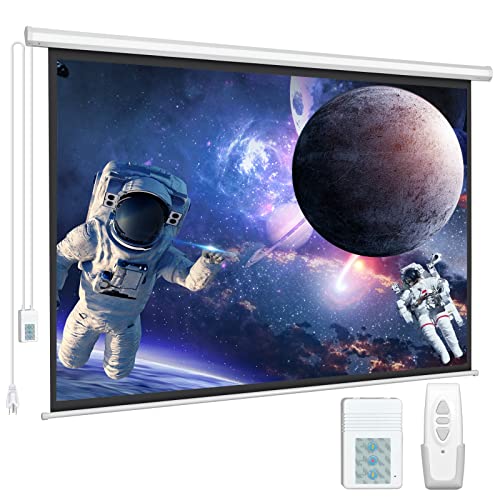
| Best Motorized | Screen Type: Motorized pull down | Screen Size: 100 inch | Aspect Ratio: 16:9 | VIEW LATEST PRICE | Read Our Analysis |
| VIVIDSTORM 3D Motorized Floor-Rising Projection Screen (VSDSTALR120H-3D) |
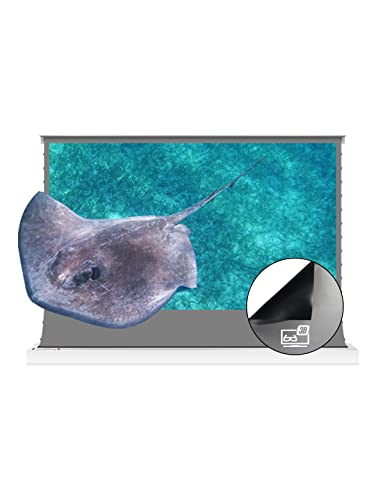
| Best Floor-Rising | Screen Type: Floor rising | Screen Size: 120 inch | Aspect Ratio: 16:9 / 16:10 / 4:3 / 2.35:1 | VIEW LATEST PRICE | Read Our Analysis |
| VEVOR 120-inch Outdoor Fixed Frame Projector Screen |

| Best Outdoor Use | Screen Type: Fixed frame | Screen Size: 120 inch | Aspect Ratio: 16:9 | VIEW LATEST PRICE | Read Our Analysis |
More Details on Our Top Picks
Elite Screens Aeon CineGrey 3D Projector Screen AR135DHD3
Should you want a large, fixed-frame 3D screen that performs well in real-world lighting, the Elite Screens Aeon CineGrey 3D AR135DHD3 is a strong fit for you. You get a 135-inch, 16:9 screen with a 1.2 gain CineGrey 3D surface that rejects about 65% of ambient light while keeping colors vivid and blacks deep. It works with standard-throw, Active 3D, passive polarized, and 4K/8K projectors. The tensioned, frameless aluminum frame stays flat, installs easily, and suits movie rooms or conference spaces. You also get ISF certification, low-emission GREENGUARD ratings, and lifetime tech support.
- Screen Type:Fixed frame
- Screen Size:135 inch
- Aspect Ratio:16:9
- Mounting:Wall mount
- 3D Support:Passive 3D
- Ambient Light Rejection:ALR / CLR
- Additional Feature:ISF certified color
- Additional Feature:GREENGUARD Gold certified
- Additional Feature:Lifetime tech support
3D Wall Mounted Projector Screen 72 Inch
The 72-inch D Wall Mounted Projector Screen is a strong fit provided provided you want a compact home theater setup with a bright, LED-compatible canvas that mounts cleanly to your wall. You can use it for wall-mounted projection in smaller rooms, and its 60–120 inch range gives you flexibility provided later want a bigger image. The canvas format suits everyday movie nights, and the product’s 3D-friendly design helps you build a sharper viewing setup. Provided you’re checking value, you can also use the feedback flow to report a lower price, sign in, and share pricing details.
- Screen Type:Wall mounted
- Screen Size:72 inch
- Aspect Ratio:Not specified
- Mounting:Wall mounted
- 3D Support:3D
- Ambient Light Rejection:Not specified
- Additional Feature:Lower-price feedback
- Additional Feature:Shipping cost field
- Additional Feature:Sign-in feedback required
4:3 HD 3D Projector Screen 60 Inch
Built for compact spaces and flexible setups, this 60-inch 4:3 HD 3D projector screen is a smart pick should you want a clean, easy-roll-up display for home theater, classroom, or office use. You can mount it on a wall or ceiling, and it works with ropes, hooks, or nails. The white fiberglass surface delivers ultra-clear, high-color images while helping protect your eyes through refracting light twice and reducing harmful blue light. It rolls up for simple storage, needs no floor stand, and also suits 16:9 viewing. Weighing 4.41 pounds, it’s easy to carry indoors or out.
- Screen Type:Roll-up
- Screen Size:60 inch
- Aspect Ratio:4:3 / 16:9
- Mounting:Wall/ceiling
- 3D Support:3D
- Ambient Light Rejection:Not specified
- Additional Feature:Roll-up storage
- Additional Feature:Ceiling mount compatible
- Additional Feature:Blue-light reduction
Motorized 100-inch Electric Projector Screen with Remote
With its motorized 100-inch 16:9 design, DINAH’s electric projector screen is a strong pick should you want a clean, easy-to-use setup for home theaters, classrooms, offices, or event spaces. You get a 1.2 gain matte surface with 160-degree viewing, plus a black-backed PVC layer that blocks light and keeps images sharp for 4K, HD, and active 3D. The ultra-quiet motor raises and lowers it smoothly, while the remote works from up to 82 feet. You can wall- or ceiling-mount it, and the steel casing adds durability.
- Screen Type:Motorized pull down
- Screen Size:100 inch
- Aspect Ratio:16:9
- Mounting:Wall/ceiling
- 3D Support:Active 3D
- Ambient Light Rejection:Not specified
- Additional Feature:Wireless remote control
- Additional Feature:Ultra-quiet motor
- Additional Feature:Black backing layer
VIVIDSTORM 3D Motorized Floor-Rising Projection Screen (VSDSTALR120H-3D)
Should you want a premium 3D projector screen that pairs well with a normal-throw projector in a bright indoor setup, the VIVIDSTORM 3D Motorized Floor-Rising Projection Screen (VSDSTALR120H-3D) is a strong fit. You get a 120-inch, 3D Obsidian ALR surface with 1.2 gain, 8K and 4K support, and active 3D readiness. Its motorized floor-rising design pops up in about a minute, needs no screws, and saves space whenever stored. With 150–160-degree viewing, glass-like flatness, and easy soap-and-water cleaning, it’s built for flexible, eye-comforting movie nights.
- Screen Type:Floor rising
- Screen Size:120 inch
- Aspect Ratio:16:9 / 16:10 / 4:3 / 2.35:1
- Mounting:Floor mount
- 3D Support:Active 3D
- Ambient Light Rejection:ALR
- Additional Feature:Floor-rising design
- Additional Feature:Plug-in setup
- Additional Feature:Glass-like flatness
VEVOR 120-inch Outdoor Fixed Frame Projector Screen
The VEVOR 120-inch Outdoor Fixed Frame Projector Screen is a strong pick should you desire a large, stable screen for 4K, 3D, or gaming setups at home, in a classroom, or even outdoors. You get a 16:9 fixed frame with a 104.5 x 58.9-inch viewing area and a 120° viewing angle, so images stay broad and clear. Its nm-level optical coated PVC enhances color, brightness, and softness while cutting flicker and eye strain. The thick aluminum alloy frame, velvet edges, wall-mount brackets, and tension rod system make setup secure, easy, and durable.
- Screen Type:Fixed frame
- Screen Size:120 inch
- Aspect Ratio:16:9
- Mounting:Wall mount
- 3D Support:Active 3D
- Ambient Light Rejection:Optical coated PVC
- Additional Feature:Optical coated PVC
- Additional Feature:Black velvet edges
- Additional Feature:Water washable
Factors to Consider When Choosing 3D Projector Screens
As you choose a 3D projector screen, you’ll want to match the screen size to your room and viewing distance initially. You should also check the aspect ratio, throw distance, and how well the screen handles ambient light. Afterwards compare gain and brightness so your 3D images stay clear, vivid, and comfortable to watch.
Screen Size Selection
Choosing the right 3D projector screen size starts with your room and seating distance: aim for a diagonal and aspect ratio that match the space, since a typical home theater viewing distance is about 1.5–2.5 times the screen height, which puts a 16:9 screen around 66–70 inches tall, or roughly 100–135 inches diagonal, at about 8–14 feet away. Measure your wall initially, because a 120–135-inch screen can need about 104–119 inches of width once you add mounting space. Make sure your projector can light the image well; brighter standard-throw models handle bigger screens, while dimmer or short-throw units usually work better on smaller ones. In brighter rooms, choose materials that preserve contrast. Finally, keep seats within about a 90-degree viewing cone.
Aspect Ratio Match
Match your screen’s aspect ratio to your projector output and the content you watch most, so you avoid letterboxing, cropping, and unnecessary scaling. In case you mainly watch HDTV or 4K movies, a 16:9 screen usually fits best; for legacy presentations, 4:3 can make more sense. Whenever the ratios line up, your projector uses the full screen area, so you keep native resolution, sharper detail, and better perceived brightness. Should you switch between 16:9 films and 4:3 slides, look for masking or adjustable screens to preserve framing without digital stretching. For ultra-wide 2.35:1 or 2.40:1 content, choose a wider screen or add masking or anamorphic support. A mismatch can waste lumens and soften the image.
Throw Distance Compatibility
Throw distance can make or break a 3D setup, so check your projector’s throw ratio and use your screen width to pin down the distance range it needs. Multiply that ratio by your target width to find the minimum and maximum distances for a clean image fit. Make sure the screen size and aspect ratio work with your projector’s zoom range, so you don’t need heavy keystone correction or risk cropping. Should you be using a short-throw or ultra-short-throw model, choose a screen built for steep angles and follow the maker’s placement specs. For fixed installs, measure wall-to-lens distance carefully, leave room for seating and mounts, and confirm lens shift and focus can handle small adjustments.
Ambient Light Rejection
Should your room isn’t dark, an ambient light rejecting (ALR) screen can help a 3D projector keep contrast and black levels intact through reflecting more of the projector’s light toward you while cutting down on stray light from lamps or windows. You’ll get the best results whenever the screen’s directional coating matches your room, since ALR models can reject 60–90% of ambient light. Pay attention to the viewing angle, because some screens keep brightness uniform only within 90°–160°. In case your seating spreads wide, choose a screen with a suitable half-gain angle. Also, place lights off-axis from the projector for stronger performance. Balance rejection, color neutrality, and seating layout, because aggressive coatings can cause hotspotting or subtle color shifts.
Gain And Brightness
Once you’ve accounted for ambient light, the next thing to weigh is gain, since it directly affects how bright your 3D image looks. Screen gain measures how much light the surface sends back toward you, and most 3D-friendly matte or ALR screens sit around 1.0 to 1.2. That range usually works best because it keeps brightness even across the image and helps preserve accurate 3D performance. Higher gain can make your image look punchier, especially if your projector loses light through active shutters or polarization, but it also narrows the sweet spot. Choose carefully based on your projector’s lumen output, how far viewers sit from the screen, and how much 3D brightness loss you need to overcome for a satisfying result.
3D Format Support
Once you’re choosing a 3D projector screen, make sure it supports the 3D format your projector uses. Should you use active shutter 3D, you need a screen that works well with high refresh rates and doesn’t distort timing. In case you use passive polarized 3D, pick a polarization-preserving surface so each eye gets the right image. Check that the screen is neutral for active systems or polarization-preserving for passive ones to reduce ghosting and brightness loss. Also verify compatibility with your projector’s resolution and refresh rate, like 1080p/120Hz or 4K/60Hz frame packing. A screen with the right gain and viewing angle helps you keep 3D depth consistent across seats, while accurate color and contrast preserve the stereoscopic cues you want.
Mounting And Setup
Mounting your 3D projector screen starts with choosing the style that fits your room and how permanent you want the setup to be, whether that’s a fixed-frame screen, a wall- or ceiling-mounted retractable model, a motorized roll-down, or a floor-rising option. Next, make sure the wall, ceiling, or floor area can handle the screen’s weight and size, and that your projector can hit the viewing area with the right throw distance and clean alignment. Check mounting depth, ceiling drop, center supports, and clearance so the screen hangs flat and stays tensioned. Plan cable routing, power access, and control options, including wall switches, remotes, or trigger systems. Finally, confirm assembly tolerances and leave access for cleaning or servicing without removing permanent fixtures.
Material And Durability
After the screen is mounted and aligned, the next thing to judge is what it’s made of, because material has a big impact on how a 3D projector screen looks and lasts. PVC, woven fiberglass, and ALR-coated fabrics all affect gain, viewing angle, and projector compatibility, with matte and ALR options usually sitting near 1.0 to 1.2 gain. You should also check tensile strength, tear resistance, and whether the surface stays tensioned or backed flat over time. Black backing, flame-retardant coatings, and antimicrobial or odorless finishes can improve safety and longevity. Suppose you plan to clean it often, choose washable fabric and watch for stains or UV damage. Finally, sturdy aluminum frames, steel casings, and good warranties signal better long-term reliability.
Frequently Asked Questions
Do 3D Projector Screens Work With Active and Passive Glasses?
Yes. 3D projector screens can work with both active and passive glasses, but the projector and 3D format must match the glasses. The screen alone does not create the 3D effect, so the full setup has to be compatible.
Can I Use a 3D Screen for Regular 2D Movies?
Yes, you can use a 3D screen for regular 2D movies. The film will still appear normally, and most 3D screens keep about 90% of the brightness, so the picture should stay fairly strong.
What Room Size Is Best for a 3D Projector Screen?
A room around 12 by 16 feet or larger usually works well for a 3D projector screen, giving you enough distance to see the image clearly, manage ambient light, and enjoy the 3D effect with less eye strain or distortion.
How Do I Clean and Maintain a 3D Projector Screen?
Use a soft microfiber cloth with a little mild soap and water to wipe the screen, then dry it gently. Remove dust often, keep abrasive cleaners away, and store the screen out of direct sunlight.
Are 3D Projector Screens Compatible With Short-Throw Projectors?
Yes, some 3D projector screens work with short throw projectors, but you need a screen built for that throw distance. If the screen is not made for short throw use, you may get distortion, hotspotting, or image loss during playback.
Conclusion
Now that you’ve seen these six 3D projector screens, you can turn an ordinary wall into a portal and make movie night glow like a private cinema. Whether you want the punchy contrast of an ALR giant, the sleek rise of a floor-rising screen, or the easy charm of a motorized option, the right pick can make every scene leap, shimmer, and breathe. Choose the screen that fits your space, and let the magic unfold.
