

Looking for an AX3000 router that actually fixes slow spots, keeps gaming smooth, and handles many devices without drama? I tested top AX3000 models to show which deliver wide coverage, strong CPUs with 160 MHz support, multi‑gig/business features, and solid value with WPA3, QoS, VPN and Ethernet backhaul.
You’ll get clear picks like the TP‑Link Deco X55 mesh, Archer AX50, Nighthawk RAX36, and sensible budget or multi‑gig choices. This guide explains what each router does best so choosing one for your home is straightforward.
| TP-Link Deco X55 AX3000 WiFi 6 Mesh (3-Pack) |

| Best For Large Homes | Wi‑Fi Standard: Wi‑Fi 6 (802.11ax) | AX3000 Class / Max Throughput: AX3000 (2402 Mbps + 574 Mbps) | Dual‑Band Support: Yes — 2.4 GHz & 5 GHz | VIEW LATEST PRICE | Read Our Analysis |
| Tenda AX3000 WiFi 6 Dual-Band Gigabit Router |

| Best Budget Router | Wi‑Fi Standard: Wi‑Fi 6 (802.11ax) | AX3000 Class / Max Throughput: AX3000 (2402 Mbps + 574 Mbps; combined ~2976 Mbps) | Dual‑Band Support: Yes — 2.4 GHz & 5 GHz | VIEW LATEST PRICE | Read Our Analysis |
| TP-Link Archer AX50 AX3000 Wireless Dual-Band Gigabit Router (Renewed) |

| Best Value Performance | Wi‑Fi Standard: Wi‑Fi 6 (802.11ax) | AX3000 Class / Max Throughput: AX3000 (2402 Mbps + 574 Mbps; total ~3000 Mbps) | Dual‑Band Support: Yes — 2.4 GHz & 5 GHz | VIEW LATEST PRICE | Read Our Analysis |
| Cudy AX3000 WiFi 6 Multi-Gig Mesh Router |
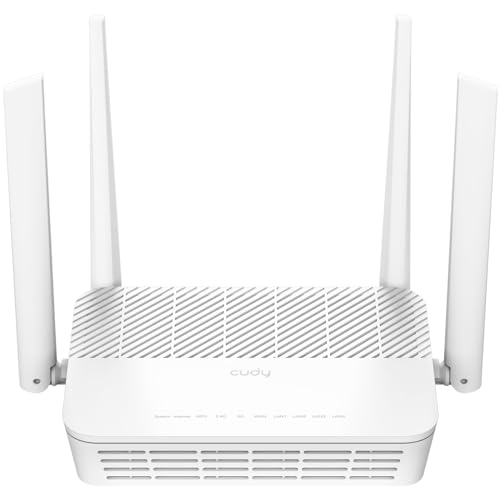
| Best For Multi‑Gig Internet | Wi‑Fi Standard: Wi‑Fi 6 (AX) | AX3000 Class / Max Throughput: AX3000 (2400 Mbps + 574 Mbps) | Dual‑Band Support: Yes — 2.4 GHz & 5 GHz | VIEW LATEST PRICE | Read Our Analysis |
| NETGEAR Nighthawk RAX36 WiFi 6 Router (AX3000) |

| Best For Gaming & Streaming | Wi‑Fi Standard: Wi‑Fi 6 (802.11ax) | AX3000 Class / Max Throughput: AX3000 (dual‑band up to ~3 Gbps) | Dual‑Band Support: Yes — 2.4 GHz & 5 GHz | VIEW LATEST PRICE | Read Our Analysis |
| TP-Link Festa FR365 AX3000 WiFi 6 VPN Router |

| Best For VPN & Multi‑WAN | Wi‑Fi Standard: Wi‑Fi 6 (802.11ax) | AX3000 Class / Max Throughput: AX3000 (2402 Mbps + 574 Mbps; total ~2976 Mbps) | Dual‑Band Support: Yes — 2.4 GHz & 5 GHz | VIEW LATEST PRICE | Read Our Analysis |
| Cudy AX3000 WiFi 6 Dual-Band Gigabit Router |

| Best For Many Devices | Wi‑Fi Standard: Wi‑Fi 6 (AX3000) | AX3000 Class / Max Throughput: AX3000 (total throughput ~3000 Mbps; 160 MHz support) | Dual‑Band Support: Yes — 2.4 GHz & 5 GHz | VIEW LATEST PRICE | Read Our Analysis |
| TP-Link Deco X55 AX3000 WiFi 6 Mesh System (2-Pack) |

| Best For Small‑to‑Mid Homes | Wi‑Fi Standard: Wi‑Fi 6 (AX3000) | AX3000 Class / Max Throughput: AX3000 (2402 Mbps + 574 Mbps) | Dual‑Band Support: Yes — 2.4 GHz & 5 GHz | VIEW LATEST PRICE | Read Our Analysis |
More Details on Our Top Picks
TP-Link Deco X55 AX3000 WiFi 6 Mesh (3-Pack)
If you want fast, reliable Wi‑Fi across a large home and hate dead zones, the TP‑Link Deco X55 AX3000 mesh kit is made for you. You’ll get Wi‑Fi 6 speeds that handle streaming and gaming, and the system replaces your old router and extenders so setup feels cleaner. The three units cover up to 6,500 sq. ft. and support about 150 devices without constant buffering. You can use Ethernet backhaul and each node has three Gigabit ports, so wired devices stay speedy. HomeShield gives basic security, QoS, and parental controls, and the Deco app guides setup and remote management.
- Wi‑Fi Standard:Wi‑Fi 6 (802.11ax)
- AX3000 Class / Max Throughput:AX3000 (2402 Mbps + 574 Mbps)
- Dual‑Band Support:Yes — 2.4 GHz & 5 GHz
- Gigabit Ethernet:Each unit has 3 × Gigabit Ethernet ports; supports Ethernet backhaul
- Mesh or Multi‑Unit Capability:Mesh system (3‑pack) — full mesh, any unit can be router
- Security & Parental Controls:TP‑Link HomeShield — basic security, QoS, parental controls (no‑cost)
- Additional Feature:AI‑driven mesh optimization
- Additional Feature:Covers up to 6,500 sq.ft.
- Additional Feature:Any unit can router
Tenda AX3000 WiFi 6 Dual-Band Gigabit Router
You’ll like the Tenda RX12 Pro AX3000 if you want fast, reliable home Wi‑Fi without fuss, because it packs Wi‑Fi 6 speed, five high‑gain antennas, and simple app control into an affordable black router that’s easy to set up. You get dual‑band AX3000 throughput for smooth 4K streaming, gaming, and many smart devices. The app and web interface let you manage guest mode, parental controls, and one‑click diagnostics. Wired needs are met with four gigabit LAN ports. Security is strong with WPA3 and firewall protection. VPN options and a three‑year warranty add peace of mind and value.
- Wi‑Fi Standard:Wi‑Fi 6 (802.11ax)
- AX3000 Class / Max Throughput:AX3000 (2402 Mbps + 574 Mbps; combined ~2976 Mbps)
- Dual‑Band Support:Yes — 2.4 GHz & 5 GHz
- Gigabit Ethernet:4 × Gigabit Ethernet ports (WAN + LAN)
- Mesh or Multi‑Unit Capability:Wi‑Fi+ function enables multi‑unit networking (mesh‑style)
- Security & Parental Controls:WPA3, guest mode, parental controls, internet security features
- Additional Feature:Five external high‑gain antennas
- Additional Feature:Built‑in WireGuard support
- Additional Feature:3‑year manufacturer warranty
TP-Link Archer AX50 AX3000 Wireless Dual-Band Gigabit Router (Renewed)
Looking for a router that keeps a busy home running smoothly makes the Archer AX50 AX3000 a great pick for families and small households with lots of devices. You get Wi‑Fi 6 speeds that feel noticeably faster and smarter. It offers up to 3000 Mbps across dual bands, so streaming, gaming, and video calls stay smooth. Intel dual core power cuts buffering and keeps traffic flowing. OFDMA and Target Wake Time help many devices share the network while saving battery on phones and gadgets. TP Link HomeCare gives you antivirus, parental controls, and QoS, all managed in the Tether app.
- Wi‑Fi Standard:Wi‑Fi 6 (802.11ax)
- AX3000 Class / Max Throughput:AX3000 (2402 Mbps + 574 Mbps; total ~3000 Mbps)
- Dual‑Band Support:Yes — 2.4 GHz & 5 GHz
- Gigabit Ethernet:Gigabit Ethernet LAN/WAN ports (dual‑band gigabit router)
- Mesh or Multi‑Unit Capability:Not a mesh system (single‑router product) — can be used with extenders but listed as standalone router
- Security & Parental Controls:TP‑Link HomeCare — lifetime antivirus, parental controls, QoS
- Additional Feature:Intel dual‑core CPU
- Additional Feature:HomeCare lifetime subscription
- Additional Feature:Target Wake Time support
Cudy AX3000 WiFi 6 Multi-Gig Mesh Router
For households or small offices that need faster-than-gigabit internet and steady mesh coverage, the Cudy AX3000 Multi Gigabit Dual Band WiFi 6 Mesh Router is a great choice. You’ll like its 2.5 Gbps WAN port when your plan outpaces 1 Gbps, and four gigabit LAN ports for wired devices. It uses Wi Fi 6 with five streams and four 5 dBi antennas to serve up to 256 devices. The 1.3 GHz dual core CPU keeps traffic smooth. You can set up mesh nodes, use WireGuard or OpenVPN, and manage settings via the cloud app with ease.
- Wi‑Fi Standard:Wi‑Fi 6 (AX)
- AX3000 Class / Max Throughput:AX3000 (2400 Mbps + 574 Mbps)
- Dual‑Band Support:Yes — 2.4 GHz & 5 GHz
- Gigabit Ethernet:1 × 2.5 Gbps WAN + 4 × Gigabit LAN ports (multi‑gig support)
- Mesh or Multi‑Unit Capability:Mesh router capability (mesh‑capable)
- Security & Parental Controls:VPN support + standard security features; cloud app management
- Additional Feature:2.5 Gbps multi‑Gig WAN
- Additional Feature:Five‑stream Wi‑Fi design
- Additional Feature:Supports ZeroTier VPN
NETGEAR Nighthawk RAX36 WiFi 6 Router (AX3000)
If you want fast, reliable home Wi‑Fi that can keep a family streaming, gaming, and working all at once, the NETGEAR Nighthawk RAX36 AX3000 is a strong choice because it brings Wi‑Fi 6 speeds, a 1.7 GHz quad core processor, and support for up to 25 devices in a compact black router. You’ll get dual band AX3000 performance with 160 MHz channel support, coverage up to 2,000 sq ft, and a USB 3.0 port for shared storage. Setup is app driven and friendly, security uses WPA3 and built in VPN, and four gigabit LAN ports link wired devices.
- Wi‑Fi Standard:Wi‑Fi 6 (802.11ax)
- AX3000 Class / Max Throughput:AX3000 (dual‑band up to ~3 Gbps)
- Dual‑Band Support:Yes — 2.4 GHz & 5 GHz
- Gigabit Ethernet:4 × 1 Gbps LAN ports (connects to modem)
- Mesh or Multi‑Unit Capability:Not a mesh system (single‑router product)
- Security & Parental Controls:WPA3, built‑in VPN support, internet security features
- Additional Feature:1.7 GHz quad‑core CPU
- Additional Feature:USB 3.0 port
- Additional Feature:Covers ~2,000 sq.ft.
TP-Link Festa FR365 AX3000 WiFi 6 VPN Router
The TP-Link Festa FR365 AX3000 is the right pick when you need a business-grade router that won’t slow down multiple offices or remote workers, because it combines fast Wi‑Fi 6 speeds with robust multi-WAN and VPN features you can count on. You get dual-band AX3000 wireless for smooth video and file transfers, plus six gigabit ports and an SFP for flexible wiring. It balances up to five WANs and even accepts a USB 3.0 4G modem for backup. Festa mesh and cloud management make setup easy, and high-capacity VPNs secure many branch connections without fuss.
- Wi‑Fi Standard:Wi‑Fi 6 (802.11ax)
- AX3000 Class / Max Throughput:AX3000 (2402 Mbps + 574 Mbps; total ~2976 Mbps)
- Dual‑Band Support:Yes — 2.4 GHz & 5 GHz
- Gigabit Ethernet:Six Gigabit ports (1 WAN + 4 WAN/LAN) + USB 3.0 WAN and SFP
- Mesh or Multi‑Unit Capability:Festa Mesh & seamless roaming (mesh capable with Festa devices)
- Security & Parental Controls:High VPN support, centralized management; security features via Festa
- Additional Feature:Six Gigabit ports (load‑balancing)
- Additional Feature:SFP port included
- Additional Feature:Festa cloud centralized management
Cudy AX3000 WiFi 6 Dual-Band Gigabit Router
Pick the Cudy AX3000 when you want fast, reliable Wi Fi across a busy home or small office that connects lots of gadgets without hiccups. You’ll get AX3000 dual-band speeds with 160 MHz bandwidth and 1024-QAM, pushing about 3000 Mbps so streaming and gaming stay smooth. A 1.2 GHz dual-core CPU handles heavy traffic and supports AR/VR gaming plus whole-house coverage. Smart beamforming finds devices and boosts signal, and the router can serve 100+ devices without panicking. You can use PPTP, L2TP, WireGuard, or OpenVPN for secure remote access, manage it with Cudy Cloud, and add Cudy Mesh.
- Wi‑Fi Standard:Wi‑Fi 6 (AX3000)
- AX3000 Class / Max Throughput:AX3000 (total throughput ~3000 Mbps; 160 MHz support)
- Dual‑Band Support:Yes — 2.4 GHz & 5 GHz
- Gigabit Ethernet:Gigabit Ethernet ports (multi‑LAN/WAN gigabit capable)
- Mesh or Multi‑Unit Capability:Cudy Mesh compatible (supports mesh)
- Security & Parental Controls:VPN support (WireGuard/OpenVPN/PPTP/L2TP), parental controls via app
- Additional Feature:1.2 GHz dual‑core CPU
- Additional Feature:Designed for 100+ devices
- Additional Feature:160 MHz / 1024‑QAM support
TP-Link Deco X55 AX3000 WiFi 6 Mesh System (2-Pack)
You’ll love the Deco X55 AX3000 if you want fast, reliable Wi‑Fi across a larger home with simple setup and smart management. You get Wi‑Fi 6 speeds that handle many tasks at once, and the mesh covers up to 4,500 sq. ft., so dead zones fade away. The system learns and optimizes performance, reducing buffering and improving roaming as you move through rooms. Each unit has three Gigabit Ethernet ports and any node can act as the router, plus wired backhaul is supported. You can connect up to 150 devices, use HomeShield security, and manage everything through the Deco app.
- Wi‑Fi Standard:Wi‑Fi 6 (AX3000)
- AX3000 Class / Max Throughput:AX3000 (2402 Mbps + 574 Mbps)
- Dual‑Band Support:Yes — 2.4 GHz & 5 GHz
- Gigabit Ethernet:Each unit has 3 × Gigabit Ethernet ports; supports Ethernet backhaul
- Mesh or Multi‑Unit Capability:Mesh system (2‑pack) — full mesh, any unit can be router
- Security & Parental Controls:TP‑Link HomeShield — basic security, QoS, parental controls (no‑cost)
- Additional Feature:AI‑driven mesh optimization
- Additional Feature:Covers up to 4,500 sq.ft.
- Additional Feature:Six total Gigabit ports
Factors to Consider When Choosing Ax3000 Router
When I’m picking an AX3000 router, I first look at speed and bandwidth because that decides how fast multiple devices can stream and game. I also check coverage and wired port options so the signal reaches every room and my wired devices get reliable connections. On top of that I ask about security and privacy plus device capacity limits to make sure my home network stays safe and runs smoothly as more gadgets join.
Speed And Bandwidth
Because speed numbers can be confusing, I want to walk you through what AX3000 really means and why it matters for your home network. AX3000 adds the 5 GHz and 2.4 GHz peak rates to about 3000 Mbps total, usually around 2402 Mbps on 5 GHz and 574 Mbps on 2.4 GHz. That sum shows raw wireless capacity, but real life is different. Look for 160 MHz channel support and 1024 QAM on 5 GHz to get closer to the top single client speeds. Also check OFDMA and MU MIMO for better multi device throughput when the house is full. Finally, match the router to your ISP speed and wired ports so the wireless side is not held back by a slow WAN or LAN connection.
Coverage And Range
We just talked about raw speeds and how headline numbers can mislead, so now I want to help you think about how far that speed actually reaches in your home. I look at the router’s stated coverage in square feet and compare it to my house layout. A single router rated for about 2,000 sq ft is very different from a mesh kit claiming 4,500 to 6,500 sq ft. I check antenna count, beamforming, and MU-MIMO because they aim signal where devices are and boost real-world range. I also value 160 MHz support and Wi‑Fi 6 features like OFDMA and 1024-QAM for better range efficiency. Finally, I factor in walls, floors, and interference and plan for usable range to be lower.
Wired Port Options
Think about wired ports as the backbone of your home network, and you’ll see why they matter as much as Wi‑Fi speed. I look for routers with a dedicated WAN plus at least three to four Gigabit LAN ports so my PC, console, and smart hub all stay stable. If you stream or backup large files, link aggregation on two LAN ports raises throughput and cuts bottlenecks. For faster plans or a NAS, a Multi‑Gig 2.5 Gbps WAN or LAN port future‑proofs performance. I also check if ports are configurable for WAN or LAN and whether Ethernet backhaul is supported for mesh nodes. Finally, I value USB or SFP options for modem backup or fiber modules when my setup needs extra flexibility.
Security And Privacy
Security matters more than speed when it comes to keeping your home network safe, and I want you to feel confident choosing an AX3000 router that protects your data and privacy. I look for WPA3 support first because modern encryption stops offline password cracking and passive eavesdropping. Next I check for a built in firewall and VPN options like OpenVPN, WireGuard, or IPsec so remote access stays encrypted. I also verify the manufacturer provides regular firmware updates and automatic scheduling to patch holes quickly. Role based access, guest networks, and client isolation help me keep IoT and visitors separate from sensitive devices. Finally I want logging, intrusion detection or anomaly alerts, and easy admin controls with strong passwords and two factor authentication.
Device Capacity Limits
When you’re picking an AX3000 router, capacity matters more than the headline speed, so I look first at how many devices it can actually handle. I check the manufacturer’s stated capacity, since models vary from about 100 to 256 devices. Then I consider multi user tech like OFDMA and MU MIMO because they let the router talk to many devices at once and cut latency as counts grow. I also review CPU and RAM numbers because they determine how well the router stays responsive under heavy connections and services like VPN and QoS. Firmware features such as band steering, airtime fairness, and QoS help prioritize critical devices. For dense homes or heavy 4K gaming, plan mesh nodes or Ethernet backhaul to ease wireless contention.
Management And Features
You’ve picked a router that can handle your devices, and now you want to know how you’ll control and protect that network. I look for models with both a mobile app and web interface so you can set up QoS, guest networks, and firmware updates from any device. I favor built in security suites that offer firewall, WPA3, and malware or IPS scanning, plus regular firmware patches to close holes. Granular parental controls and traffic shaping let you limit or prioritize bandwidth per device or app, which keeps everyone happy. If you need remote access I check VPN support for OpenVPN, WireGuard, and IPsec and count concurrent tunnels. For multiple units I want cloud management and zero touch provisioning for easy deployment and scaling.
Frequently Asked Questions
Can an AX3000 Router Support Gaming Consoles Without Added Lag?
Yes. An AX3000 router can support gaming consoles without added lag when you connect consoles via wired Ethernet, enable quality of service settings to prioritize gaming traffic, keep the router firmware current, reduce sources of wireless interference, and use the 5 GHz Wi Fi band for lower latency.
Do AX3000 Routers Work With Fiber Internet Connections?
Yes. I used an AX3000 router with a fiber connection by plugging its WAN port into the fiber modem or ONT. If the ISP requires the modem to handle routing, I set the AX3000 to bridge or access point mode. Make sure your ISP supports third-party routers and that the router has gigabit WAN and LAN ports.
How Long Do AX3000 Routers Typically Receive Firmware Updates?
They typically receive firmware updates for about 2 to 5 years. I can check your router’s manufacturer and model to confirm exact timelines and let you know if extended support or security patches continue beyond that.
Can I Use an AX3000 Router as a Wireless Access Point Only?
Yes. I will switch the AX3000 to Access Point mode, connect it to the main LAN, disable its DHCP server, and use it solely for wireless coverage without routing functions.
Are AX3000 Routers Compatible With Mesh Systems From Other Brands?
Yes. You can often pair an AX3000 router with mesh nodes from other brands, but it depends on supported standards such as Wi‑Fi 6, Ethernet backhaul and the specific mesh protocol used. Check the router and node firmware and any vendor interoperability notes before attempting to mix equipment.
Final Thoughts
I’ve evaluated many routers and I’d pick one that fits your space and habits. Like a reliable friend who knows your schedule, the right AX3000 unit keeps all your devices connected without drama. If you need wide coverage, pick a mesh pack. If you want raw speed or multi gig, choose a multi gig router. I’ll help you choose one that matches your home and gives steady, simple Wi‑Fi you can trust.



