

Picture a slim aluminum chassis glowing under your desk lamp while a AAA game pushes every core to the edge. If you want a Blade laptop, you’re choosing between real mobility and desktop-class punch, and each model brings a different balance of speed, display quality, and cooling. Some lean toward travel, others toward brute force, and the right one may surprise you.
| Razer Blade 14 (2025) Gaming Laptop RTX 5070 |

| Best Overall | Processor: AMD Ryzen AI 9 365 | Graphics: RTX 5070 | Display Size: 14-inch | VIEW LATEST PRICE | Read Our Analysis |
| Razer Blade 15 Gaming Laptop RTX 4070 i7 |

| Best OLED Performance | Processor: Intel Core i7-13800H | Graphics: RTX 4070 | Display Size: 15.6-inch | VIEW LATEST PRICE | Read Our Analysis |
| Razer Blade 15 Base Gaming Laptop 2020 |
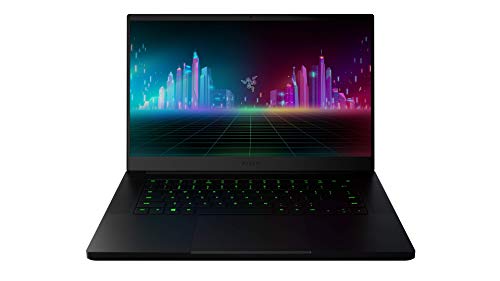
| Budget-Friendly Pick | Processor: Intel Core i7-10750H | Graphics: GTX 1660 Ti | Display Size: 15.6-inch | VIEW LATEST PRICE | Read Our Analysis |
| Razer Blade 18 Gaming Laptop RTX 4090 i9 HX |

| Desktop Replacement | Processor: Intel Core i9-13950HX | Graphics: RTX 4090 | Display Size: 18-inch | VIEW LATEST PRICE | Read Our Analysis |
| Razer Blade 17 Gaming Laptop with RTX 3070 Ti |

| Big-Screen Power | Processor: Intel Core i7-12800H | Graphics: RTX 3070 Ti | Display Size: 17.3-inch | VIEW LATEST PRICE | Read Our Analysis |
| Razer Blade Pro 17 Gaming Laptop 2020 |

| Creator Ready | Processor: Intel Core i7-10875H | Graphics: RTX 2080 Super | Display Size: 17.3-inch | VIEW LATEST PRICE | Read Our Analysis |
More Details on Our Top Picks
Razer Blade 14 (2025) Gaming Laptop RTX 5070
If you want a gaming laptop that stays genuinely portable without skimping on premium hardware, the Razer Blade 14 (2025) is built for you. You get an ultra-thin 0.62-inch aluminum unibody chassis that weighs about 3.59 pounds, plus Chroma RGB for style. Its 14-inch 3K OLED panel hits 120Hz, 0.2ms, and 400 nits, while six speakers with THX Spatial Audio improve immersion. Inside, the Ryzen AI 9 365 and RTX 5070 deliver strong gaming and Copilot+ AI features, backed by 32GB LPDDR5X, 1TB SSD, Wi-Fi 7, and up to 11 hours of battery life.
- Processor:AMD Ryzen AI 9 365
- Graphics:RTX 5070
- Display Size:14-inch
- Refresh Rate:120 Hz
- Memory:32 GB LPDDR5X
- Storage:1 TB SSD
- Additional Feature:3K OLED panel
- Additional Feature:Wi-Fi 7 support
- Additional Feature:72Wh battery
Razer Blade 15 Gaming Laptop RTX 4070 i7
The Razer Blade 15 Gaming Laptop RTX 4070 i7 is a strong fit for gamers who want desktop-level power in a slim, portable chassis. You get an Intel Core i7-13800H, an RTX 4070, and 16GB of DDR5 memory for fast play and smooth multitasking. Its 15.6-inch QHD OLED panel runs at 240Hz with G-SYNC, so motion stays crisp. The vapor chamber cooling helps the CNC aluminum body stay composed. At 4.54 pounds, it’s easy to carry, yet you still get Thunderbolt 4, HDMI, Wi‑Fi, and upgrade options for storage and RAM.
- Processor:Intel Core i7-13800H
- Graphics:RTX 4070
- Display Size:15.6-inch
- Refresh Rate:240 Hz
- Memory:16 GB DDR5
- Storage:1 TB SSD
- Additional Feature:240Hz OLED display
- Additional Feature:Thunderbolt 4 ports
- Additional Feature:Vapor chamber cooling
Razer Blade 15 Base Gaming Laptop 2020
With its 10th Gen Intel Core i7-10750H processor, NVIDIA GeForce GTX 1660 Ti graphics, and 120 Hz 15.6-inch Full HD display, the Razer Blade 15 Base Gaming Laptop 2020 is a strong fit for gamers who want smooth performance in a slim, premium chassis. You get 16 GB of RAM and a 256 GB SSD for fast loading and responsive multitasking. Its CNC aluminum body stays sleek at 0.78 inches thick, while Chroma RGB adds flair. You also get Wi-Fi, Bluetooth 5, a webcam, Windows 10 Home, and versatile USB-C and USB-A ports.
- Processor:Intel Core i7-10750H
- Graphics:GTX 1660 Ti
- Display Size:15.6-inch
- Refresh Rate:120 Hz
- Memory:16 GB RAM
- Storage:256 GB SSD
- Additional Feature:10th Gen i7
- Additional Feature:CNC aluminum unibody
- Additional Feature:Chroma RGB lighting
Razer Blade 18 Gaming Laptop RTX 4090 i9 HX
Razer’s Blade 18 is a strong pick for you if you want desktop-level gaming power in a premium laptop. You get an Intel Core i9-13950HX, an RTX 4090 with up to 175W, and 32GB of DDR5 memory, so it crushes AAA games and heavy creative work. The 18-inch QHD+ 240Hz display looks sharp and fluid, while the 2TB SSD gives you plenty of fast storage. Its CNC aluminum chassis, vapor chamber cooling, and triple-fan system help it stay composed. With 10 ports, Wi-Fi 5.3, and Windows 11, you’re set.
- Processor:Intel Core i9-13950HX
- Graphics:RTX 4090
- Display Size:18-inch
- Refresh Rate:240 Hz
- Memory:32 GB DDR5
- Storage:2 TB SSD
- Additional Feature:5MP webcam
- Additional Feature:2.5Gb Ethernet
- Additional Feature:Triple-fan cooling
Razer Blade 17 Gaming Laptop with RTX 3070 Ti
If you want a 17-inch gaming laptop that pairs high-end speed with a sharp, fast display, the 2022 Razer Blade 17 with RTX 3070 Ti fits the bill. You get an Intel Core i7-12800H, 16GB of DDR5 memory, and a 1TB NVMe SSD, so games and apps launch quickly. Its 240Hz QHD screen with G-SYNC keeps motion smooth, while the vapor chamber cooling helps manage heat. You also get Thunderbolt 4, HDMI 2.1, USB-A, Ethernet, Wi‑Fi 6, and a per-key RGB keyboard. Windows 11 Home rounds out the package.
- Processor:Intel Core i7-12800H
- Graphics:RTX 3070 Ti
- Display Size:17.3-inch
- Refresh Rate:240 Hz
- Memory:16 GB DDR5
- Storage:1 TB NVMe SSD
- Additional Feature:Fingerprint reader
- Additional Feature:UHS-II SD slot
- Additional Feature:82Wh battery
Razer Blade Pro 17 Gaming Laptop 2020
The Razer Blade Pro 17 Gaming Laptop 2020 is built for gamers and creators who want desktop-class power in a portable 17.3-inch package. You get a 10th Gen Intel Core i7-10875H with 8 cores and boost speeds up to 5.1 GHz, plus 16 GB RAM and room to grow to 64 GB. The NVIDIA GeForce RTX 2080 Super handles ray tracing, while the 4K 120 Hz display keeps visuals sharp and smooth. You also get a 1 TB SSD, vapor chamber cooling, Thunderbolt 3, Wi‑Fi 6, and a CNC chassis with Chroma RGB.
- Processor:Intel Core i7-10875H
- Graphics:RTX 2080 Super
- Display Size:17.3-inch
- Refresh Rate:120 Hz
- Memory:16 GB RAM
- Storage:1 TB SSD
- Additional Feature:4K UHD display
- Additional Feature:Windows Hello
- Additional Feature:UHS-III card reader
Factors to Consider When Choosing Blade Laptops
When you choose a Blade laptop, start with display quality and match it to your performance needs so your games look sharp and run smoothly. You’ll also want to balance portability with cooling design, since thinner builds can run hotter under load. Finally, check the memory and storage options so the laptop can handle your games and multitasking needs.
Display Quality
Display quality can make or break a Blade laptop’s appeal, so you’ll want to match the panel to how you actually use it. Choose a resolution and size that fit your priorities: QHD or 3K screens look sharper and give you more workspace, while 14-inch to 18-inch models trade portability for immersion. If you edit photos or video, look for OLED panels with strong color coverage, Calman verification, and sRGB, Adobe RGB, or DCI-P3 support. For gaming, a high-refresh-rate OLED or LCD at 120 to 240 Hz helps motion feel smoother. Don’t ignore brightness, either; 300 to 400+ nits improves visibility in bright rooms. High contrast, fast response times, and adaptive sync also help reduce blur and tearing.
Performance Needs
To get the right Blade laptop performance, match the CPU, GPU, cooling, memory, and storage to what you actually do. If you game and use mostly single-threaded apps, a CPU with strong boost clocks matters more than sheer core count. If you edit video, compile code, or multitask heavily, choose more cores. Pair that with a GPU that has enough VRAM and wattage for your targets; 8–12GB or more helps at higher resolutions and in creative apps. Don’t overlook cooling, because vapor chambers and multiple fans help hold peak speeds. Aim for 16–32GB of fast RAM and at least a 1TB NVMe SSD so your projects, games, and assets load quickly without bottlenecks.
Portability Balance
How portable does your Blade laptop need to be day to day? If you commute, travel, or move between rooms often, aim for a machine under about 4–5 pounds. Heavier models can work if they’ll mostly stay on a desk. Screen size also shapes portability: a bigger display helps you see more, but it adds weight and bulk, so pick the smallest panel that still fits your workflow. Check chassis thickness and exact dimensions too, because a thinner laptop slips into bags and airplane trays more easily. Battery capacity and rated runtime matter when you’re away from outlets, and smart port choices help you avoid packing dongles or hubs. Choose the lightest, slimmest Blade that still covers your daily needs.
Cooling Design
Cooling matters a lot in Blade laptops, especially if you game for long sessions or push a high-wattage GPU and CPU. You should look for vapor chambers, dual or triple fans, and dense exhaust fins, because they spread heat better and help prevent sustained throttling. If you’re choosing a model with a higher-TGP GPU or a multi-core CPU, favor a thicker cooling system with more vapor chamber area or heat pipes, since those parts need extra thermal headroom to hold boost clocks. Also check the vents: bottom and rear exhausts with clear airflow usually cool better than cramped intakes. Smart fan curves and thermal hoods can boost performance under load, but thinner chassis often run louder and throttle sooner than bulkier designs.
Memory And Storage
After cooling, memory and storage are the next specs that can shape how well a Blade laptop handles games and everyday workloads. You should aim for 16 GB of RAM for most gaming, but 32 GB or more makes sense if you multitask heavily, create content, or work with large datasets. Faster memory, like LPDDR5X or high-MHz DDR5, can boost bandwidth-sensitive tasks and AI workloads. Check whether the RAM is soldered or upgradeable, and note how many slots you get, since soldered memory can block future expansion. For storage, choose an NVMe PCIe SSD for much faster loads and transfers than SATA. A 1 TB drive is a smart minimum for modern games and media projects. Also verify M.2 slots and max supported capacity.
Port Selection
Port selection can make a Blade laptop far more practical, especially if you connect docks, external displays, cameras, or wired networking. You’ll want at least one 40 Gbps USB-C or Thunderbolt port so you can run fast docks, external GPUs, and multi-4K displays without bottlenecks. If you plan to game on a TV or high-refresh monitor, HDMI 2.1 or newer lets you output 4K at 120Hz natively, with no adapter fuss. Check for enough USB-A and USB-C ports, ideally with USB-C power delivery, so you don’t depend on hubs for mice, drives, or charging. An SD or UHS-II reader helps if you move large camera files often. Ethernet, built-in or via a strong adapter, keeps downloads and multiplayer sessions stable.
Battery Life
Battery life matters a lot on Blade laptops, especially if you plan to move between gaming, work, and travel without living near a charger. Start by checking the battery’s watt-hours; higher Wh usually means longer runtime when you use the same settings. Don’t trust claimed hours alone, because gaming and content creation can cut battery life far more than web browsing. Look for fast-charging support so you can top up quickly between sessions. You should also use power profiles, CPU and GPU limits, and adaptive refresh rates to stretch runtime when you’re unplugged. Finally, watch the display: higher resolution, higher refresh rates, and bright panels all drain power faster, so pick the screen that fits your actual use.
Frequently Asked Questions
Which Blade Laptop Has the Best Battery Life for Gaming?
The Blade 14 typically offers the best gaming battery life because its smaller size and efficient components use power more conservatively than the larger Razer models. To extend unplugged playtime, reduce graphics settings and limit frame rates.
Are Blade Laptops Good for Video Editing and 3D Rendering?
Yes. Blade laptops offer high-performance CPUs, powerful NVIDIA GPUs such as the RTX series, and high-resolution, color-accurate displays that handle video editing and 3D rendering well. Expect significant heat buildup and rapid battery drain during prolonged, intensive sessions, so plan for good cooling and use plugged-in power for best sustained performance.
How Often Should I Upgrade a Blade Laptop?
You should upgrade your Blade laptop every three to five years, or sooner if you notice declining performance, reduced battery runtime, or loss of software and driver support. If your games and workflows still run smoothly, it’s fine to wait longer.
Do Blade Laptops Support External GPUS?
Yes. If your Razer Blade has Thunderbolt 3, Thunderbolt 4, or USB4, it can usually run a supported external GPU. Verify the specific Blade model and its ports before purchasing an external enclosure.
Which Blade Model Is Best for Travel and Portability?
Choose the Blade 14 for travel. It is the lightest and most compact model while still delivering strong performance. It fits easily in a backpack and handles gaming, work, and editing on the go.
Final Thoughts
Whether you’re chasing a slim travel rig or a desktop-level beast, one of these Blade laptops is bound to fit your game, your grind, and your goals. You might notice the “right” pick keeps matching the moments that matter most: the flight you booked, the match you can’t miss, the project deadline you swore you’d beat. When power, design, and timing line up like that, you don’t just choose a laptop—you choose momentum.
