

CD shredders in 2026 can do a lot more than destroy discs.
Many models also handle DVDs, cards, and paper with ease.
The best pick depends on your space and how much shredding you do.
Some fit neatly on a home desk, while others are built for heavier office use.
| WOLVERINE 18-Sheet Crosscut Paper Shredder with Waste Bin |

| Best Overall | Cut Type: Cross-cut | Sheet Capacity: 18 sheets | Media Support: CDs, credit cards | VIEW LATEST PRICE | Read Our Analysis |
| Bonsaii 12-Sheet Micro Cut Paper Shredder (C266-BW) |

| Best for Home Offices | Cut Type: Micro-cut | Sheet Capacity: 12 sheets | Media Support: CDs, credit cards | VIEW LATEST PRICE | Read Our Analysis |
| KOBRA +2 SS7 Professional Straight Cut Shredder |
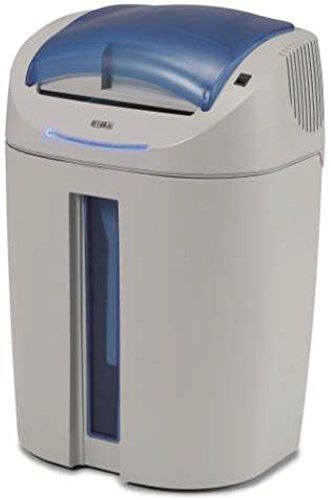
| Professional Grade | Cut Type: Straight cut | Sheet Capacity: 26–27 sheets | Media Support: CD-ROMs, DVDs, credit cards, chip cards | VIEW LATEST PRICE | Read Our Analysis |
| High-Security Micro-Cut Paper CD/DVD and Credit Card Shredder |
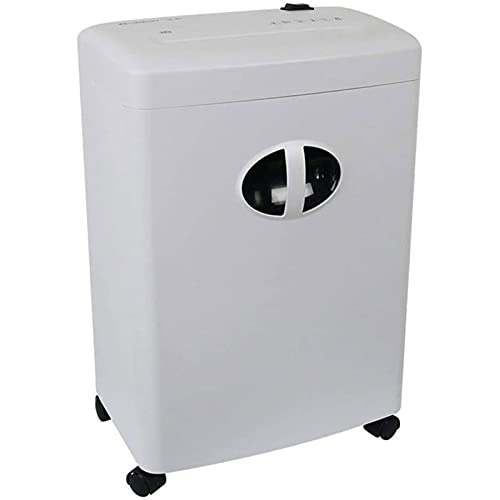
| Best Compact Pick | Cut Type: Micro-cut | Sheet Capacity: 6 sheets | Media Support: CDs/DVDs, credit cards | VIEW LATEST PRICE | Read Our Analysis |
| ZHCHAO Heavy-Duty Cross-Cut Paper Shredder for CDs/Cards |

| Budget-Friendly Pick | Cut Type: Cross-cut | Sheet Capacity: 8 sheets | Media Support: CDs, credit cards | VIEW LATEST PRICE | Read Our Analysis |
More Details on Our Top Picks
WOLVERINE 18-Sheet Crosscut Paper Shredder with Waste Bin
If you need a quiet, heavy-duty shredder for a home office or small business, the Wolverine 18-Sheet Crosscut Paper Shredder is a strong fit because it handles confidential papers, CDs, and credit cards with P-4 security and an 18-sheet capacity. You can shred staples and paper clips too, while its automatic jam reverse helps you keep working. It runs up to 60 minutes, and the patented cooling system supports longer jobs. At 58 dB, it stays impressively quiet. The 6-gallon pullout bin has a viewing window, and ETL certification, plus a one-year warranty, adds extra confidence.
- Cut Type:Cross-cut
- Sheet Capacity:18 sheets
- Media Support:CDs, credit cards
- Security Level:P-4
- Run Time:Up to 60 minutes
- Noise Level:58 dB
- Additional Feature:Automatic jam reverse
- Additional Feature:6-gallon pullout bin
- Additional Feature:ETL certified
Bonsaii 12-Sheet Micro Cut Paper Shredder (C266-BW)
The Bonsaii 12-Sheet Micro Cut Paper Shredder (C266-BW) is a strong pick provided you need a compact, high-security shredder for a home office or small business, especially while you’re handling CDs along with paper, cards, staples, and clips. You get P-4 micro-cut security, 5×12mm particles, and 60 minutes of nonstop runtime before a 20-minute cool-down. Its 60dB operation keeps noise down, while overload protection helps prevent jams. You can move it easily on four casters, check the bin through the window, and rely on 24/7 support plus a one-year warranty.
- Cut Type:Micro-cut
- Sheet Capacity:12 sheets
- Media Support:CDs, credit cards
- Security Level:P-4
- Run Time:60 minutes nonstop
- Noise Level:60 dB
- Additional Feature:20-minute cool-down
- Additional Feature:4 universal casters
- Additional Feature:Transparent trash window
KOBRA +2 SS7 Professional Straight Cut Shredder
KOBRA’s +2 SS7 is a smart pick for offices that need one machine to handle both paper and optical media, since it shreds up to 26–27 sheets plus CDs, DVDs, and credit cards through separate cutting systems. You’ll get 1/4-inch strip cuts, carbon-hardened knives, and staples-and-clips resistance, so routine prep stays simple. Two removable containers keep paper and plastic apart, and you won’t need waste bags. Dual sensors, lid-open cutoff, and auto start/stop enhance safety. Its 24-hour motor runs quietly at 54/55 dBA and won’t overheat.
- Cut Type:Straight cut
- Sheet Capacity:26–27 sheets
- Media Support:CD-ROMs, DVDs, credit cards, chip cards
- Security Level:DIN P-1/O-1/T-2/E-2
- Run Time:24-hour continuous duty
- Noise Level:54/55 dBA
- Additional Feature:Dual cutting blade sets
- Additional Feature:2 integrated containers
- Additional Feature:TAA compliant
High-Security Micro-Cut Paper CD/DVD and Credit Card Shredder
HHWKSJ’s High-Security 6-Sheet Micro-Cut Paper, CD/DVD and Credit Card Shredder is a strong pick for home users and small offices that need reliable disposal of confidential materials, since it handles paper, CDs/DVDs, and credit cards with micro-cut security and a 16L waste bin. You can feed up to 6 A4 sheets at once, and the 220 mm inlet suits everyday documents. It runs automatically at 3 m/min, stays relatively quiet at ≤58 dB, and protects itself with overheating and overload safeguards. Its durable build and spacious bin make routine shredding easier.
- Cut Type:Micro-cut
- Sheet Capacity:6 sheets
- Media Support:CDs/DVDs, credit cards
- Security Level:High-security micro-cut
- Run Time:Not specified
- Noise Level:≤58 dB
- Additional Feature:16L drum capacity
- Additional Feature:Overheating protection
- Additional Feature:Overloading protection
ZHCHAO Heavy-Duty Cross-Cut Paper Shredder for CDs/Cards
Need a compact shredder for office paperwork, CDs, and credit cards? The ZHCHAO Minute Heavy-Duty Cross-Cut Paper Shredder gives you simple, reliable protection for everyday office supplies. You can shred A4 paper, up to 8 sheets at once, plus 8 broken credit cards, into 3 × 9 mm cross-cut pieces. Its environment-friendly plastic build and simple panel make operation easy. When the tray fills, empty it promptly and clean the machine to keep it running well. Don’t overload it or insert unsupported items. Contact us anytime during use; colors may vary.
- Cut Type:Cross-cut
- Sheet Capacity:8 sheets
- Media Support:CDs, credit cards
- Security Level:Cross-cut security
- Run Time:Not specified
- Noise Level:Not specified
- Additional Feature:Environment-friendly plastic
- Additional Feature:Simple panel
- Additional Feature:Easy operation
Factors to Consider When Choosing Cd Shredders
When we choose a CD shredder, we should first check shred size, security, and how much media it can handle at once. We also need to confirm media compatibility and continuous run time so it fits our workflow. Finally, we should look for strong jam prevention to keep shredding smooth and reliable.
Shred Size Security
Shred size matters because the smaller the pieces, the harder it is to reconstruct a CD or recover the data on it. We should look for finer cuts whenever we want stronger protection, since more fragments make recovery far less practical. Micro-cut shredding around 5 × 12 mm gives us better security than cross-cut styles around 4 × 35 mm or 3 × 9 mm, because the particles are much harder to piece together. Strip-cut shredding is the weakest choice for CDs, since long strips can still be matched. Security ratings like P-4 usually point to cross-cut or micro-cut performance, giving us a solid balance for daily use. Whenever we’re disposing of sensitive data, we should choose a shredder that creates many small pieces, not a few large ones.
Sheet Capacity
After choosing the right shred size for security, we should also look at sheet capacity to make sure the shredder can keep up with our workload. Sheet capacity shows how many paper sheets we can feed at once, and common models range from 6 to 27 sheets. If we shred often, a higher rating can speed up batch jobs, but it might also need a stronger motor and more careful loading to prevent jams. A 18-sheet shredder handles bigger stacks than a 12-sheet unit, so it fits heavier use better. We should also check whether the rating covers paper only or every item we feed. Picking a capacity that matches our routine helps us avoid overheating and keeps shredding efficient.
Media Compatibility
Media compatibility matters because we need a shredder that explicitly handles the items we plan to destroy, whether that includes CDs, CD-ROMs, DVDs, or credit cards. We should verify that the model doesn’t just process paper, since some units need media-specific blades and a throat built for flat discs or cards. We also want to know whether it shreds media separately or mixes it with paper output, because distinct cutting paths can improve compatibility. Next, we should check the stated limits for discs and plastic cards, even though the shredder accepts staples or paper clips. Finally, we need the advertised cut result, such as three-piece cuts or micro-cut particles, because the output format tells us how well the machine handles each media type.
Continuous Run Time
Continuous run time matters because it tells us how long a CD shredder can keep working before it needs a break, and that directly affects how efficiently we can handle bigger shredding jobs. When we choose a model with about 60 minutes of nonstop operation, we can push through heavier workloads and cut downtime during busy sessions. Some shredders then need a cool-down cycle, like 20 minutes, so we should plan around a work-rest rhythm. This becomes even more important when we shred mixed media such as paper, credit cards, and CDs, since those loads strain the motor more than light paper alone. If we want frequent, high-volume shredding, we should look for continuous-duty designs or patented cooling systems that help the machine stay ready longer without overheating.
Jam Prevention
Along with long run times, we need to consider jam prevention so a CD shredder keeps moving instead of stopping mid-job. We should look for automatic jam-reverse or overload protection, because these features sense resistance and help clear blockages before they strain the motor. We also need to respect the maximum per-pass limit; higher capacity doesn’t mean lower jam risk. If we feed too much at once, the machine can bind. For heavier workloads, continuous-duty models with cooling systems help prevent heat-related shutdowns that often follow repeated jams. Separate cutting paths for paper and media, like CDs or credit cards, also reduce clogging. Finally, we should empty the waste bin often and avoid overfilled output chambers, since back-pressure can trigger misfeeds and stoppages.
Noise Level
Noise matters more than many of us expect, especially whether we’re using a CD shredder in a home office or shared workspace. We should look for models rated around 54–60 dB, because that range usually stays comfortable without dominating the room. Should we share space or shred often, “ultra-quiet” or “low-noise” models help us avoid constant interruptions. We also need to recall that CDs and credit cards can raise sound levels, so a stable motor and sound-dampening design matter. For longer sessions, continuous-duty shredders with cooling systems often keep noise from climbing as heat builds. Should we’re sensitive to sound, let’s compare decibel ratings directly; even a few dB can change how loud a machine feels.
Waste Bin Capacity
Waste bin capacity plays a big role in how often we need to stop and empty the shredder, so larger bins work better for longer shredding sessions or shared spaces. We often find that a bin around 6 gallons strikes a practical balance for home or office use, holding plenty without taking up too much room. Smaller bins, like 16 liters, can fit neatly under a desk and still handle routine jobs, though they’ll need emptying more often. Provided that we shred different materials, separate containers for paper and plastic help us keep waste organized and move faster. A transparent viewing window or bin indicator also makes it easier to check fill levels at a glance, so we can avoid overfilling and keep performance steady.
Safety Features
As we choose a CD shredder, safety features should be high on the list because they help prevent damage, downtime, and accidents. We should look for automatic jam reverse or overload protection, so the machine can sense a blockage and clear it before the motor suffers. Thermal protection matters too, especially whenever we plan to shred for long stretches, because it helps prevent overheating and wear. We also want lid-open cutoffs, automatic stops, or electronic sensors that halt operation whenever the bin or access panel is removed. If we’ll use the shredder in shared spaces, a stable, low-noise design makes safe operation easier. Continuous-duty ratings or cooling systems add extra peace of mind and support longer runtime without pushing the unit too hard.
Frequently Asked Questions
How Noisy Are CD Shredders During Operation?
You’ll usually hear a steady whir and a crisp cracking sound, similar to a compact paper shredder. Some stronger units produce a sharper tone, but the sound is typically short-lived, and better-built models tend to run more quietly.
Can These Shredders Handle Staples and Paper Clips Too?
No. We should remove staples, take off paper clips, and clear binder clips first. Most CD shredders are built for discs only, not metal, so this helps protect the machine and keep shredding running smoothly.
How Often Should Shredder Blades Be Oiled?
Oil shredder blades every 30 minutes of continuous use, or after each full bin if you shred often. Use shredder oil sheets because they are cleaner and help keep cutting smooth.
What Happens if a CD Gets Jammed Inside?
A jammed CD can halt playback, strain the drive motor, and damage the disc. Turn the unit off, unplug it, and gently clear any obstruction. If the disc still will not come out, contact support.
Do CD Shredders Require Special Maintenance?
Yes, they do, but the upkeep is straightforward. Clean the blades, remove dust buildup, and lubricate moving parts when needed. Regular care helps prevent jams and keeps performance consistent.
Conclusion
We’ve seen that the best CD shredders don’t just cut; they protect, simplify, and fit the way we work. Whether we want the steady power of the KOBRA +2 SS7, the compact security of Bonsaii, or the home-office convenience of WOLVERINE, the right choice keeps old discs from becoming tomorrow’s risk. So let’s choose wisely, shred regularly, and let sensitive data disappear where it belongs: out of sight, out of mind.
