

Should you’re trying to free up floor space without giving up a good viewing angle, I’ve rounded up six ceiling TV mounts that can make a real difference. I’ll look at options that tilt, swivel, and adjust for different screen sizes, plus the practical details that matter once they’re installed. Some are compact, some are full-motion, and one might fit your room better than you expect.
| Mount-It! TV Ceiling Mount Bracket (MI-509B) |

| Best Overall | Mount Type: Ceiling mount | Screen Size: 32–75 inches | Weight Capacity: 110 lbs | VIEW LATEST PRICE | Read Our Analysis |
| PUTORSEN Flip Down Ceiling TV Mount Adjustable Swivel |
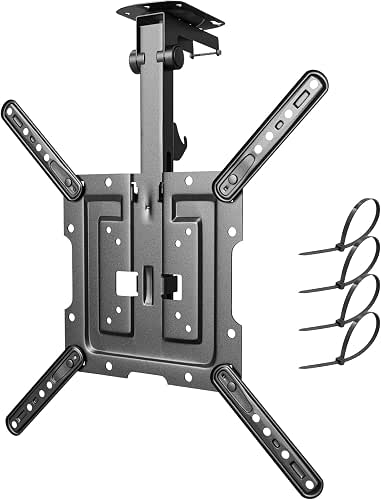
| Best for Tight Spaces | Mount Type: Ceiling/under-cabinet mount | Screen Size: 23–55 inches | Weight Capacity: 44 lbs | VIEW LATEST PRICE | Read Our Analysis |
| Electric Motorized Ceiling TV Mount with Remote |

| Best Motorized Pick | Mount Type: Ceiling mount | Screen Size: 32–70 inches | Weight Capacity: 90 lbs | VIEW LATEST PRICE | Read Our Analysis |
| Mount-It! Compact Folding Ceiling TV Mount for Small Screens |

| Best Compact Option | Mount Type: Ceiling mount | Screen Size: 13–24 inches | Weight Capacity: 18 lbs | VIEW LATEST PRICE | Read Our Analysis |
| ProMounts Adjustable Ceiling TV Mount Bracket |

| Best for Large TVs | Mount Type: Ceiling mount | Screen Size: 37–90 inches | Weight Capacity: Capacity not stated | VIEW LATEST PRICE | Read Our Analysis |
| ONKRON Adjustable Full Motion Ceiling TV Mount |

| Best Heavy-Duty Mount | Mount Type: Ceiling/wall mount | Screen Size: 32–80 inches | Weight Capacity: 150 lbs | VIEW LATEST PRICE | Read Our Analysis |
More Details on Our Top Picks
Mount-It! TV Ceiling Mount Bracket (MI-509B)
If you need a ceiling TV mount that’s built for everyday reliability, the Mount-It! TV Ceiling Mount Bracket (MI-509B) gives you high-strength alloy steel construction and safety testing at 3x its rated 110 lb capacity. You can mount 32–75 inch flat panel TVs, including LED, LCD, OLED, and 4K models, with VESA patterns from 200x200mm to 600x400mm. It installs on flat, sloped, vaulted, or angled ceilings, and the telescoping pole adjusts 22–36 inches. You’ll also get 25° tilt, 360° swivel, concealed cable management, and a lifetime warranty.
- Mount Type:Ceiling mount
- Screen Size:32–75 inches
- Weight Capacity:110 lbs
- Tilt Range:25° down
- Swivel:360°
- VESA Support:200×200 to 600×400
- Additional Feature:Telescoping 22–36 inches
- Additional Feature:Works on sloped ceilings
- Additional Feature:Hidden cable management holes
PUTORSEN Flip Down Ceiling TV Mount Adjustable Swivel
The PUTORSEN Flip Down Ceiling TV Mount is a smart pick if you need a space-saving solution for a 23–55 inch TV or monitor in a flat, pitched, or even under-cabinet setup. You get a foldable, height-adjustable design that helps you dial in the right viewing angle and drop-down position. It supports VESA patterns up to 400×400 mm and holds up to 44 lbs. With 0° to -80° tilt, 90° swivel on flat ceilings, and sturdy aluminum-steel construction, you’ll also appreciate the included cable ties and five-year warranty.
- Mount Type:Ceiling/under-cabinet mount
- Screen Size:23–55 inches
- Weight Capacity:44 lbs
- Tilt Range:0° to -80°
- Swivel:90° on flat ceiling
- VESA Support:75×75 to 400×400
- Additional Feature:Foldable locking design
- Additional Feature:Height-adjustable vertical rail
- Additional Feature:5-year warranty
Electric Motorized Ceiling TV Mount with Remote
With remote-controlled motorized tilt, this ceiling TV mount is a smart choice for you whenever you want a clean, space-saving setup with easy viewing adjustment. It fits 32- to 70-inch flat or curved TVs with many VESA patterns, and its 0–75° tilt plus ±4° leveling helps you dial in the view. You can control it from up to 131 feet away, and the sturdy steel frame supports up to 90 lbs. The dual wire system and anti-collision rebound protect your TV and head. It installs on wood or concrete ceilings and comes with a 5-year warranty.
- Mount Type:Ceiling mount
- Screen Size:32–70 inches
- Weight Capacity:90 lbs
- Tilt Range:0° to 75°
- Swivel:Not stated
- VESA Support:200×100 to 600×400
- Additional Feature:Remote control operation
- Additional Feature:Anti-collision rebound function
- Additional Feature:Dual steel wire system
Mount-It! Compact Folding Ceiling TV Mount for Small Screens
Mount-It!’s Compact Folding Ceiling TV Mount is a smart pick for small screens in tight spaces, especially in case you need a ceiling or under-cabinet setup in a kitchen, office, or compact room. You can fold it down to just 1.6 inches, and its heavy-duty steel build adds strength you can trust. It supports 13- to 24-inch screens, up to 18 lbs, with 50×50, 75×75, and 100×100 VESA patterns. You’ll also get 360° swivel, 90° tilt, hardware, instructions, lifetime warranty, and US-based support.
- Mount Type:Ceiling mount
- Screen Size:13–24 inches
- Weight Capacity:18 lbs
- Tilt Range:90°
- Swivel:360°
- VESA Support:50×50 to 100×100
- Additional Feature:Folds to 1.6 inches
- Additional Feature:Under-cabinet installation option
- Additional Feature:Lifetime warranty
ProMounts Adjustable Ceiling TV Mount Bracket
ProMounts’ Adjustable Ceiling TV Mount Bracket is a strong fit should you need a space-saving overhead setup for a large screen in a home, office, or commercial setting. You can mount TVs from 37 to 90 inches, and the universal VESA arms help you fit many flat screens and OLED monitors. The retractable swivel design and adjustable pole let you aim the display cleanly, while the 5-degree tilt adds fine control. Built from heavy-duty metal, it’s ready for bedrooms, bars, gyms, lobbies, and conference rooms. Its lifetime warranty adds welcome peace of mind.
- Mount Type:Ceiling mount
- Screen Size:37–90 inches
- Weight Capacity:Capacity not stated
- Tilt Range:5°
- Swivel:Swivel design
- VESA Support:Universal VESA
- Additional Feature:Retractable swivel overhead
- Additional Feature:Heavy-duty steel construction
- Additional Feature:Lifetime warranty
ONKRON Adjustable Full Motion Ceiling TV Mount
ONKRON’s N2L-B full motion ceiling TV mount is a strong choice in case you need a flexible, heavy-duty setup for a 32–80 inch screen. You can support displays up to 150 lbs, and the VESA range from 100×100 to 600×400 covers many TVs. The arm swivels 60° and tilts from -5° to +15°, so you can dial in the view. It extends from 28.2 to 122.2 inches, making it great for high ceilings. You also get steel construction, cable management, and ceiling or wall mounting options for safer installation.
- Mount Type:Ceiling/wall mount
- Screen Size:32–80 inches
- Weight Capacity:150 lbs
- Tilt Range:-5° to +15°
- Swivel:60°
- VESA Support:100×100 to 600×400
- Additional Feature:Height extends to 122.2
- Additional Feature:Wall installation option
- Additional Feature:Built-in cable management
Factors to Consider When Choosing Ceiling TV Mounts
When I help you choose a ceiling TV mount, I first check TV size compatibility, weight capacity, and VESA pattern matching. I also make sure the mount fits your ceiling type and gives you the motion and tilt you want. These basics help you avoid problems and get a secure, flexible setup.
TV Size Compatibility
TV size compatibility starts with matching your screen to the mount’s supported range, because ceiling mounts can fit anything from compact 13-inch displays to 90-inch TVs. I always check the mount’s minimum and maximum size limits first, especially if I’m working with a very small or very large set. Many models are built for common ranges like 32–75 inches or 32–80 inches, while some compact versions stop at 24 inches. I also confirm VESA compatibility by comparing my TV’s hole pattern, such as 75×75 mm, 200×200 mm, 400×400 mm, or 600×400 mm, with the mount’s supported patterns. That way, I know the bracket lines up properly and supports the screen size I’m trying to hang.
Weight Capacity Limits
Weight capacity is one limit I never ignore, because I want the mount to safely handle more than my TV actually weighs. I always check the mount’s rated maximum load and leave a healthy margin, since that extra headroom helps reduce stress over time. Ceiling mounts can vary widely, from compact models that hold about 18 lbs to heavy-duty options rated for 150 lbs or more, so I match the rating to my screen’s size and mass. For heavier TVs, I look for stronger steel construction and higher load ratings, especially overhead. I also trust only mounts whose safety testing goes beyond the rated load. And I never exceed the specified limit, even though the TV seems to fit otherwise.
VESA Pattern Matching
I always check the VESA pattern first, because the mount has to match my TV’s rear hole layout exactly, whether that’s 75×75, 100×100, 200×200, 400×400, or 600×400 mm. I don’t guess from screen size, since larger TVs often need wider patterns. Instead, I compare the mount’s minimum and maximum supported VESA range with my TV’s pattern before I buy. If my TV uses an uncommon layout, I make sure the product explicitly lists it or has enough adjustment to cover it. I also verify the VESA fit alongside the mount’s weight capacity, because matching holes alone doesn’t mean the mount can safely hold the display. That quick check helps me avoid returns, wasted time, and an unstable installation.
Ceiling Type Fit
Before I choose a ceiling TV mount, I make sure it fits my ceiling type, because not every design works on a flat surface. I look for a model that matches my room, whether I have a flat, sloped, vaulted, angled, or pitched ceiling. Then I check the ceiling-to-screen drop range so the TV lands at a comfortable height for my space. I also confirm the base can anchor into the structure I actually have, like wood or concrete, since that decides which hardware and anchors I need. Provided that my ceiling isn’t flat, I verify the mount still secures properly and keeps its intended range. For tight spots, I prefer a compact or foldable design that stays close to the surface whenever I don’t need it.
Motion And Tilt
Whenever I compare ceiling TV mounts, I pay close attention to how much tilt and swivel they offer, since that motion controls how well I can aim the screen for different seats and room layouts. I look for a tilt range that matches the room, because some mounts barely move 5°, while others let me angle the screen 80° or 90°. Swivel matters too, especially when people sit off-center; I’ve seen models with 60°, 90°, or even 360° rotation at the TV plate. Full-motion designs give me both, which makes fine-tuning easier. Whenever I’m mounting the TV high, I want a stronger downward tilt to cut glare and improve viewing comfort. I also check whether pitched or vaulted ceilings limit motion.
Height Adjustment Range
Upon I choose a ceiling TV mount, I always check the height adjustment range initially, because it determines whether the screen can sit at a comfortable viewing level in my room. I look for a model whose drop matches my ceiling height and seating distance, whether that’s a modest 22 to 36 inches or a much longer 120-inch reach for tall spaces. In a standard room, a mid-range drop-down mount usually works well. Should my room has a vaulted or pitched ceiling, I prefer a longer telescoping or pole-style design. I also value a height-adjustable vertical rail, since it lets me fine-tune the TV for different screen sizes and viewing angles. I make sure the range still allows tilt, swivel, and clearance.
Installation And Cable Management
When I’m choosing a ceiling TV mount, I first check whether the kit includes the right hardware, clear instructions, and fasteners made for my ceiling type, because installation goes a lot smoother whenever everything matches a flat, pitched, sloped, or vaulted ceiling. I also want a mount with a drop-down pole that fits my room, so the screen sits at a comfortable height. For cleaner setup, I look for cable holes, clips, or routing channels that hide power and signal cords and keep them from snagging whenever I swivel or tilt the TV. If the mount folds up, I make sure it still leaves room for connectors. Finally, I confirm the bracket’s load rating and my ceiling’s strength, because safe anchoring matters as much as the mount itself.
Frequently Asked Questions
Can Ceiling TV Mounts Be Installed on Sloped Ceilings?
Yes, I can install ceiling TV mounts on sloped ceilings, and it is often simpler than people expect. I would use a mount designed for angled surfaces, then set the screen perfectly level.
Do Ceiling Mounts Work With Soundbars Attached?
Yes, some ceiling mounts can work with soundbars attached, but I would first check the weight limit, available clearance, and bracket compatibility. I would also make sure the added hardware does not interfere with tilt, swivel, or cable movement.
How Much Weight Can a Ceiling TV Mount Hold?
It depends on the model, but most ceiling TV mounts are rated for 30 to 110 pounds. Check the mount’s weight limit, your TV’s size, and the ceiling structure before installation.
Are Ceiling TV Mounts Safe for Bedrooms?
Yes, ceiling TV mounts can be safe in bedrooms if installed into solid framing, kept within the mount’s weight limit, and paired with properly secured cables. Avoid drywall anchors that are not rated for the load, since bedroom safety and peace of mind are important.
Can I Hide Cables Inside a Ceiling TV Mount?
I can hide cables inside some ceiling TV mounts if the mount includes built in cable routing. I would still check the clearance, weight rating, and local code, then route power safely through approved channels or conduit.
