

A classroom wall, a busy kitchen counter, and a travel bag call for very different kinds of chart tablets. You may need blank paper for large-format lessons, a shared touchscreen calendar for household plans, or an Android tablet that handles notes and documents. The right fit depends on whether your priority is visible scheduling, open-ended writing space, or portable digital work.
The Shortlist At A Glance

KINGRID Android 16 Tablet 11.5 Inch 2.8K Keyboard

VEJLD 27 Inch Digital Family Calendar

Pacon Chart Tablet 24×16 Set of 3

VEJLD Digital Calendar 10.1 Inch Planner

VEJLD Digital Wall Calendar 15.6 Inch

VEJLD 21.5 Inch Digital Family Calendar
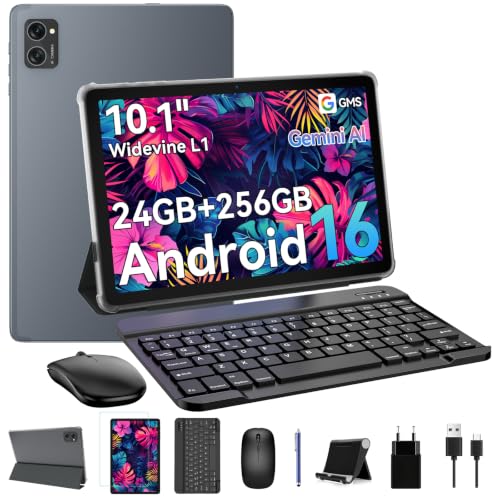
KINGRID 10 Inch Android 16 Tablet Keyboard
Meet The Standout Selections
The 11.5-inch display is the main reason to consider this KINGRID model for digital charts, documents, and split-screen work. Its 2.8K resolution means 2,800 by 1,840 pixels, giving your text and diagrams more room to stay sharp at a larger viewing size.
Unlike the paper-based Pacon Chart Tablet, this setup supports keyboard work, stylus notes, and files in one portable device. You may find the included keyboard, mouse, case, stylus, and screen protector especially useful for study sessions away from a desk.
Notable Gains
- 11.5-inch BOE display provides a broad workspace for notes and charts.
- 256GB internal storage supports sizable document and media libraries.
- Bluetooth keyboard and mouse help you handle longer typed assignments.
- 8000mAh battery supports mobile reading, browsing, and video sessions.
- Supports microSD expansion up to 2TB for additional files.
Things To Consider
- The larger screen and accessory bundle take more bag space than a compact 10-inch tablet.
- Virtual RAM is software-assisted memory, not the same as physical RAM.
A 27-inch touchscreen changes the role of a calendar from a personal device into a visible household board. Compared with VEJLD’s 10.1-inch model, this larger format gives your color-coded schedule more breathing room from across a kitchen or entryway.
Google Calendar and Outlook support two-way syncing, so edits made in either place can flow back to the shared display. For your active household, the meal planner, chore chart, timers, and photo display make it more than a date grid.
Advantages To Know
- 27-inch touchscreen keeps shared appointments easy to scan.
- Wall mounting and tabletop placement support different room layouts.
- Two-way Google Calendar and Outlook syncing reduces duplicate updates.
- Chore check-offs give your household a clear routine board.
Worth Noting
- The large footprint needs a deliberate wall area or a substantial tabletop.
- Wi-Fi is part of setup and calendar syncing.
- A 27-inch display may feel oversized for a narrow desk.
Paper still works beautifully for spontaneous lessons, group mapping, and workshop activities, and Pacon’s 24-by-16-inch format gives you a familiar write-on surface. Unlike the VEJLD calendar displays, you don’t need Wi-Fi, a power outlet, or an app before putting an idea on the wall.
Each set includes three tablets with 25 sheets each, while the unruled page design leaves room for drawings, large lettering, or custom grids. For most classroom stations, the stiff covers and two drilled holes make hanging and page handling straightforward.
Key Advantages
- Unruled sheets suit diagrams, brainstorming maps, and oversized handwriting.
- 24-by-16-inch pages stay visible during small-group instruction.
- Three-tablet set gives you multiple pads for separate projects.
Trade Offs
- Paper sheets are not editable after your writing session.
- You need an easel, wall hook, or another display method for hanging.
- The 24-inch width needs flat storage space between sessions.
- Digital scheduling needs are better served by VEJLD 21.5 Inch Digital Family Calendar.
Who It Suits Best
You benefit most from this set while leading classroom lessons, collaborative workshops, or hands-on planning sessions.
Where Another Pick Suits Better
KINGRID Android 16 Tablet 11.5 Inch 2.8K Keyboard suits your portable documents and typed notes better.
VEJLD’s 10.1-inch planner brings the same shared-calendar idea into a desk, counter, or compact entryway. It takes far less room than the 27-inch version, so you may prefer it where a larger display would crowd your daily workspace.
Its HD touchscreen manages schedules, shared lists, meal plans, recurring events, reminders, chores, and photo display functions. Magic Import lets you add events by voice or a photo, which can save typing after receiving a printed school notice.
A Few Highlights
- 10.1-inch format fits compact counters and work desks.
- Desk stand is included for immediate tabletop placement.
- Shared lists keep grocery tasks and household to-dos visible.
- Portrait and landscape viewing gives you placement flexibility.
- Auto brightness and sleep mode support day-to-evening use.
Minor Gripes
- The smaller display is less comfortable for viewing a packed schedule across a large room.
The 15.6-inch VEJLD calendar lands between the desk-friendly 10.1-inch model and the wall-dominating 27-inch display. That middle size makes sense for your kitchen, home office, or entryway where you want a readable planner without dedicating an entire wall.
You get both a wall-mount bracket and tabletop stand, plus portrait or landscape placement. The recipe view includes photos, ingredients, and steps, so your weekly meal plan can move beyond a short dinner label.
Where It Helps
- 15.6-inch FHD touchscreen balances visibility with manageable wall space.
- Wall bracket and tabletop stand support two placement approaches.
- Meal planning combines recipes with shared grocery lists.
- Multiple reminders help keep recurring household plans in view.
Room For Improvement
- Wall mounting requires a suitable location near power.
- The screen is smaller than VEJLD 21.5 Inch Digital Family Calendar for distant viewing.
This 21.5-inch model occupies a practical middle ground between VEJLD’s 15.6-inch and 27-inch calendar displays. In a shared kitchen or entryway, you may find its broader screen easier to read without the physical presence of the 27-inch format.
Google Calendar and Outlook offer two-way synchronization, while iCloud, Yahoo, Cozi, and TeamSnap can join the color-coded view. Screensaver mode also lets you show photos, videos, or artwork between planning tasks.
Everyday Wins
- 21.5-inch touchscreen offers generous shared viewing space.
- Color-coded calendars make schedule categories easier to separate.
- Interactive chores give your routine a visible completion system.
- Meal plans, recipes, lists, and reminders stay together.
- Auto brightness and sleep mode suit an always-visible household screen.
- Wood-grain frame supports a more home-oriented appearance.
Points To Note
- Its size still calls for adequate wall room or a stable tabletop.
- Wi-Fi connection is needed for synced calendars and companion-app use.
- Your smallest rooms may suit VEJLD Digital Calendar 10.1 Inch Planner more comfortably.
A 10-inch tablet with a keyboard makes more sense for your short notes, email, and travel documents than a large shared display. Compared with KINGRID Android 16 Tablet 11.5 Inch 2.8K Keyboard, this model favors a more compact carrying profile.
Android 16 provides the operating system, while the listed 24GB RAM figure combines 8GB physical memory with 16GB virtual memory. The 256GB storage gives you room for downloaded files, though your screen workspace remains smaller than the 11.5-inch KINGRID model.
Reasons It Performs
- 10-inch format is easier to pack for commuting and travel.
- Keyboard support helps with typed notes and messages.
Softer Spots
- The smaller screen leaves less room for side-by-side documents.
- Check keyboard layout and connection preferences before setting up your workflow.
What Matters Before You Choose a Chart Tablet
Paper Space or Digital Screen
Paper chart tablets work well for teaching, presenting, sketching, and activities where you want everyone focused on the same physical page. A touchscreen calendar is more useful for your repeating schedules, reminders, lists, and household coordination. An Android tablet is the better route for personal files, typing, online classes, and portable notes.
Screen Size and Placement
Your available room should drive calendar-display size. A 10.1-inch VEJLD unit suits a desk or tight counter, while 21.5-inch and 27-inch screens work better where several people need to see the day at once. Check wall space, outlet access, and viewing distance before committing to a larger panel.
Calendar Connections
Shared digital calendars are only helpful when they work with the accounts already used in your home. Google Calendar, iCloud, Outlook, Yahoo, Cozi, and TeamSnap support vary by model, so match the planner with your existing routine. Two-way sync matters most where you edit events from both the screen and your phone.
Work Accessories
A keyboard changes an Android tablet from a touch-first device into a compact writing station. Stylus support can help with handwritten notes, while storage expansion matters for your larger document library. For occasional email, a 10-inch unit may be enough, but detailed spreadsheets and side-by-side materials benefit from 11.5 inches.
A Few Practical Distinctions
Common Shopping Slip Ups
Avoid treating a digital family calendar like a portable tablet. Its placement, Wi-Fi connection, and visible screen size matter more than its ability to travel with you.
What the Higher Tier Buys
Larger calendar screens give your shared schedule more distance visibility. Higher-resolution Android displays and included accessories matter more for your documents, media, and typed work.
Frequently Asked Questions
Are chart tablets only paper pads?
No, chart tablets can include paper pads, digital calendars, and Android tablets used for visual planning. Your intended task determines the right type.
What size digital calendar works for a kitchen?
A 15.6-inch or 21.5-inch display suits many kitchen walls and counters. A 10.1-inch model works better where your space is limited.
Can you use a digital family calendar on a table?
Yes, the listed VEJLD calendar models include tabletop stands. Larger models still need a stable surface with nearby power.
Why does an Android tablet need a keyboard?
A keyboard makes longer emails, documents, and school assignments more comfortable to type. Touch input remains useful for quick notes and navigation.
Is unruled chart paper useful for teaching?
Yes, unruled paper gives you flexible space for diagrams, lettering, and custom layouts. It is especially useful for activities that do not need preprinted lines.
The Takeaway
Your choice becomes clearer once you decide where the chart will live and who needs to see it. Choose Pacon for hands-on writing, VEJLD for a shared home schedule, or KINGRID for portable digital work. The right format will fit naturally into your routine.
