

A reliable wake-up can feel luxurious until a dead battery or dim display ruins it. You want a clock radio that’s clear at a glance, steady through outages, and flexible enough for changing routines. The six models here do that in different ways, from large LED screens to dual alarms and FM radio. Which one fits your mornings best?
| DreamSky Alarm Clock Radio with Battery Backup |
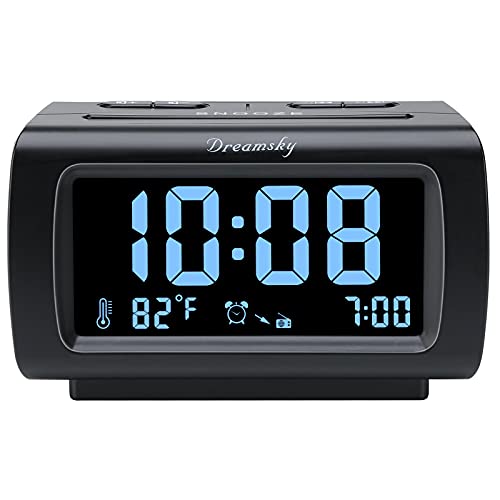
| Best for Charging | Radio Type: FM radio | Alarm Setup: Single alarm | Snooze: 8-minute snooze | VIEW LATEST PRICE | Read Our Analysis |
| Philips Digital Alarm Clock Radio with Large LED Display |

| Best Brand Option | Radio Type: FM radio | Alarm Setup: Dual alarm | Snooze: Snooze support | VIEW LATEST PRICE | Read Our Analysis |
| Digital Alarm Clock with FM Radio and Dual Alarms |

| Best for Travel | Radio Type: FM radio | Alarm Setup: Dual alarms | Snooze: Large snooze button | VIEW LATEST PRICE | Read Our Analysis |
| Magnasonic Digital AM/FM Clock Radio (EAAC201) |

| Best Classic Pick | Radio Type: AM/FM radio | Alarm Setup: Dual daily alarms | Snooze: Snooze function | VIEW LATEST PRICE | Read Our Analysis |
| Digital Alarm Clock Radio with Dual Alarms |

| Best Presets | Radio Type: AM/FM radio | Alarm Setup: Dual alarms | Snooze: Snooze function | VIEW LATEST PRICE | Read Our Analysis |
| JALL Digital Alarm Clock with FM Radio |

| Best Feature-Rich | Radio Type: FM radio | Alarm Setup: Dual alarms | Snooze: 9-minute snooze | VIEW LATEST PRICE | Read Our Analysis |
More Details on Our Top Picks
DreamSky Alarm Clock Radio with Battery Backup
If you want a clock radio that’s easy to read at a glance, the DreamSky Alarm Clock Radio with Battery Backup is a strong fit. You get a 4-inch LCD with large blue digits, a full-range dimmer, 12/24-hour display, and indoor temperature readout in ℃ or ℉. The FM radio tunes easily, and you can set the volume loud or low. You can wake to radio or buzzer, use the 8-minute snooze, and rely on battery backup during short outages. A USB port lets you charge your phone, too.
- Radio Type:FM radio
- Alarm Setup:Single alarm
- Snooze:8-minute snooze
- Sleep Timer:10–120 minutes
- Display:4-inch LCD
- Backup Power:Battery backup
- Additional Feature:Indoor temperature display
- Additional Feature:USB charging port
- Additional Feature:Gradual alarm volume
Philips Digital Alarm Clock Radio with Large LED Display
The Philips Digital Alarm Clock Radio with Large LED Display is a smart pick for anyone who wants a simple bedside clock that’s easy to read at a glance. You get a black, modern tabletop design with a clear digital display and oversized clock digits, so you can check the time fast. Set one of two alarms, wake to FM radio or a tone, and use gradual volume rise for a gentler start. You can dim the screen, hit snooze easily, and drift off with the sleep timer. Battery backup keeps your time memory during outages.
- Radio Type:FM radio
- Alarm Setup:Dual alarm
- Snooze:Snooze support
- Sleep Timer:Up to 2 hours
- Display:Large LED display
- Backup Power:Battery backup
- Additional Feature:Dual alarm function
- Additional Feature:Adjustable brightness
- Additional Feature:Gentle wake rise
Digital Alarm Clock with FM Radio and Dual Alarms
With dual alarms, a loud wake-up tone, and a large snooze button that’s easy to find half-asleep, this digital alarm clock with FM radio works especially well for teens, adults, and seniors who want a simple bedside clock they can trust. You’ll see the 5.1-inch LED screen clearly across the room, and advanced chip technology keeps time accurate with minimal error. Three brightness settings and night mode help at night. You can scan FM stations, save favorites, and use the 5–90 minute sleep timer. Its compact size fits your bedroom, office, or travel bag easily.
- Radio Type:FM radio
- Alarm Setup:Dual alarms
- Snooze:Large snooze button
- Sleep Timer:5–90 minutes
- Display:5.1-inch LED
- Backup Power:Battery memory backup
- Additional Feature:Automatic station scan
- Additional Feature:Night mode display
- Additional Feature:Large snooze button
Magnasonic Digital AM/FM Clock Radio (EAAC201)
Magnasonic’s Digital AM/FM Clock Radio (EAAC201) is a solid pick for anyone who wants a simple bedside alarm clock with useful everyday features. You can wake to either radio or buzzer, and you’ll appreciate the dual daily alarms if you share a room. The 20-station memory makes tuning quick, while the sleep and snooze functions add convenience. Its 0.6-inch green LED display offers two brightness settings and dimming, so you can keep it comfortable at night. Battery backup preserves your time and alarms during outages, and the tabletop design fits neatly on your nightstand.
- Radio Type:AM/FM radio
- Alarm Setup:Dual daily alarms
- Snooze:Snooze function
- Sleep Timer:Sleep function
- Display:0.6-inch LED
- Backup Power:Battery backup
- Additional Feature:20 programmable stations
- Additional Feature:2 brightness settings
- Additional Feature:Lifetime customer support
Digital Alarm Clock Radio with Dual Alarms
If you want a clock radio that’s easy to read and simple to use, this digital alarm clock radio with dual alarms is a strong fit for bedrooms, kitchens, offices, or even kids’ rooms. Its 4.17-inch red LED display shows the time clearly across the room, and you can dim it when needed. You get stable AM/FM reception from the high-sensitivity DSP chip, plus presets for up to 200 stations. Set two alarms with beep, music, or radio, then use snooze or the sleep timer as you drift off. The simple buttons make daily use easy for you.
- Radio Type:AM/FM radio
- Alarm Setup:Dual alarms
- Snooze:Snooze function
- Sleep Timer:Sleep timer
- Display:4.17-inch red LED
- Backup Power:Not specified
- Additional Feature:200 station memory
- Additional Feature:Weekday alarm option
- Additional Feature:Weekend alarm option
JALL Digital Alarm Clock with FM Radio
The JALL Digital Alarm Clock with FM Radio is a strong pick if you want a bedside clock that’s easy to read and simple to use, especially for seniors, kids, or anyone who likes a bright display with flexible alarms. You get a 5-inch LED screen with large digits and a dimmer you can adjust from 0 to 100. Set dual alarms for weekdays, weekends, or every day, and choose from seven tones or FM radio. It also adds an 8-color night light, USB charging ports, snooze, and sleep timer convenience.
- Radio Type:FM radio
- Alarm Setup:Dual alarms
- Snooze:9-minute snooze
- Sleep Timer:10–480 minutes
- Display:5-inch LED
- Backup Power:Not included
- Additional Feature:8-color night light
- Additional Feature:Dual USB ports
- Additional Feature:3.5mm headphone jack
Factors to Consider When Choosing Clock Radios
When you’re choosing a clock radio, start with display clarity so you can read the time easily at a glance, day or night. Check the alarm options, radio features, and power backup to make sure it fits your routine and still works during outages. Extra conveniences like USB charging, snooze settings, and sleep timers can also make it more useful every day.
Display Clarity
Since you’ll likely check your clock radio at a glance, display clarity matters a lot. You should look for a larger screen, ideally around 4 to 5.1 inches, because it’s easier to read from across the room than a tiny display. High-contrast digits also help; bright LED or LCD numbers on a dark background stand out well in low light. Adjustable brightness is just as important, since dimmer controls let you cut glare at night and boost readability during the day. If you want more control, choose a model with multiple brightness levels or smooth dimming. Features like night mode, stable screens that don’t fade, and large digit formatting keep the time easy to see without straining your eyes every morning.
Alarm Options
After you’ve made sure the display is easy to read, think about how the clock radio will actually wake you up. You’ll want more than one alarm mode, like buzzer, tone, music, or radio, so you can pick what feels right each morning. If you share the clock or keep different schedules, dual alarms let you set separate wake times for weekdays, weekends, or another person. A gradual volume ramp can ease you awake instead of jolting you upright. Also check snooze settings: some models give you longer intervals, while others let you repeat snooze only a few times. Finally, see whether you can set alarm volume independently from everyday volume, so you can wake reliably without blasting your regular listening.
Radio Features
Radio features can make a clock radio feel tailored to your routine. You should check whether it offers FM-only or AM/FM reception, so the bands match what you actually listen to. Tune convenience matters too: some models use simple manual knobs, while others scan automatically and store dozens or even hundreds of presets. Pay attention to sound quality and volume control, especially if you want clear playback from your nightstand without blasting the room. If you like drifting off to music or talk radio, compare sleep timers, which can run from 5 minutes to 480 minutes. For mornings, look at wake options such as radio or buzzer alarms, dual alarms, and gradual volume increase so you can start the day more comfortably.
Power Backup
A battery backup can keep your clock radio’s time and alarm working through short power outages, so you do not wake up late after a brief outage. You should check whether the backup system saves only the time or also preserves the alarm, because not every model protects both. If you rely on the radio to wake you, pick one that keeps both settings intact. Also, confirm how many backup batteries the unit needs and whether they’re included; many models use three AAA batteries, which you may need to buy separately. Remember that these batteries usually serve as emergency support, while the clock radio still needs corded power for normal operation. For the most reliable wake-up performance, choose a model with full memory backup so your schedule stays on track after outages.
Extra Conveniences
Extra conveniences can make a clock radio fit your routine better, so look for features that add daily ease without complicating the setup. You can charge your phone through a USB port while the clock stays on your nightstand. If you like a little light at night, choose a model with a night-light or bedside lamp that lets you adjust color or brightness. Dual alarms help you and a partner wake on separate schedules, and weekday/weekend settings keep your routine flexible. An 8- to 9-minute snooze can feel just right. Sleep timers let you drift off to music or radio, then shut off later. Battery backup also helps preserve the time and alarm settings during brief outages.
Frequently Asked Questions
How Long Do These Clock Radios Typically Last?
Clock radios usually remain reliable for about 5 to 10 years. Lifespan can be stretched by handling them gently, using a stable power source, and replacing batteries or backup cells when they show signs of wear.
Are Clock Radios Safe to Leave Plugged in Overnight?
Yes. Clock radios are generally safe to leave plugged in overnight. Use a properly grounded outlet, replace frayed or damaged cords, and unplug the unit immediately if it becomes hot to the touch or emits a burning or chemical odor.
Can I Use Headphones With a Clock Radio?
Yes. If your clock radio has a headphone jack, you can plug in headphones and listen privately. Some models omit this output, so verify the radio’s specifications or inspect the unit before connecting headphones.
Do Any Models Work During Power Outages?
Yes. Some models keep running during power outages because their batteries continue to power the alarm system. Timers and clocks usually keep time when the lights go out, but radio playback commonly stops.
How Do I Reset a Clock Radio After a Power Loss?
Plug the clock radio back into power, reenter the current time, reset any alarms and radio presets, and verify or replace the backup battery if the unit has one. If it continues to behave oddly, unplug it for about 10 seconds and plug it in again to perform a power cycle.
Final Thoughts
When you choose the right clock radio, you’re setting yourself up for smoother mornings and less stress. Whether you want a bright display, dual alarms, FM radio, or battery backup, these picks can help you rise and shine without a hitch. Think about the features that matter most to you, and you’ll land on a model that fits your routine. After all, a dependable alarm clock radio is a small buy that can make a big difference.
