

The best dual-band modems for 2026 keep speeds steady while handling everyday streaming, gaming, and browsing with ease.
Some models pair cable modem power with built-in Wi-Fi, while others work better as simple router upgrades.
The right pick depends on your internet service and home setup.
Here, we’ll compare ARRIS SURFboard, TP-Link Archer A7, and NETGEAR options so you can find a fit fast.
| ARRIS SURFboard DOCSIS 3.1 Cable Modem Router |
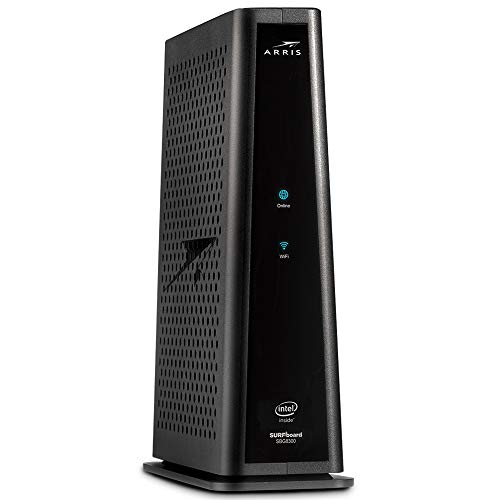
| Best Overall | Device Type: Cable modem router | Dual-Band: 2.4 GHz / 5 GHz | Ethernet Ports: 4 Gigabit | VIEW LATEST PRICE | Read Our Analysis |
| TP-Link Archer AC1750 WiFi Router with Alexa |

| Best Router Only | Device Type: Wi‑Fi router | Dual-Band: 2.4 GHz / 5 GHz | Ethernet Ports: 4 LAN + 1 WAN | VIEW LATEST PRICE | Read Our Analysis |
| NETGEAR Dual-Band N600 Router with Cable Modem (C3700-100NAS) |
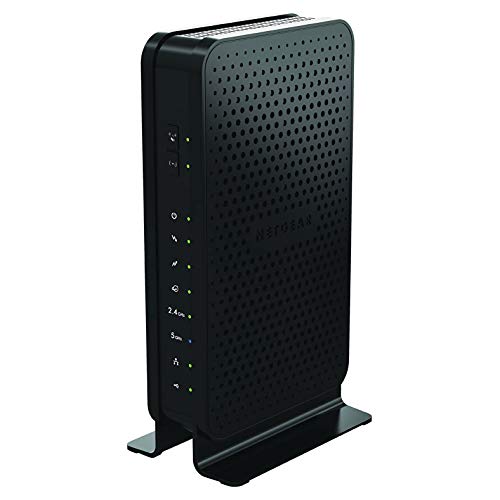
| Best Renewed Combo | Device Type: Cable modem router | Dual-Band: 2.4 GHz / 5 GHz | Ethernet Ports: 2 Gigabit | VIEW LATEST PRICE | Read Our Analysis |
| Netgear R7000 Dual-Band Gigabit Wireless Router |

| Best Performance | Device Type: Wireless router | Dual-Band: 2.4 GHz / 5 GHz | Ethernet Ports: 2 ports | VIEW LATEST PRICE | Read Our Analysis |
| Netgear N600 Wireless Dual Band Gigabit ADSL2+ Modem Router (DGND3700) |

| Best DSL Combo | Device Type: Modem router | Dual-Band: Dual-band | Ethernet Ports: 4 ports | VIEW LATEST PRICE | Read Our Analysis |
More Details on Our Top Picks
ARRIS SURFboard DOCSIS 3.1 Cable Modem Router
The ARRIS SURFboard DOCSIS 3.1 Cable Modem Router is a strong fit provided you want an all-in-one setup for a cable internet home, especially with Cox, Charter, and other compatible providers. You get a DOCSIS 3.1 modem, AC2350 dual-band Wi‑Fi, and four Gigabit Ethernet ports in one unit. It handles plans up to 4 Gbps and uses 32 x 8 channels plus OFDM support for solid performance. You can manage settings with the SURFboard Manager app or Alexa. Keep in mind, it isn’t compatible with Xfinity Comcast, and it doesn’t support cable voice service.
- Device Type:Cable modem router
- Dual-Band:2.4 GHz / 5 GHz
- Ethernet Ports:4 Gigabit
- Wi‑Fi Standard:Wi‑Fi 5
- Control Method:App, Alexa
- Security:Voice/Wi‑Fi mgmt
- Additional Feature:Supports 4 Gbps plans
- Additional Feature:Voice service not supported
- Additional Feature:Alexa Wi‑Fi management
TP-Link Archer AC1750 WiFi Router with Alexa
TP-Link’s Archer A7 AC1750 is a strong pick should you want a dual-band Wi‑Fi router that balances speed, range, and smart-home convenience. You get up to 1,750 Mbps across 2.4 GHz and 5 GHz bands, plus coverage that can reach 2,500 square feet. Use the Alexa app or voice controls to manage settings, while WPA2 security, parental controls, QoS, and a USB print server help you stay organized. Three fixed antennas, Gigabit ports, and dual IPv4/IPv6 support make it a practical fit for streaming, gaming, and everyday home networking.
- Device Type:Wi‑Fi router
- Dual-Band:2.4 GHz / 5 GHz
- Ethernet Ports:4 LAN + 1 WAN
- Wi‑Fi Standard:Wi‑Fi 5
- Control Method:App, voice
- Security:WPA/WPA2
- Additional Feature:2500 sq ft coverage
- Additional Feature:USB print server
- Additional Feature:Parental control features
NETGEAR Dual-Band N600 Router with Cable Modem (C3700-100NAS)
NETGEAR’s C3700-100NAS is a smart fit provided you want to cut cable rental fees while getting a reliable all-in-one modem and router for a smaller household or everyday streaming setup. You get DOCSIS 3.0 with 8×4 channel bonding, dual-band N600 WiFi, and up to 340 Mbps modem speeds, plus 600 Mbps wireless transfer rates. Two Gigabit Ethernet ports and one USB 2.0 port give you wired flexibility. Because it’s renewed and professionally checked, you can expect solid performance, strong coverage, and Amazon Renewed protection.
- Device Type:Cable modem router
- Dual-Band:2.4 GHz / 5 GHz
- Ethernet Ports:2 Gigabit
- Wi‑Fi Standard:Wi‑Fi 4
- Control Method:App, push button
- Security:WPS
- Additional Feature:2-in-1 modem router
- Additional Feature:Eliminate modem rental fees
- Additional Feature:Amazon Renewed product
Netgear R7000 Dual-Band Gigabit Wireless Router
Should you want a reliable dual-band Wi‑Fi 5 router with wide coverage and strong speeds, the NETGEAR R7000 is a solid fit for a busy home or small office. You get 2.4 GHz and 5 GHz bands, up to 1900 Mbps, and 1000 Mbps LAN ports for wired devices. It’s a Gigabit Dual-Band Wireless Router, model R7000-100PES, with app control, WPS, OpenVPN, and PPTP support. You can connect Ethernet and Wi‑Fi devices easily. It isn’t a modem, but it handles steady networking well.NETGEAR backs it with warranty support and strong user feedback.
- Device Type:Wireless router
- Dual-Band:2.4 GHz / 5 GHz
- Ethernet Ports:2 ports
- Wi‑Fi Standard:Wi‑Fi 5
- Control Method:App
- Security:WPS, VPN
- Additional Feature:OpenVPN support
- Additional Feature:Multiple-voltage compatible
- Additional Feature:Wide coverage
Netgear N600 Wireless Dual Band Gigabit ADSL2+ Modem Router (DGND3700)
The NETGEAR N600 Wireless Dual Band Gigabit ADSL2+ Modem Router (DGND3700) is a solid pick for households that want an all-in-one modem-router with strong wireless performance, especially whenever you stream HD video, game online, or share a connection across multiple devices. You get concurrent dual-band WiFi, a Gigabit WAN port, four LAN ports, and ReadySHARE USB access for shared storage. It works with major ADSL providers and many devices, from laptops to consoles. Live Parental Controls, guest access, and Push ’N’ Connect help you manage and secure your network easily.
- Device Type:Modem router
- Dual-Band:Dual-band
- Ethernet Ports:4 ports
- Wi‑Fi Standard:802.11a/b/g/n
- Control Method:App, Android, push button
- Security:WPS, parental controls
- Additional Feature:Built-in ADSL2+ modem
- Additional Feature:ReadySHARE USB storage
- Additional Feature:Guest network access
Factors to Consider When Choosing Dual-Band Modems
When we choose a dual-band modem, we need to check modem compatibility first so it works with our internet service. We should also weigh dual-band performance, speed requirements, port availability, and wireless range to match our needs. By comparing these factors, we can pick a modem that gives us reliable, fast coverage at home.
Modem Compatibility
Compatibility matters most because we need a modem that matches both our internet technology and our provider’s network. We should confirm support for the exact standard we use, whether that’s DOCSIS 3.0, DOCSIS 3.1, or ADSL2+, because each network needs its own modem type. Next, we need to verify that the model works with our ISP, since some units fit cable service only, while others support DSL, cable, or fiber connections. We also have to know whether we’re buying a modem-only device or a modem-router combo, because the WAN setup has to match our line. Finally, we should check the supported service speed and voice support whether we use cable digital voice, so our plan and phone service work without surprises.
Dual-Band Performance
Once we’ve confirmed a modem fits our ISP and internet type, we can focus on how well it handles wireless traffic. We want dual-band models that use both 2.4 GHz and 5 GHz to split devices and cut congestion. The 5 GHz band can carry faster, busier traffic, while 2.4 GHz reaches farther for rooms that sit at the edge of coverage. We should also check whether the modem/router broadcasts both bands at once, since concurrent operation helps if we’re streaming, gaming, or juggling multiple devices. Compare the combined wireless throughput rating, too, because figures like 600 Mbps, 1750 Mbps, or 1900 Mbps show the unit’s total wireless potential across both bands. Strong band performance keeps connections steadier and more flexible.
Speed Requirements
To keep a dual-band modem from slowing us down, we should match its maximum download and upload speeds to our internet plan so it doesn’t become the bottleneck. We also need to check total data transfer rate and channel bonding, because ratings like 600 Mbps, 1750 Mbps, or 4 Gbps usually translate into stronger real-world performance. Whenever we stream, game, or share the connection with several people, we should aim for at least gigabit-class throughput and modern dual-band support. We should also verify whether the modem uses DOCSIS 3.0 or DOCSIS 3.1, since DOCSIS 3.1 handles much faster plans. Finally, we can’t ignore upstream capacity. Whenever we upload large files, join video calls, or run cloud backups, solid upload speeds matter just as much.
Port Availability
After we’ve matched a dual-band modem’s speed to our internet plan, we should also check its port layout so it can handle all our wired and shared-device needs. We should count every Ethernet and USB port before we buy, because some modem-router combos offer only two ports, while others give us four LAN ports plus one or two USB ports. Should we want faster wired performance, we should look for Gigabit LAN support, since port speeds can run from 10/100 Mbps to 1000 Mbps. Four Ethernet ports usually suit multiple devices better than two. USB ports can let us share a printer or access external storage, but they aren’t standard. We should also confirm whether the unit includes a dedicated WAN port for cable or fiber service.
Wireless Range
How far should our dual-band modem reach? We should start by checking the coverage area, because range matters more than headline speed while we need steady service everywhere. Some models cover about 2,500 sq ft, while others simply promise wide household coverage. Antenna design also shapes reach: three fixed antennas or internal antennas can spread signal more evenly through rooms. Dual-band support helps us balance distance and speed, since 2.4 GHz usually goes farther and 5 GHz works best nearby for faster connections. Even though a modem advertises 1,900 Mbps or 2,350 Mbps, our actual range still depends on layout, interference, and placement. For whole-home use, we should favor units that clearly mention strong household coverage or large maximum coverage areas.
Security Features
Once we’ve checked coverage and speed, we should also look closely at security features, because a dual-band modem has to protect the network as well as reach it. We should favor modem-routers that support WPA2, WPA2-Enterprise, or WPA-Enterprise, since stronger encryption keeps wireless traffic harder to intercept. We also want solid firewall protection, or at least high firewall security settings, so we add a defense layer beyond Wi‑Fi encryption. WPS can speed setup, but we shouldn’t let convenience outrank stronger authentication. Whenever available, app-based controls help us change passwords or disable wireless access fast. Guest networks, parental controls, and internet security tools can further segment users and reduce exposure on the main network, which keeps everyday browsing safer.
Voice Support
Whenever we choose a dual-band modem, we also need to confirm voice support, because Wi‑Fi and phone service aren’t the same thing. We should check whether the modem includes built-in digital voice support, since some modem-router combos handle internet and wireless well but skip cable digital voice service entirely. If we need home phone service, we must verify compatibility with our provider before we buy, because many dual-band models are internet-only. We should also look for dedicated voice ports or clear voice-capable labeling. A standard modem-router may offer Ethernet and Wi‑Fi yet still lack telephony features. Most crucially, we need to match the exact service type we use: cable voice, DSL voice, and internet-only connections aren’t interchangeable, so dual-band speed alone never guarantees phone support.
Setup and Control
For setup and control, we should choose a dual-band modem whose installation fits how we like to work, whether that means an app, a browser-based setup, push-button pairing, or a guided quick-install process. A companion management app can make it easier to adjust Wi‑Fi settings, check network activity, and turn on parental controls or security features. We should also look for voice assistant support, but only as a handy extra, not a substitute for a clear setup flow. After installation, useful controls like guest access, QoS, usage meters, and traffic reports help us manage the network with less hassle. Finally, we should confirm that the modem works smoothly across operating systems and browsers, so setup and ongoing administration stay simple wherever we connect.
Frequently Asked Questions
Do Dual-Band Modems Work Better for Streaming 4K Video?
Yes, dual-band modems often give smoother 4K streaming because they split traffic across two bands, which can cut congestion and reduce interference. For video, the 5 GHz band is usually the better choice when the device is close enough to maintain a strong signal, since it often provides faster and more consistent speeds.
Can One Modem Support Both Gaming and Smart Home Devices?
Yes. A single modem can handle both gaming and smart home devices if it has enough capacity. Dual band models help split traffic, limit congestion, and keep gaming responsive while smart devices use bandwidth in the background.
How Often Should I Update Firmware on a Dual-Band Modem?
Update the firmware whenever the manufacturer publishes a security patch or stability improvement, which is often every few months. Check for new versions each month, turn on automatic updates if your modem supports them, and apply urgent fixes as soon as they appear.
Will a Dual-Band Modem Improve Wi-Fi Range in Large Homes?
Yes, a dual band modem can help a little, but it will not suddenly push Wi Fi across a huge house. Greater range usually comes from mesh nodes, smarter placement, and fewer walls between the router and your devices.
Are Dual-Band Modems Compatible With All Internet Providers?
No. Dual band modems do not work with every internet provider. Check your ISP approved modem list, required standards, and connection type because some providers require specific modems or gateways.
Conclusion
As we wrap up, let’s consider of a dual-band modem as the heartbeat of our home network, quietly keeping every stream, call, and game in rhythm. The ARRIS SURFboard, NETGEAR C3700, DGND3700, TP-Link Archer A7, and R7000 each shine for different needs, but the right choice depends on our service and setup. Provided we match compatibility with performance, we’ll keep our connection steady, our speeds balanced, and our digital life moving smoothly.
