

Most homes run on Wi‑Fi for work, school, and streaming, so picking the right modem and router reduces dropouts and boosts speeds.
This guide covers six practical setups that suit common internet plans and household needs.
Options range from DOCSIS 3.1 cable combos for multi‑gig plans to Wi‑Fi 7 routers with MLO and 4K‑QAM.
I also call out models with VPN, parental controls, and multi‑gig ports so gear can grow with your household.
| Motorola MG8702 DOCSIS 3.1 Cable Modem + Router |
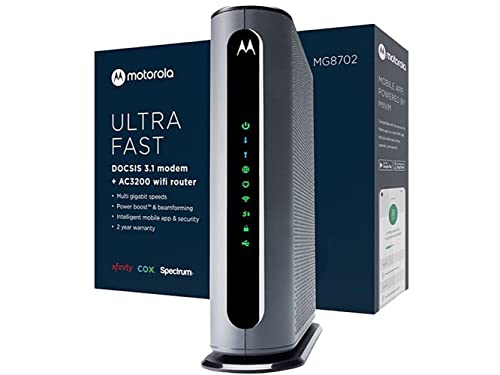
| Best for Simplicity | Device Type: Modem + Wi‑Fi router combo (DOCSIS 3.1) | Wireless Standard / Wi‑Fi Generation: AC (AC3200) | ISP Compatibility (Cable Providers): Approved for Xfinity, Cox, Spectrum | VIEW LATEST PRICE | Read Our Analysis |
| ARRIS G34 DOCSIS 3.1 WiFi 6 Cable Modem Router |

| Best Multi‑Gig Combo | Device Type: Modem + Wi‑Fi router combo (DOCSIS 3.1) | Wireless Standard / Wi‑Fi Generation: Wi‑Fi 6 (802.11ax, AX3000) | ISP Compatibility (Cable Providers): Approved/tested for Xfinity, Cox, Spectrum (CableLabs certified) | VIEW LATEST PRICE | Read Our Analysis |
| GL.iNet Flint 3 (GL-BE9300) Tri-Band WiFi 7 Router |

| Cutting‑Edge Performance | Device Type: Router only (Wi‑Fi 7) | Wireless Standard / Wi‑Fi Generation: Wi‑Fi 7 (802.11.be) | ISP Compatibility (Cable Providers): Not a modem — used as router with any modem (compatible with fiber/ISP via separate modem) | VIEW LATEST PRICE | Read Our Analysis |
| ARRIS SBG7400AC2 Modem Router Combo (AC2350) |

| Reliable Budget Combo | Device Type: Modem + Wi‑Fi router combo (DOCSIS 3.0) | Wireless Standard / Wi‑Fi Generation: AC (AC2350) | ISP Compatibility (Cable Providers): Approved for Xfinity, Cox, Spectrum | VIEW LATEST PRICE | Read Our Analysis |
| GL.iNet Flint 3e (GL-BE6500) WiFi 7 Router |

| Best Value Wi‑Fi 7 | Device Type: Router only (Wi‑Fi 7) | Wireless Standard / Wi‑Fi Generation: Wi‑Fi 7 (802.11.be) | ISP Compatibility (Cable Providers): Router only — pairs with fiber/modem separately | VIEW LATEST PRICE | Read Our Analysis |
| NETGEAR Nighthawk CAX80 Cable Modem WiFi 6 Router |

| Power‑User Choice | Device Type: Modem + Wi‑Fi router combo (DOCSIS 3.1) | Wireless Standard / Wi‑Fi Generation: Wi‑Fi 6 (802.11ax, AX6000) | ISP Compatibility (Cable Providers): Approved for Xfinity, Spectrum, Cox | VIEW LATEST PRICE | Read Our Analysis |
More Details on Our Top Picks
Motorola MG8702 DOCSIS 3.1 Cable Modem + Router
If you want a simple all-in-one solution that saves money and cuts clutter, the Motorola MG8702 is a great pick. You’ll get a DOCSIS 3.1 cable modem and AC3200 router in one box, so you can stop renting gear and cut costs fast. It works with Comcast Xfinity, Cox, and Charter Spectrum, and it handles the fastest plans now and later. You’ll enjoy AnyBeam beamforming, Range Boost, and Power Boost for steadier coverage. The mobile app helps you set up, manage guests, run speed tests, set parental controls, and monitor usage easily. Trust Motorola reliability.
- Device Type:Modem + Wi‑Fi router combo (DOCSIS 3.1)
- Wireless Standard / Wi‑Fi Generation:AC (AC3200)
- ISP Compatibility (Cable Providers):Approved for Xfinity, Cox, Spectrum
- Security / VPN & Protocols:App-based network security, parental controls, security alerts
- Management / App or Web Control:Mobile app for setup, guest network, monitoring, parental controls
- Warranty / Support:2 years free expert support (ownership support noted)
- Additional Feature:AnyBeam Wi‑Fi beamforming
- Additional Feature:Integrated modem+router
- Additional Feature:2 years free support
ARRIS G34 DOCSIS 3.1 WiFi 6 Cable Modem Router
Gamers, streamers, and busy households will like the ARRIS G34 because it combines a DOCSIS 3.1 multi-gig modem and a Wi-Fi 6 router in one compact box, so you get faster cable speeds and stronger home Wi-Fi without juggling two devices. You’ll enjoy up to 2.5 Gbps cable throughput when your ISP supports it and AX3000 wireless that serves many devices with less lag. Setup is simple: connect coax, power up, activate with your provider, then personalize SSID and password. Built-in security, parental controls, and app management keep things easy and safe across about 2,500 square feet.
- Device Type:Modem + Wi‑Fi router combo (DOCSIS 3.1)
- Wireless Standard / Wi‑Fi Generation:Wi‑Fi 6 (802.11ax, AX3000)
- ISP Compatibility (Cable Providers):Approved/tested for Xfinity, Cox, Spectrum (CableLabs certified)
- Security / VPN & Protocols:WPA/WPA2/WPA3, guest mode, router firewall, security updates
- Management / App or Web Control:App control for setup and management
- Warranty / Support:2‑year limited warranty
- Additional Feature:Multi‑gig 2.5 Gbps modem
- Additional Feature:AX3000 Wi‑Fi 6
- Additional Feature:4 × 1 Gbps LAN
GL.iNet Flint 3 (GL-BE9300) Tri-Band WiFi 7 Router
Think of the Flint 3 as a future-ready home hub that’s built for people who want fast, reliable Wi‑Fi across a big space without fuss. You’ll like the Flint 3 if you need long-range coverage up to 2,000 square feet and low-latency performance for gaming, 8K streaming, and video calls. It uses Wi‑Fi 7 with MLO, 4K QAM, and a 6 GHz band to speed things up while keeping older devices connected. Setup is simple via Ethernet or the app, and you can add WireGuard or OpenVPN, AdGuard Home, parental controls, and plugins for extra features.
- Device Type:Router only (Wi‑Fi 7)
- Wireless Standard / Wi‑Fi Generation:Wi‑Fi 7 (802.11.be)
- ISP Compatibility (Cable Providers):Not a modem — used as router with any modem (compatible with fiber/ISP via separate modem)
- Security / VPN & Protocols:WPA3/WPA2, WireGuard & OpenVPN, AdGuard Home support
- Management / App or Web Control:Mobile app + web Admin Panel for setup and advanced settings
- Warranty / Support:2 years warranty; security updates
- Additional Feature:Tri‑band with 6 GHz
- Additional Feature:Five 2.5G Ethernet ports
- Additional Feature:12.5 Gbps aggregate
ARRIS SBG7400AC2 Modem Router Combo (AC2350)
The ARRIS SBG7400AC2 shines for people who want a simple, all-in-one modem and Wi-Fi router that handles fast cable internet without a fuss. You’ll get DOCSIS 3.0 modem tech and AC2350 Wi‑Fi that suit plans up to 960 Mbps. Setup is easy with the SURFboard Central App, which helps you activate service, name your network, and monitor devices. You can set time limits and pause internet for kids. It has four 1 Gbps Ethernet ports and cuts rental fees when you own it. Note it won’t work with fiber or DSL providers and lacks digital voice support.
- Device Type:Modem + Wi‑Fi router combo (DOCSIS 3.0)
- Wireless Standard / Wi‑Fi Generation:AC (AC2350)
- ISP Compatibility (Cable Providers):Approved for Xfinity, Cox, Spectrum
- Security / VPN & Protocols:App parental controls, basic security features (via SURFboard Central)
- Management / App or Web Control:SURFboard Central App for activation, setup, monitoring
- Warranty / Support:(Vendor brand support) ownership benefits; brand reliability noted (typical SURFboard support)
- Additional Feature:DOCSIS 3.0 modem
- Additional Feature:SURFboard Central app
- Additional Feature:Supports plans to 960 Mbps
GL.iNet Flint 3e (GL-BE6500) WiFi 7 Router
If you want a compact home router that handles lots of devices and keeps streaming and video calls smooth, the GL.iNet Flint 3e (GL-BE6500) is a strong pick because it brings Wi‑Fi 7 speeds and modern features into a small, easy-to-manage package. You’ll get theoretical speeds to 6.5 Gbps, DDR4 1 GB memory, and low latency for 4K or 8K streaming and gaming. It adds MLO, enhanced OFDMA, 4K-QAM, and Multi-RUs for stability. You can run WireGuard or OpenVPN near 680 Mbps, use five 2.5G Ethernet ports, cover about 2,500 sq ft, and connect 100+ devices. AdGuard Home and Bark support keep browsing safer. Setup is simple via web admin and plugins add features.
- Device Type:Router only (Wi‑Fi 7)
- Wireless Standard / Wi‑Fi Generation:Wi‑Fi 7 (802.11.be)
- ISP Compatibility (Cable Providers):Router only — pairs with fiber/modem separately
- Security / VPN & Protocols:WPA3/WPA2, WireGuard & OpenVPN, AdGuard Home support
- Management / App or Web Control:Web Admin Panel (and tutorials) for setup; supports plugins
- Warranty / Support:Warranty noted (return guarantee; seller details usually 30‑day; product warranty indicated)
- Additional Feature:Five 2.5G Ethernet ports
- Additional Feature:AdGuard Home support
- Additional Feature:Supports 100+ devices
NETGEAR Nighthawk CAX80 Cable Modem WiFi 6 Router
For a household that wants fast, simple internet without juggling a separate modem and router, the NETGEAR Nighthawk CAX80 is a strong all-in-one choice thanks to its built-in DOCSIS 3.1 modem and Wi-Fi 6 performance. You’ll plug into major cable providers like Xfinity, Spectrum, or Cox and get AX6000 speeds up to 6 Gbps. The unit covers about 2,500 sq ft and handles roughly 30 devices with three fixed antennas. You get 4 Gigabit LAN ports plus a 2.5 Gbps multi‑gig port and USB 3.0. Use the Nighthawk app, enable WPA3 and NETGEAR Armor, and enjoy simple setup.
- Device Type:Modem + Wi‑Fi router combo (DOCSIS 3.1)
- Wireless Standard / Wi‑Fi Generation:Wi‑Fi 6 (802.11ax, AX6000)
- ISP Compatibility (Cable Providers):Approved for Xfinity, Spectrum, Cox
- Security / VPN & Protocols:WPA/WPA2/WPA3, NETGEAR Armor (security suite), firewall
- Management / App or Web Control:Nighthawk app for setup, settings, monitoring
- Warranty / Support:1‑year warranty (manufacturer)
- Additional Feature:AX6000 Wi‑Fi 6
- Additional Feature:2.5 Gbps multi‑gig port
- Additional Feature:USB 3.0 file sharing
Factors to Consider When Choosing a Home Router and Modem
When I’m helping someone pick a router and modem, I start by matching the device to their internet connection and the speeds they actually get, because compatibility and throughput matter most. I also look at wireless generation support, coverage, and how many devices the setup must handle, and then I check security features and parental controls to keep the home network safe and manageable. Together these points guide sensible choices that fit your budget and daily needs so you won’t end up paying for features you don’t use or missing those you do.
Connection Type Compatibility
Because your internet type determines what gear will actually work, I want to help you match your modem and router to the service you pay for. First, verify your service: cable, fiber, DSL, or satellite. That matters because each needs specific hardware. For cable, pick a DOCSIS modem. DOCSIS 3.1 fits multi gig plans and lasts longer, while 3.0 can cap you below gigabit. If you have fiber or DSL, a cable modem won’t work. Instead get a router only or a modem made for fiber or DSL. Also check for built in VoIP if you use bundled phone service, since many combos lack cable voice support. Finally confirm channel bonding and WAN port speeds match your plan to avoid hidden bottlenecks.
Speed And Throughput
Although speed numbers on a box can look exciting, I want you to focus on what really matters at home: sustained throughput under real use. I look at your ISP plan first and match devices so your modem and router handle at least that speed. For cable, I check DOCSIS version and channel bonding because those set real WAN limits. Then I check wired ports since a 1 Gbps port caps any single wired device unless you have 2.5G, 5G, 10G, or link aggregation. I also consider Wi‑Fi features that help sustained loads like MU-MIMO, OFDMA, and QoS. Finally, I trust independent speed tests over peak claims and watch how devices handle many users at once to keep performance steady.
Wireless Generation Support
Now that we’ve looked at sustained throughput and how routers and modems handle real loads, I want to talk about wireless generations and why they matter for your home. I’d choose the newest Wi‑Fi generation your devices support because it gives higher real speeds, lower delay, and better handling of many devices. Wi‑Fi 6 adds OFDMA and MU‑MIMO for more efficient simultaneous connections. Wi‑Fi 6E and 7 open 6 GHz and add features like multi link operation for even lower delay and more total capacity. Match bands and 6 GHz inclusion to your device count and heavy users. Remember older gadgets won’t get full benefits, so pick a generation that helps most of your devices. Look for range, beamforming, and multi‑client quality, not just headline Gbps.
Security And Parental Controls
When you pick a router and modem, think about safety and control as part of the core features, not extras you can add later. I want you to choose devices with modern encryption like WPA3 or WPA2 PSK and automatic security updates so your family stays protected without extra work. Look for built in firewall and network segmentation so IoT and guest gadgets stay apart from phones and computers. Prefer routers with app or web based parental controls that do content filtering, set schedules, and pause devices individually. Pick equipment that offers DNS level filtering or safe DNS integration to block malicious and unwanted sites across your whole network. Also verify VPN support and secure remote management with strong passwords and two factor authentication.
Coverage And Device Capacity
If you want steady Wi‑Fi that covers every room and keeps all your devices working at once, start by matching the router to your home size and device load. I check square footage first: under 1,000 sq ft a single router is fine, 1,000 to 2,500 sq ft needs a stronger unit, and over 2,500 or multi story homes usually need mesh or extra access points. Then I count devices and pick gear rated for that many concurrent clients. I prefer dual band for mixed devices and tri band or multi link for heavy streaming and gaming. I also look for MU MIMO, OFDMA, and link aggregation to raise real world capacity. Finally I place APs around thick walls or use wired backhaul to keep coverage consistent.
Frequently Asked Questions
Can I Use a Mesh System With These Modem-Router Combos?
Yes. Put the modem‑router combo into bridge or passthrough mode so the mesh system performs routing. I have done this; it typically eliminates double NAT and provides better whole home coverage.
Do These Devices Support IPV6 and VPN Passthrough?
Yes. I will verify each model’s firmware for IPv6 support and check the settings required, test IPv6 connectivity, and confirm that common VPN protocols such as IPsec and OpenVPN can pass through correctly for your devices.
How Do I Secure Guest Network Access on These Models?
I will create a separate SSID named GuestNet with a unique strong passphrase, enable client isolation so clients cannot communicate with each other, apply per-client bandwidth limits of 5 Mbps down and 2 Mbps up during peak hours and allow 20 Mbps down off peak, schedule the SSID to be active only from 08:00 to 22:00, disable guest access to the LAN and only permit internet access, configure WPA3 Personal with WPA2 fallback for device compatibility, enable automatic firmware updates or schedule weekly checks and apply security patches within 48 hours, monitor connection and authentication logs daily and set alerts for abnormal activity, and revoke credentials immediately for compromised devices or when access is no longer required.
Will Firmware Updates Be Automatic or Require Manual Installation?
Automatic update behavior varies by model and configuration. I typically enable automatic updates when supported, but I review the router’s administration interface because some models require manual approval or allow scheduled installations. I confirm the current setting and adjust preferences as needed.
Can I Prioritize Devices for Gaming or Video Streaming?
Yes. I can configure your router to prioritize specific devices for gaming or streaming by enabling quality of service or device priority in the router settings. I will allocate higher bandwidth and reduce latency for the selected devices so their traffic is handled first.
Final Thoughts
I’ve walked you through solid setups that match plans and priorities, and I know picking gear can feel puzzling. Pick a modem and router that fit your ISP, speed, and space. Look for multi‑gig ports, strong security, and easy controls. If you want future proofing, choose DOCSIS 3.1 or Wi‑Fi 7 models. Trust your needs, test your placement, and tweak settings. Small steps yield steady, satisfying speed.



