

A laptop mount can make your workspace feel cleaner and more comfortable. It lifts your screen, clears up desk space, and can ease neck strain.
Some mounts attach to a desk, wall, or vehicle seat for flexible use. Others add better airflow or firmer support for heavier laptops.
The best choice depends on your laptop size, setup, and daily routine.
| RAM MOUNTS Universal Vehicle Laptop Mount (RAM-VB-196-SW1) |

| Best For Vehicles | Mount Type: Vehicle laptop mount | Compatibility: Universal vehicle fit | Adjustability: Dual swing arm | VIEW LATEST PRICE | Read Our Analysis |
| OMOTON Aluminum Laptop Stand for All Laptops |

| Best Portable Stand | Mount Type: Laptop stand | Compatibility: 10–16 inch laptops | Adjustability: Ergonomic elevation | VIEW LATEST PRICE | Read Our Analysis |
| WALI Laptop Desk Mount with Adjustable Laptop Holder |

| Best Adjustable Mount | Mount Type: Desk mount | Compatibility: Up to 17 inch laptops | Adjustability: Tilt/swivel/rotate | VIEW LATEST PRICE | Read Our Analysis |
| ELETIUO Wall & Under Desk Laptop Mount Holder |

| Best Space Saver | Mount Type: Wall/under-desk mount | Compatibility: Up to 26 mm devices | Adjustability: Adjustable spacing | VIEW LATEST PRICE | Read Our Analysis |
| Mount-It! Ergonomic Laptop Arm for Wall/Pole Mounting |

| Best Wall Mount | Mount Type: Wall/pole arm | Compatibility: 10–15.6 inch laptops | Adjustability: Full motion | VIEW LATEST PRICE | Read Our Analysis |
| MOUNT PRO 2-in-1 Laptop Monitor Desk Arm Mount |
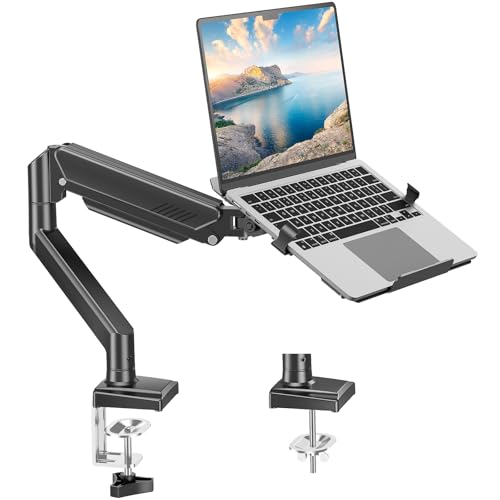
| Best 2-in-1 Mount | Mount Type: Desk arm mount | Compatibility: Up to 17 inch laptops | Adjustability: Tilt/swivel/rotate | VIEW LATEST PRICE | Read Our Analysis |
| Mount-It! Car Laptop Mount for 12–15.4 Inch Laptops |

| Best Car Mount | Mount Type: Car laptop mount | Compatibility: 12–15.4 inch laptops | Adjustability: Height adjustable | VIEW LATEST PRICE | Read Our Analysis |
More Details on Our Top Picks
RAM MOUNTS Universal Vehicle Laptop Mount (RAM-VB-196-SW1)
Should you spend long hours in your car, truck, or work vehicle, the RAM MOUNTS Universal Vehicle Laptop Mount, model RAM-VB-196-SW1, is made for you. You can install it with your existing passenger seat bolts, so you skip drilling and keep your vehicle intact. The universal base fits many rides, which makes setup easier. Its patented ball and socket system helps reduce shock and vibration, and the dual swing arm lets you adjust your laptop fast. With a lifetime warranty, you can work with more confidence and less stress on the road.
- Mount Type:Vehicle laptop mount
- Compatibility:Universal vehicle fit
- Adjustability:Dual swing arm
- Installation:Seat-bolt install
- Material:Patented ball/socket
- Cooling:Shock damping
- Additional Feature:Passenger seat bolt mount
- Additional Feature:Dual articulating swing arm
- Additional Feature:Lifetime warranty
OMOTON Aluminum Laptop Stand for All Laptops
The OMOTON Aluminum Laptop Stand is a smart pick should you want a sturdy, no-fuss mount that works with most laptops from 10 to 16 inches. You can place your MacBook, Surface, ThinkPad, or Chromebook on it with ease. Its aluminum alloy frame feels solid, yet you can still detach and carry it without hassle. Because it elevates your screen to eye level, your neck and shoulders get a break. The open tower design also helps air move under your laptop, which can cut heat. Soft rubber pads keep your device steady and scratch-free.
- Mount Type:Laptop stand
- Compatibility:10–16 inch laptops
- Adjustability:Ergonomic elevation
- Installation:Detachable setup
- Material:Aluminum alloy
- Cooling:Airflow underneath
- Additional Feature:Detachable portable design
- Additional Feature:Eye-level ergonomic lift
- Additional Feature:11 lb weight capacity
WALI Laptop Desk Mount with Adjustable Laptop Holder
Should you want a mount that helps a laptop feel steady, cool, and easy to position, the WALI Laptop Desk Mount with Adjustable Laptop Holder is a smart pick for home offices and busy workspaces. You can fit laptops up to 17 inches and support loads up to 22 lbs, so your setup feels secure. Then, the arm extends, retracts, tilts, swivels, and rotates, letting you fine-tune your view without strain. The ventilated tray helps air move under your laptop, which can keep heat down. Plus, the C-clamp and grommet options make installation easier.
- Mount Type:Desk mount
- Compatibility:Up to 17 inch laptops
- Adjustability:Tilt/swivel/rotate
- Installation:C-clamp/grommet
- Material:Alloy steel/aluminum
- Cooling:Ventilated tray
- Additional Feature:16-inch height pole
- Additional Feature:360° rotation
- Additional Feature:14 x 11 tray
ELETIUO Wall & Under Desk Laptop Mount Holder
Should you be tired of a laptop taking over your desk, the ELETIUO Wall & Under Desk Laptop Mount Holder gives you a neat, low-stress fix that feels almost too easy. You can mount it on a wall, under a desk, or on a shelf, so your gear stays close without crowding your workspace. It fits laptops, MacBooks, Surface devices, keyboards, tablets, and even a Nintendo Switch. The adjustable spacing handles devices up to 26 mm thick. With anti-scratch pads, cutouts for ports, and either adhesive strips or screws, you get smart storage and solid peace of mind.
- Mount Type:Wall/under-desk mount
- Compatibility:Up to 26 mm devices
- Adjustability:Adjustable spacing
- Installation:Adhesive or screw
- Material:Plastic
- Cooling:Open cut-out
- Additional Feature:26 mm thickness
- Additional Feature:Dual installation methods
- Additional Feature:Accessible port cutouts
Mount-It! Ergonomic Laptop Arm for Wall/Pole Mounting
Should your desk feel cramped, this Mount-It! ergonomic laptop arm can be a smart fix for both comfort and space. You can mount it to a wall or pole, and it comes with the brackets you need for either setup. Once installed, you get full motion control with a 180° swivel, a 21.8-inch reach, and tilt from +90° to -45°. That helps you find a position that eases neck strain. It fits laptops from 10 to 15.6 inches, and it can also hold a 32-inch monitor.
- Mount Type:Wall/pole arm
- Compatibility:10–15.6 inch laptops
- Adjustability:Full motion
- Installation:Wall or pole mount
- Material:Metal
- Cooling:Space-saving
- Additional Feature:Wall or pole mount
- Additional Feature:21.8-inch extension
- Additional Feature:Lifetime warranty
MOUNT PRO 2-in-1 Laptop Monitor Desk Arm Mount
Should you desire one sturdy arm that can hold both your laptop and your monitor, the MOUNT PRO 2-in-1 Laptop Monitor Desk Arm Mount is a smart fit for a busy desk. You can use it with laptops up to 17 inches and monitors from 13 to 32 inches, as long as they stay under 22 pounds. Its aluminum build feels solid, while the clamp or grommet setup lets you match your desk. You can tilt, swivel, and rotate the arm for better posture and easier work. Cable management also helps keep your space neat and calm.
- Mount Type:Desk arm mount
- Compatibility:Up to 17 inch laptops
- Adjustability:Tilt/swivel/rotate
- Installation:Clamp or grommet
- Material:Aluminum
- Cooling:Cable management
- Additional Feature:2-in-1 monitor stand
- Additional Feature:Internal cable management
- Additional Feature:2-year warranty
Mount-It! Car Laptop Mount for 12–15.4 Inch Laptops
The Mount-It! Car Laptop Mount gives you a steady, no-drill way to work from your passenger seat. It fits 12 to 15.4 inch laptops and supports up to 9 pounds, so you can trust it with many everyday machines. You can adjust the height from 23 to 35 inches, then swivel and tilt it until the screen feels right. Velcro straps help hold your laptop still, while the vented tray keeps air moving. Its alloy steel and aluminum build feels durable, and setup stays simple with included hardware and US support.
- Mount Type:Car laptop mount
- Compatibility:12–15.4 inch laptops
- Adjustability:Height adjustable
- Installation:No-drill install
- Material:Alloy steel/aluminum
- Cooling:Vented tray
- Additional Feature:Velcro laptop straps
- Additional Feature:23 to 35-inch height
- Additional Feature:Alloy steel aluminum construction
Factors to Consider When Choosing Laptop Mounts
Upon selecting a laptop mount, start with the mounting type so it fits your car, desk, or wall the way you need it to. Then check device compatibility, adjustability range, and space efficiency so your laptop feels easy to use without taking over your space. Ultimately, look for strong stability and support, because a mount should hold your device steady and help you feel confident every time you use it.
Mounting Type
Mounting type can make or break how easy your laptop mount is to set up, and it also affects how steady it feels once it’s in place. You can choose clamp, grommet, or no-drill options, depending on your desk and how much effort you want to spend. Clamp mounts are quick and handy, while grommet styles give you a tighter hold should you want extra security. Some desk mounts offer both methods, so you can fit different desk thicknesses and adjust the placement with less stress. In case you need a cleaner look, wall and pole mounts use vertical space well. For your car, seat-bolt mounts stay firm without permanent changes. And in the event that you move often, portable mounts let you pack up fast.
Device Compatibility
A good fit starts with your laptop’s size and shape, because not every mount handles every device with the same ease. Check the screen size initially, since many mounts work for laptops from 10 to 17 inches. Then confirm the weight limit. Should your machine be heavier than the mount can hold, you’ll feel the wobble right away, and nobody wants that little drama on the desk.
Next, look for a design that matches your laptop’s thickness and form, whether you use a MacBook, Chromebook, or another model. Universal compatibility helps, too, because brands like Dell, HP, and Lenovo should sit safely without fuss. Also, choose a mount with ventilation or comfort features, so your laptop stays cooler and your setup feels better during long work sessions.
Adjustability Range
More adjustability usually means less strain on your body, and that can make a big difference during a long workday. Whenever you choose a laptop mount, look at how high it can rise and how far it can extend. You want your screen near eye level so you can keep your neck relaxed and your spine neutral.
Next, check whether the mount tilts, swivels, or rotates. Those small moves help you fine-tune your view without hunching or twisting. Also, consider your desk and how much movement you need for your own setup. A mount with a wider range gives you more freedom, and that matters in case you share your workspace with others. With the right range, you can stay comfortable and focused.
Space Efficiency
Whenever desk space feels tight, the right laptop mount can make your whole setup breathe easier. You can lift your laptop off the desk and instantly open room for a mouse, notebook, or second monitor. That extra surface helps your workspace feel calmer and less crowded. Should you work in a small room, wall or under-desk mounts give your laptop a set spot without stealing precious space. You can also choose a compact mount to keep the setup slim and neat. Adjustable models help you place the screen where it fits best, so you use space with purpose. Some mounts even hide cables, which cuts visual mess and keeps your desk looking clean. With the right pick, you create more room and a better flow.
Stability And Support
Stability matters most at the moment your laptop mount has to do real work, because even a small wobble can make typing feel annoying and unsafe. You need a mount that holds steady while you move, type, or shift position. Check the weight capacity initially, since many mounts safely support 9 to over 22 pounds. Then look at height, tilt, and swivel adjustments, because they help you find a balanced angle without extra strain. Strong materials like aluminum or steel also matter, since they keep the frame firm over time. Ultimately, secure attachment to the surface cuts movement and helps your setup feel solid. As your mount supports your laptop well, you can focus better and work with less stress.
Installation Method
How one installs a laptop mount can make setup feel easy or turn it into a weekend headache, so it’s worth slowing down here. You want a method that fits your space and your gear. Should you need a fast, reversible setup, a no-drill mount can use existing vehicle or desk features and save you from permanent changes. Adhesive mounts keep things tool-free and work best for lighter devices. At the time of mounting a heavier laptop, screw-in options with anchors give you a firmer hold. Also, check whether your surface works with a C-clamp or grommet setup, since the wrong fit can waste time. Before you start, confirm the package includes the hardware and clear instructions. That little check can spare you a lot of frustration later.
Warranty Coverage
After you choose the right way to mount your laptop, the next thing to check is the warranty, because it can save you from a costly surprise later. Some mounts come with lifetime coverage, while others only protect you for one or two years. A stronger warranty usually shows the maker trusts the mount’s build, and that can ease your mind whenever you depend on it every day.
Look closely at what the warranty covers. You could get help for faulty parts, labor, or even shipping on a replacement. Also, check the return policy, since that gives you a chance to send it back in case it doesn’t fit your setup. Finally, make sure customer support is easy to reach, because quick help matters whenever something goes wrong.
Frequently Asked Questions
Can Laptop Mounts Damage My Desk or Vehicle Interior?
Yes, they can when you over tighten clamps, use poor pads, or leave mounts in one spot too long. You will protect your desk or interior by checking fit, adding cushioning, and removing mounts carefully.
Are These Mounts Compatible With Dual-Monitor Setups?
Yes, if you choose a mount with enough weight capacity and adjustable arms. You will need separate monitor arms or a dual screen dock, though, since most laptop mounts do not directly support two monitors together.
How Difficult Is the Installation Process for Beginners?
It’s usually straightforward, like assembling a bookshelf with a clear guide. You’ll likely need basic tools, follow a few steps, and secure everything carefully. Should you be patient, you won’t find it intimidating.
Do Laptop Mounts Improve Posture During Long Work Sessions?
Yes, you’ll usually improve posture because you raise your screen, align your neck, and reduce slouching. You’ll still need an external keyboard and regular breaks though, to keep your shoulders and wrists comfortable.
Can I Use a Laptop Mount With a Docking Station?
Yes, you can use a laptop mount with a docking station. You will keep cables tidy, connect peripherals easily, and move your laptop less. Just make sure the mount leaves room for the dock and ports.
Wrap Up
A laptop mount can do more than hold your device. It can help you sit better, work longer, and keep your desk from turning into a tangled mess. Should your neck feel tight or your workspace feel cramped, the right mount can make a real difference.
Below, you’ll find seven solid options for home, office, and car use. Each one brings a different strength, so you can pick what fits your space and your routine.
1. RAM MOUNTS Universal Vehicle Laptop Mount (RAM-VB-196-SW1)
Should you work on the road, this mount gives you strong support in your vehicle. It uses a sturdy build that helps keep your laptop steady, even when you’re moving around. That matters when you need to type, check maps, or handle quick tasks without wrestling your setup.
You also get flexible adjustment, which helps you place your screen at a safer, easier angle. That can reduce strain on your neck and shoulders during long drives or job stops. Because the mount is built for vehicle use, it works best when you want a dependable mobile workstation.
2. OMOTON Aluminum Laptop Stand for All Laptops
This stand is a simple fix for a cluttered desk. It lifts your laptop off the surface, which frees up room for a mouse, notebook, or coffee cup. That alone can make your desk feel calmer and easier to use.
The aluminum frame also helps with airflow. So, should your laptop tend to get warm, this stand gives it a little breathing room. It’s a smart pick should you want cleaner lines, a cooler device, and a setup that feels more open.
3. WALI Laptop Desk Mount with Adjustable Laptop Holder
Should you want your laptop off the desk but still close at hand, this mount gives you that balance. It attaches to your desk and holds your laptop in a raised position, which can help you build a more ergonomic workspace. You can adjust the angle to fit your view and posture.
That kind of setup works well should you switch between typing, reading, and video calls. It keeps your laptop in a comfortable spot while making your desk feel less crowded. For many people, that’s the sweet spot between comfort and control.
4. ELETIUO Wall & Under Desk Laptop Mount Holder
This mount is a good choice should you want to save surface space fast. You can place it on a wall or under a desk, which keeps your laptop out of the way when you’re not using it. That makes your area look neat without much effort.
It also helps should your room feel tight or shared. Since the mount stores your laptop in a fixed spot, you don’t have to keep moving it around. That small change can make your setup feel much more organized and less stressful.
5. Mount-It! Ergonomic Laptop Arm for Wall or Pole Mounting
This arm gives you more freedom to position your laptop where you want it. Because it mounts to a wall or pole, it can work in different rooms and layouts. You can raise, lower, or angle your laptop so it fits your posture better.
That flexibility helps should you work with other gear nearby, like a monitor or printer. It can also keep your laptop from taking over your desk. Should you like a setup that feels customized to you, this mount brings that custom fit.
6. MOUNT PRO 2-in-1 Laptop Monitor Desk Arm Mount
This one works well should you want both a laptop and monitor setup. It helps you place your screen in a better position while keeping your desktop cleaner. Should you often jump between tabs, calls, and documents, that extra height can feel like a relief.
The 2-in-1 design also helps you build a more focused workspace. You’re not stacking devices in awkward spots or hunching over to see the screen. Instead, you get a setup that feels more natural and easier to use throughout the day.
7. Mount-It! Car Laptop Mount for 12 to 15.4 Inch Laptops
Should your work take you into your car, this mount gives you a stable place for your laptop when you need it. It fits a useful range of laptop sizes, which makes it a practical option for many users. You can keep your device secure while you manage tasks between stops.
It’s also helpful for anyone who uses their car as a mobile office. Instead of balancing a laptop on your lap or passenger seat, you get a safer and cleaner setup. That can save time and lower frustration during busy workdays.
Factors to Reflect On When Choosing Laptop Mounts
Before you buy, contemplate how and where you’ll use the mount. The best choice depends on your space, your laptop, and how often you move around.
Here are the most crucial things to check:
- Mount type: Decide if you need a desk, wall, pole, or vehicle mount.
- Laptop size: Make sure the mount fits your laptop’s width and weight.
- Adjustability: Look for tilt, height, and rotation should you want better comfort.
- Stability: Choose a model that holds your laptop firmly without wobbling.
- Airflow: Pick a design that helps your laptop stay cool during long use.
- Space needs: Contemplate how much room you want to save on your desk or in your car.
- Ease of setup: A mount that installs easily can save you time and hassle.
- Daily use: Match the mount to your routine, whether you type, stream, travel, or work from home.
Should you spend hours at your laptop, comfort starts to matter more than you realize. A good mount can support better posture, cleaner organization, and a calmer work area. It can also help your gear fit your life instead of forcing your life around your gear.
Summary
Reflect on a laptop mount as the frame around your daily work scene. Should you choose the right one, your space feels lighter, your posture feels better, and your day runs smoother. You don’t need a fancy office to feel comfortable. You just need the right support. Pick the mount that fits your habits, and your setup can start working with you, not against you.
