

Lenovo tablets come in a wide range of options for work, school, and entertainment.
Some focus on smooth multitasking and note-taking.
Others keep things light, simple, and budget-friendly.
The best one depends on how you plan to use it day to day.
| Lenovo Idea Tab Pro Student Tablet with Pen |

| Best Overall | Screen Size: 12.7-inch | Display Type: 3K LCD | Operating System: Android | VIEW LATEST PRICE | Read Our Analysis |
| Lenovo Tab M11 Tablet with Folio Case |

| Best for Students | Screen Size: 11-inch | Display Type: LCD | Operating System: Android 13 | VIEW LATEST PRICE | Read Our Analysis |
| Lenovo Tab M8 2nd Gen Android Tablet (Renewed) |

| Budget-Friendly Pick | Screen Size: 8-inch | Display Type: IPS LCD | Operating System: Android 9 Pie | VIEW LATEST PRICE | Read Our Analysis |
| Lenovo Tab M9 Tablet with Folio Case |
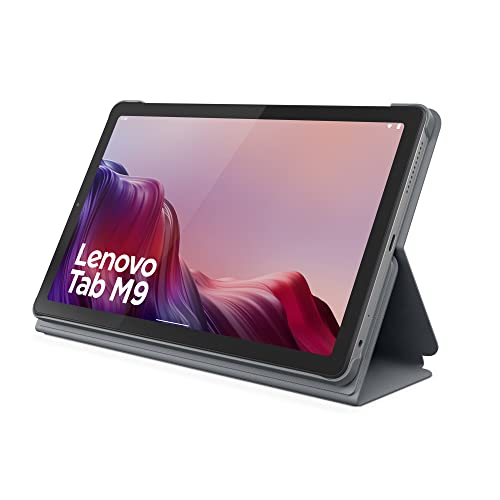
| Best for Entertainment | Screen Size: 9-inch | Display Type: HD display | Operating System: Android 12+ | VIEW LATEST PRICE | Read Our Analysis |
| Lenovo Tab 10 Android Tablet (TB-X103F) |

| Best for Families | Screen Size: 10-inch | Display Type: HD display | Operating System: Android | VIEW LATEST PRICE | Read Our Analysis |
| Lenovo Tab M10 Plus 3rd Gen Tablet (32GB) |

| Best for Productivity | Screen Size: 10.6-inch | Display Type: FHD IPS | Operating System: Android 12 | VIEW LATEST PRICE | Read Our Analysis |
More Details on Our Top Picks
Lenovo Idea Tab Pro Student Tablet with Pen
Should you be looking for a Lenovo student tablet that’s built for studying, note-taking, and everyday entertainment, the Lenovo Idea Tab Pro stands out with its 12.7-inch 3K display, included Lenovo Tab Pen Plus, and Google Gemini integration. You get a sharp 2944 x 1840 screen, 90Hz motion, and low blue light comfort for long sessions. The MediaTek Dimensity 8300, 8GB RAM, and 128GB storage keep tasks smooth. Quad JBL speakers with Dolby Atmos enhance media and lectures. With Wi‑Fi 6E, 11-hour battery life, 45W charging, and a lightweight folio case, it’s ready for class and travel.
- Screen Size:12.7-inch
- Display Type:3K LCD
- Operating System:Android
- Storage:128 GB
- Battery Life:11 hours
- Cameras:13 MP rear / front camera support
- Additional Feature:Google Gemini integration
- Additional Feature:Includes Tab Pen Plus
- Additional Feature:45W quick charge
Lenovo Tab M11 Tablet with Folio Case
The Lenovo Tab M11 Tablet with Folio Case is a strong pick should you want an affordable 11-inch tablet for entertainment or schoolwork, especially with the folio case and pen included. You get a crisp 1920 x 1200 display, a smooth 90 Hz refresh rate, and a lightweight 1.03-pound body that’s easy to carry. Its MediaTek Helio G88 chip, 4 GB RAM, and 128 GB storage handle streaming and browsing well. Android 13, Wi-Fi, Bluetooth, 4G, and up to 10 hours of battery life add flexibility, while the 13 MP rear camera and USB-C port round it out.
- Screen Size:11-inch
- Display Type:LCD
- Operating System:Android 13
- Storage:128 GB
- Battery Life:10 hours
- Cameras:13 MP rear / front camera support
- Additional Feature:Includes folio case
- Additional Feature:4G cellular support
- Additional Feature:3.5 mm audio jack
Lenovo Tab M8 2nd Gen Android Tablet (Renewed)
Should you want a compact tablet for browsing, streaming, and travel, the renewed Lenovo Tab M8 2nd Gen is a smart pick. You get an 8-inch IPS display with 1280 x 800 resolution, TÜV-certified blue-light reduction, and Dolby Audio-tuned sound for comfortable viewing. The MediaTek Helio A22, 2GB RAM, and 16GB storage handle everyday tasks, while the included 64GB microSD card expands space. You can stay connected with Wi-Fi, Bluetooth, Micro-USB, and a headphone jack. Its slim metal design feels easy to carry, and the 90-day warranty adds peace of mind.
- Screen Size:8-inch
- Display Type:IPS LCD
- Operating System:Android 9 Pie
- Storage:16 GB
- Battery Life:Not specified
- Cameras:Camera not specified
- Additional Feature:64GB microSD included
- Additional Feature:Metal back cover
- Additional Feature:Headphone/mic combo port
Lenovo Tab M9 Tablet with Folio Case
Lenovo’s Tab M9 with Folio Case makes a smart pick should you want a compact tablet for travel, streaming, and everyday browsing. You’ll enjoy the 9-inch HD display for mobile cinematic viewing, while the 5100 mAh battery can last up to 13 hours of video playback. The MTK G80 octa-core processor, 3GB of memory, and 32GB of storage help you browse and game smoothly. You also get a 2MP front camera, 8MP rear camera, Google Lens tools, facial recognition login, Android 12 or later, and a folio case in gray.
- Screen Size:9-inch
- Display Type:HD display
- Operating System:Android 12+
- Storage:32 GB
- Battery Life:13 hours playback
- Cameras:2 MP front / 8 MP rear
- Additional Feature:Facial recognition login
- Additional Feature:Google Lens tools
- Additional Feature:Folio case included
Lenovo Tab 10 Android Tablet (TB-X103F)
Should you want a simple 10-inch Android tablet for family use, the Lenovo Tab 10 (TB-X103F) is a solid pick. You get a Snapdragon 210 quad-core chip, 2GB of RAM, and 16GB of storage for everyday apps, browsing, and streaming. Its HD display and Dolby Atmos dual speakers help movies and TV sound better. Multi-account support lets each family member keep separate profiles and app settings, while Kids Mode adds parental controls for websites and apps. You can also enjoy up to 10 hours of battery life, and the box includes useful basics.
- Screen Size:10-inch
- Display Type:HD display
- Operating System:Android
- Storage:16 GB
- Battery Life:10 hours
- Cameras:Camera not specified
- Additional Feature:Kids Mode
- Additional Feature:Multi-account support
- Additional Feature:Parental controls
Lenovo Tab M10 Plus 3rd Gen Tablet (32GB)
With its 10.6-inch FHD IPS display, quad speakers, and Dolby Atmos audio, the Lenovo Tab M10 Plus 3rd Gen Tablet (32GB) is a strong pick should you want a lightweight tablet for streaming, studying, and everyday multitasking. You can watch 1080p video with clear sound, then switch to research or project work without slowing down. The Instant Memo app helps you jot annotations right on screen, and Immersive Reading Mode makes long sessions easier on your eyes. With Android 12, three years of updates, solid performance, and all-day battery life, you’ll stay productive and entertained.
- Screen Size:10.6-inch
- Display Type:FHD IPS
- Operating System:Android 12
- Storage:32 GB
- Battery Life:All-day use
- Cameras:Camera not specified
- Additional Feature:Lenovo Instant Memo app
- Additional Feature:Immersive Reading Mode
- Additional Feature:Three-year updates
Factors to Consider When Choosing Lenovo Tablets
While you’re choosing a Lenovo tablet, start with checking the display quality and how sharp and bright it feels for your everyday use. You’ll also want enough performance power and battery life to handle your apps without constant charging. Should you plan to carry it often or use a pen, portability and stylus support should be high on your list.
Display Quality
Display quality plays a big role in how a Lenovo tablet feels day to day, and a sharper panel can make text, photos, and videos look much more detailed. When you choose a model, look for higher resolutions like 2944 x 1840 or 1920 x 1200 so everything appears crisp. Screen size also affects comfort: a 12.7-inch display suits multitasking, while 8- to 11-inch options are easier to hold and carry. A 90 Hz refresh rate can make scrolling, animations, and handwriting feel smoother than a standard 60 Hz panel. You’ll also benefit from a 16:10 aspect ratio for reading and split-screen use. If you spend long hours on the tablet, low blue light, TÜV-certified panels, and reading modes can help reduce eye strain.
Performance Power
Performance power matters just as much as screen quality once you’re choosing a Lenovo tablet. You should pick a newer, faster processor when you plan to run demanding apps, switch between tasks, or use split-screen smoothly. An octa-core chip usually gives you better speed for browsing, streaming, and jotting down notes than an entry-level quad-core model. For everyday use, 4 GB of RAM can keep things responsive, but 8 GB or more is a smarter choice when you multitask heavily or handle productivity work. Storage also matters: 128 GB gives you more room for larger apps, files, and offline media than 16 GB or 32 GB. When you want stronger schoolwork or creative performance, choose modern chipsets over older low-power processors.
Battery Life
After checking processor speed and memory, battery life should be next on your list as you choose a Lenovo tablet. You’ll want a model that keeps going for hours, especially should you stream, read, or work away from an outlet. Some Lenovo tablets can deliver about 10 to 13 hours of playback, and higher battery capacities like 5,100 mAh, 7,040 mAh, or 10,200 mAh usually help you stay unplugged longer. Keep in mind that brightness, gaming, and higher refresh rates can drain power faster. Fast charging matters too, because a 45W quick-charge option can top you up quickly while you’re in a hurry. Should you use your tablet for all-day classes or travel, choose one with strong endurance.
Portability Matters
Portability matters whenever you want a Lenovo tablet you can carry every day, and lighter models are usually the easiest to take along. You’ll notice big differences between models that weigh about 1.03 pounds and those closer to 1.4 pounds. Slim designs also help, especially when thickness stays around 0.27 to 0.32 inches. Smaller 8- to 11-inch screens usually travel better than 12.7-inch options, since they’re easier to slip into a backpack or hold in one hand. Compact shapes, such as 6.54 x 10 x 0.28 inches or 7.84 x 4.79 x 0.32 inches, make packing simpler. Assuming you want extra convenience, pair a light tablet with a folio case so you can carry it safely on the move.
Stylus Support
Whenever you want to take handwritten notes or sketch on a Lenovo tablet, stylus support should be one of your initial checks. You’ll want to confirm that the tablet works with a stylus natively or with a compatible accessory, because good pen input makes writing and annotating feel natural. Check for palm rejection and low-latency response so your hand can rest on the screen without causing errors. Should you write or draw for long sessions, choose a display size and aspect ratio that give you enough space to work comfortably. Also, see whether the stylus comes in the box or costs extra, since that affects your budget and setup. For school or work, save notes as PDF or image files so you can share and archive them easily.
Storage Capacity
Storage capacity is one of the biggest factors in how practical a Lenovo tablet feels day to day, since it determines how many apps, files, photos, videos, and offline downloads you can keep before you need to delete items or add external storage. Provided that you mainly browse, stream, and take notes, 16 GB to 32 GB can work, but it fills fast when you install more apps or save media locally. A 128 GB model gives you far more breathing room for multitasking, larger app libraries, downloaded lessons, and higher-resolution video. Should the tablet support microSD expansion, you can add extra space for documents and media. Always check both the listed storage and the usable space after the operating system loads.
Frequently Asked Questions
Which Lenovo Tablet Has the Longest Battery Life?
You’ll usually get the longest battery life from Lenovo’s Tab P12, since it can last through a full day of work, streaming, and browsing. If you need even more, pick a larger model.
Do Lenovo Tablets Support Google Play Apps?
Yes, most Lenovo tablets that use Android can install apps from Google Play. Check your tablet’s Android version and whether Google services are available in your region.
Can Lenovo Tablets Connect to External Keyboards?
Yes, Lenovo tablets can connect to external keyboards through Bluetooth or a USB C adapter. This lets you type faster and work more comfortably. Some models also support keyboard cases, so check your tablet’s compatibility first.
Are Lenovo Tablets Good for Video Streaming?
Yes, Lenovo tablets handle video streaming well. Their displays are bright, the battery lasts through long viewing sessions, and performance stays smooth for apps like Netflix and YouTube. Many models also include Wi Fi and speakers that deliver clear audio for casual watching.
How Often Does Lenovo Release New Tablet Models?
Lenovo often refreshes its tablet lineup each year, although some series take a year off. New models frequently appear at CES or IFA, and Lenovo has introduced more than 20 tablets in recent years, depending on region and demand.
Conclusion
In the end, you’ve got plenty of solid Lenovo choices, whether you want a tablet for class, work, or kicking back with a show. Should you need a bigger, sharper display, the Idea Tab Pro stands tall; should you want everyday value, the Tab M11 and M10 Plus 3rd Gen shine. Like Goldilocks, you just need the one that feels just right for you. Consider your needs, then pick with confidence.
