

The best MikroTik switches for 2026 are the ones that match your network size, speed needs, and power setup.
For most admins, top picks include the CRS305, CRS112, CSS326, CRS354, and CRS317. Each model serves a different role, from small 10GbE setups to dense rack deployments and fiber-heavy networks.
This guide compares them in plain terms so you can choose the right switch without wasting budget or rack space.
| MikroTik CRS305-1G-4S+in Managed Gigabit Network Switch |

| 10Gb Compact Pick | Port Configuration: 4× SFP+ + 1× Gigabit Ethernet | Switch Type: Managed Gigabit switch | Management OS: RouterOS / SwOS dual boot | VIEW LATEST PRICE | Read Our Analysis |
| MikroTik Gigabit Smart Switch with PoE-out (CRS112-8P-4S-IN) |

| Best PoE Switch | Port Configuration: 8× Gigabit RJ45 + 4× SFP | Switch Type: Smart managed Gigabit switch | Management OS: RouterOS L5 | VIEW LATEST PRICE | Read Our Analysis |
| Mikrotik CSS326-24G-2S+RM Managed Gigabit Network Switch |
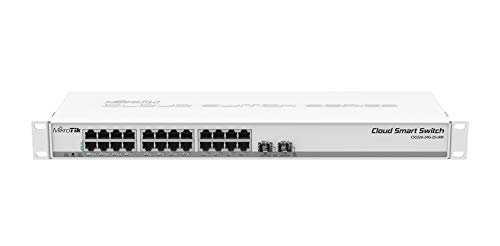
| Best Value | Port Configuration: 24× Gigabit Ethernet + 2× SFP+ | Switch Type: Managed Gigabit switch | Management OS: SwOS | VIEW LATEST PRICE | Read Our Analysis |
| MikroTik Cloud Router Switch CRS354-48G-4S+2Q+RM |

| Enterprise Backbone Pick | Port Configuration: 48× Gigabit RJ45 + 4× SFP+ + 2× QSFP+ | Switch Type: Managed switch | Management OS: RouterOS L5 | VIEW LATEST PRICE | Read Our Analysis |
| MikroTik CRS317-1G-16S+RM Managed L3 Network Switch |
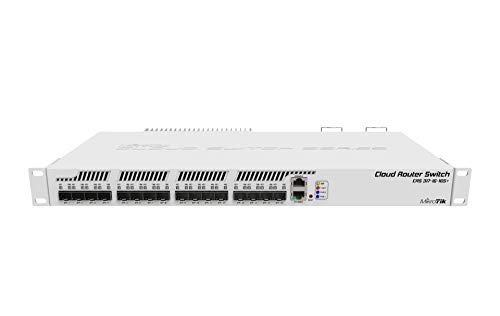
| Fiber Aggregation Pick | Port Configuration: 16× SFP+ + 1× Gigabit Ethernet + RJ-45 console | Switch Type: Managed L3 switch | Management OS: L3 managed OS support | VIEW LATEST PRICE | Read Our Analysis |
More Details on Our Top Picks
MikroTik CRS305-1G-4S+in Managed Gigabit Network Switch
When you need a small switch that gives you serious 10 Gig speed without noise or clutter, the MikroTik CRS305-1G-4S+in is an easy fit. You get four SFP+ ports, each pushing up to 10 Gbit, plus a 1 Gbit copper management port that keeps setup simple. Because the fanless metal case stays silent, you can place it on a desk, shelf, or lab bench without distraction.
That compact build also gives you flexibility. You can power it through dual DC jacks for redundancy or via 802.3af/at PoE in. Then you choose SwOS for clean switching or RouterOS for Layer 3 control and routing.
- Port Configuration:4× SFP+ + 1× Gigabit Ethernet
- Switch Type:Managed Gigabit switch
- Management OS:RouterOS / SwOS dual boot
- Form Factor:Compact desktop
- Uplink Type:SFP+ uplinks
- Power Input:Dual DC jack + PoE-in
- Additional Feature:Dual boot support
- Additional Feature:Fanless metal case
- Additional Feature:PoE-in support
MikroTik Gigabit Smart Switch with PoE-out (CRS112-8P-4S-IN)
For small offices, labs, and camera or access point setups that need both data and power from one box, the MikroTik CRS112-8P-4S-IN stands out as a smart fit. You get eight Gigabit RJ45 ports, four SFP ports, and RouterOS Level 5 in a managed switch that keeps your setup flexible. Better yet, it supports autosensing 802.3af/at PoE/PoE+ and passive PoE, so you can power devices without extra injectors. With 48 to 57V input, it delivers reliable output, while automatic detection helps protect connected gear. Should you require tidy cabling, fiber uplinks, and practical control, this compact white switch makes your life easier daily.
- Port Configuration:8× Gigabit RJ45 + 4× SFP
- Switch Type:Smart managed Gigabit switch
- Management OS:RouterOS L5
- Form Factor:Desktop
- Uplink Type:SFP uplinks
- Power Input:DC input with PoE-out support
- Additional Feature:PoE-out on 8 ports
- Additional Feature:Autosensing 802.3af/at
- Additional Feature:Passive PoE support
Mikrotik CSS326-24G-2S+RM Managed Gigabit Network Switch
Small offices, labs, and home network builders will get the most value from the MikroTik CSS326-24G-2S+RM, because it gives you a rare mix of 24 Gigabit Ethernet ports and 2 SFP+ uplinks in a clean 1U rackmount switch that stays easy to manage. You get SwOS, so setup feels light, not intimidating. It gives you port-to-port forwarding control, VLANs, MAC filtering, traffic mirroring, bandwidth limits, and header field adjustment. That means you can shape traffic cleanly and troubleshoot faster. The two SFP+ cages support 1.25G SFP and 10G SFP+ modules, which gives your network room to grow without drama. Just observe international versions could ship with different labeling or instructions.
- Port Configuration:24× Gigabit Ethernet + 2× SFP+
- Switch Type:Managed Gigabit switch
- Management OS:SwOS
- Form Factor:1U rackmount
- Uplink Type:SFP+ uplinks
- Power Input:DC powered
- Additional Feature:Port forwarding control
- Additional Feature:Traffic mirroring
- Additional Feature:Bandwidth limiting
MikroTik Cloud Router Switch CRS354-48G-4S+2Q+RM
Built for busy networks that need lots of wired connections, the MikroTik Cloud Router Switch CRS354-48G-4S+2Q+RM fits best in offices, labs, and desktop-heavy setups where port count matters most. You get a managed Layer 1 switch with RouterOS L5, RJ45 and SFP interfaces, and a 12 Gbps transfer rate for steady daily traffic. Its black metal case feels sturdy, while the 2 kilogram build stays rack friendly. It runs on 220 volts and handles temperatures up to 60 degrees Celsius. Should you want a dependable MikroTik switch with strong user feedback and a 30 day return window, this model gives you room to grow.
- Port Configuration:48× Gigabit RJ45 + 4× SFP+ + 2× QSFP+
- Switch Type:Managed switch
- Management OS:RouterOS L5
- Form Factor:Rackmount metal chassis
- Uplink Type:SFP+ / QSFP+ uplinks
- Power Input:220 V input
- Additional Feature:RouterOS L5 license
- Additional Feature:Metal case
- Additional Feature:60°C temperature rating
MikroTik CRS317-1G-16S+RM Managed L3 Network Switch
Need a switch that gives you plenty of high-speed fiber room without turning setup into a headache? The MikroTik CRS317-1G-16S+RM does exactly that. You get 16 S+ ports for fast fiber links, plus one 1G Ethernet RJ-45 port for easy management. Because it supports Layer 3 features, you can handle smarter traffic control without adding extra gear.
That makes it a strong fit for growing racks. Its 1U rackmount design saves space, and the mounting grid helps you install it cleanly. You also get an RJ-45 console port, IEEE 802.1Q support, and simple DC-in power. So, should uptime matters, this switch keeps things efficient and straightforward daily.
- Port Configuration:16× SFP+ + 1× Gigabit Ethernet + RJ-45 console
- Switch Type:Managed L3 switch
- Management OS:L3 managed OS support
- Form Factor:1U rackmount
- Uplink Type:SFP+ uplinks
- Power Input:DC-in jack
- Additional Feature:Layer 3 support
- Additional Feature:RJ-45 console port
- Additional Feature:Mounting grid included
Factors to Consider When Choosing MikroTik Switches
Whenever I choose a MikroTik switch, I initially look at the port types and counts I need, then I match them to my speed goals. Next, I check PoE power, because I don’t want you to end up short on power for phones, cameras, or access points. I also compare management options, operating system features, and whether a rackmount or compact model fits your space best.
Port Types And Counts
A smart place to start is the port layout, because that choice shapes how well a MikroTik switch will fit your network today and how easily it can grow later. I initially count every copper Ethernet connection I need for PCs, phones, cameras, and access points. Some MikroTik models have just 1 RJ45 port, while others give you 8, 24, or 48.
Next, I check fiber uplinks. Depending on the model, you might get 2, 4, 16, or more SFP or SFP+ ports. Then I match port types to the gear I already run, from 10/100/1000 Mbps copper to 1.25 Gbps SFP and 10 Gbps SFP+.
I also verify whether there’s a separate 1 Gbit management port. Should you need flexibility, mixed layouts with RJ45, SFP, and SFP+ can make life much easier.
Switching Speed Needs
Because speed affects every device on the switch, I always match MikroTik switching performance to both my endpoint traffic and my uplinks before I look at anything else. A basic 1 Gbps model can choke faster servers, storage, or aggregation links, so I check real traffic paths first.
From there, I look at uplink type and total capacity together. When I expect fiber or a faster backbone, I want 10 Gbps SFP+ ports, not just 1 Gbps SFP. In mixed networks, I verify how many high speed uplinks and standard gigabit ports I get, because oversubscription can quietly hurt performance. I also separate Layer 2 needs from Layer 3 needs. For simple forwarding, switching throughput matters most. When I need fast inter-VLAN or subnet routing, stronger Layer 3 performance matters too.
PoE Power Requirements
PoE power deserves the same close look as switching speed, since a fast switch won’t help much whether it can’t feed your phones, cameras, or access points reliably. I always check the total PoE budget initially, because a switch might promise PoE on many ports but still cap the overall wattage.
From there, I confirm the input voltage needed for full PoE output. Some MikroTik models only deliver proper 802.3af or 802.3at power whenever they get higher DC input, often 48 to 57 volts. I also compare per-port current ratings, since they can shift with input voltage, like 1 amp at 18 to 28 volts versus 450 milliamps at 48 to 57 volts. Then I match active PoE, passive PoE, or both, and I prefer dual power inputs for safety.
Management And OS
Management choices shape how easy your switch feels to live with every day, so I always start asking whether I need clean switch controls only or full Layer 3 features too. Should I only need VLANs, MAC filtering, and port-to-port forwarding, I lean toward a switch-focused platform because it keeps setup simpler and faster.
That matters even more once a model offers dual boot. Then I can pick a switch OS for traffic mirroring, bandwidth limits, and header-field changes, or boot into a router-capable OS whenever I need Layer 3 routing alongside normal managed-switch tools. As I compare models, I also check software license level and interface support. Those details quietly decide how much control I really get, and they can save you from buying hardware that feels restrictive later.
Rackmount Vs Compact
Whenever I choose between a rackmount MikroTik switch and a compact one, I start with the room it has to live in and the way I’ll manage the cables around it. In a server room or wiring closet, a 1U rackmount model usually fits my workflow better because racks keep runs neat and easy to trace.
If I’m working in a small office, on a shelf, or on a wall, I lean toward a compact switch. Its smaller footprint saves space and feels less intrusive. That said, size isn’t the only issue. Rackmount units often give me more ports, while compact models favor simplicity and portability. I also like metal fanless compact designs in quiet spaces, since they stay discreet and avoid the extra noise and wear that moving parts can bring over time.
Uplink And Expansion
Beyond the switch’s size and shape, I pay close attention to uplink capacity because that’s what decides how smoothly the network can grow later. I look for enough fast uplink ports now, not after the rack feels crowded. Multiple 10 G SFP+ links are a smart starting point, and aggregation setups could need 40 G class uplinks.
From there, I check how access ports and uplinks are balanced. When you plan to add more devices, I’d choose a model with plenty of copper ports plus dedicated uplink cages, so growth doesn’t eat every fast interface. For fiber expansion, I also verify whether the cages accept both 1.25 G SFP and 10 G SFP+ modules. That flexibility matters. Even a high port count can choke whenever uplink bandwidth stays too small for traffic.
Layer 2 Vs 3
As I compare MikroTik switches, I initially decide whether I need Layer 2 switching or Layer 3 routing, because that choice shapes how the whole network will behave. Layer 2 models forward frames via MAC address, so I use them for VLANs, MAC filtering, port mirroring, and bandwidth limiting. If I only need clean segmentation and steady traffic control inside one LAN, Layer 2 usually gives me everything I need, and it stays easier to manage.
Then I look at how traffic must move between networks. Layer 3 switches route between IP subnets, so I choose them whenever I need inter-VLAN routing, subnet isolation, or policy decisions based on IP headers. That extra power feels great, but it also asks more from me, especially with IP planning, routing rules, and careful setup.
Frequently Asked Questions
Can Mikrotik Switches Integrate With Non-Mikrotik Routers and Firewalls?
Yes. MikroTik switches work with non MikroTik routers and firewalls through standard Ethernet, VLANs, LACP, and routing protocols. Interoperability depends on aligning configuration settings, firmware versions, and management features on both sides.
How Often Does Mikrotik Release Long-Term Firmware Updates?
MikroTik usually publishes long term firmware updates every few months rather than on a fixed timetable. Check the release notes often, since important security and stability fixes may arrive when a stable branch is promoted.
Are Mikrotik Switches Suitable for Silent Office Environments?
Yes. In quiet office spaces such as libraries, many MikroTik switches work well, particularly the fanless models. Check the cooling design and expected workload for each model, since some higher performance units still rely on fans.
What Warranty Coverage Is Typically Included With Mikrotik Switches?
MikroTik switches commonly come with a one year limited hardware warranty, but the exact terms depend on the seller and your region. Check the warranty period, what hardware defects are covered, how returns are handled, and what support is available before you purchase.
Do Mikrotik Switches Support Remote Management Through Mobile Apps?
Many MikroTik switches can be managed remotely through MikroTik’s mobile app when they run RouterOS. SwOS models usually depend on a web interface and offer more limited mobile app management.
