

You want small size, strong performance, and smart connectivity; you want a board that fits your case, your CPU, and your storage plan. From legacy LGA1155 and LGA1150 options to modern LGA1700 and NAS-focused mini-ITX designs, the best choices vary more than you might expect, and a few details can make or break your build. Here’s what separates the six strongest picks from the rest.



More Details on Our Top Picks
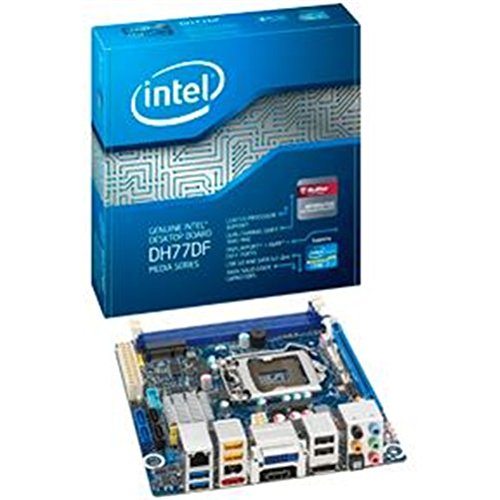
Intel Desktop Motherboard LGA1155 DDR3 1600 mini-ITX – BOXDH77DF
If you’re building a compact PC and want broad compatibility, the Intel Desktop Motherboard LGA1155 DDR3 1600 mini-ITX – BOXDH77DF is a strong fit. You get LGA1155 support for 2nd and 3rd gen Core i7, i5, and i3 CPUs, plus the H77 Express chipset. It accepts up to 16GB of DDR3 across two slots and gives you one PCIe x16 slot for expansion. You also get five SATA III ports, 14 USB ports, HDMI, DVI-I, DisplayPort, optical S/PDIF, and Ethernet. Intel backs it with a three-year warranty.
- Form Factor:Mini-ITX
- CPU Socket:LGA1155
- Memory Type:DDR3
- Memory Slots:2 slots
- Display Outputs:DVI-I / HDMI / DisplayPort
- Ethernet:1 port
- Additional Feature:Intel H77 Express chipset
- Additional Feature:Optical S/PDIF connector
- Additional Feature:3-year warranty
StoneStorm 6-Bay NAS Mini-ITX Motherboard Core i7 1165G7
The StoneStorm CW-L04 is a compact 6-bay NAS Mini-ITX board built for users who want a storage-dense, low-power Intel platform without giving up networking speed. You get a Core i7-1165G7, 2 DDR4 slots for up to 64GB, and two PCIe 3.0 x4 M.2 slots. Add the SFF-8643 cable, and you can run six SATA drives total. Four Intel i226-V 2.5GbE ports, HDMI 2.0, DisplayPort 1.4, and USB-C give you flexible I/O. It supports Windows, Linux, and compact LGA115x cooling.
- Form Factor:Mini-ITX
- CPU Socket:FCBGA1449
- Memory Type:DDR4
- Memory Slots:2 slots
- Display Outputs:HDMI / DisplayPort
- Ethernet:4 ports
- Additional Feature:6-bay NAS support
- Additional Feature:4x 2.5GbE ports
- Additional Feature:Triple 4K display
Mini-ITX Motherboard for Home Server NAS Firewall
Built for compact always-on systems, this Mini-ITX board suits you best when you need a home server, NAS, or firewall with serious networking and storage density. You get an 8th-gen U-series quad-core, 8-thread CPU with up to 3.9 GHz turbo and VT-x/VT-d support, so virtualization runs smoothly. Dual 2.5GbE ports, one PCIe x4 slot, eight SATA 3.0 ports, and two M.2 NVMe 2280 slots give you plenty of flexibility. It also supports 64 GB DDR4 SO-DIMM and dual 4K displays. Expect a slow first boot and a reported sleep bug.
- Form Factor:Mini-ITX
- CPU Socket:FCBGA1528
- Memory Type:DDR4
- Memory Slots:2 slots
- Display Outputs:HDMI / DisplayPort
- Ethernet:2 ports
- Additional Feature:8x SATA 3.0 ports
- Additional Feature:2x M.2 NVMe slots
- Additional Feature:Dual 2.5GbE ports
Vikye Mini ITX Motherboard LGA 1150 DDR3 Support
Vikye’s Mini ITX motherboard stands out for compact builds that still need real desktop-class compatibility, especially if you’re running an Intel Core i3, i5, or i7 4th/5th gen Haswell CPU with DDR3 memory. You get an LGA 1150 socket, Intel H81 chipset, and dual DDR3 SO-DIMM slots supporting up to 16GB at 1066, 1333, or 1600MHz. It also gives you Gigabit Ethernet, M.2 NVMe storage, Mini PCIe expansion, VGA and HDMI-compatible video, plus 6-channel audio. With USB 3.0, serial headers, fan connectors, and 12V power input, you can build a tidy desktop or all-in-one system.
- Form Factor:Mini-ITX
- CPU Socket:LGA1150
- Memory Type:DDR3
- Memory Slots:2 slots
- Display Outputs:VGA / HDMI
- Ethernet:1 port
- Additional Feature:H81 Express chipset
- Additional Feature:6-channel HD audio
- Additional Feature:Dual serial ports
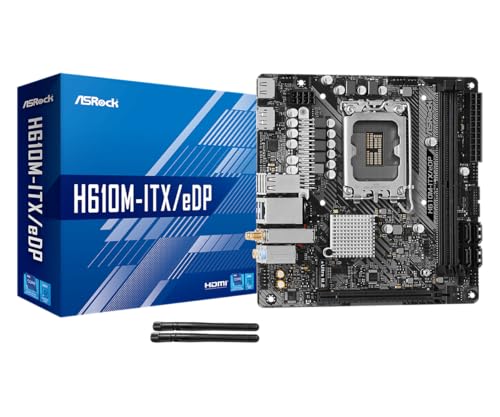
ASRock H610M-ITX/eDP Mini-ITX Motherboard (LGA1700 DDR4)
If you’re building a compact Intel-based rig, the ASRock H610M-ITX/eDP stands out with its LGA1700 socket for 12th, 13th, and 14th Gen Core CPUs, making it a smart pick for SFF PCs, embedded setups, AIOs, and digital signage. You get a Mini-ITX 6.7-inch board with a 6-phase Digi Power design, 50A Dr.MOS, and sturdy Super Alloy parts for efficient, reliable operation. It supports DDR4 up to 3200 MHz, PCIe 4.0 graphics, one Ultra M.2 slot, four SATA ports, HDMI 2.1, DisplayPort 1.4, eDP 1.4, Intel Gigabit LAN, Wi‑Fi 5, and Bluetooth 5.1.
- Form Factor:Mini-ITX
- CPU Socket:LGA1700
- Memory Type:DDR4
- Memory Slots:2 slots
- Display Outputs:HDMI / DisplayPort / eDP
- Ethernet:1 port
- Additional Feature:Wi-Fi 5 built in
- Additional Feature:Bluetooth 5.1
- Additional Feature:eDP 1.4 connector
Mini ITX Desktop Motherboard LGA 1155 DDR3 NVME Support
The Mini ITX Desktop Motherboard LGA 1155 DDR3 with NVMe support is a smart pick if you want a compact Windows 10-ready system for everyday computing, light upgrades, or a small HTPC build. You get the Zopsc H6 ME board with an Intel H61 Express chipset, LGA 1155 socket, and support for Core i5 and Core 2 Duo CPUs. It takes up to 16 GB of DDR3 across two slots, adds NVMe M.2 storage, and keeps four SATA 2.0 ports. You also get VGA, HDMI, PCIe x16, onboard audio, networking, and stable multiphase power.
- Form Factor:ITX / Mini-ITX
- CPU Socket:LGA1155
- Memory Type:DDR3
- Memory Slots:2 slots
- Display Outputs:VGA / HDMI
- Ethernet:1 port
- Additional Feature:M.2 NVMe support
- Additional Feature:Realtek ALC662 audio
- Additional Feature:10 USB 2.0 ports
Factors to Consider When Choosing Mini ITX Motherboards
When you choose a Mini ITX motherboard, make sure the CPU socket matches your processor and the chipset offers the features you need. You’ll also want to check memory limits, storage expansion options, and rear I/O connectivity. These details help you get the right balance of performance, flexibility, and space-saving design.
CPU Socket Compatibility
Before you buy a Mini ITX motherboard, make sure its CPU socket matches your processor family, whether that means LGA, PGA, or a soldered FCBGA design. You need the exact socket because it determines mechanical fit and electrical contact. Next, confirm the board supports your CPU generation and that its chipset and BIOS/UEFI microcode can recognize it. A socket alone doesn’t guarantee compatibility. If the processor is soldered, you can’t swap or upgrade it later, so choose carefully. You should also check that the board’s power delivery and CPU power headers can handle your chip’s TDP without strain. Finally, review vendor firmware notes, since you may need a BIOS update before the system will boot or fully support newer processors.
Chipset Feature Set
Beyond the socket itself, the chipset largely decides what a Mini ITX motherboard can actually do. You should check which CPU generations and PCIe lane layouts it supports, because that determines compatibility and expansion. It also controls onboard storage options, including how many SATA III 6 Gb/s ports you get and whether M.2 slots run on PCIe 3.0 or 4.0. Chipset-exposed USB and networking matter too, so look for the mix of USB 3.2 Gen1/Gen2, USB-C, and 1GbE or 2.5GbE ports you need. If you care about displays or audio, verify HDMI, DisplayPort, codec, and S/PDIF support. Finally, consider RAID, virtualization, power management, UEFI, and overclocking features for more advanced builds.
Memory Capacity Limits
Mini ITX motherboards usually include just two memory slots, so you’ll want to check both the per-slot capacity and the board’s total RAM limit before you buy. Look at how much each slot supports, since many boards top out at 16GB or 32GB per module. Your chipset and CPU memory controller also matter, because they can cap total memory, from 16GB on older platforms to 64GB or 128GB on newer ones. If you need big modules, confirm the DIMM type the board accepts, whether standard DIMM or SO-DIMM. To get the best performance, install matched sticks in both slots for dual-channel speed. Also, check the board’s QVL and BIOS updates for compatibility.
Storage Expansion Options
Storage options on mini ITX motherboards are often limited, so you’ll want to check the onboard SATA ports and M.2 support closely. Count each SATA port and confirm whether they’re SATA III 6 Gb/s or slower SATA II 3 Gb/s, since many boards only give you two to four native connectors for drives. Then inspect the M.2 slots: some support PCIe NVMe with x4 lanes for fast storage, while others only accept SATA M.2 drives. If you need more capacity, look for SFF-8643 headers or controller chips that can add SATA ports or RAID, but they can use system resources. A PCIe x4 or x16 slot can also let you add an HBA or NVMe card, though case space, heat, and power draw matter too.
Rear I/O Connectivity
When comparing mini ITX motherboards, check the rear I/O carefully because it can make or break day-to-day usability. You should verify the video outputs first, since HDMI, DisplayPort, or DVI determine whether you can drive your monitor at the resolution and refresh rate you want. Next, count the USB ports and note their speeds; you’ll want enough USB 3.2 or USB-C connections for fast storage, peripherals, and display output over USB-C. Also confirm the networking options, whether that’s a single Gigabit port or faster dual 2.5GbE links. If you use older gear, look for optical S/PDIF, 3.5mm audio jacks, PS/2, or serial support. Finally, check antenna connectors and handy BIOS or reset buttons.
Power Connector Requirements
Check the power connectors before you buy a mini ITX motherboard, because the wrong layout can quickly become a headache in a compact build. You’ll usually need a 24-pin ATX main connector and, for the CPU, either a 4-pin or 8-pin EPS plug. If you’re building with a higher-TDP processor, make sure your PSU provides the right 8-pin EPS cable and enough amperage for stable voltage delivery. Some boards with onboard or soldered CPUs still use the same headers, while ultra-low-power designs may need less. Also check for SATA power, Molex, or auxiliary 12V headers if your case or add-on devices require them. Finally, confirm connector orientation so your cables route cleanly and don’t fight the rest of your build.
Cooling And Clearance
Because Mini-ITX cases leave very little room to work with, you’ll want to confirm cooler height clearance before you buy a motherboard and case combination. Measure the case’s CPU cooler limit, then compare it with the board layout and your cooler choice. Most builds need 40–70 mm, while some low-profile coolers fit in 23–35 mm. Check that the motherboard gives you enough CPU fan and pump headers for your cooling setup, so you don’t rely on splitters. Also, make sure tall RAM heatsinks and a large graphics card won’t clash with a tower cooler. Finally, verify case fan support, airflow paths, and BIOS fan control options so you can manage heat effectively in the cramped interior.
Network And Wireless Features
Once you’ve sorted out cooling and clearance, network features are the next big Mini-ITX decision, especially if your build will handle storage, streaming, or remote access. Check Ethernet first: 1GbE is fine for basic use, but 2.5GbE or 10GbE gives you faster NAS transfers and smoother large-file work. If you plan routing, virtualization, or link aggregation, make sure the board offers multiple NICs or spare M.2/PCIe lanes for add-in cards. For wireless, compare Wi‑Fi 5, 6, and 6E, plus Bluetooth 4.x or 5.x, so your speed and accessory support match your needs. Also look for Wake-on-LAN, PXE boot, and VLAN tagging. Hardware offloads and solid OS driver support can cut CPU load in demanding builds.
Frequently Asked Questions
Which Mini ITX Motherboard Best Supports Modern Gaming GPUS?
Choose a Mini‑ITX motherboard that offers PCIe 4.0 x16, robust VRM heatsinks and heatpipes, and a mature BIOS with frequent updates and clear overclocking options. In practice, specific models from ASUS ROG Strix, Gigabyte AORUS, and MSI MPG families tend to provide the power delivery and firmware support modern gaming GPUs require.
Can Mini ITX Boards Handle Quiet, Fanless Cooling Setups?
Yes. With the right case and low-power components, a Mini ITX build can run virtually silent. In one build I used a compact case, passive CPU heatsink, efficient low-TDP CPU, and strategically routed airflow to keep temperatures down while maintaining near-silent operation.
Do All Mini ITX Motherboards Include Onboard Wi-Fi and Bluetooth?
No. Not every Mini ITX motherboard has Wi Fi and Bluetooth. Check the specifications: some boards include both wireless features, while others omit one or both to reduce cost and simplify the design.
How Many Storage Drives Can a Mini ITX Motherboard Realistically Support?
You can typically install one or two SATA SSDs; a few Mini ITX boards provide a third drive using an M.2 slot or an additional SATA connector. Keep in mind motherboard PCIe lane allocation and case cooling constraints when planning extra storage.
Are Mini ITX Motherboards Suitable for Long-Term 24/7 Operation?
Yes. Use a mini ITX board with a robust VRM design and high quality capacitors. Install a case and cooler that ensure steady airflow and maintain low component temperatures. Use a reliable power supply with adequate wattage and tight voltage regulation. Disable or avoid CPU and GPU overclocking and enable power management features in the BIOS. Perform regular maintenance such as cleaning dust from fans, filters, and heatsinks and monitoring temperatures and voltages with software so you can address issues before they cause failures.
Final Thoughts
Choosing the right Mini-ITX motherboard means matching your needs with the board’s bones. You’ll want to balance BIOS support, storage slots, networking speed, and cooling clearance before you buy. From budget-friendly legacy boards to bold modern models, each option brings its own blend of compact capability. By focusing on fit, features, and future-proofing, you can build a powerful small-form system that stays cool, connected, and ready for whatever you throw at it.
