

Nearly 70% of home networking complaints come down to slow speeds or too many devices on one setup. If you’re tired of renting gear that underdelivers, you’ve got better options. These five modem router combos can simplify your network and boost performance, from basic DOCSIS 3.0 picks to Wi‑Fi 6 models built for heavier use. The differences matter more than you might think.
| NETGEAR Cable Modem Wi-Fi Router Combo C6250 |
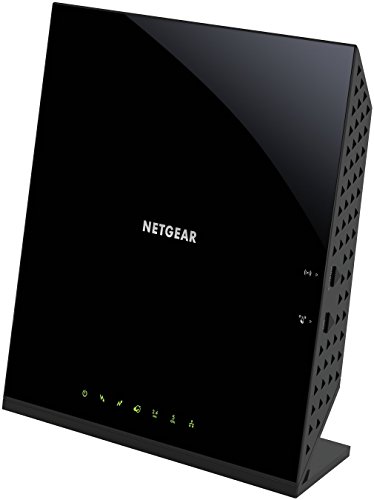
| Best for Basics | Modem Standard: DOCSIS 3.0 | Wi‑Fi Generation: Wi‑Fi 5 (802.11ac) | Cable Speed: Up to 300 Mbps | VIEW LATEST PRICE | Read Our Analysis |
| NETGEAR Nighthawk DOCSIS 3.1 Cable Modem Router (CAX30S) |

| Best Overall | Modem Standard: DOCSIS 3.1 | Wi‑Fi Generation: Wi‑Fi 6 | Cable Speed: Major cable plans | VIEW LATEST PRICE | Read Our Analysis |
| NETGEAR Nighthawk Cable Modem WiFi Router Combo (C7000) |

| Best Value | Modem Standard: DOCSIS 3.0 | Wi‑Fi Generation: Wi‑Fi 5 | Cable Speed: Up to 800 Mbps | VIEW LATEST PRICE | Read Our Analysis |
| NETGEAR Nighthawk DOCSIS 3.1 Cable Modem Router Combo (CAX30) |

| Best Upgrade | Modem Standard: DOCSIS 3.1 | Wi‑Fi Generation: Wi‑Fi 6 | Cable Speed: Major cable plans | VIEW LATEST PRICE | Read Our Analysis |
| Motorola Cable Modem Router Combo DOCSIS 3.0 |

| Budget-Friendly Pick | Modem Standard: DOCSIS 3.0 | Wi‑Fi Generation: N300 Wi‑Fi | Cable Speed: Up to 150 Mbps | VIEW LATEST PRICE | Read Our Analysis |
More Details on Our Top Picks
NETGEAR Cable Modem Wi-Fi Router Combo C6250
If you want a straightforward all-in-one modem router for a cable internet plan, the NETGEAR C6250 is a solid pick, especially for households on Xfinity, Spectrum, or Cox speeds up to 300 Mbps. You get DOCSIS 3.0, AC1600 Wi‑Fi, and dual-band 802.11ac performance that can cover up to 1,500 square feet and support 25 devices. It also gives you two Gigabit Ethernet ports and a USB 2.0 port. You won’t use it with Verizon, AT&T, DSL, or bundled voice plans, so check your ISP first.
- Modem Standard:DOCSIS 3.0
- Wi‑Fi Generation:Wi‑Fi 5 (802.11ac)
- Cable Speed:Up to 300 Mbps
- Ethernet Ports:2 Gigabit ports
- USB Port:1 USB 2.0
- Wireless Coverage:Up to 1,500 sq ft
- Additional Feature:16×4 channel bonding
- Additional Feature:Parental controls included
- Additional Feature:WPS support
NETGEAR Nighthawk DOCSIS 3.1 Cable Modem Router (CAX30S)
The NETGEAR Nighthawk DOCSIS 3.1 Cable Modem Router (CAX30S) is a strong choice if you want a single device that replaces both your modem and WiFi router while delivering fast WiFi 6 performance. You get dual-band AX2700 speeds, up to 2,000 square feet of coverage, and support for 25 devices. It works with Xfinity, Spectrum, Cox, and other major cable providers, but not Verizon, AT&T, CenturyLink, or DSL. Four Gigabit Ethernet ports, USB 3.0, NETGEAR Armor, WPA3 security, and app-based setup make daily use easy.
- Modem Standard:DOCSIS 3.1
- Wi‑Fi Generation:Wi‑Fi 6
- Cable Speed:Major cable plans
- Ethernet Ports:4 Gigabit ports
- USB Port:1 USB 3.0
- Wireless Coverage:Up to 2,000 sq ft
- Additional Feature:NETGEAR Armor protection
- Additional Feature:WPA3 security support
- Additional Feature:90-day trial included
NETGEAR Nighthawk Cable Modem WiFi Router Combo (C7000)
NETGEAR’s Nighthawk C7000 is a solid pick for cable internet users who want to replace both their modem and router with one AC1900 device. You can use this renewed DOCSIS 3.0 combo with major providers like Xfinity and Cox, but not with Verizon, Spectrum, AT&T, CenturyLink, DSL, or bundled voice plans. It handles cable plans up to 800 Mbps, delivers up to 1.9 Gbps, and covers about 1,800 square feet. You can connect up to 30 devices and may save up to $150 a year on rental fees.
- Modem Standard:DOCSIS 3.0
- Wi‑Fi Generation:Wi‑Fi 5
- Cable Speed:Up to 800 Mbps
- Ethernet Ports:4 Gigabit ports
- USB Port:Not specified
- Wireless Coverage:Up to 1,800 sq ft
- Additional Feature:Up to 30 devices
- Additional Feature:AC1900 WiFi
- Additional Feature:800 Mbps support
NETGEAR Nighthawk DOCSIS 3.1 Cable Modem Router Combo (CAX30)
Need a fast, all-in-one upgrade for your home internet? The NETGEAR Nighthawk DOCSIS 3.1 Cable Modem Router Combo (CAX30) lets you replace both your cable modem and WiFi router with one device. It works with Xfinity, Spectrum, Cox, and other major cable providers, but not Verizon, AT&T, CenturyLink, DSL, or voice bundles. You get dual-band WiFi 6, up to 2,000 sq. ft. of coverage, and support for 25 devices. It also includes four Gigabit Ethernet ports, USB 3.0, NETGEAR Armor, and easy app-based setup.
- Modem Standard:DOCSIS 3.1
- Wi‑Fi Generation:Wi‑Fi 6
- Cable Speed:Major cable plans
- Ethernet Ports:4 Gigabit ports
- USB Port:1 USB 3.0
- Wireless Coverage:Up to 2,000 sq ft
- Additional Feature:32×8 channel bonding
- Additional Feature:NETGEAR Armor included
- Additional Feature:Port aggregation support
Motorola Cable Modem Router Combo DOCSIS 3.0
If you want an all-in-one cable internet solution for a home or small office, the Motorola Cable Modem Router Combo, DOCSIS 3.0 is a strong fit, especially since it supports cable providers like Comcast Xfinity, Cox, Charter Spectrum, and others. You get an 8×4 DOCSIS 3.0 modem with up to 343 Mbps capacity and real-world speeds up to 150 Mbps. Built-in N300 Wi‑Fi covers 2.4 GHz devices, while four Gigabit Ethernet ports handle wired gear. It doesn’t support phone service, but its vertical design, firewall, quick setup, and two-year warranty make it practical.
- Modem Standard:DOCSIS 3.0
- Wi‑Fi Generation:N300 Wi‑Fi
- Cable Speed:Up to 150 Mbps
- Ethernet Ports:4 Gigabit ports
- USB Port:No USB port
- Wireless Coverage:Not specified
- Additional Feature:Broadcom modem chipset
- Additional Feature:Vertical space-saving design
- Additional Feature:2-year warranty
Factors to Consider When Choosing Modem Router Combos
When you choose a modem router combo, make sure it works with your ISP and can handle the speeds you pay for. You’ll also want strong Wi-Fi coverage and enough device capacity for your home. Don’t forget security features that help protect your network.
ISP Compatibility
Before you buy a modem-router combo, make sure it’s approved for your internet service type, because many cable models won’t work with fiber, DSL, satellite, or bundled voice services. Next, check your provider’s approved-device list, since network approval matters as much as the device itself. Some combos only work on certain cable networks, so a model that fits one provider may fail on another. You should also confirm that your provider allows customer-owned equipment, or you could face activation problems after setup. Finally, verify the exact plan tier the unit supports. Depending on the modem standard and channel bonding, a combo may handle about 150 Mbps to 800 Mbps or more, but only if your ISP supports that device on its network.
Speed Requirements
Speed requirements matter just as much as compatibility, so match the modem and Wi‑Fi ratings to your internet plan rather than buying the fastest-looking combo on the shelf. If your service tier tops 300 Mbps, skip older DOCSIS 3.0 models and lean toward DOCSIS 3.1 for safer headroom. Also check channel bonding: 16×4 or 32×8 usually handles faster downstream speeds better than 8×4 designs. For everyday streaming and gaming, dual-band Wi‑Fi is the minimum you should expect, and a combo rated for around 25 to 30 connected devices helps when phones, consoles, and laptops all share the network. Don’t settle for a modem rated at 300 Mbps if your plan is faster; it’ll throttle performance and waste the speed you pay for.
Wi-Fi Coverage
Wi‑Fi coverage should match the size and layout of your home, not just the number on the box. You’ll often see modem router combos rated around 1,500 to 2,000 square feet, but that figure only tells part of the story. If you live in a larger home, a higher coverage rating can help keep the signal stronger from room to room. For apartments or smaller spaces, a lower rating may be enough. Dual-band systems can also help by splitting traffic between 2.4 GHz and 5 GHz, which eases congestion. Keep in mind that walls, floors, and interference can cut real-world range. If your home has lots of connected devices, choose a combo that pairs solid coverage with reliable performance under load.
Device Capacity
Device capacity matters just as much as speed, especially if your home has a lot of connected gadgets. You should check how many devices a modem router combo can handle at once, since some models support only about 25 connections while others manage around 30. If your household runs phones, laptops, tablets, TVs, and gaming systems all at the same time, a higher-capacity design will keep everything moving more smoothly. You’ll also want to make sure the modem section matches your internet plan, because higher throughput helps prevent bottlenecks when several people are online. Coverage and capacity work together, too, so a router that reaches 1,500 to 2,000 sq. ft. can spread connections more reliably. For heavy streaming or gaming, choose extra bandwidth headroom and stronger channel bonding.
Security Features
Security features should be high on your list when you choose a modem router combo, because they help keep your network private and your data safer. You should look for WPA2 or WPA3 support, since these wireless standards block unauthorized access better than older options. Built-in firewall protection adds another defense layer, and parental controls help you manage what others can see online. If the combo includes security software or a subscription, check what it protects against, such as malware, hackers, and identity theft, and note how long the trial lasts. You’ll also want regular security updates so the device can fix new vulnerabilities. App-based setup and control make it easier to change passwords, review connected devices, and adjust settings quickly and safely.
Frequently Asked Questions
How Do I Know if My ISP Supports This Modem Router Combo?
Check your ISP’s approved device list, verify the modem supports your specific service type such as cable or fiber, and contact ISP support to confirm compatibility. If the device is not on the approved list, do not assume it will work.
Can I Use a Modem Router Combo With Mesh Wi‑Fi?
Yes. Your modem router combo must allow you to turn off its Wi Fi or offer bridge mode so the mesh system can manage the network. If not, you may encounter double NAT, poorer roaming performance, and unreliable connections.
Will a Modem Router Combo Improve My Internet Speed?
Yes. Replacing an old modem router combo can improve performance if your current device is the bottleneck, though it will not raise the maximum speed of your internet service plan. Expect more stable connections, fewer dropouts, and stronger Wi‑Fi coverage with newer hardware.
Is It Difficult to Replace a Rented ISP Modem?
Usually not. If you are comfortable with basic cabling you can replace a rented modem in a few minutes. For example, unplug Comcast’s rental, connect your own modem to the coax or Ethernet and power, then follow the provider’s online activation steps. Return the old unit to avoid ongoing rental charges.
How Often Should I Upgrade My Modem Router Combo?
Upgrade your modem router combo every three to five years, or sooner if your internet speed falls behind what your plan promises, your ISP adopts new standards, or devices frequently lose their connection. This reduces bottlenecks and improves reliability.
Final Thoughts
Choosing the right modem router combo depends on your speed, coverage, and how many devices you use. If you’ve got a basic cable plan, the NETGEAR C6250 or Motorola DOCSIS 3.0 model can do the job. For example, a family streaming, gaming, and working from home may find the CAX30S worth it because Wi‑Fi 6 and DOCSIS 3.1 help reduce slowdowns. Pick the combo that matches your internet needs today and tomorrow.
