

Netgear’s best Wi‑Fi 6 routers can boost home wireless performance quickly and reliably.
The Orbi RBK752 delivers seamless whole‑home mesh coverage.
The RAX54S and AX3600 strike a smart balance of price and speed.
RAX120 offers multi‑gig throughput while the RAXE300 adds a 6 GHz band for future‑proofing.
| NETGEAR Orbi WiFi 6 Mesh System (RBK752P) |

| Best for Whole-Home Coverage | Wi‑Fi Generation: WiFi 6 (802.11ax), tri‑band | Coverage: Up to 5,000 sq. ft. | Device Capacity (supported devices): Up to 75 devices | VIEW LATEST PRICE | Read Our Analysis |
| NETGEAR Nighthawk RAX54S WiFi 6 Router (AX5400) |

| Best for Small Homes | Wi‑Fi Generation: WiFi 6 (AX5400) | Coverage: Up to 2,500 sq. ft. | Device Capacity (supported devices): Up to 25 devices | VIEW LATEST PRICE | Read Our Analysis |
| NETGEAR Nighthawk RAX120 WiFi 6 AX6000 Router |

| Best for Power Users | Wi‑Fi Generation: WiFi 6 (AX6000) | Coverage: Up to 3,500 sq. ft. | Device Capacity (supported devices): Up to 30 devices | VIEW LATEST PRICE | Read Our Analysis |
| Netgear Nighthawk AX3600 Dual-Band WiFi 6 Router |
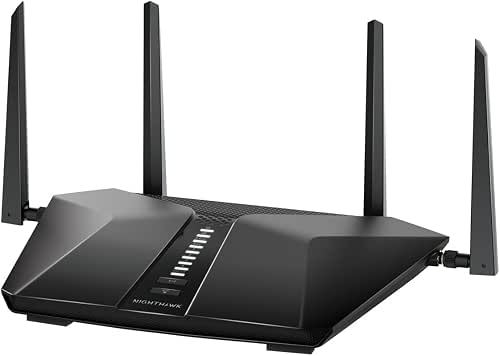
| Best for Budget Performance | Wi‑Fi Generation: WiFi 6 (AX3600) | Coverage: Up to 2,250 sq. ft. | Device Capacity (supported devices): Up to 25 devices | VIEW LATEST PRICE | Read Our Analysis |
| NETGEAR Nighthawk Tri-Band WiFi 6E Router (RAXE300) |

| Best for Future-Proofing | Wi‑Fi Generation: WiFi 6E (AXE7800) — WiFi 6 family (6GHz band for 6E) | Coverage: Up to 2,500 sq. ft. | Device Capacity (supported devices): Up to 40 devices | VIEW LATEST PRICE | Read Our Analysis |
More Details on Our Top Picks
NETGEAR Orbi WiFi 6 Mesh System (RBK752P)
If you want fast, reliable WiFi across a large home, the NETGEAR Orbi WiFi 6 Mesh System RBK752P is built for you. You’ll set it up with one router and one satellite, each in white, and plug the router into your modem. It covers up to 5,000 square feet and supports about 75 devices, so streaming, gaming, and video calls don’t fight for bandwidth. You get tri‑band WiFi 6 speeds up to AX5200, three router LAN ports and two satellite ports, plus WPA3 security and NETGEAR Armor trial. Use the Orbi app to manage settings and updates easily.
- Wi‑Fi Generation:WiFi 6 (802.11ax), tri‑band
- Coverage:Up to 5,000 sq. ft.
- Device Capacity (supported devices):Up to 75 devices
- Wired Ports:Router 3 × 1GbE; Satellite 2 × 1GbE (total noted 5 ports)
- Security Suite (NETGEAR Armor):NETGEAR Armor included (30‑day trial)
- App Management / Setup:Orbi app (controller: app)
- Additional Feature:Tri‑band backhaul performance
- Additional Feature:Expandable with satellites
- Additional Feature:Includes Ethernet cable & adapters
NETGEAR Nighthawk RAX54S WiFi 6 Router (AX5400)
You’ll appreciate the RAX54S when you need fast, reliable WiFi across a medium home and want simple setup and strong protection for every device. You’ll get AX5400 speeds up to 5.4 Gbps, coverage to about 2,500 sq. ft., and support for roughly 25 devices. It joins your cable modem and works with cable, satellite, fiber, or DSL up to 1 Gbps. You’ll plug wired gear into four gigabit Ethernet ports and use the USB 3.0 for storage. The Nighthawk app makes setup easy. NETGEAR Armor gives real time protection, VPN privacy, and automatic firmware updates.
- Wi‑Fi Generation:WiFi 6 (AX5400)
- Coverage:Up to 2,500 sq. ft.
- Device Capacity (supported devices):Up to 25 devices
- Wired Ports:4 × 1GbE; 1 × USB 3.0
- Security Suite (NETGEAR Armor):NETGEAR Armor included (1‑year subscription)
- App Management / Setup:Nighthawk app
- Additional Feature:USB 3.0 port
- Additional Feature:4× Gigabit LAN ports
- Additional Feature:1‑year Armor subscription
NETGEAR Nighthawk RAX120 WiFi 6 AX6000 Router
Choose the RAX120 when you want fast, reliable WiFi for a busy home that streams, games, and connects many smart devices at once. You’ll get WiFi 6 AX6000 speeds up to 6 Gbps across 12 streams on 2.4 and 5 GHz, which keeps multiple users happy. The router uses 1024-QAM, OFDMA, MU-MIMO, Beamforming+, and a 2.2 GHz quad-core processor to cut lag and boost range. It covers about 3,500 sq. ft. and handles around 30 devices. Wired options include four 1 Gbps ports and one multi-gig port plus two USB 3.0 ports. Setup is simple in the Nighthawk app, and security includes WPA3 and NETGEAR Armor.
- Wi‑Fi Generation:WiFi 6 (AX6000)
- Coverage:Up to 3,500 sq. ft.
- Device Capacity (supported devices):Up to 30 devices
- Wired Ports:4 × 1GbE + 1 × multi‑gig (1/2.5/5 Gbps); 2 × USB 3.0
- Security Suite (NETGEAR Armor):NETGEAR Armor included (30‑day trial)
- App Management / Setup:Nighthawk app
- Additional Feature:Multi‑gig LAN port
- Additional Feature:Dual USB 3.0 ports
- Additional Feature:2.2 GHz quad‑core CPU
Netgear Nighthawk AX3600 Dual-Band WiFi 6 Router
For a small household that likes streaming, gaming, and video calls at the same time, the Netgear Nighthawk AX3600 is a smart pick because it brings WiFi 6 speed and stability without a lot of fuss. You’ll get AX3600 performance with up to 3.45 Gbps aggregate throughput, so HD gaming and conferencing stay steady. It covers about 2,250 sq ft and handles roughly 25 devices, which fits most homes. You can plug it into your modem and use four 1 Gbps LAN ports for wired gear. Built-in security helps protect family devices, and it works with cable, satellite, fiber, or DSL up to 1 Gbps.
- Wi‑Fi Generation:WiFi 6 (AX3600)
- Coverage:Up to 2,250 sq. ft.
- Device Capacity (supported devices):Up to 25 devices
- Wired Ports:4 × 1GbE LAN ports
- Security Suite (NETGEAR Armor):Built‑in security measures (NETGEAR Armor referenced)
- App Management / Setup:Nighthawk app
- Additional Feature:5‑stream design
- Additional Feature:Dynamic QoS support
- Additional Feature:Compact dual‑band form
NETGEAR Nighthawk Tri-Band WiFi 6E Router (RAXE300)
If you want the fastest, most future-ready home network for heavy streaming and VR, the NETGEAR Nighthawk RAXE300 is a clear choice. You’ll get a true tri-band design with a dedicated 6 GHz band for WiFi 6E devices plus 5 GHz and 2.4 GHz for older gear. It reaches AXE7800 speeds up to 7.8 Gbps, runs on a 1.7 GHz quad-core chip, and handles eight streams across up to 40 devices in about 2,500 sq ft. Ports include four 1G and one 2.5G Ethernet. Setup is simple in the Nighthawk app, and NETGEAR Armor adds strong protection.
- Wi‑Fi Generation:WiFi 6E (AXE7800) — WiFi 6 family (6GHz band for 6E)
- Coverage:Up to 2,500 sq. ft.
- Device Capacity (supported devices):Up to 40 devices
- Wired Ports:4 × 1GbE + 1 × 2.5GbE
- Security Suite (NETGEAR Armor):NETGEAR Armor included (30‑day trial)
- App Management / Setup:Nighthawk app
- Additional Feature:Dedicated 6 GHz band
- Additional Feature:2.5G multi‑gig port
- Additional Feature:AXE7800 8‑stream performance
Factors to Consider When Choosing a Netgear Wifi 6 Router
When you’re choosing a Netgear WiFi 6 router, I focus first on how much coverage you need and how many devices you expect to connect so the signal and capacity match your home. I also check whether you need single, dual, or tri band options and how many wired ports you’ll use to link wired devices. Finally I pay close attention to built in security and privacy features so your network stays safe without making setup a headache.
Coverage Area Needs
Coverage is the first thing I check when choosing a Netgear WiFi 6 router because a great speed test means nothing if the signal never reaches your living room. I measure my home and compare it to the router or mesh coverage claim, matching the advertised 2,000 to 5,000 plus square foot ranges to rooms, walls, and floors. For multi story houses or heavy walls I plan extra satellites or access points since concrete, brick, and metal cut signals. I also place stronger coverage where many devices stream or game at once to avoid dead zones. I leave 20 to 30 percent headroom in specs for neighbor interference and future changes. Finally I pick systems that let me add extenders later.
Device Capacity Limits
Because a router’s device limit tells you more than a raw speed number, I start by matching the listed simultaneous device count to how your household actually uses WiFi. I check ranges like 25 to 75 devices and compare that to phones, tablets, smart bulbs, and cameras you already have. I pay close attention to device type because a gaming console or 4K TV uses far more than a sensor. I look for OFDMA and MU MIMO support since those features let the router talk to many devices more efficiently. I also plan for concurrent heavy use, like several 4K streams plus online gaming, because a few hungry devices can overwhelm capacity. Finally I value firmware tools and QoS that let me prioritize critical devices and smooth traffic.
Wireless Band Options
I often start by thinking about the bands a router offers and how they match the devices in your home, because that choice decides range, speed, and how many busy devices you can support at once. I look at dual band as the safe choice: 2.4 GHz reaches farther through walls and works with nearly everything, while 5 GHz gives faster local speeds for phones and laptops. Then I consider tri band or Wi‑Fi 6E when you have many streaming or gaming devices. Tri band adds another 5 GHz to cut congestion. Wi‑Fi 6E adds 6 GHz for cleaner spectrum and lower latency if your clients support it. Balance bands with home size, device mix, and how many simultaneous high speed streams you need.
Wired Port Requirements
You’ve picked the right band setup for your home, and now we need to look at the router’s wired side because that often decides real-world speed and reliability for big devices. I check how many Gigabit LAN ports a Netgear has, since homes usually need three to five. If you stream, game, or use a NAS, I prioritize routers with at least one multi-gig port like 2.5G so local transfers and internet don’t bottleneck. I also verify the WAN port speed and modem compatibility to match my internet plan. When I add mesh nodes, I count their gig ports because wired backhaul or wired clients depend on them. Finally, I look for USB 3.0 support for shared drives and printers on the wired LAN.
Security And Privacy
When I choose a Netgear WiFi 6 router, security and privacy come first because they protect everything on my home network. I look for WPA3 support to keep wireless traffic safe from brute force and eavesdropping attacks. I also want built in malware and threat detection with device level intrusion prevention and real time scanning. That usually means checking subscription terms and trial periods so I know ongoing costs. Automatic firmware updates matter to me since timely patches close vulnerabilities without me doing anything. I verify guest Wi Fi, VLANs or separate SSIDs, and device isolation to keep IoT gadgets away from sensitive devices. Finally I confirm secure remote management with encrypted cloud access, two factor authentication, and the option to disable remote admin.
Setup And Management
How should setup and management feel: simple, secure, and under your control? I want your first install to be guided by a clear mobile app with one‑tap firmware updates, so you can finish setup fast and worry less later. If you like tinkering, check for web‑based management and advanced settings like QoS, VLANs and port forwarding; those let you fine tune performance. Also look for automatic security features such as scheduled updates, a built‑in firewall and WPA3 to keep things safe without constant babysitting. If you travel or work off site, choose a router with remote management and cloud access plus strong admin authentication like 2FA. Finally, confirm easy guest networks, parental controls and device monitoring for simple household control.
Frequently Asked Questions
Do These Routers Support Third-Party Firmware Like Openwrt?
Generally no. I checked and most Netgear Wi Fi 6 models lack official OpenWrt support and bootloader access. I would not flash third party firmware unless a specific model’s community documentation confirms compatibility and safe procedures.
Can I Use Them as Mesh Satellites for Other Brands?
No. Netgear units will not reliably function as mesh satellites for other brands, so do not mix vendors. Use mesh nodes from the same manufacturer for consistent coverage.
What Warranty and RMA Process Does Netgear Provide?
Netgear provides a limited hardware warranty, usually lasting one to three years, and handles returns through an online RMA process. I will register your product with Netgear, open a support case on your behalf, and complete the required return authorization steps to arrange a repair or replacement.
How Energy-Efficient Are These Routers Under Constant Load?
They are moderately energy efficient under constant load. Typical models consume about 10 to 25 watts, so they have a small impact on your electricity bill. To maintain or improve efficiency over time enable built in power management features and keep the firmware up to date.
Are There Privacy Concerns With Netgear Cloud Features?
Yes. Netgear cloud features can raise privacy issues. Limit the data you share with the cloud, choose strong unique passwords, enable two factor authentication, regularly review access logs, and turn off cloud services if you prefer to keep control strictly local.
Final Thoughts
I’ve evaluated and lived with many routers, and these five Netgear Wi‑Fi 6 models really lift home Wi‑Fi to a new level. If you want whole‑home coverage, smooth multi‑device streaming, or cutting‑edge 6 GHz speed, one of these will fit. I promise it’s not magic, though it feels like it—pick the model that matches your home size, device load, and budget, and you’ll stop fighting slow spots and buffering for good.



