

If you’re trying to work from a café, train, or hotel desk, the right portable monitor can change how you set up. You’ll see compact 12.5-inch options, larger 15.6-inch picks, and even 24-inch extenders, each with different strengths in weight, brightness, and connections. The best choice isn’t always the biggest one, though, and a few models stand out for reasons you might not expect.





More Details on Our Top Picks
MNN 15.6-inch FHD Portable Monitor with Speakers
If you want a portable second screen that’s easy to carry and simple to set up, the MNN 15.6-inch FHD Portable Monitor is a strong pick for travelers, students, remote workers, and gamers. You get a sharp 1920×1080 IPS display with wide 178° viewing, bright color, HDR, and eye-care support. Two USB-C ports let you run power and video through one cable with compatible devices. Use it as a mirror, extended screen, or portrait display. The slim build, smart cover stand, and speaker support make it easy to pack, protect, and use anywhere.
- Screen Size:15.6-inch
- Resolution:1920×1080
- Panel Type:IPS
- Refresh Rate:60 Hz
- Viewing Angle:178°
- Portable Design:Ultra-slim
- Additional Feature:Full-feature USB-C ports
- Additional Feature:HDR support
- Additional Feature:Smart cover stand
KYY 15.6″ Portable Monitor 1080P USB-C HDMI
The KYY 15.6″ Portable Monitor is a strong pick if you want a lightweight second screen that’s easy to carry and quick to set up. You get a 15.6-inch IPS 1080p display with HDR enhancement, 178-degree viewing angles, and a matte finish that cuts glare. USB-C and mini-HDMI connections make it work with laptops, phones, consoles, and PCs without drivers. It weighs just 1.7 pounds, supports landscape or portrait mode, and includes stereo speakers, a smart cover stand, and cables. You also get blue light filtering for easier long sessions.
- Screen Size:15.6-inch
- Resolution:1920×1080
- Panel Type:IPS
- Refresh Rate:60 Hz
- Viewing Angle:178°
- Portable Design:Ultra-slim
- Additional Feature:Mini-HDMI input
- Additional Feature:Built-in stereo speakers
- Additional Feature:Screen protector included
ARZOPA Portable 15.6″ FHD Monitor with Kickstand (A1)
ARZOPA’s A1 stands out if you want a lightweight 15.6-inch portable monitor that’s easy to carry between home, work, and travel. You get a native 1080p IPS display with a matte finish, 300 nits of brightness, 178-degree viewing angles, and 60Hz smoothness for everyday work or casual gaming. The 0.35-inch metal body weighs just 1.41 kg, and the built-in kickstand lets you set a comfortable angle fast. With HDMI and USB-C support, it works plug-and-play with laptops, Macs, phones, and consoles. Built-in speakers add convenience, too.
- Screen Size:15.6-inch
- Resolution:1920×1080
- Panel Type:IPS
- Refresh Rate:60 Hz
- Viewing Angle:178°
- Portable Design:Ultra-slim
- Additional Feature:Adaptive Sync support
- Additional Feature:Built-in kickstand
- Additional Feature:3 ms response
Laptop Screen Extender Dual Portable Monitor for Laptop
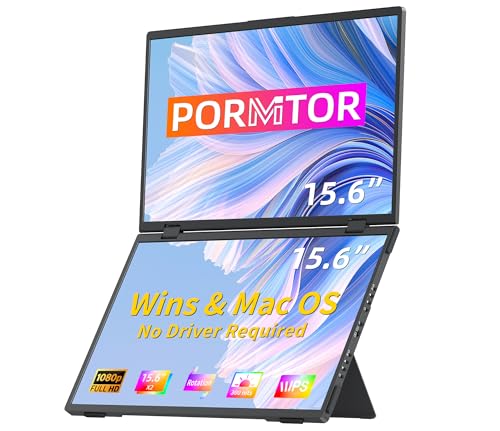
Need a lot more screen space on the go? This Laptop Screen Extender gives you two stacked 15.6-inch FHD IPS screens that fold like a laptop and weigh about 3.5 pounds. You can extend, mirror, split, or use portrait mode, and the 100% sRGB panels deliver sharp 1080p color at 300 nits. It works with Windows and Mac, plus consoles and tablets, through USB-C, Thunderbolt, or HDMI. With plug-and-play setup, built-in speakers, a 90° stand, and a 3-year warranty, you’ll work faster anywhere.
- Screen Size:Dual 15.6-inch
- Resolution:1920×1080
- Panel Type:IPS
- Refresh Rate:60 Hz
- Viewing Angle:178°
- Portable Design:Folding dual-screen
- Additional Feature:Dual stacked screens
- Additional Feature:3-year warranty
- Additional Feature:360° rotating screen
24″ Portable 1080P FHD Monitor Extender with Stand
If you want a 24-inch portable monitor that makes multitasking easier without sacrificing image quality, this 1080p FHD extender with stand is a strong pick. You get a 1920 x 1080 IPS display with 100Hz refresh, 300 nits brightness, and wide viewing angles, so colors stay vivid and motion looks smooth. It supports USB-C single-cable use or HDMI plus USB-C, and it works with laptops, desktops, phones, tablets, and consoles. The adjustable kickstand tilts 90 degrees, and VESA mounting adds flexibility. Remember to use the included 30W power supply.
- Screen Size:24-inch
- Resolution:1920×1080
- Panel Type:IPS
- Refresh Rate:100 Hz
- Viewing Angle:Wide-angle
- Portable Design:Travel-friendly
- Additional Feature:100 Hz refresh
- Additional Feature:VESA compatible
- Additional Feature:30W power supply
SideTrak Slide Portable Monitor 12.5″ Full HD IPS Display
SideTrak’s Slide Portable Monitor is a strong pick for anyone who wants a true dual-screen setup on the go, especially if you work from a 13″–17.5″ Mac, Windows, or Chrome laptop. You get a 12.5-inch IPS display with crisp 1080p resolution, 300 nits of brightness, and wide 170° viewing angles. It connects through one USB 3.0 port, uses DisplayLink, and needs a free driver download. The magnetic mount holds securely, rotates 270°, and lets you travel with the included sleeve. At about 1.7 pounds, it’s built for productivity anywhere.
- Screen Size:12.5-inch
- Resolution:1920×1080
- Panel Type:IPS
- Refresh Rate:60 Hz
- Viewing Angle:170°
- Portable Design:Attach-on portable
- Additional Feature:DisplayLink driver support
- Additional Feature:Magnetic laptop attachment
- Additional Feature:Neoprene carrying sleeve
Factors to Consider When Choosing Portable Monitors
When you choose a portable monitor, start by comparing screen size and resolution so it fits your workspace and image needs. You’ll also want to check connectivity and compatibility, plus brightness and color quality, to make sure it works well with your devices and lighting. Finally, consider portability and build, along with power and stand options, so it stays practical wherever you use it.
Screen Size And Resolution
Screen size and resolution shape how comfortable a portable monitor feels in real use, so you’ll want to match both to your workflow. For most people, 13–16 inches hits the sweet spot between portability and usable space, while 24-inch models give you more room but travel less easily. On 15–16-inch displays, Full HD 1920×1080 is the practical baseline: it keeps text sharp and preserves battery life. If you need more detail or multitasking room, higher pixel density and resolutions above 1080p can help, though icons and text may shrink. Choose larger, sharper panels for creative editing, and stick with 15–16-inch FHD screens for coding, documents, and everyday productivity. A 16:9 aspect ratio works well, and portrait rotation can improve reading and vertical workflows.
Connectivity And Compatibility
Once you’ve settled on the right size and resolution, the next thing to check is how the monitor connects to your devices. You’ll want to match the input type to your laptop, tablet, or phone, whether that’s USB-C with DP Alt Mode, Thunderbolt 3, HDMI, or DisplayLink USB. If you want one cable, confirm that both video and power can travel over USB-C; your device must support USB-C Power Delivery and DP Alt Mode. Check the monitor’s wattage needs, too, so you know if your host can power it or if you’ll need an outlet. Also verify your OS and GPU support extended, mirrored, or portrait modes, plus any drivers. Finally, make sure you have enough ports, lanes, and adapters for dual-screen setups.
Brightness And Color
Brightness and color matter just as much as resolution, especially if you’ll use your portable monitor in mixed lighting or for creative work. Check brightness in nits: 250–300 is fine indoors, but 400+ helps when sunlight washes out the screen. Look at color gamut too. If you edit photos or video, aim for at least 100% sRGB or around 90% NTSC for richer, more accurate tones. Contrast ratio also counts; a 1000:1 IPS panel can show deeper blacks and clearer shadow detail. If you want HDR, make sure the monitor can actually reach strong peak brightness and handle tone mapping well. Finally, see whether it ships factory-calibrated, and compare ΔE values; lower numbers mean better out-of-box color accuracy for you.
Portability And Build
When you’re choosing a portable monitor, portability and build matter as much as image quality, because the whole point is to make the screen easy to carry and easy to use anywhere. Aim for a 12–16-inch display if you travel often; it usually weighs 1–2 pounds and slips into a backpack or carry-on without hassle. Keep an eye on thickness too, since ultra-slim panels around 0.3–0.4 inches save space. A metal shell or reinforced PU leather cover can better guard the screen on the road. Smart covers and integrated stands add protection and let you change angles without extra bulk. If you want fewer accessories, a USB-C connection helps. Also check for kickstands, rotation, or mount support so the monitor fits your workspace.
Power And Stand Options
After checking portability and build, turn to power and stand options, since both affect how easy the monitor is to use on the go. You should look for USB-C with DisplayPort Alt Mode, because single-cable power and video cuts clutter and keeps setup fast. Check the monitor’s voltage and wattage needs, since many 15–24-inch panels draw about 5V and 12–30W, and you may need a powered laptop, PD charger, or adapter. If you want true freedom, consider built-in batteries and compare capacity with real-world runtime at your usual brightness. For support, choose a smart cover, kickstand, or tripod that locks firmly, stays stable, and works in portrait and landscape. A foldable cover that doubles as protection can save space in your bag.
Frequently Asked Questions
Can Portable Monitors Run From a Power Bank?
Many portable monitors can be powered by a power bank provided the bank delivers the required USB-C wattage. Verify the monitor’s input wattage and note that some models require a separate video connection in addition to power.
Do Portable Monitors Support Portrait Mode?
Yes. Many portable monitors can be used in portrait orientation if the monitor’s on-screen menu or companion software allows rotation and your computer or device also supports changing the display orientation. Install or enable the appropriate drivers or display utilities when required. Note that not all monitor stands allow physical rotation, so check whether the included stand or a VESA mount supports turning the screen vertical.
Are Portable Monitors Compatible With Gaming Consoles?
Yes. Many portable monitors work with gaming consoles that provide an HDMI or USB-C video output. Check that the monitor can be powered by the console or has an external power option, supports the console’s resolution and refresh rate, and has low input lag for responsive gameplay. In most cases you connect the console’s video output to the monitor and adjust the console display settings.
How Do Portable Monitors Affect Laptop Battery Life?
Using a portable monitor increases power draw because the laptop must drive the extra display and process additional graphics output. To lessen the impact, lower the monitor and laptop brightness, connect the monitor with a USB-C cable that supports power delivery, or plug the monitor into its own power source.
Can One Portable Monitor Connect to Multiple Devices?
Yes. A single portable monitor can be connected to more than one device, but you generally switch the active input manually or use a USB-C or HDMI switch or docking station. Viewing multiple sources at the same time is possible only if the monitor explicitly supports picture-by-picture or multi-input modes.
Final Thoughts
So, if you want to work anywhere without missing a beat, you’ve got plenty of solid portable monitor options. From slim 12.5-inch picks to roomy 24-inch displays, each one can give you sharper visuals, easier multitasking, and more flexibility on the go. Focus on the features that fit your setup, and you’ll be ahead of the game. With the right screen by your side, you can turn almost any space into a productive workspace.
