

If you want your home theater to look dramatically better overnight, the screen you choose can matter more than the projector itself. You’ll see compact portable options, sturdy manual pull-down designs, and motorized screens that make setup effortless. From small rooms to large-format setups, each pick solves a different problem, but only a few truly sharpen the image. The best fit for your space may surprise you, and the differences are worth a closer look.




More Details on Our Top Picks
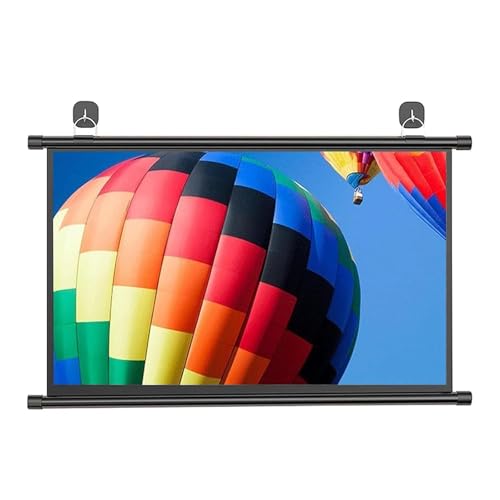
Portable Pull Down Projector Screen 16:9 30
If you need a compact, easy-to-move screen for a small room, classroom, office, or outdoor setup, the Portable Pull Down Projector Screen 16:9 30 gives you a practical fit. You can pull it down manually, and its matte white fiberglass surface delivers sharp, true-color images with a 178-degree viewing angle. The black border boosts contrast and helps the screen stay flat. You can mount it on a wall or ceiling with included accessories, or use hooks for flexible setup. Its lightweight roll-up design makes travel easy, and it works well for movies, lessons, and presentations.
- Screen Size:30″
- Aspect Ratio:16:9
- Operation:Manual pull-down
- Mounting:Wall/ceiling
- Viewing Angle:178°
- Screen Finish:Matte white
- Additional Feature:Fiberglass screen surface
- Additional Feature:Black border contrast
- Additional Feature:Adjustable top hook
Elite Screens 100-Inch Manual Pull Down Projector Screen (M100H)
The Elite Screens Manual B 100-inch M100H is a smart pick when you want a larger 16:9 screen that’s easy to mount on either a wall or ceiling and simple to operate by hand. You get a 49.2 x 87.4-inch viewing area, a matte MaxWhite 2 surface, 1.1 gain, and 180-degree viewing. It’s black-backed with black borders, so stray light won’t wash out your image. The slow retract and 2-inch auto-lock let you set the height you need. It’s 4K, 8K, HDR, and 3D ready, but skip it for ultra short throw projectors.
- Screen Size:100″
- Aspect Ratio:16:9
- Operation:Manual pull-down
- Mounting:Wall/ceiling
- Viewing Angle:180°
- Screen Finish:Matte
- Additional Feature:2-inch auto-lock intervals
- Additional Feature:Greenguard Gold certified
- Additional Feature:Lifetime technical support
YODOLLA 150″ Motorized 4K Projector Screen
For a large-format, low-maintenance home theater setup, YODOLLA’s 150″ motorized 4K projector screen is a strong fit, especially if you want a massive 16:9 viewing area with smooth, remote-controlled operation. You get a 130.71 x 73.62-inch matte PVC surface with 1.2 gain, 160° viewing, and support for 3D, 4K, and 1080P. The triple-layer build helps block light and boost color. You can mount it on a wall or ceiling, and the quiet motor, self-locking design, and included remotes make setup and use easy.
- Screen Size:150″
- Aspect Ratio:16:9
- Operation:Motorized
- Mounting:Wall/ceiling
- Viewing Angle:160°
- Screen Finish:Matte PVC
- Additional Feature:Triple-layer PVC screen
- Additional Feature:Wired and wireless remotes
- Additional Feature:Self-locking length adjustment
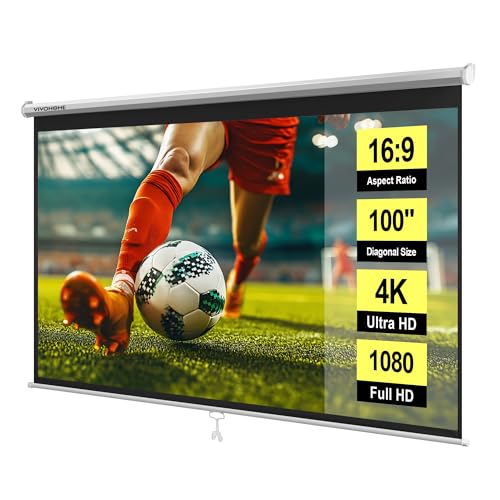
VIVOHOME 100 Inch Retractable Projector Screen (16:9)
VIVOHOME’s 100-inch pull-down projector screen is a strong pick when you want a clean, manual setup that locks at any height and works just as well in a home theater as it does in a classroom or meeting room. You get a 16:9 matte white surface with a 160-degree viewing angle, so images stay bright and even for 3D, 1080p, 4K, and 8K content. Its three-layer PVC fabric resists creases, moisture, and temperature shifts, while the metal casing adds durability. You can wall- or ceiling-mount it, and it’s easy to wipe clean.
- Screen Size:100″
- Aspect Ratio:16:9
- Operation:Manual pull-down
- Mounting:Wall/ceiling
- Viewing Angle:160°
- Screen Finish:Matte white
- Additional Feature:Three-layer PVC fabric
- Additional Feature:Waterproof screen material
- Additional Feature:CE, ROHS certified
Kodak Manual Pull-Down 80″ Projector Screen
If you want a clean, reliable setup for home theater nights, office presentations, or classroom use, Kodak’s Manual Pull-Down White Projector Screen makes a strong case with its 80-inch 16:9 matte white surface and easy retractable design. You get a 1.0 gain screen with a 160-degree viewing angle, so colors stay balanced and glare stays low. Mount it on your wall or ceiling with the included hooks and screws. The heavy-duty square housing keeps things neat, and the wrinkle-resistant surface wipes clean. It works with HD, FHD, and 4K projectors for movies, meetings, gaming, and lectures.
- Screen Size:80″
- Aspect Ratio:16:9
- Operation:Manual pull-down
- Mounting:Wall/ceiling
- Viewing Angle:160°
- Screen Finish:Matte white
- Additional Feature:Heavy-duty square case
- Additional Feature:Easy-clean matte surface
- Additional Feature:Defect warranty coverage
Motorized 100-Inch Automatic Projector Screen with Remote
The Motorized 100-Inch Automatic Projector Screen with Remote is a strong pick when you want a clean, convenient setup for home theaters, classrooms, or office presentations. You get a 16:9, 100-inch matte screen with a 1.2 gain and a wide 160° viewing angle, so your image stays bright and accurate. The four-layer polyester surface resists wrinkles and cleans easily. You can raise or lower it with the wireless remote or wired control, then lock it at the right length. Its quiet motor, metal housing, and wall or ceiling mount make installation simple.
- Screen Size:100″
- Aspect Ratio:16:9
- Operation:Motorized
- Mounting:Wall/ceiling
- Viewing Angle:160°
- Screen Finish:Matte
- Additional Feature:Four-layer polyester fabric
- Additional Feature:Extended power cord
- Additional Feature:1-year warranty
Factors to Consider When Choosing Pull Down Projector Screens
When you choose a pull down projector screen, start with the right size, aspect ratio, and viewing area for your room. You’ll also want to check the screen material and gain, plus how easily you can mount and install it. Finally, make sure the screen retracts smoothly and fits your projector, space, and intended use.
Screen Size and Aspect Ratio
Screen size and aspect ratio should match both your content and your space: choose 16:9 for widescreen movies and modern HDTV or 4K sources, or 4:3 for legacy presentations and older computer displays. Then measure your room and seating distance so the screen feels immersive without overwhelming you. A useful rule is to sit about 1.5 to 3 times the screen height away. Check that the active image width and height fit your wall, mount, and projector throw distance, so you can fill the screen cleanly without keystone or cropping. If you need portability, smaller 30″–60″ screens are easier to carry and hang. Larger 100″+ screens need stronger mounting and more roll-down clearance. Keep brightness in mind too, since bigger screens spread the same light thinner.
Material and Gain
Material choice shapes how a pull down projector screen performs day to day: PVC, fiberglass, and multi-layer PVC/polyester fabrics differ in durability, wrinkle resistance, and how easily you can clean them, while thicker multi-layer and fiberglass options usually stay flatter longer. You should also check gain, because it tells you how much light the surface reflects. Matte screens around 1.0 to 1.1 give you the most even color and the widest viewing angles, which works well for group viewing. Higher-gain surfaces can make the image brighter on-axis, but they can narrow the sweet spot and create hotspotting. In rooms that aren’t fully dark, a black-backed or triple-layer screen helps block light bleed and boosts contrast. Avoid specialized high-gain coatings if you use an ultra-short-throw projector.
Mounting and Installation
Even the best screen surface won’t perform well if it’s hard to install or sits in the wrong spot. You’ll want to choose a wall-mount or ceiling-mount setup based on your room’s layout and sightlines; ceiling mounting often gives you a higher position and fewer obstructions. Check the screen’s weight and enclosure size against your surface and hardware, and use anchors or expansion screws in drywall or masonry for a secure hold. If the screen includes adjustable hooks, brackets, or a hole-punchable casing, you can fine-tune alignment for a flatter image. For motorized models, plan power access and cable routing early. Also match the mount to your substrate—glass, tile, painted drywall, or wallpaper—so you avoid damage and get reliable attachment.
Operation and Retractability
When you’re choosing a pull down projector screen, how it operates matters just as much as the image it produces. You can pick manual or motorized: manual models use a slow-retract spring system, while motorized screens lift and lower with a quiet electric motor and remote. Look for soft-close, self-locking, or auto-lock features so the screen stays at your chosen height and doesn’t snap back. If you go motorized, check whether it offers wired, wireless, or hardwired control, plus a manual override for outages. Also think about portability: lightweight roll-up screens are easier to move, but motorized units usually need fixed mounting and power. Finally, choose a sturdy casing and quality mechanism to reduce wear and wrinkling over time.
Compatibility and Use Cases
To get the right pull down projector screen, match it to how you’ll actually use it: 16:9 works best for movies and streaming, while 4:3 can still fit legacy presentations and some classroom content. Next, size the viewing area to your room and seating distance so the picture fills your field of view without overwhelming the space or straining your eyes. Check your projector’s throw distance too; short-throw and ultra-short-throw models may need screens built to reduce hotspots and distortion. If your room has ambient light or wide seating, choose a material with the right gain and viewing angle for brighter, more even images. Finally, pick manual or motorized mounting, plus wall or ceiling placement, based on how permanent, adjustable, or portable you need it to be.
Frequently Asked Questions
How Do I Clean a Pull Down Projector Screen Safely?
Use a microfiber cloth to remove dust, then wipe the surface with a soft cloth slightly dampened with warm water and a small amount of mild liquid soap. Do not scrub, soak, or apply chemical cleaners. Allow the screen to dry completely before rolling it up again.
Can a Pull Down Screen Be Mounted on a Sloped Ceiling?
Yes. Install angle-adjusting brackets or a spacer so the screen hangs level; otherwise the image will tilt and appear distorted.
What Causes Projector Screens to Wrinkle Over Time?
Wrinkles form when the screen is stored improperly, stretched unevenly, or exposed to heat, high humidity, dust accumulation, or frequent pull-down cycles. Prevent them by cleaning with a soft cloth and mild cleaner, maintaining uniform edge tension, and rolling the screen loosely rather than tightly.
Are Pull Down Screens Compatible With Short-Throw Projectors?
Yes. Use a flat tensioned screen and position the projector precisely. Otherwise you may get geometric distortion, bright central hot spots, or wrinkles that degrade image quality.
How Long Do Motorized Projector Screen Motors Usually Last?
Motorized projector screen motors typically last between 5 and 10 years. Proper care can extend that lifespan: limit frequent full-cycle operation, keep the housing and remote sensor free of dust, and verify the motor and screen are aligned and mounted securely to prevent strain. Regularly inspect for loose fasteners and address unusual noises promptly.
Final Thoughts
Choosing the right pull-down projector screen can turn movie night into a true escape. Whether you need the portability of a compact 30-inch model, the reliability of a manual 100-inch screen, or the luxury of a motorized 4K-ready option, there’s a fit for every space. Think about your room, your screen size, and your viewing style, and you’ll bring every scene to life. Your perfect home theater isn’t far—it’s waiting to be lowered.
