

A good Samsung TV remote should match your TV and feel easy to use. Voice controls, app shortcuts, and simple buttons all matter. A solid replacement can make daily viewing smoother and faster.
The best picks balance compatibility, speed, and comfort.
| Samsung TV Remote Replacement with Voice Control |
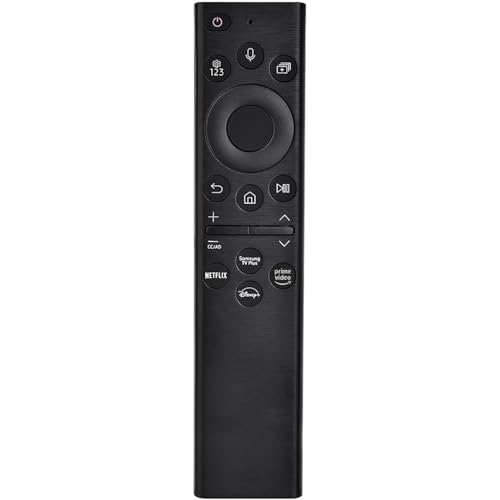
| Best for Voice Control | Compatibility: Samsung Smart TVs, 2019–2025; voice models only | Connectivity: Infrared + Bluetooth voice | Setup: Pairing required | VIEW LATEST PRICE | Read Our Analysis |
| Universal Samsung TV Remote Control for Smart TVs |

| Best Universal Pick | Compatibility: Samsung Smart TVs, 2017–2024 | Connectivity: Infrared | Setup: No setup | VIEW LATEST PRICE | Read Our Analysis |
| Samsung TV Replacement Remote Control (BN59-01388A) |

| Best Premium Replacement | Compatibility: Samsung TVs, 2015–2025 | Connectivity: Infrared | Setup: Plug-and-play | VIEW LATEST PRICE | Read Our Analysis |
| Universal Remote Control for Samsung Smart TV |

| Best Night Use | Compatibility: Samsung LCD/Smart/3D/LED/HD TVs | Connectivity: Not specified | Setup: No setup | VIEW LATEST PRICE | Read Our Analysis |
| Samsung OEM Remote Control with Netflix Hotkey – Black (BN59-01315J) |

| Best for TU7000 | Compatibility: Samsung TU7000 series TVs | Connectivity: Infrared | Setup: No programming | VIEW LATEST PRICE | Read Our Analysis |
| Replacement Samsung BN59-01301A TV Remote Control |

| Best for Older Models | Compatibility: Samsung Smart TVs; many NU/MU models | Connectivity: Not specified | Setup: No programming | VIEW LATEST PRICE | Read Our Analysis |
More Details on Our Top Picks
Samsung TV Remote Replacement with Voice Control
If you’ve got a Samsung Smart TV from 2019 to 2025 and want voice control without complicated setup, this replacement remote is a strong fit. You can use it with many Samsung voice-control models, including BN59 and TM series remotes. Its Bluetooth voice control lets you search, launch, and pause content from up to 40 inches away, while infrared keeps basic control reliable. Just insert 2 AAA batteries, turn on your TV, and hold Back/Exit plus Play/Pause for 5–7 seconds. Built from durable ABS, it’s proven for 100,000 clicks and includes a 2-year warranty.
- Compatibility:Samsung Smart TVs, 2019–2025; voice models only
- Connectivity:Infrared + Bluetooth voice
- Setup:Pairing required
- Batteries:2 AAA
- Shortcuts:Voice control
- Color:Black
- Additional Feature:Bluetooth voice control
- Additional Feature:100,000-click buttons
- Additional Feature:2-year full warranty
Universal Samsung TV Remote Control for Smart TVs
The Universal Samsung TV Remote Control for Smart TVs is a smart pick for anyone who needs a simple replacement for a lost, damaged, or aging Samsung remote, since it works with most Samsung Smart TVs from 2017 through 2024 and supports many common model numbers. You can use it with Samsung LED, LCD, HDTV, and 3D sets too. This infrared remote needs no programming or setup, so you’re ready fast. Its compact body feels easy to grip, and its stable signal reaches farther. You’ll also get full function control plus Netflix, Prime Video, and Hulu shortcut buttons.
- Compatibility:Samsung Smart TVs, 2017–2024
- Connectivity:Infrared
- Setup:No setup
- Batteries:Not specified
- Shortcuts:Netflix/Prime/Hulu
- Color:Not specified
- Additional Feature:Compact easy-grip design
- Additional Feature:Stable long-range signal
- Additional Feature:3 shortcut buttons
Samsung TV Replacement Remote Control (BN59-01388A)
Looking for a simple replacement that works with a wide range of Samsung TVs? The Samsung TV Replacement Remote Control (BN59-01388A) fits Crystal UHD, QLED, Neo QLED, OLED, The Frame, and many 2015–2025 Samsung series. You can use it as a replacement for numerous original remotes, including BN59-01388A, BN59-01388H, TM2240A, and many more. It’s plug-and-play, so you won’t need pairing or programming. Just add 2 AAA batteries, and you’re set. With 0.1-second response, 45-foot range, shortcut buttons, and durable ABS construction, it’s a smart, reliable choice.
- Compatibility:Samsung TVs, 2015–2025
- Connectivity:Infrared
- Setup:Plug-and-play
- Batteries:2 AAA
- Shortcuts:Netflix/Prime/Disney+/TV Plus
- Color:Not specified
- Additional Feature:45-foot control range
- Additional Feature:0.1-second response
- Additional Feature:200K-click durability
Universal Remote Control for Samsung Smart TV
A universal remote control for Samsung Smart TV is a great choice whenever you desire a simple replacement that works right away, because it fits Samsung LCD, Smart, 3D, LED, and HD TVs without any programming or pairing. You just insert batteries and start watching; batteries aren’t included. It also covers the original Samsung remote’s functions and supports Netflix and Amazon buttons for easy streaming access. The durable buttons feel good in your hand, and the backlit night light helps you use it in the dark. Should you ever hit a quality issue, you can contact the seller for support.
- Compatibility:Samsung LCD/Smart/3D/LED/HD TVs
- Connectivity:Not specified
- Setup:No setup
- Batteries:Batteries not supplied
- Shortcuts:Netflix/Amazon
- Color:Not specified
- Additional Feature:Backlit night button
- Additional Feature:Netflix and Amazon buttons
- Additional Feature:Satisfactory solution support
Samsung OEM Remote Control with Netflix Hotkey – Black (BN59-01315J)
Samsung’s OEM BN59-01315J remote is a smart pick should you want a simple replacement for a compatible TU7000-series TV and value instant streaming access, thanks to its dedicated Netflix hotkey. You get true Samsung branding, infrared control, and no programming hassles, so you can start using it right away. It works with many TU7000 models, including the UN43TU7000FXZA and UN75TU7000FXZA, and controls one TV from up to 30 feet away. You’ll need two AAA batteries, which aren’t included. At just 0.08 kilograms, it feels light, compact, and easy to handle.
- Compatibility:Samsung TU7000 series TVs
- Connectivity:Infrared
- Setup:No programming
- Batteries:2 AAA
- Shortcuts:Netflix hotkey
- Color:Black
- Additional Feature:Samsung OEM remote
- Additional Feature:30-foot range
- Additional Feature:1-year manufacturer warranty
Replacement Samsung BN59-01301A TV Remote Control
Need a replacement for a lost Samsung remote? This Samsung BN59-01301A TV remote gives you the same functions as your original, so you can control your Smart TV without hassle. It isn’t universal, but it’s compatible with many Samsung models, including the UN55NU6900B, UN50NU7100F, UN65NU7300F, and UN75NU7200F. You don’t need to program it; just add 2 AAA alkaline batteries, and it works right away. Should you be unsure about fit, use CTRL+F to search your TV or remote model number in the description details before you buy.
- Compatibility:Samsung Smart TVs; many NU/MU models
- Connectivity:Not specified
- Setup:No programming
- Batteries:2 AAA
- Shortcuts:Not specified
- Color:Not specified
- Additional Feature:Non-universal design
- Additional Feature:Same as original
- Additional Feature:CTRL+F model search
Factors to Consider When Choosing Remote Controls for Samsung
When you choose a Samsung remote, make sure it’s compatible with your TV model and easy to pair. You’ll also want to check whether it supports voice control and uses the right signal type for your setup. Shortcut buttons can save you time, so look for features that match how you use your TV.
Compatibility With TV Models
Before you buy a replacement, check your TV’s model year and series, because remote compatibility can vary a lot across Samsung lines from 2015–2025, including NU, TU, AU, CU, DU, QLED, Neo QLED, OLED, and The Frame. Whenever possible, match the remote to the exact original part number or code so you don’t end up with buttons that don’t fit your set. Universal remotes can work well, but only provided they explicitly list your TV category, like LED, LCD, HDTV, 3D, or Smart TV. Don’t rely on a long compatibility list alone; verify your exact model number and read any exclusion remarks. Even then, some replacements cover only certain model families, so a close match matters more than broad claims.
Voice Control Support
Once you’ve matched the remote to your Samsung TV model, check whether voice control is actually supported. If the remote or TV doesn’t explicitly include it, you’ll still get normal button control, but you won’t be able to use spoken commands. That matters because voice compatibility often depends on certain model years or code families, so your TV itself has to support it too. Some voice-enabled remotes use Bluetooth for voice input, which can let you issue commands from different angles and from roughly 40 inches away. Even then, the remote still use infrared for regular button control, so voice features don’t make every function wireless. If voice control isn’t listed, expect a standard replacement with no spoken search, launch, or pause.
Setup And Pairing
Setup matters just as much as button layout, so check whether the remote needs pairing or works right out of the box. If you want the easiest experience, look for a model that says “no programming required” or “no setup required.” Those remotes should work immediately, so you can start using them fast. If pairing is needed, the process is usually simple: insert two AAA batteries, turn on your TV, then hold the required buttons for about 5 to 7 seconds until it connects. When you’re replacing an older remote, match the model code if you can, since that often cuts down on setup problems and helps the buttons behave as expected. Reading the setup notes first saves you time and frustration.
Remote Type And Signal
After you’ve handled setup and pairing, the next thing to check is the remote’s signal type. You should match the remote to your Samsung TV’s system: infrared models need a clear line of sight, while Bluetooth voice remotes can work from different angles and might add voice features on supported TVs. Check whether the remote uses infrared, Bluetooth, or both, because that affects pairing, speed, and smart-control access. Also, confirm the operating range before you buy; some remotes work best at about 3 feet, while others reach 30–45 feet. Provided that you want a simple swap, choose a no-programming infrared replacement. Provided that your TV supports it, a paired voice remote might need a button-hold setup. Finally, make sure the device limit fits your setup.
Shortcut Button Features
Shortcut buttons can make a Samsung TV remote much easier to use through providing you one-touch access to apps and features like Netflix, Prime Video, Hulu, Disney+, Samsung TV Plus, or voice and quick-launch functions. When you choose a remote, check how many shortcuts it offers. Some basic models give you just two, while others include four dedicated keys. You could see branded hotkeys for Netflix and Amazon, or a trio for Netflix, Prime Video, and Hulu. These buttons help you skip extra menu steps and open your favorite services fast. Before you buy, confirm that the shortcuts work with your Samsung TV model, since compatibility can depend on the TV’s generation. Provided they match, you’ll enjoy a smoother, faster viewing experience every day.
Power And Battery Needs
Beyond handy shortcut buttons, battery and power needs are another key thing to check when selecting a Samsung TV remote. You’ll often see remotes that take 2 AAA batteries, and batteries might not come in the box, so check before you buy. Should the remote only works best with standard alkaline AAA cells, that matters for fit and runtime. Power features also vary a lot: some models use ultra-low-power designs with standby times up to 6 months, while others are rated for about 9 years of normal use. Should there’s no solar charging, you’ll need to replace batteries yourself instead of relying on light-based recharging. A lighter remote, around 0.07 to 0.08 kilograms, can feel easier to use during long viewing sessions too.
Build Quality And Durability
When you choose a Samsung TV remote, build quality matters just as much as features. You should pick one made from durable materials like ABS, because it can handle daily use and the occasional drop better. Check the button lifespan too; remotes evaluated for 100,000 to 200,000 clicks usually hold up far longer whenever you use them often. A lightweight design, around 0.07 to 0.08 kg, can feel easier in your hand and won’t strain the casing as much. You’ll also want sturdy buttons with a solid tactile feel, since well-built controls resist wear and keep working smoothly over time. Should you want real longevity, look for models rated for about 6 months to 9 years of normal use.
Range And Responsiveness
Range and responsiveness can make a Samsung TV remote feel smooth or frustrating, especially whenever you’re controlling the TV from across the room. Should you need to steer the TV from a sofa, bed, or kitchen, choose a remote with a strong control range; options can span from about 3 feet to 45 feet. Fast response also matters, because some remotes react in just 0.1 seconds, so channel changes and menus feel instant. Check whether the remote uses infrared, Bluetooth, or voice control, since infrared usually needs a clear line of sight and offers less freedom from different angles. For dependable use at distance, make sure the remote supports stable transmission and that voice or buttons still work well where you’ll sit.
Frequently Asked Questions
Which Samsung Remote Works With Older Non-Smart TVS?
Use a Samsung infrared universal remote, such as the BN59-01259B or another replacement that specifically supports non-smart TVs. It works with older Samsung TVs and can be programmed for power, volume, and channel control.
Can Replacement Remotes Control Soundbars and Cable Boxes?
Yes. Many replacement remotes can control soundbars and cable boxes, and nearly 80% of users pair devices through HDMI CEC or infrared. This lets you simplify your setup, cut clutter, and control everything with a single remote.
How Do I Pair a Samsung Remote Without the Original Remote?
Turn on the TV, then press and hold Back and Play/Pause on the remote for three seconds until pairing begins. If that does not work, use the TV buttons or the SmartThings app.
Do Universal Remotes Support Samsung TV Gaming Shortcuts?
Yes, some universal remotes support Samsung TV gaming shortcuts, but most provide only basic controls. To access game mode, input switching, and quick settings, you will usually need a programmable remote or a Samsung specific remote.
Are There Rechargeable Samsung Remote Control Options?
Yes, rechargeable Samsung remote control options do exist, especially third party models and solar powered Samsung remotes. You can charge them with USB or sunlight, which reduces battery replacements and helps avoid dead remotes.
Conclusion
Whenever you choose the right Samsung TV remote, you’re not just pressing buttons—you’re summoning comfort with a flick of your thumb. Whether you want voice control, one-touch streaming shortcuts, or a simple universal backup, the best pick feels almost invisible in your hand and instant on screen. You’ll settle into your couch, hear the soft click, and watch your TV respond like it knows you. That’s the kind of magic that makes every evening easier.
