

The best router modems for 2026 are fast, reliable, and easy to set up.
Top picks like the NETGEAR Nighthawk CAX80, CAX30, and Motorola MB8611 handle busy homes with ease.
They pair strong Wi‑Fi with solid modem performance for smoother everyday use.
The best choice comes down to speed, home size, and your internet plan.
| NETGEAR Nighthawk Cable Modem and WiFi 6 Router Combo |

| Best Overall | Modem Type: DOCSIS 3.1 modem/router combo | Wi‑Fi: Wi‑Fi 6 | Band Type: Dual-band | VIEW LATEST PRICE | Read Our Analysis |
| Motorola MB8611 DOCSIS 3.1 Cable Modem 2.5 Gbps |
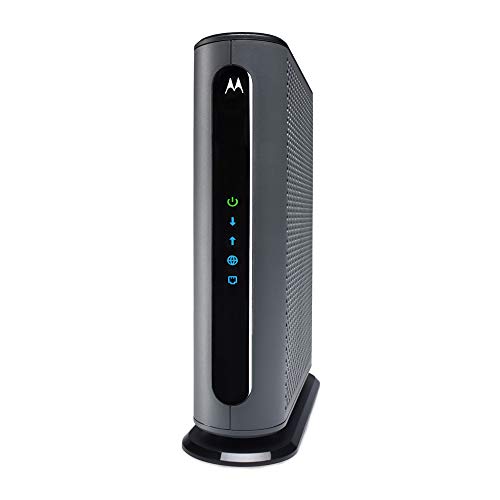
| Best Modem Only | Modem Type: DOCSIS 3.1 cable modem | Wi‑Fi: No Wi‑Fi | Band Type: N/A | VIEW LATEST PRICE | Read Our Analysis |
| NETGEAR Cable Modem Wi-Fi Router Combo C6250 |
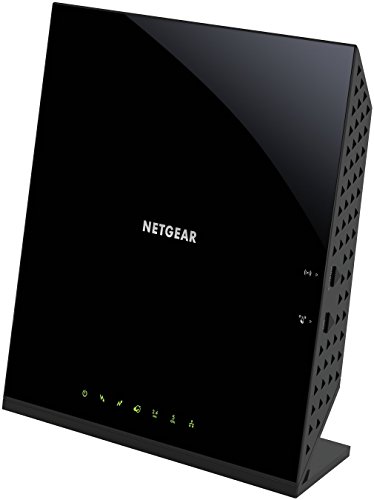
| Budget-Friendly Pick | Modem Type: DOCSIS 3.0 modem/router combo | Wi‑Fi: AC1600 Wi‑Fi | Band Type: Dual-band | VIEW LATEST PRICE | Read Our Analysis |
| WiFi SIM Card Portable LTE Router Modem |

| Best Portable | Modem Type: LTE SIM card modem/router | Wi‑Fi: Wi‑Fi hotspot | Band Type: Dual-band | VIEW LATEST PRICE | Read Our Analysis |
| NETGEAR Nighthawk CAX30 Modem Router Combo WiFi 6 |

| Best Midrange Pick | Modem Type: DOCSIS 3.1 modem/router combo | Wi‑Fi: Wi‑Fi 6 | Band Type: Dual-band | VIEW LATEST PRICE | Read Our Analysis |
More Details on Our Top Picks
NETGEAR Nighthawk Cable Modem and WiFi 6 Router Combo
Should you want a single device that replaces both your cable modem and WiFi router, the NETGEAR Nighthawk CAX80 is a strong pick for cable internet users who need speed and coverage. You can use it with Xfinity, cable provider, Cox, and other major cable providers, but not Verizon or AT&T. Its DOCSIS 3.1 modem and WiFi 6 AX6000 design support plans up to 6 Gbps, cover about 2,500 square feet, and handle 30 devices. You also get 4 Ethernet ports, a 2.5Gb port, USB 3.0, Nighthawk app setup, and NETGEAR Armor security.
- Modem Type:DOCSIS 3.1 modem/router combo
- Wi‑Fi:Wi‑Fi 6
- Band Type:Dual-band
- Ethernet Ports:4 ports
- Max Speed:Up to 6 Gbps
- Security:WPA/WPA2/WPA3
- Additional Feature:2.5G multi-gig port
- Additional Feature:Port aggregation support
- Additional Feature:NETGEAR Armor protection
Motorola MB8611 DOCSIS 3.1 Cable Modem 2.5 Gbps
The Motorola MB8611 is a strong pick when you want a cable modem that can keep up with multi-gig internet plans without adding a built-in router or phone line. You get DOCSIS 3.1 performance, a 2.5 Gbps Ethernet port, and backward compatibility with 32×8 DOCSIS 3.0 service. It supports downstream speeds up to 2500 Mbps and upstream speeds up to 800 Mbps, depending on your plan. AQM helps cut latency, so gaming, video calls, and streaming feel smoother. It works with any WiFi router and includes a 2-year warranty.
- Modem Type:DOCSIS 3.1 cable modem
- Wi‑Fi:No Wi‑Fi
- Band Type:N/A
- Ethernet Ports:1 port
- Max Speed:Up to 2.5 Gbps
- Security:AQM performance support
- Additional Feature:AQM latency reduction
- Additional Feature:USA technician support
- Additional Feature:2-year warranty
NETGEAR Cable Modem Wi-Fi Router Combo C6250
NETGEAR’s C6250 is a solid pick provided you want an all-in-one modem/router for a smaller home and a cable plan up to 300 Mbps. You can use it with major cable providers, and it’s certified for Xfinity, Cox, and Charter. It delivers AC1600 Wi‑Fi, covers up to 1,500 sq ft, and supports up to 25 devices. You also get two Gigabit Ethernet ports and a USB port for wired gear. Since it uses DOCSIS 3.0 with 16×4 channel bonding, it works well for everyday streaming, browsing, and light gaming.
- Modem Type:DOCSIS 3.0 modem/router combo
- Wi‑Fi:AC1600 Wi‑Fi
- Band Type:Dual-band
- Ethernet Ports:2 ports
- Max Speed:Up to 1.6 Gbps
- Security:WEP/WPA/WPA2
- Additional Feature:25-device support
- Additional Feature:Parental controls included
- Additional Feature:1 USB port
WiFi SIM Card Portable LTE Router Modem
Should you need a compact, unblocked LTE modem that can give you Wi‑Fi on the go, this WiFi SIM Card Portable LTE Router Modem is a strong fit for travel, car use, and remote work. You can drop in a SIM card, connect through dual-band 802.11ac Wi‑Fi, and share 3G/4G access with up to 10 devices. Its 2100mAh battery, 138 g build, and ABS shell keep it portable and durable. You get app control, a retractable antenna, and support for many global bands. It’s open, so you’ve got flexible coverage across regions.
- Modem Type:LTE SIM card modem/router
- Wi‑Fi:Wi‑Fi hotspot
- Band Type:Dual-band
- Ethernet Ports:1 port
- Max Speed:Up to 1 Gbps
- Security:Not encrypted
- Additional Feature:Built-in 2100mAh battery
- Additional Feature:Portable mini design
- Additional Feature:SIM card slot
NETGEAR Nighthawk CAX30 Modem Router Combo WiFi 6
With WiFi 6 speeds up to 2.7Gbps and DOCSIS 3.1 support, the NETGEAR Nighthawk CAX30 is a strong pick should you want one cable modem router combo that can handle fast cable plans up to 2Gbps without extra gear. You get 32×8 channel bonding, four Gigabit Ethernet ports, port aggregation, and a USB 3.0 port for flexible wired connections. It works with Xfinity, Charter, and Cox, but not DSL or bundled voice. NETGEAR Armor adds protection, while the Nighthawk app makes setup easy.
- Modem Type:DOCSIS 3.1 modem/router combo
- Wi‑Fi:Wi‑Fi 6
- Band Type:Dual-band
- Ethernet Ports:4 ports
- Max Speed:Up to 2.7 Gbps
- Security:WPA-PSK/WPA2-PSK
- Additional Feature:30-day Armor trial
- Additional Feature:Internal antenna design
- Additional Feature:Supports Linux systems
Factors to Consider When Choosing Router Modems
When we choose a router modem, we should first match it to our internet plan speed so we’re not paying for performance we can’t use. We also need to check modem compatibility, the WiFi standard, and coverage area to make sure the connection fits our home and setup. Finally, let’s consider device capacity so our network can handle everyone’s phones, laptops, and smart devices at once.
Internet Plan Speed
Your internet plan speed should be the initial thing we check, because the modem/router combo needs to match or exceed your subscribed download rate to avoid becoming a bottleneck. We should choose hardware rated at or above our plan so we’re not paying for speeds it can’t pass through. When we’re on plans above 1 Gbps, we need DOCSIS 3.1 and multi-gig Ethernet, since older gear often tops out between 300 Mbps and 1 Gbps. For a 2 Gbps plan, we should target a device rated for at least 2 Gbps with a multi-gig port. For very fast 6 Gbps service, we need explicit support for that range on both wired and Wi‑Fi sides. When we’re at 300 Mbps or less, lower-capacity models can still work well.
Modem Compatibility
Next, we need to check modem compatibility before we buy anything, because the device has to match both the cable technology and the service requirements of our provider. We should confirm support for the right standard, such as DOCSIS 3.0 or DOCSIS 3.1, since the wrong one won’t connect. Then we need to verify that our provider approves the modem for our plan speed, because some models only work on major cable networks or slower tiers. If we use a different service type, we shouldn’t pick a cable-only unit. We also need a standalone modem if we already own a router, not a modem-router combo. Finally, let’s check channel bonding and upstream and downstream speed ranges so the modem fits both the network and our performance needs.
WiFi Standard
WiFi standard matters just as much as modem compatibility, because it shapes how well our router modem handles everyday traffic. We should favor WiFi 6 (802.11ax) as we want higher throughput, better efficiency, and stronger performance with many connected devices. AC-class WiFi, built on WiFi 5, can still work well, but it’s usually less efficient in busy homes. Dual-band support also helps us split traffic between 2.4 GHz and 5 GHz, giving us a practical mix of range and speed. We should match the standard to our device mix, especially as we’re juggling phones, laptops, smart TVs, and game consoles. Higher ratings can promise faster speeds, but real-world results still depend on interference, congestion, and how many devices we’re using.
Coverage Area
Coverage area is the next piece we should check, because even a fast WiFi standard won’t help provided the signal can’t reach every room. We should match the modem’s range to our space: about 1,500 sq. ft. can fit a small home, while 2,500 sq. ft. works better for larger layouts. If walls, floors, or long hallways can weaken signal, we’ll want extra range, not just a bare minimum. For homes with multiple rooms, choose a model rated for at least 2,000 sq. ft. Coverage claims usually assume open space, so real-world reach might shrink in dense or multi-story buildings. Let’s favor some headroom so we get fewer dead zones and steadier signal near the edges of our home.
Device Capacity
Device capacity is another key factor, especially in homes or offices where lots of gadgets are online at once. We should check how many devices a router modem can handle without slowing down, because that limit directly shapes real-world performance. Bigger models can support about 25 to 30 devices, while compact portable units could serve only around 10 at a time. That difference matters whenever we’re juggling phones, laptops, streaming players, printers, and gaming consoles all at once. To keep speeds steady, we should look for stronger channel bonding and Wi‑Fi standards built to handle heavier loads. Choosing extra capacity helps us cut buffering, reduce slowdowns, and avoid annoying connection drops whenever everyone’s online.
Port Selection
After we’ve checked how many devices a router modem can support, the next thing we should look at is port selection, because the right mix of connections determines how well our wired gear will perform. We should count Ethernet ports carefully, since some models give us just one and others offer four for desktops, consoles, and smart hubs. When we want wired speeds above 1 Gbps, we should look for a multi-gig port, often a 2.5 Gbps LAN or internet jack. For multiple high-speed devices, port aggregation can combine two ports for up to 2 Gbps. We should also decide whether we need a USB port for storage or peripherals. Finally, we need to match the port layout to our internet service and device setup.
Security Features
Security should be a top priority whenever we choose a router modem, because the right features help keep our network and data protected. We should look for WPA2 and WPA3 support, since these protocols help secure wireless traffic from unauthorized access. Built-in firewalls and high security settings add another layer of defense against common threats. We also benefit from security software that monitors activity in real time, helping block hackers, malware, and other suspicious behavior before it spreads. Device-level controls, remote access limits, and regular security updates help us maintain protection over time. Should we want more privacy, VPN support matters, and parental controls give us better oversight of who can use the network and how they use it each day.
Setup Ease
Whenever we’re choosing a router modem, setup ease can save us a lot of time and frustration from the start. We should favor models that let us get online in minutes with an app or guided setup instead of manual firmware updates and network tuning. Clear setup lights and a built-in speed test help us confirm activation and check performance right away. Devices with management tools for Wi‑Fi settings, device controls, and data monitoring also make adjustments easier after installation. If we can replace two separate boxes with one combo unit, we cut down on cables, power cords, and activation steps. We should also look for compatibility with common security standards and automatic updates, since they reduce extra configuration and keep the process smooth.
Frequently Asked Questions
Which Router Modem Works Best for Gaming Latency?
For gaming latency, a Wi Fi 6E or Wi Fi 7 modem router with low jitter, strong QoS, and wired Ethernet is a solid choice. ASUS ROG and Netgear Nighthawk models tend to deliver the best results.
Can I Use a Router Modem With Mesh Wi‑Fi?
Yes, you can use a router modem with mesh Wi Fi. Think of the modem router as the internet gateway and the mesh nodes as extra wireless access points that extend coverage through your home, helping reduce dead zones without replacing your existing equipment.
Do Router Modems Support IPV6 by Default?
Usually, yes. Many router modems support IPv6 out of the box, but this is not guaranteed. Check the device specifications and turn it on in the settings if your ISP and network support it.
How Often Should I Replace My Router Modem?
Like shoes that lose their tread, replace your router modem every 4 to 5 years, or sooner if speeds slow, connections drop more often, or security updates end. This helps keep your internet fast, steady, and more secure.
Will a Router Modem Improve Wi‑Fi Range Upstairs?
Yes, a higher quality router modem can improve upstairs Wi Fi when it is placed well and has stronger antennas, but a mesh node or extender is often needed for consistent coverage through floors and walls.
Conclusion
In the end, we believe the best router modem for you depends on your speed needs, home size, and budget. Should you want top-tier performance, the Nighthawk CAX80 is a standout, while the MB8611 gives us a solid separate-modem option with a 2.5Gb port. With over 70% of U.S. households now relying on Wi‑Fi for daily streaming and work, it’s clear we need gear that can keep up. Choose wisely, and we’ll all stay connected.
