

The best Nest smart thermostats for 2026 bring comfort, savings, and simple control to any home. This list highlights seven top choices across budget, renewed, and learning models with room sensors.
Each pick matches different wiring setups, energy goals, and feature needs. Use this guide to pick the thermostat that fits your routine and avoids paying for unused features.
| Google Nest Smart Thermostat for Home |

| Best Overall | Thermostat type: Smart programmable | Connectivity: Wi‑Fi and Bluetooth | Voice control: Google Assistant, Alexa, Matter | VIEW LATEST PRICE | Read Our Analysis |
| Google Nest Smart Thermostat for Home (Renewed) |

| Best Refurbished | Thermostat type: Smart programmable | Connectivity: Dual-band Wi‑Fi and Bluetooth | Voice control: Google Assistant, Alexa | VIEW LATEST PRICE | Read Our Analysis |
| Google Nest Learning Thermostat 3rd Gen (Renewed) |

| Best Learning Thermostat | Thermostat type: Learning smart programmable | Connectivity: Wi‑Fi | Voice control: Alexa | VIEW LATEST PRICE | Read Our Analysis |
| Google Nest Learning Thermostat + Temperature Sensor (Silver) |

| Best With Sensor | Thermostat type: Learning smart programmable | Connectivity: Wi‑Fi | Voice control: Alexa, Siri, Google Assistant | VIEW LATEST PRICE | Read Our Analysis |
| Nest T3016US – Programmable Thermostat |

| Best Classic Pick | Thermostat type: Learning smart programmable | Connectivity: Wi‑Fi, Bluetooth LE, 802.15.4 | Voice control: Google Assistant, Alexa | VIEW LATEST PRICE | Read Our Analysis |
| Google Nest Smart Thermostat for Home (Charcoal) |

| Best Value | Thermostat type: Smart programmable | Connectivity: Wi‑Fi and Bluetooth LE | Voice control: Google Assistant, Matter | VIEW LATEST PRICE | Read Our Analysis |
| Nest Thermostat E Smart Thermostat (T4002ES) |
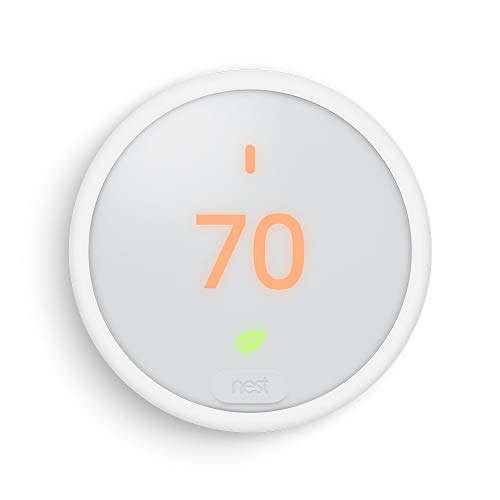
| Best For Home Use | Thermostat type: Learning smart programmable | Connectivity: Wi‑Fi | Voice control: Google Assistant, Alexa | VIEW LATEST PRICE | Read Our Analysis |
More Details on Our Top Picks
Google Nest Smart Thermostat for Home
If you want a smart thermostat that feels easy from day one, the Google Nest Thermostat is a strong pick for your home. You can install it yourself in under 30 minutes, and it often works without a common C wire. It learns your routine, lets you set schedules in the Google Home app, and you can adjust it from your phone, tablet, or laptop. It also watches your HVAC system and sends alerts and reminders. Plus, it supports Alexa, Google Assistant, and Matter voice control when your Wi-Fi stays on.
- Thermostat type:Smart programmable
- Connectivity:Wi‑Fi and Bluetooth
- Voice control:Google Assistant, Alexa, Matter
- Display:LCD backlit
- Power source:Battery powered
- Wall mount:Yes
- Additional Feature:Savings Finder schedule tweaks
- Additional Feature:HVAC monitoring alerts
- Additional Feature:Nest Renew compatible
Google Nest Smart Thermostat for Home (Renewed)
The Google Nest Thermostat (Renewed) is a smart pick for homeowners who want easy app control, solid energy savings, and a lower price without giving up core features. You get a professionally inspected Snow model that looks and works like new, plus a wiring plate, screws, and batteries. It runs on AC/DC power, usually without a C wire, and still lets you control heat or cooling by hand if your Wi-Fi drops. You can use Google Home, Nest, or voice control. It’s ENERGY STAR certified too, and the 90-day warranty adds peace of mind.
- Thermostat type:Smart programmable
- Connectivity:Dual-band Wi‑Fi and Bluetooth
- Voice control:Google Assistant, Alexa
- Display:LCD backlit
- Power source:AC/DC powered
- Wall mount:Yes
- Additional Feature:Professionally inspected refurbished
- Additional Feature:Manual control offline
- Additional Feature:Mobile alerts and notifications
Google Nest Learning Thermostat 3rd Gen (Renewed)
Google Nest Learning Thermostat 3rd Gen (Renewed) is a smart pick for anyone who wants a thermostat that does some of the thinking for you. You get Auto-Schedule, so it learns your routine and builds settings around it. The Nest Leaf helps you spot energy-saving temps, while Auto-Tune fine-tunes use to cut waste and support Rush Hour Rewards and Seasonal Savings. You can control it with the app, your voice, or Alexa. Its round white body, Wi-Fi connection, hardwired power, and wall-mount design fit neatly, and the renewed unit still earns solid trust with 3.9 stars.
- Thermostat type:Learning smart programmable
- Connectivity:Wi‑Fi
- Voice control:Alexa
- Display:Digital
- Power source:Hardwired
- Wall mount:Yes
- Additional Feature:Auto-Schedule learning
- Additional Feature:Nest Leaf indicator
- Additional Feature:Auto-Tune optimization
Google Nest Learning Thermostat + Temperature Sensor (Silver)
Ready for a smarter home that feels a little more in tune with your day? The Google Nest Learning Thermostat plus Temperature Sensor in Silver helps you save energy while keeping comfort steady. You get a larger display, smart Farsight views, and easy control in the Google Home app. Because it learns your habits, it can adjust for sunlight and outdoor swings, then return to comfort fast. The included sensor helps fix hot and cold spots, and you can add more later. It works with most 24V systems and often needs no C wire.
- Thermostat type:Learning smart programmable
- Connectivity:Wi‑Fi
- Voice control:Alexa, Siri, Google Assistant
- Display:Large color display
- Power source:Hardwired
- Wall mount:Yes
- Additional Feature:Includes temperature sensor
- Additional Feature:Dynamic Farsight display
- Additional Feature:Adaptive Eco mode
Nest T3016US – Programmable Thermostat
Nest T3016US is a strong pick if you want a thermostat that does more than just follow your commands, because it learns your routine and starts handling the schedule for you. You can control it from anywhere with the Nest app, and it also works with Google Assistant and Alexa when your Wi-Fi stays on. The round stainless steel body looks polished, and the bright display is easy to read. Home/Away Assist saves energy when you’re out, while Energy History and the Nest Leaf help you spot smart savings without guesswork.
- Thermostat type:Learning smart programmable
- Connectivity:Wi‑Fi, Bluetooth LE, 802.15.4
- Voice control:Google Assistant, Alexa
- Display:Digital backlit
- Power source:24V with batteries
- Wall mount:Yes
- Additional Feature:Home/Away Assist
- Additional Feature:Energy History tracking
- Additional Feature:Optional trim kit
Google Nest Smart Thermostat for Home (Charcoal)
With its easy setup, compact charcoal design, and helpful energy-saving features, the Google Nest Thermostat for Home is a smart pick if you want simple climate control without the fuss. You can set schedules in the Google Home app, then adjust the temperature from your phone, tablet, or laptop. It also works with Google Assistant, Alexa, and other Matter-certified voice helpers. Auto-away lowers energy use when you leave, while Savings Finder suggests smarter settings. You’ll get HVAC alerts, too. It’s ENERGY STAR certified, battery powered, and often installs in about 30 minutes.
- Thermostat type:Smart programmable
- Connectivity:Wi‑Fi and Bluetooth LE
- Voice control:Google Assistant, Matter
- Display:LCD backlit
- Power source:Battery powered
- Wall mount:Yes
- Additional Feature:Auto-away feature
- Additional Feature:Multi-device voice support
- Additional Feature:Includes steel plate
Nest Thermostat E Smart Thermostat (T4002ES)
The Nest Thermostat E (T4002ES) is a smart pick if you want an easy, low-stress upgrade that still feels genuinely helpful every day. You can use the frosted white round dial, or let the app do the work through Wi-Fi. It learns your habits, so your home starts feeling right without constant tweaking. Then auto-away cuts waste when you leave. You can check energy history, lock settings with a code, and use Google Assistant or Alexa. It fits many 24V systems, and setup often takes under an hour.
- Thermostat type:Learning smart programmable
- Connectivity:Wi‑Fi
- Voice control:Google Assistant, Alexa
- Display:Frosted LCD backlit
- Power source:Battery powered
- Wall mount:Yes
- Additional Feature:Front dial control
- Additional Feature:Thermostat lock feature
- Additional Feature:Optional stand available
Factors to Consider When Choosing Smart Thermostats Nest
When I help you choose a Nest smart thermostat, I first check if it matches your HVAC system and if the wiring at your wall can support it. Then I look at connectivity, control options, and energy-saving features so you get a setup that feels easy to use and actually helps lower your bills.
Compatibility Check
I always start a smart thermostat check by looking at the HVAC basics, because a great app won’t help if the wiring can’t support it. I verify that your system runs on the right voltage, usually 24V, and I check the control type next. Then I look for a common C wire or a power accessory, since steady power keeps the thermostat calm and responsive. After that, I match the model to your setup, whether you use single-stage heat and cool, a heat pump, multi-stage equipment, or zoning. I also confirm Wi-Fi fit, because your home network should support the thermostat’s bands and Bluetooth needs. Finally, I review voice assistants, sensors, and energy programs so the features you want actually show up when you need them.
Wiring Requirements
Because wiring can make or break a smart thermostat, I always check it before I talk features, apps, or voice control. Most Nest smart thermostats run on 24 volt HVAC systems, and many need a C wire to stay powered all day. I look for R, W, Y, G, O/B, and C terminals, because each wire tells me what the system can do. Heating only, cooling only, zoned, and heat pump setups often need extra care, and that’s where a C wire or power accessory helps. If one’s missing, I can add a new wire, use a power extender, or rely on batteries, but each choice changes reliability. When wiring looks odd, I call a pro.
Connectivity Options
Wiring is only part of the story, and I always check connectivity next, since a smart thermostat can’t help much if it keeps dropping offline. I look for strong 2.4 GHz support, and I’m happier when 5 GHz is included too. If you want quick setup or nearby sensor links, Bluetooth Low Energy can make life easier. I also verify Matter, Zigbee, Z-Wave, or Thread support when I want smoother smart-home teamwork. Then I check whether remote access depends on the cloud or can still work locally during an outage. Finally, I confirm WPA2 or WPA3, plus any network credentials or firewall rules. That small prep saves headaches later and keeps the thermostat steady.
Control Methods
How do you want to control your thermostat day to day? I like having choices, because your routine may shift from couch to commute in minutes. First, check the app, on-device buttons, and dials, since each one gives you a different level of ease. Next, make sure voice control works with the assistants you already use, and look for Matter support if you want wider compatibility. Also, remember that remote access and alerts need internet and home Wi-Fi, while offline use usually means basic manual changes. I also suggest checking the app itself for scheduling, alerts, energy reports, and approval prompts, plus support for your phone’s system. Finally, if you want room-by-room control, confirm sensor and zoning support.
Energy-Saving Features
When I look for a smart thermostat, I always start with the features that can cut energy use without making daily life harder. I want one that learns my habits, then eases back the heat or cooling when the house is empty. Auto-Schedule and adaptive learning can spot patterns and trim HVAC run time without constant fiddling. I also like usage history and energy reports, because they show where money slips away and what small schedule changes help. Remote control and geofencing matter too, since I can lower settings fast if plans change. If the thermostat works with time-of-use or clean energy programs, even better, because it can favor cheaper or cleaner power. That mix keeps comfort steady and waste low.
Installation Ease
Before I buy a smart thermostat, I always check the install path first, because even a great model can turn into a weekend headache if my home setup fights back. I look for a C-wire or a compatible power accessory, since missing power can slow me down fast. Then I check my HVAC type, because single-stage, heat pump, zoned, and electric baseboard systems don’t all play nice with the same unit. I also plan for about 30 to 60 minutes, plus extra time to kill the breaker and pull the old thermostat. Next, I compare wallplate fit, wire length, and screw spots so I don’t end up drilling new holes. Finally, I make sure Wi-Fi reaches that spot, because weak signal can make setup feel like a tiny tech treasure hunt.
Warranty Coverage
A solid warranty can save me from a lot of stress, so I always read the fine print on a smart thermostat with care. I check how long the coverage lasts, because a one-year plan usually protects me better than a 90-day promise. Then I look at what it actually covers, like the display, sensors, battery, or control board, and I note any exclusions for cosmetic damage or normal wear. I also verify installation rules, since some brands want a certified pro, while others accept self-installation. After that, I review software support and network limits, because app or Wi-Fi problems may not count. Finally, I study the claim steps, shipping costs, and repair time, so I’m not stuck waiting in the cold.
Frequently Asked Questions
Does Nest Work With Multi-Zone HVAC Systems?
Yes. Nest is compatible with many multi zone HVAC systems. Check your system wiring and zone control components first. Verify compatibility because some homes require additional equipment or a professional installer.
Can I Control Nest Thermostats With Voice Assistants?
Yes. With a properly linked account and compatible Nest thermostat you can use Google Assistant or Alexa to set the temperature, ask for the current temperature and humidity, and change modes such as heat, cool, or eco hands free.
How Long Does Nest Battery Backup Last During Outages?
Nest thermostats typically run on battery backup for about 1 to 2 hours during an outage, though actual time depends on the specific model and how it is wired. Check whether your thermostat has a common wire C connected because a C wire lessens reliance on the battery and can extend runtime.
Are Nest Thermostats Compatible With Geothermal Systems?
Many Nest models support geothermal heat pump systems, but compatibility depends on your specific wiring and the equipment type. Check the compatibility tool on Google Nest support or have an HVAC technician verify your heat pump wiring and control requirements before installing.
Does Nest Support Energy Reports for Monthly Savings?
Yes. Nest provides energy reports in the app where you can view monthly usage trends and estimated savings. Use those reports to identify specific patterns, cut unnecessary heating or cooling, and lower your bills.
Final Thoughts
If you want a thermostat that feels simple on day one and still keeps helping months later, Nest is a strong place to start. I like Nest because it can make home comfort feel less like a chore and more like a quiet helper on the wall. Some models are better for easy installs, while others are built for deeper learning, zoning, and stronger savings. Below, I’ll walk you through the best Nest options for 2026 so you can choose with confidence.
Google Nest Smart Thermostat for Home
The Google Nest Smart Thermostat for Home is a smart pick if you want a clean design and easy control without a lot of fuss. It fits well in homes where you want quick comfort changes from your phone, your voice, or the thermostat itself.
What makes it useful is how smoothly it works with Google Home. You can change the temperature while you’re on the couch, at work, or coming home from a long day. That kind of control feels small, but it can make your whole routine easier.
This model also helps you pay attention to energy use. It gives you reports that show heating and cooling patterns, so you can spot waste before it turns into a bigger bill. If you want a simple smart thermostat that still feels modern, this one is a solid match.
Why it stands out
- Easy to use
- Works well with Google Home
- Helpful energy reports
- Good fit for everyday comfort control
Google Nest Smart Thermostat for Home (Renewed)
If you want Nest value without paying full price, the renewed version is worth a close look. It gives you many of the same smart features while helping you save money up front. That can be a big relief if you want a smarter home but don’t want a heavy hit to your budget.
A renewed unit can also be a smart choice for a second home, rental space, or guest house. In those situations, you may want dependable control without chasing every top-end feature. This model keeps things practical.
I also like that renewed Nest thermostats often offer a fast install. Many homeowners can get them set up in about 30 to 60 minutes. In some homes, you may not even need a C-wire, which can make the process feel far less intimidating.
Best for
- Budget-conscious buyers
- Second homes
- Quick installs
- Simple smart-home use
Google Nest Learning Thermostat 3rd Gen (Renewed)
The Google Nest Learning Thermostat 3rd Gen is one of the most recognized names in this space, and for good reason. It learns your schedule over time, so it can start making comfort choices that match how you actually live. That means less manual adjusting and more steady comfort.
The renewed version makes this premium model more affordable. You still get features like Auto-Schedule, Auto-Tune, and Farsight options, depending on the unit and setup. Those features are useful because they let the thermostat adapt to your habits and make the screen easy to read from across the room.
This thermostat fits well in homes where temperature changes matter a lot. If your family has different routines, the learning feature can help the system settle into a rhythm. It feels a bit like having a helpful housemate who remembers the little things.
Why people choose it
- Learns your routine
- Strong premium feature set
- Renewed pricing can be easier to handle
- Great for comfort-focused homes
Google Nest Learning Thermostat + Temperature Sensor (Silver)
This bundle is a smart choice if you deal with uneven temperatures in your home. Some rooms run warmer. Some stay cooler. That can turn daily comfort into a small battle, especially in larger houses or homes with more than one floor.
The included temperature sensor helps solve that problem by letting the thermostat understand conditions in different areas. That makes zoning easier and gives you more control over where comfort matters most. If you’ve ever sat in one room while another room felt like a sauna, you already know why this matters.
The silver finish also gives it a polished look that works in many home styles. Beyond looks, the bundle is about better balance. It can help your home feel more even, which often leads to better comfort and less wasted energy.
Good for
- Homes with hot and cold spots
- Multi-room comfort control
- Families with different temperature needs
- Better zoning support
Nest T3016US – Programmable Thermostat
The Nest T3016US is a good fit if you want smart features but still prefer a more structured approach. Instead of relying only on learning behavior, this model gives you programmability that can feel reassuring and familiar.
That can be helpful if you like knowing exactly what your thermostat will do. Some people want a device that learns. Others want one that follows a plan. This model speaks more to that second group, while still giving you Nest-style convenience.
It can also be a practical option for households that are easing into smart home gear. You get a cleaner upgrade without feeling like you’ve jumped into a complicated system overnight. That makes it less scary for first-time buyers, which I think matters more than people admit.
Best for
- Users who want scheduled control
- First-time smart thermostat buyers
- Homes that need simple reliability
- People who like predictable settings
Google Nest Smart Thermostat for Home (Charcoal)
The charcoal version gives you the same core Nest smart thermostat experience with a darker look that blends nicely into modern spaces. If you care about style as much as function, this one can feel like the right fit.
A thermostat sits in a visible place, so design does matter. The charcoal finish can look cleaner on darker walls or in rooms with bold decor. It feels subtle, not flashy, which many homeowners prefer.
Beyond looks, this model still supports everyday smart control through Google Home and voice assistants. It’s a practical choice if you want a thermostat that works hard without drawing too much attention. Sometimes the best helper is the one that quietly does its job in the background.
Why it may fit your home
- Sleek darker finish
- Easy smart-home control
- Good everyday performance
- Blends into modern interiors
Nest Thermostat E Smart Thermostat (T4002ES)
The Nest Thermostat E is often seen as a friendly entry point into the Nest family. It keeps the experience simple, which is great if you want comfort control without too many extra steps. For many homes, simple is exactly what works best.
It’s also known for easier installation and good energy-saving support. That matters because a thermostat should help you, not add another project to your weekend. If a setup feels manageable, you’re more likely to enjoy the upgrade instead of dreading it.
The Thermostat E works well for people who want smart features, basic automation, and a calmer learning curve. It’s a dependable choice when you want value and ease in the same package. Think of it like the steady friend who doesn’t talk too much but always shows up.
Best for
- Budget-friendly buyers
- Easy setup
- Simple smart control
- Energy-saving basics
Factors to Ponder When Choosing Smart Thermostats Nest
Choosing the right Nest thermostat gets easier when you focus on how you live, not just what looks impressive on paper. I always think it helps to start with the things that affect daily use the most.
1. Installation needs
Some Nest thermostats install faster than others. If you want a quick setup, look for models known for simple installation. Also check whether your home needs a C-wire. In many cases, that one detail decides whether the process feels easy or stressful.
2. Learning vs programmed control
Some models learn your habits over time. Others follow a schedule you set. If you like automation, a learning model may suit you. If you want more control, a programmable model may feel better. Neither choice is wrong. It just depends on how much hand-holding you want from the thermostat.
3. Energy savings goals
If lowering your bills matters most, look for strong energy reports and smart temperature adjustments. These features can help you spot waste and trim back on unnecessary heating or cooling. Even small changes can add up over time.
4. Home size and room balance
A single thermostat may work fine in a smaller home. But in a larger house or one with uneven temperatures, a model that supports temperature sensors can make a big difference. That extra flexibility can help your home feel more balanced.
5. Smart home compatibility
If you already use Google Home or voice assistants, make sure the thermostat works smoothly with them. Good compatibility saves time and keeps daily control simple. You shouldn’t need a tech manual just to warm up the living room.
6. Design and screen visibility
Since the thermostat sits in a visible spot, design matters more than people think. Some homeowners want a bright, easy-to-read display. Others want a finish that blends into the wall. Pick the style that feels natural in your space.
7. New or renewed
A renewed thermostat can save money and still deliver strong performance. That said, buying new may feel better if you want the latest condition and packaging. The best choice depends on your comfort with value versus fresh-out-of-the-box peace of mind.
If you take your time with these points, the choice gets much clearer. You’re not just buying a device. You’re choosing how your home will feel every day.
Conclusion
I’ve found that the best Nest thermostat is the one that fits your home like a favorite sweater, not the one with the loudest pitch. If you want simple control, strong savings, and smart comfort, Nest has a model that can work for you. Once you match your space, habits, and budget, the right choice starts to feel easy. And that’s when your home begins to breathe a little better.



