

Yes, the right tablet mount can make hands-free viewing easy. A sturdy mount keeps your screen steady for movies, video calls, reading, or work.
Different styles fit different spots, such as beds, cars, walls, and desks. Gooseneck, clamp, and drill-mounted models each offer different levels of support.
The best choice comes down to tablet size, adjustability, and where you plan to use it.
| Lamicall Gooseneck Tablet Mount Holder for Bed |
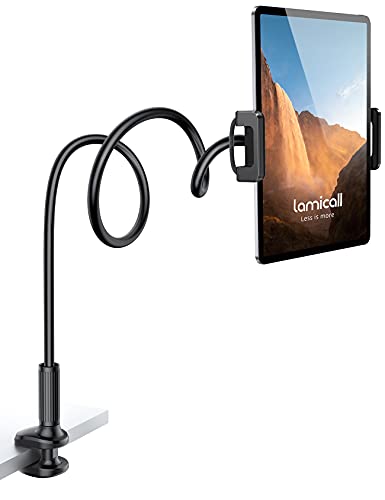
| Best For Bed | Mount Type: Gooseneck clamp | Device Size: 4.7-11 in | Adjustable Angle: 360° rotation | VIEW LATEST PRICE | Read Our Analysis |
| Bulletpoint Universal Tablet Mount for Truck |

| Best For Trucks | Mount Type: Ball-mount arm | Device Size: 4.75-9.25 in | Adjustable Angle: Fixed landscape | VIEW LATEST PRICE | Read Our Analysis |
| Mount-It! Anti-Theft Tablet Wall Mount (7.9-11″) |

| Best For Security | Mount Type: Wall mount | Device Size: 7.9-11 in | Adjustable Angle: Tilt/swivel/rotate | VIEW LATEST PRICE | Read Our Analysis |
| VAUBORTTI Heavy Duty Tablet Mount with Drill Base |

| Heavy-Duty Pick | Mount Type: Drill-base mount | Device Size: 6.5-12.9 in | Adjustable Angle: Dual ball joints | VIEW LATEST PRICE | Read Our Analysis |
| OHLPRO Heavy Duty Drill Base Tablet Holder |
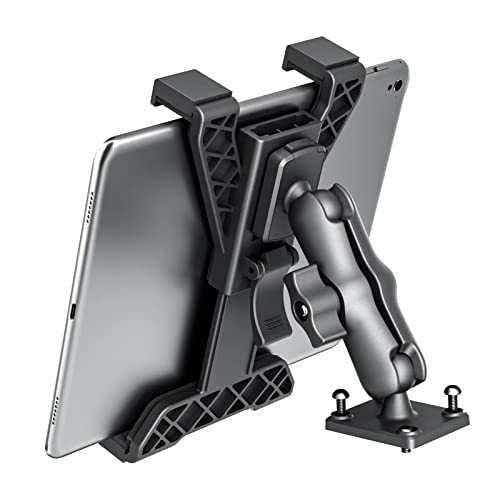
| Best For Drivers | Mount Type: Drill-base mount | Device Size: 7-11 in | Adjustable Angle: 360° rotation | VIEW LATEST PRICE | Read Our Analysis |
| ARKON Heavy Duty Tablet Holder with Gooseneck Arm |

| Best For Workspaces | Mount Type: C-clamp gooseneck | Device Size: Tablet-sized | Adjustable Angle: Adjustable gooseneck | VIEW LATEST PRICE | Read Our Analysis |
| WONNIE Tablet Holder for Car Headrest Mount |

| Best For Cars | Mount Type: Headrest strap mount | Device Size: 7-12.9 in | Adjustable Angle: Vertical/horizontal | VIEW LATEST PRICE | Read Our Analysis |
More Details on Our Top Picks
Lamicall Gooseneck Tablet Mount Holder for Bed
The Lamicall Gooseneck Tablet Mount Holder for Bed is a smart pick should you want a hands-free setup for watching videos or reading without holding your device. You can use it with most 4.7- to 11-inch devices, including iPads, iPhones, Galaxy Tabs, Kindle, and Switch models. Its 36-inch arm gives you flexible placement, and the rubber grip helps keep your device secure. Clamp it to surfaces up to 2.7 inches thick, then shape the arm into an S or Z for better stability. It also keeps your screen at a comfortable distance, which can help protect your posture and eyes.
- Mount Type:Gooseneck clamp
- Device Size:4.7-11 in
- Adjustable Angle:360° rotation
- Surface Fit:Up to 2.7 in
- Material:Plastic/rubber
- Primary Use:Bed viewing
- Additional Feature:36-inch gooseneck arm
- Additional Feature:S/Z-shaped stability
- Additional Feature:Protects eyesight distance
Bulletpoint Universal Tablet Mount for Truck
Built for drivers who want a rugged, no-fuss setup, the Bulletpoint Universal Tablet Mount for Truck fits most iPads and Android tablets and expands from 4.75 to 9.25 inches, so you can keep your screen secure on rough roads. You can also use it with a Samsung Z Fold. The integrated 20mm ball and 7cm carbon fiber and Kevlar arm make mounting simple and sturdy. Four foam grip pads help hold your device steady over bumps. In horizontal mode, it’s great for guidance or entertainment, and its compact design keeps your dashboard clean.
- Mount Type:Ball-mount arm
- Device Size:4.75-9.25 in
- Adjustable Angle:Fixed landscape
- Surface Fit:Dashboard mount
- Material:Carbon fiber/Kevlar
- Primary Use:Off-road navigation
- Additional Feature:20mm mounting ball
- Additional Feature:Carbon fiber Kevlar arm
- Additional Feature:4 foam grip pads
Mount-It! Anti-Theft Tablet Wall Mount (7.9-11″)
Should you need a secure, hands-free tablet setup for a busy public space, the Mount-It! Anti-Theft Tablet Wall Mount gives you a lockable, tamper-proof solution. You can fit tablets from 7.9 to 11 inches, including iPad Pro, iPad Air, iPad 10, and Samsung Galaxy Tab models. Its full-motion arm lets you tilt, swivel, rotate, and switch between portrait and orientation with ease. You can extend it from 3.5 to 16.1 inches for better viewing. Built from cold-rolled steel, it mounts to wood studs or concrete, and it includes hardware, a guide, support, and a lifetime warranty.
- Mount Type:Wall mount
- Device Size:7.9-11 in
- Adjustable Angle:Tilt/swivel/rotate
- Surface Fit:Wall stud/concrete
- Material:Cold-rolled steel
- Primary Use:Public display
- Additional Feature:Lockable anti-theft design
- Additional Feature:Lifetime warranty support
- Additional Feature:3.5-16.1 inch extension
VAUBORTTI Heavy Duty Tablet Mount with Drill Base
Should you need a tablet mount that stays put in demanding setups, VAUBORTTI’s Heavy Duty Tablet Mount with Drill Base is a strong pick. You get a die-cast aluminum alloy arm and base that resist breakage, plus a tough TPU ball for added strength. It holds tablets from 6.5 to 12.9 inches with a spring-loaded ABS clamp and silicone pads for a secure grip. Two adjustable ball joints let you fine-tune angles and flip between portrait and vista. With drill-base mounting, you can install it on trucks, RVs, yachts, walls, or desks.
- Mount Type:Drill-base mount
- Device Size:6.5-12.9 in
- Adjustable Angle:Dual ball joints
- Surface Fit:0.236 in base
- Material:Aluminum alloy
- Primary Use:Vehicle/desk use
- Additional Feature:Die-cast aluminum base
- Additional Feature:Dual ball joints
- Additional Feature:Includes wall anchors
OHLPRO Heavy Duty Drill Base Tablet Holder
Should you need a tablet mount that stays put in rough, high-vibration settings, the OHLPRO Heavy Duty Drill Base Tablet Holder is a strong pick for drivers, fleet operators, and anyone outfitting a truck, van, boat, or off-road rig. You can bolt it down with its 4-screw AMPS base for a permanent, vibration-free hold on dashboards or consoles. It fits 7 to 11-inch tablets, including iPad Air, iPad Pro, and Galaxy Tab models. Dual ball joints give you 360° rotation and 190° tilt, so you can angle your screen without blocking your view.
- Mount Type:Drill-base mount
- Device Size:7-11 in
- Adjustable Angle:360° rotation
- Surface Fit:AMPS base
- Material:Heavy-duty metal
- Primary Use:Truck/marine use
- Additional Feature:Permanent vibration-free hold
- Additional Feature:4-screw AMPS base
- Additional Feature:Marine-use recommended sealant
ARKON Heavy Duty Tablet Holder with Gooseneck Arm
The ARKON Heavy Duty Tablet Holder with Gooseneck Arm is a strong pick should you need a rock-solid hands-free setup for a desk, bed, cart, or lectern. You can clamp it to surfaces up to 2.25 inches thick, and its steel C-clamp keeps things steady. The 10 adjustable support legs help your iPad, Galaxy, or device fit snugly while still leaving buttons and ports open. You’ll install it easily, then use it in offices, home workspaces, wheelchairs, or virtual teaching setups. It saves space and stays secure in busy, shifting environments.
- Mount Type:C-clamp gooseneck
- Device Size:Tablet-sized
- Adjustable Angle:Adjustable gooseneck
- Surface Fit:Up to 2.25 in
- Material:Steel clamp
- Primary Use:Work/teaching use
- Additional Feature:10 adjustable support legs
- Additional Feature:C-clamp up to 2.25 inches
- Additional Feature:Works with wheelchairs
WONNIE Tablet Holder for Car Headrest Mount
WONNIE’s tablet holder is a smart pick should you want a simple, road-ready way to keep kids or passengers entertained on long drives. You can fit 7- to 12.9-inch devices, including iPad Pro, Air, Mini, Kindle Fire HD, and Switch models. The soft rubber net and nylon strap protect your tablet and car interior, while the adjustable design lets you mount it horizontally or vertically. Improved Velcro keeps it steady on rough roads, and the lightweight, foldable build makes it easy to store. You also get tool-free setup, a 365-day replacement policy, and a one-year warranty.
- Mount Type:Headrest strap mount
- Device Size:7-12.9 in
- Adjustable Angle:Vertical/horizontal
- Surface Fit:Headrest strap
- Material:Rubber/nylon
- Primary Use:Backseat entertainment
- Additional Feature:300-gram weight limit
- Additional Feature:Foldable travel-friendly design
- Additional Feature:365-day replacement service
Factors to Consider When Choosing Tablet Mounts
Upon selecting a tablet mount, make sure it fits your device and holds it securely without wobbling. You’ll also want to check the adjustability range and installation type so the mount works well in your space. Your intended use matters too, since a car, desk, or bed setup calls for different features.
Device Compatibility
Compatibility is the initial thing you should check, since a tablet mount only works well whenever it fits your device’s size, thickness, and brand. You should confirm the mount supports your tablet’s screen range, usually 4.7 to 12.9 inches, so it grips your device properly. Check whether it works with your brand and model, including iPads, Galaxy Tabs, or foldable phones. Adjustable clamps help you fit tablets up to 0.63 inches thick, which gives you more flexibility. Make sure the mount lets you switch between scenic and portrait modes, so you can match how you watch or work. Finally, match the mount type to your setup, whether you’re using it in a vehicle, on a desk, or against a wall.
Mounting Stability
Once you’ve confirmed a tablet mount fits your device, the next thing to check is how steadily it holds up in use. You want a secure system with rubber grip pads or other anti-slip materials so your tablet won’t slide, even on uneven surfaces. Check the mount’s weight capacity in the product specs, because it needs to support your tablet without sagging or loosening. Should the mount use adjustable arms or clamps, they should fit snugly and help reduce wobble. For demanding setups, choose a heavy-duty model made from aluminum or steel, since it handles vibration better. Also, pay attention to the installation method: a drill base or C-clamp fastened to a solid surface usually gives you more stability than a strap-based setup.
Adjustability Range
Adjustability range is what lets one fine-tune a tablet mount’s height, angle, and orientation for a more comfortable, accessible setup. You can position your screen where it feels natural, so you’re not craning your neck or reaching awkwardly. A flexible arm, like a gooseneck design, gives one more freedom than a fixed mount, while full motion swing arms add tilt, swivel, and rotation for better ergonomics. Should you need to share the mount with different tablets, adjustable clamping helps it fit a wider range of device sizes. Don’t ignore extension range, either: some mounts reach only a few inches, while others extend over a foot, letting you place your tablet farther from the mounting surface and closer to your ideal viewing spot.
Installation Type
After you’ve narrowed in on the right height, angle, and reach, the next thing to evaluate is how the mount installs. Clamp mounts provide you flexibility because you can attach them to desks, bed frames, or other sturdy surfaces without much hassle. Should you want a temporary setup, they’re a smart choice. Drill base mounts take more effort, but they give you a permanent, rock-solid hold that won’t wobble, even in vibration-prone spaces like vehicles. Adhesive mounts install fast and cleanly, but they might not support heavier tablets or frequent use as well. Also contemplate removal and repositioning. In case you enjoy changing locations often, choose a mount you can move easily without damaging the surface or slowing you down.
Intended Use
The right tablet mount depends a lot on where and how you’ll use it. Should you plan to use it in a car, you’ll want a mount that stays secure through turns and bumps. At home, you might care more about easy viewing angles and simple repositioning. In public spaces, choose a setup that helps protect your device and keeps it stable. Consider what you’ll do most: streaming calls for flexible adjustment, while typing or sketching calls for firmer support. Should you move the mount often, pick one that adjusts quickly without wobbling. For rough roads or constant vibration, go with a sturdier design. Should you switch between tablets or sizes, make sure the mount can adapt easily to each one.
Durability Materials
Durability starts with what the mount is made of. You should look for aluminum alloy or cold-rolled steel should you want strength and solid resistance to wear. High-hardness plastics like TPU can also help, since they provide a firm yet flexible grip that won’t crack easily during repeated use. Should you mount your tablet in a vehicle, choose a design with a die-cast base, because it keeps the setup steady under vibration and impact. For outdoor or marine use, pick weather-resistant coatings or materials to fight corrosion and breakdown. Finally, check the load-bearing capacity. Heavy-duty components allow you to support larger tablets without risking bend, failure, or loosening over time.
Frequently Asked Questions
Can Tablet Mounts Damage My Device During Long-Term Use?
Yes if you choose poorly. You can avoid damage by using a padded, adjustable mount, checking tightness often, and keeping your tablet cool. Otherwise, long term pressure, heat, or vibration could wear it down.
Are Tablet Mounts Compatible With Protective Cases?
Yes, you can use many tablet mounts with protective cases, but you will need to check clamp width and grip depth. You should choose adjustable mounts, since thicker cases can block fit, buttons, or charging ports.
How Do I Clean and Maintain a Tablet Mount?
Like a well oiled hinge, you should wipe your tablet mount with a soft damp cloth, tighten loose screws, and check joints regularly. Don’t use harsh cleaners, and store it dry to keep it steady and lasting.
Can One Mount Work for Multiple Tablet Sizes?
Yes, one mount can work for multiple tablet sizes when you choose an adjustable model. You’ll need secure grips or expandable arms, and you should check weight limits so your tablet stays stable and protected.
Are Tablet Mounts Easy to Install Without Tools?
Yes, you can often install tablet mounts without tools. You will usually clamp, twist, or press them into place in minutes. Still, some models need screws or brackets, so check the instructions before buying.
