

The best Thai keyboards for 2026 are the ones that feel natural in both Thai and English. The strongest picks pair clear Thai legends, solid layout accuracy, and quick wireless setup.
Compact designs are popular, though full-size options still make sense for long workdays. Here are the models worth typing on, plus the small details that shape daily use.
| Wireless Thai Bluetooth Keyboard for Laptop/Desktop |

| Best Overall | Product Type: Wireless Thai Bluetooth keyboard | Thai Support: Thai layout | Compatibility: Windows, Apple, Android; laptop/desktop/Surface/smart TV | VIEW LATEST PRICE | Read Our Analysis |
| Thai Ultra Slim Bluetooth Keyboard for Android/iOS |

| Best for Tablets | Product Type: Ultra slim Thai Bluetooth keyboard | Thai Support: Thai and English | Compatibility: Android, iOS, Windows tablets | VIEW LATEST PRICE | Read Our Analysis |
| Sanpyl Thai Language ABS Keycaps Set (White) |
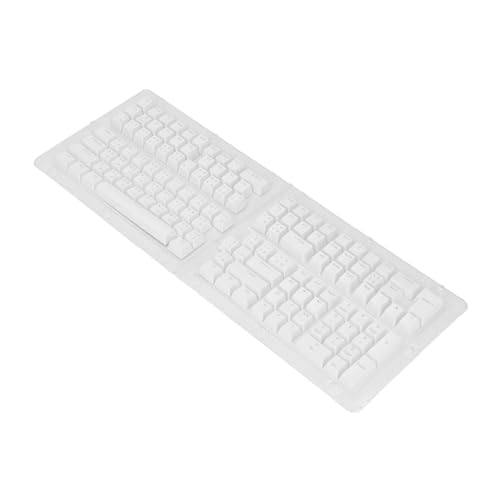
| Best Keycap Set | Product Type: Thai keycap set | Thai Support: Thai keycap set | Compatibility: 61/62/64/68/84/87/104/108-key mechanical keyboards | VIEW LATEST PRICE | Read Our Analysis |
| Ultra Slim Bluetooth Keyboard English/Thai 7-8in |

| Best Ultra-Slim Pick | Product Type: Ultra slim English/Thai Bluetooth keyboard | Thai Support: English and Thai | Compatibility: Android/iOS tablets | VIEW LATEST PRICE | Read Our Analysis |
| HEEPDD Thai Keyboard Stickers for Laptop Keyboards |

| Best Budget Pick | Product Type: Thai keyboard stickers | Thai Support: Thai characters | Compatibility: 10–17 in laptops and desktop keyboards | VIEW LATEST PRICE | Read Our Analysis |
| Thai Keycaps for Mechanical Keyboards |

| Best for Backlighting | Product Type: Thai keycaps for mechanical keyboards | Thai Support: Thai-style keycaps | Compatibility: 61/87/98/104/108-key mechanical keyboards | VIEW LATEST PRICE | Read Our Analysis |
More Details on Our Top Picks
Wireless Thai Bluetooth Keyboard for Laptop/Desktop
Should you want a clutter-free Thai keyboard for a laptop or desktop, this wireless Bluetooth model stands out thanks to its slim 78-key design, quiet low-profile keys, and broad compatibility with Windows, Apple, and Android devices.
You get a lightweight aluminum build, ergonomic feel, and stable Bluetooth 3.0 pairing from up to 32 feet. The Thai layout supports 10 languages, plus 13 shortcut keys and six multimedia keys for faster control. Concave keycaps and scissor flexor technology keep typing smooth and responsive, while the kickstand eases wrist strain. Setup stays simple: pair it, add the language in Control Panel, and start typing. Two AAA batteries power it for 2–3 months.
- Product Type:Wireless Thai Bluetooth keyboard
- Thai Support:Thai layout
- Compatibility:Windows, Apple, Android; laptop/desktop/Surface/smart TV
- Material:Aluminum body
- Design:Ultra-thin, lightweight, silent
- Installation:Bluetooth pair and use
- Additional Feature:32 ft wireless range
- Additional Feature:13 shortcut keys
- Additional Feature:2–3 month battery
Thai Ultra Slim Bluetooth Keyboard for Android/iOS
If you need a compact Thai keyboard for a tablet, this ultra slim Bluetooth model is an easy fit for Android, iOS, and even Windows devices. You get Thai and English support, a foldable aluminum build, and a clean white contemporary look. Its 78-key layout includes FN media keys, while the scissor-foot design gives you fast, comfortable typing with quick key return.
You can pair it over Bluetooth 3.0 from up to 10 meters away. Setup is simple: turn it on, search, select, enter the code, and press Enter. The 120 mAh battery lasts 40 hours, charges in 4 hours, and stands by for 60 days.
- Product Type:Ultra slim Thai Bluetooth keyboard
- Thai Support:Thai and English
- Compatibility:Android, iOS, Windows tablets
- Material:PCB + aluminum alloy
- Design:Ultra slim, foldable, white
- Installation:Bluetooth pairing code setup
- Additional Feature:40-hour work time
- Additional Feature:60-day standby
- Additional Feature:4-hour charging
Sanpyl Thai Language ABS Keycaps Set (White)
For anyone who wants an affordable way to add Thai legends to a mechanical keyboard, the Sanpyl Thai Language ABS Keycaps Set (White) stands out with its 132-key layout and broad compatibility across 61, 62, 64, 68, 84, 87, 104, and 108-key boards. You get translucent white keycaps in an OEM profile, so your board keeps a clean, stylish look while supporting Thai input.
The ABS construction gives you solid durability, plus resistance to wear and fading over time. You’ll also notice a comfortable, ergonomic typing feel that works well for everyday use. Installation is straightforward, removal is easy, and cleaning won’t become a chore.
- Product Type:Thai keycap set
- Thai Support:Thai keycap set
- Compatibility:61/62/64/68/84/87/104/108-key mechanical keyboards
- Material:ABS
- Design:White, translucent, OEM profile
- Installation:Simple install and removal
- Additional Feature:132-key keycap set
- Additional Feature:Translucent shine-through caps
- Additional Feature:OEM profile height
Ultra Slim Bluetooth Keyboard English/Thai 7-8in
The Oumij Ultra Slim Bluetooth Keyboard is a smart pick whenever you want a compact English/Thai keyboard for a 7–8 inch tablet without giving up everyday usability. You get Bluetooth wireless convenience, broad Android and iOS support, and a compact 78-key QWERTY layout.
Its ultra slim aluminum build looks clean in white and travels easily at 9.8 x 5.1 x 0.8 inches. Scissor-switch keys feel quick and comfortable, with rapid return for easier typing. You also get full keys plus FN media controls, a 40-hour battery, and 60 days of standby. Should you want portability with bilingual practicality, this Oumij model delivers.
- Product Type:Ultra slim English/Thai Bluetooth keyboard
- Thai Support:English and Thai
- Compatibility:Android/iOS tablets
- Material:Aluminum enclosure
- Design:Ultra slim, white, contemporary
- Installation:Bluetooth wireless setup
- Additional Feature:QWERTY 78-key layout
- Additional Feature:40-hour battery life
- Additional Feature:5 million clicks
HEEPDD Thai Keyboard Stickers for Laptop Keyboards
Need a quick way to add Thai input without replacing your keyboard? HEEPDD’s Thai Keyboard Stickers give you a simple, budget-friendly fix. You get clear, large-print Thai characters on durable PVC stickers that fit most 10-inch to 17-inch laptops and even desktop keyboards. They’re easy to apply, adjust, and remove, and they won’t leave sticky residue behind.
If you’re learning Thai or writing regularly, these stickers make practice easier and faster. The protective coating helps prevent wear, while the eco-friendly, skin-friendly material feels safe for daily use. Each sheet includes brand-new stickers sized about 1.3 x 1.1 cm and a 90-day warranty.
- Product Type:Thai keyboard stickers
- Thai Support:Thai characters
- Compatibility:10–17 in laptops and desktop keyboards
- Material:PVC
- Design:Large-print clear stickers
- Installation:Stick-on, removable
- Additional Feature:Large-print Thai characters
- Additional Feature:Residue-free removal
- Additional Feature:10–17 inch fit
Thai Keycaps for Mechanical Keyboards
They fit many layouts, including 61, 87, 98, 104, and 108-key keyboards, so you can use them across multiple mechanical models. Solid ABS material gives you dependable durability for long-term use. Installation stays simple too, since you can quickly swap out old keys without much effort. Whenever you game or just want your board to look better, these keycaps deliver.
- Product Type:Thai keycaps for mechanical keyboards
- Thai Support:Thai-style keycaps
- Compatibility:61/87/98/104/108-key mechanical keyboards
- Material:ABS
- Design:Semi-transparent, shine-through
- Installation:Quick key replacement
- Additional Feature:Shine-through backlighting
- Additional Feature:Semi-transparent keycaps
- Additional Feature:Gaming keyboard upgrade
Factors to Consider When Choosing Thai Keyboards
When I choose a Thai keyboard, I first check that the Thai layout is accurate and easy for you to use every day. I also look at device compatibility, wireless connection range, and key feel so I know it will work smoothly and stay comfortable. Finally, I consider size and portability, because the right keyboard should fit both your setup and your routine.
Thai Layout Accuracy
Although many keyboards claim Thai support, I focus first on layout accuracy, because clearly printed Thai characters, proper alignment on a full 78-key or standard-size layout, and dependable bilingual support all make typing more precise and character recognition much easier.
I always check whether the Thai legends are sharp, readable, and matched to the positions I expect before recommending anything. Provided a keyboard includes another language, I make sure Thai is fully supported rather than squeezed in as an afterthought. I also prefer layouts built specifically for Thai input instead of generic boards that rely on software settings alone. Upon stickers or replacement keycaps are involved, I verify that the symbols stay clear in daily use and after heavy typing. Small printing errors or poor placement can slow you down quickly and increase mistakes over time.
Device Compatibility
Because compatibility can make or break the typing experience, I always check that a Thai keyboard works with the device and operating system I actually use, whether that’s Windows, Android, or iOS. Before I buy, I confirm it’s built for my device type too, since some keyboards suit laptops and desktops, while others fit tablets better.
I also verify that my device supports the keyboard’s connection method, especially whether it relies on Bluetooth 3.0 pairing. If I’m building a mechanical setup, I check that the layout or keycaps match my board size, whether it’s 61, 87, 104, or 108 keys. And whether I’m adding Thai input to a standard keyboard, I make sure my system lets me enable the Thai layout through language and keyboard settings foremost.
Wireless Connection Range
While I don’t need extreme distance for everyday typing, I still check a Thai keyboard’s wireless range so I can avoid lag, missed keystrokes, and random dropouts. Most Bluetooth models reach about 10 meters, or 32 feet, which I find plenty for a desk, couch, or a nearby presentation setup.
Should I plan to type farther from my device, I want that stronger range because it helps keep the connection stable. Many slim Thai keyboards use Bluetooth 3.0, and for short-to-medium distances, it usually delivers reliable wireless performance. When you mostly use a tablet, laptop, or desktop up close, standard Bluetooth distance is typically enough and keeps your space cable-free. I also compare stated range carefully, since walls, interference, and device placement can shorten real-world performance quite a bit.
Key Feel And Comfort
While I compare Thai keyboards, key feel and comfort matter just as much as layout or wireless features because they shape how easy and enjoyable typing feels over time. I usually look for low-profile or scissor-switch keys initially, since they feel smooth, respond quickly, and return faster with less finger fatigue.
I also pay attention to concave keycaps because they guide my fingers into place and help me type more accurately. An ergonomic, slim body with an angled kickstand makes a real difference during long sessions via easing wrist strain. I find full-size 78-key layouts especially comfortable because they keep letters, shortcuts, and media functions within easy reach. Finally, keycap material matters too. Durable ABS or similar finishes help preserve a consistent feel and resist wear, so comfort doesn’t fade after months of use.
Size And Portability
For size and portability, I initially match the keyboard to the device I’ll use and the space I actually have in my bag or on my desk. Ultra-slim Thai keyboards often suit 7–8 inch tablets, while larger models make more sense for laptops, desktops, or even smart TVs. I always check dimensions before buying so I don’t end up with something awkward to carry or cramped to use.
If I want easier travel, I lean toward a smaller 78-key layout because it trims the footprint without sacrificing core typing functions or useful shortcuts. I also prefer thin, lightweight builds, especially aluminum or aluminum-alloy bodies, since they store and carry more easily. For desktop use, I still confirm that a slim board, around 9.8 × 5.1 × 0.8 inches, fits my workspace comfortably.
Battery Life Options
Battery life is one of the initial things I compare in a wireless Thai keyboard because real-world use can range from about 40 hours on a small 120 mAh rechargeable battery to 2–3 months on two AAA batteries.
I also look at standby time, because that often tells me how practical a keyboard feels between sessions. Some models can sit for up to 60 days before they need a recharge or fresh batteries. When I’m considering a rechargeable option, I check whether the charging time is around four hours and decide whether I’d rather have quicker top-ups or longer unplugged use. For travel or long desk stretches, I often like standard batteries since I can swap them instantly. I always compare working time and standby current, because lower standby draw usually stretches battery life much further.
Build Material Quality
Although layout and features matter, I pay close attention to build material quality because it has a direct impact on how durable and solid a Thai keyboard feels over time. I usually trust aluminum bodies or enclosures more than lighter plastic shells because they feel stiffer, sturdier, and more premium on my desk.
I also look closely at keycap materials. ABS is common for a reason: it handles daily wear well, resists fading, and lasts through heavy typing. Whenever I want backlighting, semi-transparent ABS keycaps give me both durability and better visibility in dim rooms. On thin keyboards, especially scissor-switch models, good materials help preserve stable key travel and a crisp response. That matters even more whenever I type all day and want a keyboard built for millions of clicks consistently.
Installation And Setup
When I evaluate installation and setup, I want a Thai keyboard that lets me connect and start typing with as little friction as possible. I look for a simple connect-and-play process, ideally Bluetooth pairing that finishes in just a few steps. Some models use standard system settings, while others need a pairing code, so I check whether I’ll have to confirm an on-screen code before typing.
I also make sure my operating system can add the Thai layout easily through the keyboard or input language menu. Power matters during setup too. I want to know whether the board uses replaceable batteries or a rechargeable battery, plus charging time and standby life. Finally, I verify what comes in the box, whether it’s only the keyboard, stickers, keycaps, or extra tools.
Frequently Asked Questions
How Do I Enable Thai Language Input on Windows and macOS?
On Windows, open Settings, select Time and Language, then Language and region, and add the Thai keyboard. On macOS, open System Settings, choose Keyboard, then Input Sources, add Thai, and switch to the Thai layout.
Are Thai Keyboard Layouts Standardized Across All Regions and Manufacturers?
Thai keyboard layouts are not fully standardized across all regions and manufacturers. Kedmanee is the most common layout, but Pattachote and manufacturer specific versions can change key placement and symbols.
Can I Learn Thai Touch Typing Without Changing My Current Keyboard?
Yes, you can learn Thai touch typing on your current keyboard by changing your system input layout, using key labels or an on screen keyboard as reference, and practicing often until your fingers remember each position automatically.
Which Thai Fonts Are Easiest to Read for Daily Typing?
For daily typing, Sarabun, Noto Sans Thai, and TH Chakra are among the clearest choices because their letterforms stay distinct and easy to scan. Sarabun stands out as a practical first pick with a balanced, screen friendly design that remains comfortable to read throughout the day.
Do Thai Keyboards Support Gaming Macros and Customizable Shortcuts?
Many Thai keyboards support gaming macros and customizable shortcuts, particularly mechanical models or boards with dedicated software. Check whether the keyboard includes driver software, onboard memory, and key remapping features, since those options let you assign commands more precisely.
