

When I’m choosing a Thunderbolt external SSD, I want speed, but I also look hard at security, durability, and warranty. In this list, I’ve pulled together six drives that stand out for different reasons, from Samsung’s encrypted X5 to rugged options like the SanDisk Professional PRO-G40 and compact picks from Sabrent and Fantom. The real question is which one gives you the best balance for your workflow, and that’s where things get interesting.



![TEKQ [Intel Certified] Thunderbolt 3 External Portable SSD, Bus Powered,](https://m.media-amazon.com/images/I/51ZTqoQG-HL._SL500_.jpg)
More Details on Our Top Picks
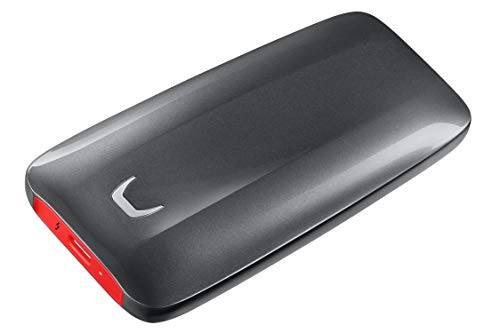
Samsung X5 Portable SSD 2TB (MU-PB2T0B/AM)
Whenever you want a Thunderbolt external SSD that’s built for serious speed, the Samsung X5 Portable SSD 2TB is a standout choice for creators and power users who need fast transfers and dependable protection. You get Samsung’s debut NVMe-based portable SSD with Thunderbolt 3 and up to 40Gb/s bandwidth. It reads at up to 2,800MB/s and writes at up to 2,300MB/s, so you can move huge files quickly. Its full metal body, non-slip base, and 2-meter drop resistance add durability. You also get AES 256-bit encryption, optional password protection, and a three-year warranty.
- Capacity:2TB
- Interface:Thunderbolt 3
- Read Speed:2800MB/s
- Write Speed:2300MB/s
- Portability:Portable
- Durability:2m drop resistance
- Additional Feature:AES 256-bit encryption
- Additional Feature:Password protection
- Additional Feature:3-year limited warranty
SANDISK Professional 4TB PRO-G40 SSD (SDPS31H-004T-GBCND)
When you need a quick, rugged external drive for Mac or PC work, the SanDisk Professional 4TB PRO-G40 SSD (SDPS31H-004T-GBCND) is a strong pick. You get 4TB of APFS-ready storage, Thunderbolt 3 speeds up to 3000MB/s, and USB-C fallback for broader compatibility. It can move 50GB in about a minute, so you’ll save time on large projects. The IP68-rated enclosure, 3-meter drop resistance, and 4000-pound crush rating give you serious protection. Its aluminum core helps manage heat, and the 5-year warranty adds peace of mind for business, multimedia, or personal use.
- Capacity:4TB
- Interface:Thunderbolt 3 / USB-C
- Read Speed:3000MB/s
- Write Speed:2500MB/s
- Portability:Portable
- Durability:IP68 / 3m drop
- Additional Feature:IP68 dust/water resistance
- Additional Feature:4000 lb crush resistance
- Additional Feature:5-year limited warranty
SSK 1TB USB4 Portable External SSD Drive
The SSK 1TB USB4 Portable External SSD Drive is a strong pick for you in the event that you want Thunderbolt 4-level speed in a compact, travel-ready drive. It uses USB4 at 40Gbps, reaching up to 4000MB/s read and 3700MB/s write for fast edits and huge transfers. You’ll get best results on Thunderbolt 4 or USB4 ports with the included 40Gbps USB-C cable. It works with Macs, laptops, phones, consoles, and tablets. S.M.A.R.T., TRIM, and LDPC ECC help protect your data, while the LED reminds you to eject it safely.
- Capacity:1TB
- Interface:USB4 / Thunderbolt 4
- Read Speed:4000MB/s
- Write Speed:3700MB/s
- Portability:Portable
- Durability:Shock/drop resistant
- Additional Feature:S.M.A.R.T. monitoring
- Additional Feature:Adaptive TRIM optimization
- Additional Feature:LED activity light
Fantom Drives Extreme 2TB External SSD (TB3X-2300N2TB)
With Thunderbolt 3 speeds up to 2,800MB/s read and 2,300MB/s write, the Fantom Drives Extreme 2TB External SSD is a strong pick for you in case you work with 6K or 8K video and need fast file transfers, editing, and rendering. Its PCIe Gen 3 NVMe drive, aluminum body, and sand-blasted finish keep it durable and pocketable. Thermal Dissipation Technology moves heat away efficiently, helping sustain performance. It supports Thunderbolt 3, Thunderbolt 4, and USB-C, but works only with Thunderbolt 3 ports. You also get a 5-year warranty and Mac-focused compatibility.
- Capacity:2TB
- Interface:Thunderbolt 3 / 4
- Read Speed:2800MB/s
- Write Speed:2300MB/s
- Portability:Portable
- Durability:Durable metal body
- Additional Feature:Thermal Dissipation Technology
- Additional Feature:6K, 8K workflows
- Additional Feature:Intel-certified design
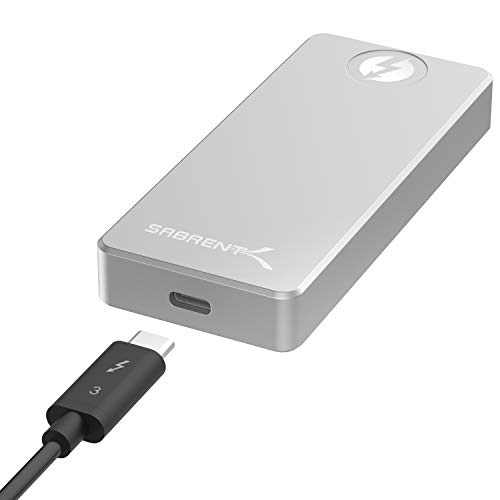
SABRENT Rocket XTRM 1TB Thunderbolt 3 External SSD (SB-XTRM-1TB)
SABRENT’s Rocket XTRM 1TB is a strong pick for you should you need a compact external SSD that can actually keep up with high-speed workflows. It uses Thunderbolt 3, so you can push read and write speeds up to 2400+ MB/sec if your system supports it. The aluminum enclosure feels sturdy, and it doesn’t need external power. You can use it with macOS Sierra or later and Windows 10, 8.1, or 7, but you’ll need a true Thunderbolt 3 port. It’s well suited for video editing, gaming, and content creation.
- Capacity:1TB
- Interface:Thunderbolt 3
- Read Speed:2400MB/s
- Write Speed:2400MB/s
- Portability:Portable
- Durability:Aluminum enclosure
- Additional Feature:Thunderbolt certified
- Additional Feature:Aluminum enclosure
- Additional Feature:Extended 5-year warranty
Intel Certified Thunderbolt 3 External Portable SSD (500G)
Should you need a truly fast, bus-powered drive for editing, backups, or moving large files on the go, this Intel Certified Thunderbolt 3 External Portable SSD is built for you. You get Thunderbolt 3 and NVMe PCIe 3.0 x4 performance with up to 2,400MB/s read and 2,300MB/s write speeds, plus 40Gbps transfers. It’s palm-sized, weighs just 130g, and needs no power adapter. The CNC aluminum case looks sharp, sheds heat passively, and runs silently. It’s certified for Mac and Windows, and it works with Thunderbolt 4 or USB4 devices that support it.
- Capacity:500GB
- Interface:Thunderbolt 3
- Read Speed:2400MB+/s
- Write Speed:2300MB+/s
- Portability:Pocket-sized
- Durability:Aluminum case
- Additional Feature:Fanless cooling
- Additional Feature:Certified by Apple
- Additional Feature:Certified by Microsoft
Factors to Consider When Choosing a Thunderbolt External SSD
When I help you pick a Thunderbolt external SSD, I focus initially on transfer speed and Thunderbolt compatibility so you get the performance your setup can actually use. I also look at storage capacity and durability features to make sure the drive fits your workload and travel needs. Should you want extra peace of mind, I check for security options like hardware encryption or password protection too.
Transfer Speed
Transfer speed is one of the biggest reasons I’d pick a Thunderbolt external SSD, especially whenever you move large files often. I look for higher-bandwidth models because Thunderbolt can reach up to 40Gb/s, and that’s what helps large transfers fly. For me, sequential read speeds around 2,800 to 4,000 MB/s mean I can open, copy, or edit big media files without long waits. Sequential write speeds around 2,300 to 3,700 MB/s matter just as much whenever I’m saving huge projects or recording high-bitrate footage. I also check that my port and cable match the drive’s supported standard, since that can affect peak performance. Even then, I expect real-world speeds to vary with file size, system condition, and how many files I’m moving.
Thunderbolt Compatibility
Speed matters, but I only get those Thunderbolt gains when the drive, cable, and port all speak the same Thunderbolt standard. If I plug a Thunderbolt SSD into a plain USB-C port, it might still work, but I won’t see the full 40Gbps potential. I also check which Thunderbolt generations the drive supports; some models work with Thunderbolt 3 and 4, yet won’t talk to older Thunderbolt 1 or 2 hardware. A USB-C shape alone doesn’t prove compatibility, so I verify the port itself supports Thunderbolt. I also look for certification or explicit support for my operating system and hardware, since firmware, BIOS, or driver updates can be needed before the drive shows up correctly and performs as expected.
Storage Capacity
Capacity is one of the initial things I weigh when choosing a Thunderbolt external SSD, because these drives commonly range from 500GB to 4TB or more. I pick a size that fits my workload, not just my budget. As I’m editing video, managing photo libraries, or installing games, I lean toward larger drives because they keep big files close at hand and reduce how often I have to move data elsewhere. For frequent multi-gigabyte projects, 1TB or 2TB usually hits the sweet spot between storage and portability. As I’m carrying multiple high-resolution projects or running heavier professional jobs, 4TB feels more future-proof and cuts down on storage juggling. I also recall that usable space runs a bit lower than advertised once formatting and file system overhead are counted.
Durability Features
After I’ve narrowed down the right capacity, I also check how well a Thunderbolt external SSD can handle real-world abuse. I look for shock and drop resistance initially, because a drive that survives 2–3 meter drops gives me more confidence on the go. I also prefer ruggedized enclosures, especially full-metal or aluminum bodies, since they shrug off everyday knocks and travel stress. When I’ll work outdoors or in dusty, wet places, I want an IP68 rating for strong dust and water protection. I also pay attention to crush resistance, because some portable SSDs are evaluated against serious pressure. Finally, I check thermal protection, such as heat-sinking metal cases and adaptive thermal management, so the drive stays cool and lasts longer.
Security Options
Whenever I’m choosing a Thunderbolt external SSD for private or business files, I look first for hardware encryption, especially AES 256-bit protection, because it helps keep data safe if the drive’s lost or stolen. I also value password protection, but I treat it as a bonus layer, not a substitute for built-in encryption. For everyday reliability, I check for safe-eject support so I can disconnect the drive without risking corruption during transfers. I like seeing S.M.A.R.T. status, adaptive TRIM, and LDPC ECC too, since they can flag problems early and help preserve data integrity. If I’m storing sensitive files, I want the product page to clearly mention data protection features and security-focused firmware support. That tells me the drive’s built to guard my information, not just move it quickly.
Warranty Coverage
Once I’ve checked security, I look at warranty coverage, because a Thunderbolt external SSD should protect my files and my wallet in case something goes wrong. I prefer a longer limited warranty, and five years usually feels far better than one or three. I also verify that the maker, not a third party, backs it, and I read the fine print to see what damage or misuse it excludes. Some drives need registration before the full warranty kicks in, so I confirm that beforehand. I check the box contents too, since cables and other accessories might not be covered the same way as the drive. Even rugged SSDs with drop or crush resistance still deserve strong warranty support provided they fail later.
Frequently Asked Questions
What Devices Support Thunderbolt External SSDS?
Macs, many Windows PCs, some Linux laptops, and newer iPads with USB4 or Thunderbolt ports can use Thunderbolt external SSDs. You will also need compatible ports, cables, and sometimes updated firmware to reach full speed.
Is Thunderbolt SSD Compatibility Different From USB-C?
Yes. Compatibility is different. Roughly one in three USB C ports cannot support Thunderbolt. Check the port logo and specs first, since Thunderbolt SSDs require Thunderbolt support, while USB C drives usually work with more devices.
Do Thunderbolt SSDS Need External Power?
Usually, no. Most Thunderbolt SSDs get power through the cable itself. You only need external power for certain high performance enclosures or drives with demanding components, so check the model specifications first.
Can Thunderbolt SSDS Work With Consoles?
I’d say no, Thunderbolt SSDs usually do not work with consoles because most consoles do not have Thunderbolt ports. For extra storage, a USB SSD is the better choice since it plugs in easily and still gives fast game loading.
How Long Do Thunderbolt External SSDS Typically Last?
I’d expect a Thunderbolt external SSD to last about 5 to 10 years, sometimes longer, if you keep it cool, avoid physical shocks, and limit heavy continuous writes.
