

Tri-band mesh Wi‑Fi can be a great fix, though some systems clearly perform better than others.
The best options for 2026 stand out with faster speeds, smarter backhaul, wider coverage, and easier app controls.
A strong pick can clear up dead zones, cut slowdowns, and keep busy homes running smoothly.
Here are seven tri-band mesh systems worth a close look before you upgrade.
| NETGEAR Nighthawk Mesh WiFi 6 System (MK73S) |

| Best for Small Homes | Coverage: Up to 4,500 sq. ft. | Max Speed: Up to 3 Gbps | Device Capacity: 25+ devices | VIEW LATEST PRICE | Read Our Analysis |
| TP-Link Deco XE75 WiFi 6E Mesh System |

| Best Overall | Coverage: Up to 7,200 sq. ft. | Max Speed: Up to 5,400 Mbps | Device Capacity: Up to 200 devices | VIEW LATEST PRICE | Read Our Analysis |
| TP-Link Deco W7200 Wi-Fi 6 Mesh System |

| Best Value | Coverage: Up to 5,500 sq. ft. | Max Speed: Up to 3,600 Mbps | Device Capacity: 150+ devices | VIEW LATEST PRICE | Read Our Analysis |
| ARRIS Surfboard mAX W130 Mesh WiFi 6 System |

| Power User Pick | Coverage: Up to 6,000 sq. ft. | Max Speed: Up to 7,800 Mbps | Device Capacity: Not specified | VIEW LATEST PRICE | Read Our Analysis |
| NETGEAR Tri-Band Mesh WiFi System (RBK50) |

| Best Legacy Pick | Coverage: Up to 5,000 sq. ft. | Max Speed: Up to 3 Gbps | Device Capacity: Multiple devices | VIEW LATEST PRICE | Read Our Analysis |
| NETGEAR Nighthawk Mesh WiFi 6 System (MK83) |

| Best for Large Homes | Coverage: Up to 6,750 sq. ft. | Max Speed: AX3600 Gigabit speed | Device Capacity: 40+ devices | VIEW LATEST PRICE | Read Our Analysis |
| NETGEAR Orbi WiFi 6 Mesh System (RBK852) |
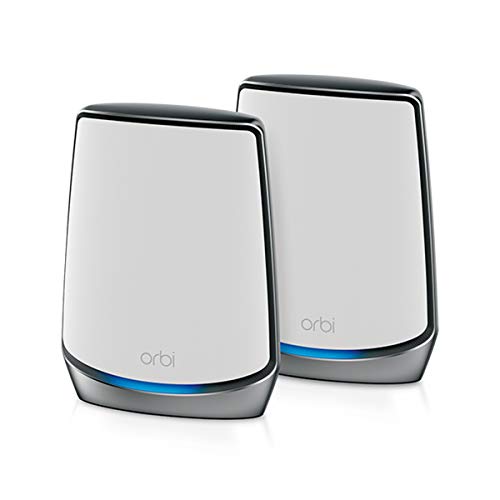
| Premium Performance Pick | Coverage: Up to 5,000 sq. ft. | Max Speed: Up to 6 Gbps | Device Capacity: Up to 100 devices | VIEW LATEST PRICE | Read Our Analysis |
More Details on Our Top Picks
NETGEAR Nighthawk Mesh WiFi 6 System (MK73S)
If you want a mesh WiFi system for a busy home with lots of screens, the NETGEAR Nighthawk Mesh WiFi 6 System (MK73S) fits especially well. You get a router and two satellites that spread fast WiFi 6 across up to 4,500 square feet and handle 25 or more devices without drama. That matters when you stream, game, and join video calls at once.
Just as important, setup stays simple. You connect it to your modem, manage everything in the Nighthawk app, and use three Gigabit Ethernet ports for wired gear. NETGEAR Armor, WPA3, automatic updates, and VPN privacy help you feel safer every day online.
- Coverage:Up to 4,500 sq. ft.
- Max Speed:Up to 3 Gbps
- Device Capacity:25+ devices
- Ethernet Ports:3 x 1G ports
- Security:NETGEAR Armor, WPA2/WPA3
- App Control:Nighthawk app
- Additional Feature:1-year Armor included
- Additional Feature:Automatic firmware updates
- Additional Feature:WPA3 support
TP-Link Deco XE75 WiFi 6E Mesh System
For large homes with lots of phones, TVs, game consoles, and smart devices, the TP-Link Deco XE75 stands out as a strong fit because it spreads fast tri-band WiFi 6E coverage across up to 7,200 square feet and supports as many as 200 devices.
You get a clean replacement for your router and extender, so dead zones and buffering fade fast. The new 6 GHz band cuts interference, and it can serve as dedicated backhaul or a fast lane for WiFi 6E devices. Speeds reach 5,400 Mbps total. Setup takes minutes in the Deco app, and you can manage everything remotely, even with Alexa. HomeShield adds security scans, IoT protection, parental controls, and quality service.
- Coverage:Up to 7,200 sq. ft.
- Max Speed:Up to 5,400 Mbps
- Device Capacity:Up to 200 devices
- Ethernet Ports:Not specified
- Security:HomeShield
- App Control:Deco app
- Additional Feature:6 GHz backhaul
- Additional Feature:AI-driven roaming
- Additional Feature:Alexa voice control
TP-Link Deco W7200 Wi-Fi 6 Mesh System
Families with lots of phones, TVs, game consoles, and smart home gear will get the most from the TP-Link Deco W7200, because its AX3600 tri-band Wi-Fi 6 design gives you a dedicated mesh connection between the two units while still providing fast, steady speeds to your devices.
You can cover up to 5,500 square feet, move from room to room without dropouts, and connect more than 150 devices. That makes daily life feel easier, especially once everyone’s online at once. Setup stays simple through the Deco app, and it works with any ISP. You also get HomeShield, parental controls, IoT protection, gigabit ports, and security updates for peace of mind.
- Coverage:Up to 5,500 sq. ft.
- Max Speed:Up to 3,600 Mbps
- Device Capacity:150+ devices
- Ethernet Ports:4 ports
- Security:HomeShield, WPA2-PSK
- App Control:Deco app
- Additional Feature:Seamless room-to-room roaming
- Additional Feature:Parental controls included
- Additional Feature:Step-by-step app setup
ARRIS Surfboard mAX W130 Mesh WiFi 6 System
Power users who need strong whole-home coverage and steady speed will feel right at home with the ARRIS SURFboard mAX W130 Mesh WiFi 6 System. You get a tri-band WiFi 6 setup with a dedicated router-to-router lane, so your devices stay fast while you move around the house. It covers up to 6,000 square feet and helps clear dead zones in basements, upper floors, attics, and even outdoor spots.
Just as significant, setup stays simple through the SURFboard Central app. You can manage parental controls, guest access, QoS, Alexa voice commands, and device alerts. With 16 antennas, eight streams per router, and a 2-year warranty, it feels dependable daily.
- Coverage:Up to 6,000 sq. ft.
- Max Speed:Up to 7,800 Mbps
- Device Capacity:Not specified
- Ethernet Ports:8 ports
- Security:WPA-PSK/WPA2-PSK
- App Control:SURFboard Central app
- Additional Feature:Alexa voice control
- Additional Feature:IFTTT smart integration
- Additional Feature:Rewards-based parental controls
NETGEAR Tri-Band Mesh WiFi System (RBK50)
Should you want strong WiFi in a large home without the usual weak spots, the NETGEAR Orbi RBK50 stands out because its tri-band design uses a dedicated backhaul between the router and satellite, so your speed stays more stable as you move from room to room. You get up to 5,000 square feet of coverage and speeds up to 3Gbps, which helps with gaming, streaming, and busy family use.
Just as crucial, setup feels simple through the Orbi app or a browser. You also get MU-MIMO, beamforming, guest access, Alexa support, and Netgear Armor security. Since it’s discontinued, you’ll want to buy carefully, but it still delivers.
- Coverage:Up to 5,000 sq. ft.
- Max Speed:Up to 3 Gbps
- Device Capacity:Multiple devices
- Ethernet Ports:7 ports
- Security:Netgear Armor, WPA2-PSK
- App Control:Orbi app/web browser
- Additional Feature:Dedicated backhaul band
- Additional Feature:MU-MIMO support
- Additional Feature:Orbi app/web setup
NETGEAR Nighthawk Mesh WiFi 6 System (MK83)
Should you want strong WiFi for a large home without giving up speed in busy rooms, the NETGEAR Nighthawk Mesh WiFi 6 System (MK83) fits especially well. You get tri-band WiFi 6, AX3600 gigabit performance, and coverage up to 6,750 square feet for 40 plus devices. That means smoother streaming, HD gaming, and video calls where your family actually needs them.
Setup stays easy through the Nighthawk app, so you can replace your router, connect to your modem, test speeds, and watch data use fast. It works with any ISP up to 1 Gbps, includes seven Gigabit Ethernet ports, and adds Armor security and parental controls trials.
- Coverage:Up to 6,750 sq. ft.
- Max Speed:AX3600 Gigabit speed
- Device Capacity:40+ devices
- Ethernet Ports:7 Gigabit LAN ports
- Security:NETGEAR Armor
- App Control:Nighthawk App
- Additional Feature:Smart parental controls
- Additional Feature:Internet speed testing
- Additional Feature:Data usage monitoring
NETGEAR Orbi WiFi 6 Mesh System (RBK852)
For busy homes that need fast, steady WiFi in every room, the NETGEAR Orbi WiFi 6 Mesh System RBK852 is a strong fit because it pairs broad 5,000-square-foot coverage with support for up to 100 devices. You get a router and satellite, plus a dedicated WiFi 6 backhaul that keeps speeds smooth for 4K and 8K streaming, gaming, and video calls. It works with cable, fiber, DSL, and plans up to 2.5 Gbps. Setup stays simple through the Orbi app, while four Gigabit Ethernet ports on each unit give you solid wired options. NETGEAR Armor adds extra peace of mind daily.
- Coverage:Up to 5,000 sq. ft.
- Max Speed:Up to 6 Gbps
- Device Capacity:Up to 100 devices
- Ethernet Ports:4 Gigabit ports each unit
- Security:NETGEAR Armor, WPA2-PSK
- App Control:Orbi app
- Additional Feature:Dedicated WiFi 6 backhaul
- Additional Feature:Supports 2.5 Gbps internet
- Additional Feature:4K/8K streaming support
Factors to Consider When Choosing Tri-Band Mesh Wi‑Fi Systems
At the time I choose a tri-band mesh Wi‑Fi system, I firstly look at how well it can cover your home and keep speeds strong where you actually use your devices. I also check device capacity and backhaul band performance, because a system can sound fast on paper but still struggle at the time your network gets busy. Just as significant, I want solid security and easy controls, so you can manage your Wi‑Fi with less stress and more confidence.
Coverage And Home Size
One of the initial things I look at is how much area a tri-band mesh system is built to cover, because that gives me a practical starting point for matching it to a home’s size. Most kits cover roughly 4,500 to 7,200 square feet, so I compare that range with your actual square footage at the outset. Then I go a step further and consider layout, because more rooms and more floors usually mean more coverage demands. In larger multi-story homes, I want stronger node-to-node stability to help reach basements, attics, and distant bedrooms without dead zones. I also check how many satellite units come in the box, since more nodes usually spread coverage farther. Should your home sit near a system’s limit, I’d leave extra headroom for thick walls and awkward layouts too.
Speed And Bandwidth
Two speed checks matter most to me here: how much total bandwidth the system can move, and how that speed is divided across its bands. Provided you stream several 4K shows, game online, and take video calls at the same time, I’d lean toward higher-throughput tri-band kits, since they range from roughly 3,000 Mbps to 7,800 Mbps.
Then I look closer at band speeds. Some systems split performance like 574 Mbps on 2.4 GHz and 2,402 Mbps on each 5 GHz and 6 GHz band. That balance matters. A dedicated backhaul band also helps because node-to-node traffic stays off the bands your devices use, which improves real speed and stability. I also check for more spatial streams and make sure the system matches your internet plan, whether that’s 1 Gbps or 2.5 Gbps service.
Device Capacity Limits
Just as speed shows how fast a mesh system can move data, device capacity tells me how well it holds up once the whole house gets online at once. I always check the stated device limit initially, because tri-band systems can support anywhere from about 25 devices to 200, depending on their hardware and in general design.
From there, I match that number to real life. If you have a few phones and TVs, a lighter system might work fine. Should your home also runs laptops, cameras, speakers, consoles, and lots of smart gear, I’d choose a higher-capacity model. I also like systems that gain device-handling strength as I add satellites. That matters for growth. Whenever a network hits its limit, performance can drop fast, even while signal coverage still looks perfectly strong everywhere.
Backhaul Band Performance
A strong backhaul band is what keeps a tri-band mesh system feeling fast as the whole house is online. When I compare systems, I look at how much wireless capacity stays open for your phones, TVs, and laptops after the mesh nodes talk to each other. A dedicated backhaul helps a lot because it cuts down traffic jams between node links and everyday use.
That matters even more in larger homes. If satellites relay data across floors or long hallways, higher backhaul throughput usually means smoother speeds, lower latency, and less buffering. Many tri-band kits use a separate 5 GHz or 6 GHz band for this job. I like 6 GHz for its cleaner air and lower interference, but only when node placement keeps the signal strong. Otherwise, the advantage fades fast in real homes.
Security And Controls
Fast backhaul keeps a mesh system moving, but strong security and clear controls are what help me trust it every day. I look for WPA2 and WPA3 support, a solid firewall, and automatic updates, because protection should start working before I touch a setting.
From there, I want smarter tools that keep watch without making my life harder. A good security suite can block threats in real time, add VPN support, stop malware, and give each device better privacy. Whenever you have kids, parental controls matter too. I like being able to pause access, set screen-time limits, filter content, and check usage reports. Just as crucial, the app should feel simple. I want quick control over guest access, device rules, QoS, alerts, and IoT monitoring for strange new activity.
Ports And Compatibility
Beyond speed and security, ports and compatibility decide how well a tri-band mesh system fits into my home without extra hassle. I always check Ethernet ports on the main unit and each satellite initially, because some systems give me only three ports while others offer as many as eight. That difference matters whenever I want to wire a TV, console, PC, printer, and more.
Then I look at port speed. Gigabit LAN support helps whenever I need fast wired backhaul or quick file transfers. Some kits still limit LAN bandwidth, so I verify that before I buy. I also make sure the system matches my internet service and modem, since not every mesh kit works the same way. Finally, I confirm it supports my ISP speed tier and all my wired and wireless devices smoothly.
Setup And App Management
How easy is it to get everything running upon I open the box? I always check setup initially, because a tri-band mesh system should guide me step by step and get me online in minutes. Provided the app is clear, I don’t need deep tech skills or a long afternoon.
Once it’s running, the app becomes my control center. I want to change Wi Fi settings, watch connected devices, and manage the network from my phone, even upon I’m away. Helpful extras matter too, like speed tests, data usage tracking, guest network controls, and parental controls. Subsequently maintenance feels lighter. I look for security scans, simple firmware updates, and alerts as devices connect or leave. Some systems also learn over time and adjust automatically, which helps keep performance steady as my home changes daily.
Frequently Asked Questions
Can Tri-Band Mesh Systems Reduce Latency for Cloud Gaming?
Yes, tri band mesh systems can lower latency for cloud gaming by using a dedicated backhaul band that keeps traffic from piling up. Results depend on more than the mesh setup alone, though. Your internet connection needs solid speeds, low ping, and well placed nodes to keep gameplay responsive.
Do Tri-Band Mesh Routers Support Separate Guest and Iot Networks?
Yes. Most tri band mesh routers let you create a guest network and, on many models, a separate IoT network. This helps keep smart home devices isolated, improves security, and prevents visitors from accessing your main network or connected gadgets.
How Often Should Mesh System Firmware Be Updated?
Update your mesh system once a month and install security patches as soon as they are released. Turn on automatic updates if the option exists. Also check manually each month and after changes like a new app, a new device, or a different internet provider.
Can Parental Controls Be Managed Remotely Through Mobile Apps?
Yes. About 70% of mesh owners use app controls each week, showing that remote management is now a core feature. Parental controls can be handled from a mobile app, so you can pause devices, set schedules, filter content, and check activity from anywhere.
Are Tri-Band Mesh Systems Compatible With Older Smart Home Devices?
Tri band mesh systems are often compatible with older smart home devices, particularly those that rely on 2.4 GHz connections. Check whether the system supports legacy mode, WPA2 security, and dedicated IoT settings, since some older devices struggle with newer security protocols.
Final Thoughts
Picking the right tri-band mesh system can feel a lot like finding the right path home. Funny enough, the moment your Wi-Fi stops dropping is often the moment daily stress gets quieter too. I’ve seen how one good upgrade can turn dead zones into shared spaces again. So whenever your home keeps growing with devices and demands, this choice is not just about speed. It’s about making your whole house feel connected, calm, and easier to live in.
