

USB streaming media players make binge nights easier by playing local files straight from a drive.
They handle movies, shows, and subtitles without extra app hassles.
They work well with TVs and projectors for a simple setup.
Here are six solid picks for smoother viewing.
| Micca 4K Ultra-HD Digital Media Player |

| Best Overall | Playback: Video/music/photos | Resolution: 4K Ultra-HD | USB Playback: USB/microSD | VIEW LATEST PRICE | Read Our Analysis |
| HDMI 4K Digital Menu Media Player |

| Best for Digital Menus | Playback: Video/pictures | Resolution: 4K | USB Playback: USB | VIEW LATEST PRICE | Read Our Analysis |
| R69PRO Android 14 TV Box 4GB/64GB WiFi 6 | Best Smart Box | Playback: Media/apps | Resolution: 8K | USB Playback: USB | VIEW LATEST PRICE | Read Our Analysis | |
| NEUMI Atom 1080P Full-HD Digital Media Player |
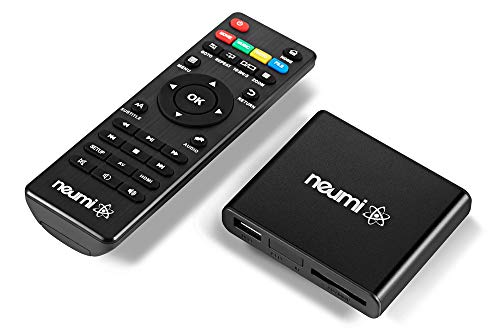
| Best for Simple Playback | Playback: Video/music/photos | Resolution: 1080P | USB Playback: USB/SD | VIEW LATEST PRICE | Read Our Analysis |
| 4K@60Hz Media Player with HDMI/AV Out |
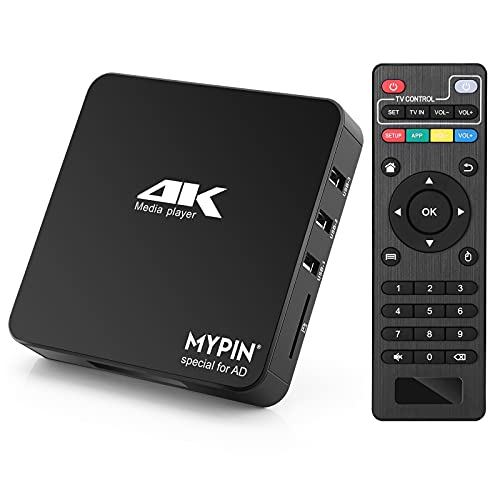
| Best for Advanced Features | Playback: Video/photo/music/PPT | Resolution: 4K@60Hz | USB Playback: USB/micro SD | VIEW LATEST PRICE | Read Our Analysis |
| 4K HD Digital Media Player with USB/Micro SD Playback |

| Best Budget 4K | Playback: Video/music/photos | Resolution: 4K@30Hz | USB Playback: USB/micro SD | VIEW LATEST PRICE | Read Our Analysis |
More Details on Our Top Picks
Micca 4K Ultra-HD Digital Media Player
Should you want a compact media player that can handle 4K playback from a USB drive or microSD card, the Micca 4K Ultra-HD Digital Media Player is a strong fit. You can play videos, music, and photo slideshows with a simple interface and a tiny black body that slips behind your TV. It supports 4K/60Hz HDMI output, composite AV for older displays, and rotation options for signage. You can load large drives, use auto play, and resume where you left off. It handles popular formats, subtitles, and endless loop playback for menus, lobbies, or exhibits.
- Playback:Video/music/photos
- Resolution:4K Ultra-HD
- USB Playback:USB/microSD
- Auto Play:Supported
- Resume:Supported
- HDMI Output:UHD HDMI
- Additional Feature:MicroSD card support
- Additional Feature:Composite AV output
- Additional Feature:Video rotation control
HDMI 4K Digital Menu Media Player
Should you need a simple, no-subscription way to run digital menu boards or ad displays, the Lunzn YM05 HDMI 4K Digital Menu Media Player fits well. You can plug in a USB drive and let it auto-play photos or videos on startup, with sharp 4K output at 3840 x 2160. It supports H.264 and H.265/HEVC files, so your content plays smoothly. Using its free CMS, you can publish ads remotely, control multiple devices, schedule campaigns, and switch between horizontal or vertical layouts. This black TV-box unit includes 8 GB storage and works with screens, phones, laptops, and tablets.
- Playback:Video/pictures
- Resolution:4K
- USB Playback:USB
- Auto Play:Supported
- Resume:Not listed
- HDMI Output:HDMI
- Additional Feature:Free CMS control
- Additional Feature:Remote device publishing
- Additional Feature:Horizontal/vertical rotation
R69PRO Android 14 TV Box 4GB/64GB WiFi 6
Best Smart Box
View Latest PriceThe R69PRO Android 14 TV Box is a solid pick assuming you want a compact streaming player that still gives you strong performance, with 4GB RAM, 64GB storage, and WiFi 6 for smoother app use and faster streaming. You’ll get an octa-core processor, Android 14, and fast browsing for apps and media. Dual-band WiFi, Gigabit Ethernet, and Bluetooth 5.0 keep connections flexible. It supports up to 8K output, HDR, H.264, and H.265/HEVC, plus HDMI and screen mirroring. USB 3.0 and expandable storage add convenience for your binge nights.
- Playback:Media/apps
- Resolution:8K
- USB Playback:USB
- Auto Play:Not listed
- Resume:Not listed
- HDMI Output:HDMI
- Additional Feature:Android 14 system
- Additional Feature:WiFi 6 support
- Additional Feature:Gigabit Ethernet
NEUMI Atom 1080P Full-HD Digital Media Player
If you want a simple, compact media player that can handle video, photos, and music straight from USB drives, hard drives, or SD cards, the NEUMI Atom 1080P is a strong fit. You get an easy, intuitive setup in a tiny black box smaller than a deck of cards. It plays up to 1080p/60Hz over HDMI, supports H.265/HEVC, and sends digital surround sound to your receiver. You can also use AV output for older TVs. It handles large drives, loops files, resumes playback, and supports signage, sensors, and many common media formats too.
- Playback:Video/music/photos
- Resolution:1080P
- USB Playback:USB/SD
- Auto Play:Supported
- Resume:Supported
- HDMI Output:HDMI
- Additional Feature:Trigger sensor input
- Additional Feature:Digital surround sound
- Additional Feature:Compact card-sized design
4K@60Hz Media Player with HDMI/AV Out
With 4K@60Hz output and HDMI/AV support, this media player is a strong fit when you need smooth playback on a TV, projector, or mixed display setup. You can play MKV, MP4, MOV, VOB, and more, plus H.265/HEVC files up to 4096x2304p at 60fps. It handles video, photos, music, and PPTs, with auto, repeat, shuffle, and breakpoint playback. You get dual USB ports, micro SD, Ethernet, Wi‑Fi, and support for drives up to 8TB. Use the remote, mouse, or keyboard, and add subtitles or logos easily.
- Playback:Video/photo/music/PPT
- Resolution:4K@60Hz
- USB Playback:USB/micro SD
- Auto Play:Supported
- Resume:Breakpoint resume
- HDMI Output:HDMI/AV
- Additional Feature:Built-in 11GB memory
- Additional Feature:Browser and app access
- Additional Feature:Logo subtitle overlay
4K HD Digital Media Player with USB/Micro SD Playback
Built for anyone who wants a compact 4K media hub, this fnetic digital player handles video, music, and photos from either a USB drive or micro SD card with ease. You can connect it to your TV, monitor, or projector and enjoy sharp 4K@30Hz playback with H.265/HEVC support and up to 200Mbps data rates. Its HDMI, optical, and AV outputs give you flexible setup options, while resume, auto-play, repeat, and shuffle features keep viewing simple. The zinc alloy body helps with heat dissipation, and the remote lets you control everything effortlessly.
- Playback:Video/music/photos
- Resolution:4K@30Hz
- USB Playback:USB/micro SD
- Auto Play:Supported
- Resume:Supported
- HDMI Output:HDMI/AV/Optical
- Additional Feature:Optical surround output
- Additional Feature:Zinc alloy casing
- Additional Feature:Shuffle music playback
Factors to Consider When Choosing USB Streaming Media Players
when you choose a USB streaming media player, check its video resolution support so it matches your screen and content quality. You’ll also want to confirm media format compatibility, storage capacity needs, playback features, and the output connection types it offers. Picking the right mix helps you get smooth playback and the setup you want.
Video Resolution Support
Video resolution support is one of the initial specs you should check in a USB streaming media player, because output can range from 1920 x 1080 at 60 fps to 3840 x 2160 at 60 Hz or even 4096 x 2304 at 30/60 fps. You should match that output to your TV or monitor, since some players stop at 1080p while others handle 4K screens cleanly. Also check whether the player can decode 4K smoothly with codecs like H.265/HEVC and H.264, so playback stays sharp and stable. Provided you’re using it for signage or a big display, look for higher bitrate support, up to 200 Mbps, to keep fine detail intact. Rotation features, such as vertical or 270-degree modes, can also change how the image fits on-screen.
Media Format Compatibility
After you’ve checked resolution, the next big question is whether the player can actually open the files in your library. You should match its supported containers and codecs to what you already own, including MKV, MP4/M4V, AVI, MOV, TS/M2TS, plus H.265/HEVC or H.264/AVC. If you use captions, verify SRT, PGS, or IDX+SUB support, and see whether you can change subtitle color, size, or position. Don’t ignore your photos and music: look for JPG, PNG, BMP, GIF, TIF, MP3, FLAC, WAV, OGG, APE, WMA, and AAC. Also check file system support, since many players need FAT32, exFAT, or NTFS and might skip Mac-formatted drives.
Storage Capacity Needs
How much storage do you really need? Start by matching the player’s internal memory or expansion options to your library. Some units give you just 8 GB, while others accept external storage up to 8 TB or more, so check your real needs initially. Then confirm each source’s limit: a USB drive may top out at 256 GB, microSD cards can reach 1 TB, and hard drives may support 8 TB. You should also verify the file systems your drives use, like FAT32, exFAT, or NTFS, because capacity alone won’t help unless the player can read the drive. If you keep large 4K files, make sure it handles single files from 4 GB to 30 GB. Lastly, see whether it reads one drive or two.
Playback Features
By you choose a USB streaming media player, focus on playback features that keep content running with minimal effort: auto-play, repeat or loop mode, shuffle, and resume-from-last-stop. These options let you start a playlist and walk away without constant clicks. Also check whether the player handles video, music, and photo slideshows on one device, so you can switch between entertainment types easily. If you need signage or kiosks, look for endless looping, breakpoint playback, and scheduled playback by time or date. For promotional use, verify subtitle and overlay controls, including size, color, position, scrolling text, and logo support. Finally, consider control options like remote control, mouse or keyboard support, and trigger inputs for sensor- or button-activated playback when you want quick, flexible operation.
Output Connection Types
The right port makes all the difference: choose a USB streaming media player with an output that matches your display and audio setup, whether that means HDMI for modern TVs and monitors, composite AV for older sets, or optical audio for a home theater receiver. HDMI usually gives you the best image, so check that it supports the resolution and refresh rate you need, like 1080p/60Hz, 4K, or even 8K on some models. Should you still use older gear, a player with both HDMI and AV lets you switch between new and legacy screens without extra adapters. For signage or portrait viewing, confirm it supports video rotation through the output. Should sound matter most, look for digital audio output or HDMI audio passthrough for cleaner stereo or surround sound.
Control And Setup
Once you’ve matched the right output port to your screen, focus on how easy the player is to set up and control. You’ll want plug-and-play USB playback so you can start watching without fiddling with menus, and auto-play on startup helps content begin right away. Look for resume or breakpoint playback unless you don’t want to lose your spot after a power cut or restart. For hands-off viewing, repeat, loop, shuffle, or sequential modes let the player keep running without your attention. Scheduling according to time and date can automate what plays during different hours or days. Also check your control options: remote control, mouse and keyboard support, or external trigger inputs all change how smoothly you can manage the device day to day.
Size And Portability
Size matters provided you plan to move a USB streaming media player between TVs, projectors, or monitors. You’ll find compact, lightweight models much easier to carry from room to room, and a unit around 60 to 100 grams usually feels far more portable than a chunky TV-box-style player. Smaller designs also save shelf space, tuck neatly behind a display, and slip into a bag for travel or presentations. Should you expect frequent relocation, look for simple USB or microSD storage instead of attached drives, since that keeps the setup slimmer. Still, don’t chase tiny dimensions alone. The best portable player balances size with the ports and drive slots you actually need, because extra connections can add bulk and reduce convenience.
Frequently Asked Questions
What Internet Speed Do USB Streaming Media Players Need for 4K?
For smooth 4K streaming on a USB streaming media player, 25 Mbps is the minimum target, while 50 Mbps offers a safer margin. If other devices use the same connection or you stream high bitrate video, a faster plan helps reduce buffering and keeps picture quality steady.
Can I Use External Hard Drives With These Media Players?
Yes, many USB streaming media players can read files from external hard drives if they support local playback. Check that the drive uses a format the player recognizes and has enough power. Some drives work better with their own power supply or through a powered USB hub.
Do These Players Support Subtitles and Multiple Audio Tracks?
Yes, many players include subtitles and multiple audio tracks. You can switch captions and audio if the file contains them and the device supports the format.
How Often Do USB Streaming Media Players Need Firmware Updates?
You’ll usually update USB streaming media players every few months, though some need updates only when bugs, app changes, or new formats appear. Check once a month, and install updates as soon as your device notifies you.
Are These Media Players Compatible With Universal Remotes?
Many USB streaming media players work with universal remotes, but you should check for code support or HDMI CEC compatibility first. Some setups need learning mode or a companion app.
Conclusion
Should you want easy binge nights, pick a USB streaming media player that matches your setup and file needs. With 4K support, subtitle options, and simple plug-and-play use, you can spend less time troubleshooting and more time watching. Did you know that the average person spends over 3 hours a day streaming video? That’s a lot of screen time, so choosing the right player can make every viewing session smoother, faster, and way more enjoyable.
