

Wireless multiroom music systems are a smart way to play audio across your home.
They let you stream to different rooms without messy wires.
You can pick simple app-based setups, Apple-friendly options, or systems built for bigger spaces.
The best one comes down to how you listen and how much control you want in each room.
| Sonos PLAY:1 4-Speaker Multi-Room Music System Bundle |

| Best All-Around | Multi-room: 4-speaker system | Wireless: Wi‑Fi | Streaming: Spotify, Pandora, Prime Music | VIEW LATEST PRICE | Read Our Analysis |
| Avantree Harmony 2 Wireless Speaker System |
| Best for TV Audio | Multi-room: Multi-room indoor | Wireless: Wireless | Streaming: TV, phone, laptop | VIEW LATEST PRICE | Read Our Analysis |
| Dio Node Multiroom Wi-Fi Home Speakers (3-Pack) |

| Best for Apple Users | Multi-room: 3-pack | Wireless: Wi‑Fi / AirPlay 2 | Streaming: Spotify, AirPlay 2 | VIEW LATEST PRICE | Read Our Analysis |
| Dio Node Multiroom Wi-Fi Home Speakers (5-Pack) |

| Best Whole-Home Coverage | Multi-room: 5-pack | Wireless: Wi‑Fi / AirPlay 2 | Streaming: AirPlay 2 | VIEW LATEST PRICE | Read Our Analysis |
| Juke-6 6 Zone Audio Amplifier with Wireless Control |
| Best for Custom Installs | Multi-room: 6-zone | Wireless: Wi‑Fi / Bluetooth | Streaming: AirPlay 2, Spotify Connect | VIEW LATEST PRICE | Read Our Analysis |
| Denon Home 350 Wireless Speaker (Black) |

| Best Premium Sound | Multi-room: Multi-room HEOS | Wireless: Wi‑Fi / Bluetooth / AirPlay 2 | Streaming: Spotify, TIDAL, Pandora | VIEW LATEST PRICE | Read Our Analysis |
More Details on Our Top Picks
Sonos PLAY:1 4-Speaker Multi-Room Music System Bundle
If you want an easy way to fill multiple rooms with music, the Sonos PLAY:1 4-speaker bundle is a smart fit, especially since you can play different songs in each room or sync them all to one track. You get four renewed black PLAY:1 speakers that connect over your existing Wi-Fi, so setup stays simple. Use the free Sonos app on your smartphone, tablet, or computer to control music from your library, Internet radio, Prime Music, Pandora, Spotify, and more. Since each speaker plugs into the wall, you won’t need batteries, a Sonos Bridge, or constant recharging.
- Multi-room:4-speaker system
- Wireless:Wi‑Fi
- Streaming:Spotify, Pandora, Prime Music
- Control:App control
- Power:Corded electric
- Use:Home audio
- Additional Feature:4-speaker bundle
- Additional Feature:Works with Prime Music
- Additional Feature:No Bridge required
Avantree Harmony 2 Wireless Speaker System
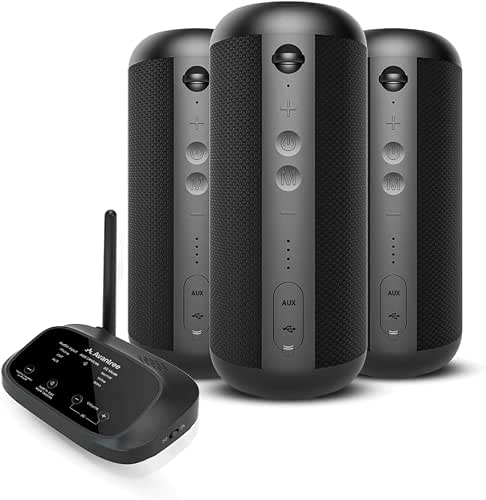
The Avantree Harmony 2 Wireless Speaker System is a smart fit for homes, classrooms, offices, and meeting rooms where you want the same audio playing across multiple speakers without delays or echo. You can stream background music, TV sound, or spoken content with under 30 ms latency, so playback stays tight and natural. Setup’s simple: connect the transmitter to your TV, phone, or laptop through optical, AUX, or Bluetooth, and the speakers auto-connect. It’s best indoors, not for loud outdoor spaces. For mic use, you’ll need line-level output, not USB, XLR, or TRRS.
- Multi-room:Multi-room indoor
- Wireless:Wireless
- Streaming:TV, phone, laptop
- Control:No app required
- Power:Powered speakers
- Use:Indoor audio
- Additional Feature:Under 30 ms latency
- Additional Feature:No app required
- Additional Feature:TV audio support
Dio Node Multiroom Wi-Fi Home Speakers (3-Pack)
Designed for Apple households that want simple whole-home audio, the Dio Node Multiroom Wi‑Fi Home Speakers 3-Pack delivers seamless multiroom playback through Apple AirPlay 2 and Wi‑Fi without needing voice assistants or built-in microphones. You can connect it to your iPhone, iPad, iPod, or Apple TV and start listening in under a minute. Its shelf-mount, gray design uses metal and polycarbonate, while the 4-inch vibrant driver supports surround audio. You get 85 dB signal-to-noise ratio, 220 Hz response, and corded 5-watt power. It’s a focused, easy home upgrade.
- Multi-room:3-pack
- Wireless:Wi‑Fi / AirPlay 2
- Streaming:Spotify, AirPlay 2
- Control:iPhone control panel
- Power:Corded electric
- Use:Home use
- Additional Feature:Apple AirPlay 2
- Additional Feature:Surround audio output
- Additional Feature:Less than 1-minute setup
Dio Node Multiroom Wi-Fi Home Speakers (5-Pack)
With no built-in microphones and no voice assistant required, Dio Node Multiroom Wi‑Fi Home Speakers suit households that want simple, private control from an iPhone and easy whole-home audio. With the 5-pack, you can cover your entire home and enjoy rich, lossless sound in every room. Setup takes less than a minute, and AirPlay 2 lets you cast from Apple devices with ease. You can also mix with over 100 compatible speaker models. Their refined design fits modern or traditional spaces, so you get practical, expandable audio that looks as good as it sounds.
- Multi-room:5-pack
- Wireless:Wi‑Fi / AirPlay 2
- Streaming:AirPlay 2
- Control:iPhone control panel
- Power:Corded electric
- Use:Home use
- Additional Feature:5-pack full coverage
- Additional Feature:No built-in microphones
- Additional Feature:AirPlay 2 compatible
Juke-6 6 Zone Audio Amplifier with Wireless Control
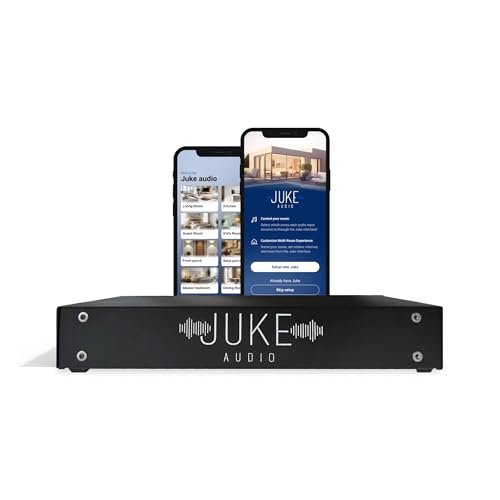
If you want whole-home audio that’s easy to control and flexible enough for different rooms, the Juke-6 6 Zone Audio Amplifier with Wireless Control is a strong fit. You get six zones, up to 12 speaker channels, and 40 watts per channel into 8 ohms, with stable performance down to 2 ohms. It works with passive in-ceiling, in-wall, and terrain speakers. You can stream with AirPlay 2, Spotify Connect, Bluetooth, or DLNA, and each zone appears individually. Add more Juke amps for extra rooms, or route TV audio through Apple TV and use your remote.
- Multi-room:6-zone
- Wireless:Wi‑Fi / Bluetooth
- Streaming:AirPlay 2, Spotify Connect
- Control:Wireless control
- Power:Wired amplifier
- Use:Whole-home audio
- Additional Feature:6-zone amplifier
- Additional Feature:12 speaker channels
- Additional Feature:TV remote control
Denon Home 350 Wireless Speaker (Black)
The Denon Home 350 Wireless Speaker in black is a strong pick should you want a room-filling wireless speaker that can anchor a multiroom setup without sacrificing stereo depth. You get 25 watts of power, 2.0 stereo output, two 0.75-inch tweeters, and dual 6.5-inch woofers for rich, low-distortion sound. Stream over Wi-Fi, Bluetooth, AirPlay 2, USB, or Aux, and use HEOS to sync rooms or play different tracks. You can pair two units for cable-free stereo, connect with Alexa or Siri, and control playback with the app or quick-select buttons.
- Multi-room:Multi-room HEOS
- Wireless:Wi‑Fi / Bluetooth / AirPlay 2
- Streaming:Spotify, TIDAL, Pandora
- Control:App / voice control
- Power:Battery powered
- Use:Stereo speaker
- Additional Feature:HEOS built-in
- Additional Feature:5.1 cinematic immersion
- Additional Feature:Quick-select buttons
Factors to Consider When Choosing Wireless Multiroom Digital Music Systems
When you choose a wireless multiroom digital music system, start by matching it to your audio coverage needs and the size of each room. You’ll also want to check streaming compatibility, setup simplicity, and how well the system keeps multi-room sync. Finally, consider about the speaker type that fits your space and listening habits.
Audio Coverage Needs
To choose the right wireless multiroom digital music system, start with matching its coverage to your space: some setups handle just 3 speakers, while others scale to 4, 5, 6 zones, or more. Count the rooms you want to fill, then check whether the system suits a small home, a classroom, an office, or a meeting room. Should you need sound in multiple areas at once, look for synchronized playback with low latency, ideally under 30 ms, so you don’t hear echoes between rooms. Pick speakers and amplification that match your layout, whether that means whole-home wireless speakers or a multi-zone amplifier that drives up to 12 channels. For bigger spaces, choose a system that lets you add units on the same network as your coverage grows.
Streaming Compatibility
Streaming compatibility matters because the best wireless multiroom system is only useful when it works with your preferred way of playing music. Check the protocols it supports: Wi‑Fi casting, AirPlay 2, Spotify Connect, Bluetooth, DLNA, or HEOS-style streaming. Then confirm it fits the services you use most, whether that’s Spotify, Pandora, TIDAL, Deezer, Sirius XM, or internet radio. You should also match the system to your devices; some setups favor Apple gear and stream directly from iPhone, iPad, or Apple TV, while others work more broadly across phones, tablets, and computers. In the case that you keep local files, verify playback for formats like MP3, WAV, AAC, WMA, ALAC, FLAC, and DSD. For TV audio, look for low-latency sync so sound stays aligned with the screen.
Setup Simplicity
Setup should be quick and painless, so favor wireless multiroom systems that run on your existing Wi‑Fi without extra hub hardware. You’ll cut installation time and avoid adding another box to your shelf. Choose models that let you control playback from an app, smartphone, tablet, or computer, so you can start listening without a messy setup process. Whenever a system auto-connects when powered on and claims setup in under a minute, that’s a strong sign it’s user-friendly. For the simplest installation, look for a transmitter that plugs into common inputs like optical, AUX, Bluetooth, RCA, or a 3.5 mm line-level output. Whenever you’re expanding later, make sure extra units join the network easily, because growth shouldn’t turn into a technical project or require extra troubleshooting.
Multi-Room Sync
While you’re choosing a wireless multiroom system, sync matters because multiple speakers should play the same audio at the same time so the sound stays aligned as you move through your home. You’ll want low-latency performance, ideally under 30 milliseconds, so TV dialog and spoken audio don’t create echo or lip-sync issues. Provided that you cover several rooms, timing consistency keeps the whole experience seamless as you walk around. Check whether the system offers automatic speaker pairing and network-based coordination, since those features help maintain stable playback without constant tweaking. Some platforms also let you play different songs in separate zones, which gives you flexibility provided that not everyone wants the same stream. Strong sync keeps shared listening smooth and reliable throughout your home.
Speaker Type
Once you’ve checked sync, speaker type is the next big choice because it shapes how each room sounds and how much gear you need. You can pick compact standalone speakers, larger home stereo speakers, or bundled setups, and each option fills space differently. If you want simple playback in several zones, a single powered speaker per room may be enough. If you want fuller stereo sound, choose a system with multiple drivers or pair passive speakers with an external amp. Also consider where you’ll use it: background audio, room-filling music, or home theater integration. Compare driver layout, enclosure size, and output power, since they affect clarity, bass, and loudness. The right type keeps each room sounding balanced and practical.
Privacy Controls
Privacy matters because a multiroom system shouldn’t make you trade convenience for constant listening. You should favor models you can run entirely from an app or device panel, so you’re not relying on voice assistants or always-on microphones. A privacy-friendly setup often skips a built-in mic, which lowers the chance of unwanted audio capture during everyday use. You can also look for systems that work over your local network with simple pairing, since that can reduce cloud dependence and extra account sign-ins. In case you’ll connect a TV or other source, make sure control comes through optical, AUX, or Wi‑Fi inputs instead of voice-first features. In shared homes or offices, pick systems that let each person manage playback from their own phone or tablet while keeping mic features disabled.
Expandability Options
While you’re choosing a wireless multiroom digital music system, consider beyond the number of speakers you need today and check how easily it can grow with you. You should verify how many zones or rooms it supports now and whether you can add speakers, amplifiers, or speaker pairs later. Pick a system that lets multiple units share the same wireless network, so you can expand from a few rooms to whole-home audio without hassle. Make sure each speaker or zone can play its own music when you need separate control. Should you expect to scale up, choose a platform that links extra devices without rewiring or complicated setup. For larger homes, confirm it can reach 6 zones, 12 speaker channels, or more through add-on hardware, not replacement.
Frequently Asked Questions
Can I Mix Different Speaker Brands in One Multiroom System?
Yes, you can mix speaker brands, but you usually need a shared platform such as AirPlay, Chromecast, or Bluetooth. Without that, you will need separate apps and syncing will be limited. Check compatibility before you buy.
Do These Systems Work With Voice Assistants?
Yes, many of these systems can connect to voice assistants. With compatible speakers or hubs, you can control playback, volume, and room selection using Alexa, Google Assistant, or Siri.
How Much Wi-Fi Bandwidth Do Multiroom Speakers Use?
Wi fi bandwidth? For music, it is very low. A typical speaker uses about 0.1 to 0.3 Mbps for compressed audio, and up to 1 to 3 Mbps for higher quality streams, so even several speakers usually have little impact on your network.
Can I Expand the System Later With More Speakers?
Yes, you can usually add more speakers later. Choose models that work with your current system, and make sure the app lets you set up new rooms without trouble. Also check device limits, software updates, and Wi Fi capacity.
What Happens if One Speaker Loses Connection?
If one speaker loses connection, that channel goes quiet while the others continue playing. In many systems, it reconnects quickly and resyncs automatically when the signal returns.
Conclusion
As you choose the right wireless multiroom digital music system, you’ll turn everyday listening into a seamless sound experience. You’ll enjoy smooth streaming, simple setup, and synchronized audio that follows you from room to room. Whether you want Sonos simplicity, Dio flexibility, or Denon depth, you can find the fit that feels right. Focus on coverage, compatibility, and control, and you’ll create a consistently engaging, clutter-free home soundtrack.
