

I know the right workstation desk can change your whole day, especially when space feels tight and clutter keeps creeping in. In this guide, I’ll walk you through seven strong picks for 2026, from compact 47-inch styles to roomy 63-inch setups, plus corner desks with power, drawers, and sturdy frames. Next, I’ll show you which features actually matter so you can choose a desk that feels solid, fits well, and makes work a little easier.
Tribesigns 63-inch Rustic Brown Computer Desk
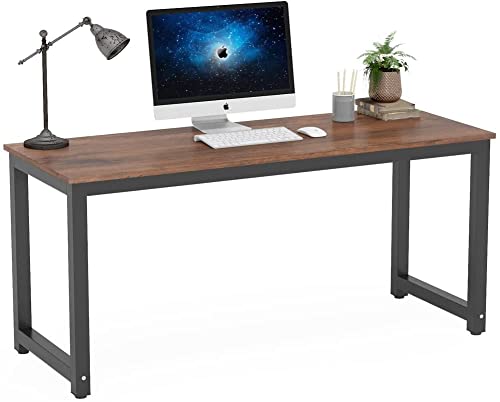
The Tribesigns 63-inch Rustic Brown Computer Desk is a strong fit for someone who needs a roomy, sturdy workspace without a bulky look. Its 63 by 23.6 inch top gives plenty of room for drafting, gaming, writing, or daily office tasks. The rustic brown finish adds warmth, while the steel frame keeps it steady. Adjustable leg pads help on uneven floors, which is a quiet relief in real homes. It assembles quickly with a hex key, and the scratch resistant, waterproof surface makes cleanup simple. The open design also leaves generous legroom for comfortable seated work.
Best For: People who want a spacious, sturdy 63-inch desk for home office work, writing, gaming, or drafting without taking up a bulky footprint.
Pros:
- Large 63 x 23.6 inch desktop provides plenty of workspace.
- Heavy-duty steel frame and adjustable leg pads improve stability, even on uneven floors.
- Scratch-resistant, waterproof surface is easy to clean and maintain.
Cons:
- No drawers or built-in storage, so organization options are limited.
- Assembly requires a hex key and is best done with two people.
- The rustic simple design may feel too basic for users wanting a more premium or decorative look.
NSdirect Modern 63-Inch Computer Desk for Home Office

Pros:
- Large 63″ x 23.6″ desktop offers plenty of room for a monitor, paperwork, and daily tasks.
- Sturdy steel frame with adjustable leg pads provides stability and helps keep the desk level.
- Simple minimalist design and quick assembly make it easy to fit into many spaces.
Cons:
- Fixed height may not suit users who want a sit-stand or adjustable desk.
- The 23.6-inch depth may feel narrow for users who prefer extra monitor distance or deeper workspace.
- Assembly is straightforward, but it may still be easier with two people.
NEWBULIG 63 Inch Computer Desk for Home Office
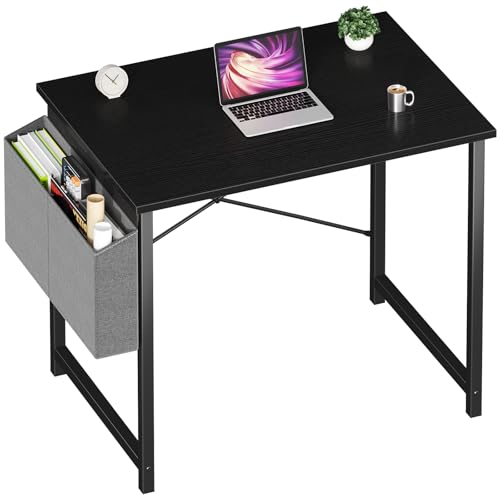
Pros:
- Large 63-inch tabletop offers plenty of room for a laptop, notebooks, and everyday work essentials.
- Steel frame with reinforced legs provides stable, wobble-resistant support.
- Scratch-resistant, waterproof laminated surface is easy to maintain and clean.
Cons:
- Assembly is required and may be easier with two people.
- Fixed height and non-customizable design may not suit everyone.
- Maximum recommended weight is lower than the product claim, which may limit heavy setups.
L Shaped Corner Desk with Power Outlets

Built for adults who need a smart mix of work and storage, this L shaped corner desk with power outlets fits neatly into home offices, gaming rooms, and study spaces where every inch matters. Its 90 degree layout can switch to a U shape, while reversible shelves, a drawer, and a storage bag keep gear close. The thick P2 wood top and iron frame support up to 500 pounds with steady, wobble free use. Built in USB and power outlets make charging easy, and fast assembly keeps setup calm.
Best For: Adults looking for a sturdy, space-saving L-shaped corner desk with built-in power outlets, flexible storage, and a layout that works well for home offices, gaming, studying, or drafting.
Pros:
- Strong P2 wood and iron construction supports up to 500 lb for heavy equipment.
- Reversible 90° L-shape with shelves, drawer, and storage bag offers flexible organization.
- Built-in USB and power outlets add convenient charging for work or gaming setups.
Cons:
- Assembly is required, so setup may take time despite the included tools and instructions.
- At 18.9 in deep, the desktop may feel narrow for users who want extra workspace.
- Large, heavy build may be harder to move or reposition once assembled.
Tribesigns Modern Simple 47-Inch Computer Desk, White
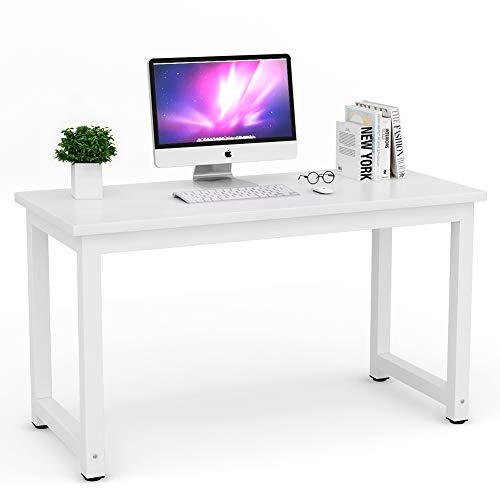
The Tribesigns Modern Simple 47-Inch Computer Desk in White stands out as a smart pick for anyone who wants a clean, sturdy workspace without giving up room to move. Its 47.2-inch top gives enough space for a monitor, laptop, and notes, while the 23.6-inch depth keeps the layout neat. The steel frame and thick MDF surface support heavy use, and the 900-pound rating adds real peace of mind. With adjustable feet, it stays steady on uneven floors. It also fits bedrooms, dorms, and offices, and assembly takes less than 15 minutes.
Best For: Adults, students, and home office users who want a simple, sturdy, space-efficient 47-inch desk for writing, studying, or computer work in bedrooms, dorms, or offices.
Pros:
- Spacious 47.2-inch tabletop fits a monitor, laptop, printer, and writing materials comfortably.
- Heavy-duty steel frame and thick MDF top provide strong stability, with a very high 900-pound weight rating.
- Easy to assemble in under 15 minutes, with adjustable feet for uneven floors and easy-clean, scratch-resistant surface.
Cons:
- No drawers or built-in storage, so you may need separate organizers.
- Fixed height may not suit users looking for an adjustable desk.
- White finish can show dirt or wear more easily than darker colors.
63 Inch Modern Home Office Gaming Desk

A 63-inch modern home office gaming desk is a smart pick for people who need more room without letting the workspace take over the whole room. Its 63 by 23.7 inch surface gives space for two monitors, a laptop, books, and even a coffee cup. The 66.9 inch diagonal also helps the layout feel open. Built with engineered wood, steel, and alloy steel, it supports up to 220 lb. The anti-scratch, waterproof top is easy to clean, while the simple teak and black look fits work, study, and play. Assembly takes about 5 to 10 minutes.
Best For: Home office workers, students, and gamers who want a spacious, sturdy desk with room for dual monitors and everyday essentials.
Pros:
- Large 63 x 23.7 inch tabletop provides plenty of workspace for multiple devices and accessories.
- Durable engineered wood and steel construction supports up to 220 lb and is easy to clean.
- Simple modern teak-and-black design fits well in offices, bedrooms, study rooms, and gaming setups.
Cons:
- Assembly is required, so it may not be ideal for those wanting a fully ready-to-use desk.
- No drawers or built-in storage for organizing supplies.
- Fixed-size rectangular design may not suit users needing adjustable or customizable furniture.
Tribesigns 59-Inch Computer Desk with 3 Drawers

Pros:
- Three drawers, including a file drawer, provide practical storage for papers and supplies.
- Reversible drawer placement offers flexibility for different room layouts.
- Adjustable foot pads and smooth edges improve stability and everyday usability.
Cons:
- Assembly is required and is best handled by two people.
- Tools are not included, so you’ll need to have your own on hand.
- The 19.68-inch depth may feel narrow for users who want a larger work surface.
Factors to Consider When Choosing Workstation Desks
When I help you choose a workstation desk, I always start with desk size and space, because the right fit keeps your room open and your setup comfortable. I also look at the material, weight capacity, storage, and organization, since those details decide how well the desk handles daily use and keeps clutter in check. Then I check assembly and stability, because a desk should feel solid from the start and not wobble like it’s trying to join the dance party.
Desk Size And Space
I always start with size and space, because even the best workstation desk can feel wrong if it crowds the room or leaves you squeezed in place. I measure the desk footprint against my room first, since models often run from 47.2 x 23.6 inches to 63 x 23.7 inches, and I still need room to move. Then I check depth, not just width. A top around 18.9 to 23.7 inches keeps my monitor, keyboard, and notes from piling up. I also look under the desk, because about 42.9 inches of legroom can change how relaxed I feel. Next, I compare diagonal surface length, from 55.1 to 69.5 inches, and I make sure the height, usually 29.1 to 29.7 inches, fits my chair and posture.
Material And Durability
Material and durability matter just as much as size, because a desk that looks great can still feel shaky or wear out fast if the build is weak. I look for tops that are about 0.59 to 1.0 inch thick, because that extra mass often adds real stiffness. Then I check for steel or alloy steel frames, since strong tubing helps keep the desk steady when I work. I also like scratch-resistant, waterproof finishes, especially laminated MDF or engineered wood, because they wipe clean fast and handle daily use well. Next, I notice adjustable leg pads, which help on uneven floors and ease stress on joints. Even if a desk claims a high weight rating, I still trust the material quality first.
Weight Capacity Limits
A desk’s strength can feel like peace of mind, especially once your setup starts to grow. I always check the maximum weight rating before I buy, because that number has to cover my monitors, computer, printer, and any gear I’ll add later. Many workstation desks range from 198 lb to 900 lb, so I look for room to spare, not just a bare match. If I plan dual monitors or heavier accessories, I choose a higher-capacity desk to keep the setup steady over time. I also pay attention to how the load spreads across the desktop, since one crowded corner can strain more than an even layout. A thicker steel frame and reinforced legs usually help the desk stay solid, and a heavier build often feels calmer under pressure.
Storage And Organization
Under the desk and around it, storage can make or break how calm your workday feels. I look for built-in drawers, shelves, hutch space, or a file drawer when I need papers, pens, and small tools off my main surface. If you like a tidy flow, reversible storage can be a smart win because I can place drawers or shelving on either side to match my room and habits. Open shelves and utility drawers also help me split quick-grab items from bulk supplies, so my monitor and notebook still have breathing room. I also like wider desks, around 59 to 63 inches, because they give me space to organize without crowding my knees. If a desk has no drawers, I ask whether I’m okay relying on outside storage before I buy.
Assembly And Stability
Once I’ve sorted out storage, I look at how the desk goes together and how steady it feels, because a desk that wobbles can turn a normal workday into a small headache. I like clear instructions, included hardware, and setups that take about 5 to 15 minutes, because that keeps mistakes low and my patience intact. Next, I check the frame. Steel or iron, plus reinforced corner or leg bars, usually gives me the firm feel I want. Adjustable leg pads help when my floor isn’t perfectly even. I also pay attention to weight capacity, since heavier desks often hold monitors and printers with less shake. Finally, I want a wide leg stance and enough knee room, so the desk feels solid and still stays comfortable for long seated work.
Frequently Asked Questions
What Desk Height Suits Standing and Sitting Alternation?
Aim for a height range roughly 22 to 47 inches so you can use the desk both sitting and standing. Set the surface to about your elbow height so your wrists stay neutral and your shoulders remain relaxed.
How Much Weight Can a Workstation Desk Safely Support?
A typical workstation desk supports about 100 to 300 pounds, depending on construction and materials. Check the manufacturer’s load rating and do not exceed it to avoid structural failure.
Which Desk Surface Resists Scratches and Stains Best?
I recommend either laminate or solid surface tabletops; both resist scratches and stains effectively. For the most durable option, choose high pressure laminate because it stands up to wear, cleans easily, and is cost effective.
Are Workstation Desks Easy to Assemble Alone?
Many workstation desks can be assembled solo; one survey reported 60% of buyers completed setup without assistance. I recommend verifying all parts, using a power driver for faster fastening, and setting aside extra time in case steps take longer than expected.
Do These Desks Offer Cable Management Features?
Many models include built-in cable grommets, under-desk cable trays, and integrated cable clips. These features keep cords organized, reduce tangling, and make it simpler to reach power outlets while maintaining a tidy workspace.
Final Thoughts
A good workstation desk can change how your day feels. It can steady your focus, ease your back, and give your room a sense of order. I know how much that matters when work, study, and gaming all share the same space. So I looked at desks that balance size, strength, and useful features. Below, I’ll walk you through seven strong picks for 2026 and then help you choose the one that fits your space and routine.
1. Tribesigns 63-Inch Rustic Brown Computer Desk
If you want a desk that feels solid and looks warm, this one stands out right away. The rustic brown finish gives it a grounded, classic feel, which works well in a home office or a shared room. Its 63-inch width gives you plenty of room for a laptop, monitor, notebook, and a few extras without making the surface feel crowded.
What I like most is the balance between style and usefulness. The frame feels built for daily use, and the broad top makes it easier to keep your setup neat. If you tend to spread out while you work, this desk gives you that breathing room. It also fits well in rooms where you want the desk to look more like furniture and less like a plain work table.
This desk is a strong match if you want a dependable center point for long work sessions. It gives you space, and it does it without feeling bulky.
2. NSdirect Modern 63-Inch Computer Desk for Home Office
The NSdirect 63-inch desk leans into a clean modern look. That matters more than people think, because a simple desk can help a room feel calmer and less cluttered. The wide surface gives you enough room for a dual-monitor setup or a mix of work and study tools.
Its frame is made for steady support, so you do not have to worry about small wobbles while typing or writing. The design also leaves good legroom, which makes a long workday feel less cramped. That little bit of comfort adds up fast. If your chair and desk height are a careful match, your posture usually thanks you later.
I’d point this desk toward anyone who wants a smooth, no-fuss workspace. It keeps the focus on your tasks, which is often exactly what a home office needs.
3. NEWBULIG 63 Inch Computer Desk for Home Office
The NEWBULIG 63-inch desk brings a practical style that fits many kinds of rooms. It gives you a large work surface, and that makes it easier to keep your essentials in one place. You can set up a laptop, monitor, lamp, and documents without feeling squeezed.
This desk also makes sense for people who want simple assembly and everyday durability. A desk should not turn into a weekend puzzle. It should help you get back to work quickly. The NEWBULIG model fits that idea well. It feels like a desk made for real life, where the coffee cup, charger, and keyboard all need their own spot.
If your current setup feels messy or too tight, this desk can bring back some order. It gives you room to breathe, and that can make a surprising difference in how you work.
4. L Shaped Corner Desk with Power Outlets
An L shaped desk can feel like a tiny command center, and this one takes that idea seriously. The corner design helps you use room space more efficiently, especially if you want to divide work, study, and gaming areas. One side can hold your main screen, while the other side can keep supplies, a printer, or a second device.
The built-in power outlets are a major help. I’ve seen how fast cords can take over a desk, like unruly vines on a fence. With outlets close by, you cut down on cable clutter and make charging easier. That kind of convenience can save time and reduce daily stress.
This desk works well for people who need structure. It gives you zones, and those zones help keep your mind organized too. If you like a setup that feels efficient and easy to use, this one deserves a close look.
5. Tribesigns Modern Simple 47-Inch Computer Desk, White
Not every workspace needs to be large. Sometimes you just need a compact desk that does its job well. The Tribesigns 47-inch white desk fits that need beautifully. Its smaller size makes it a smart choice for apartments, bedrooms, dorms, or any room where space matters.
The white finish helps the room feel lighter and more open. That can be very useful if your space already feels crowded. Even with its smaller footprint, the desk still gives you enough room for a laptop, a lamp, and a few work tools. It keeps things simple, and simple can feel very peaceful when your day is full.
I like this desk for people who want a clean setup without taking over the room. It proves that a workstation does not have to be huge to be effective. It just has to fit your life well.
6. 63 Inch Modern Home Office Gaming Desk
This desk works well for both work and play, which makes it a strong pick for flexible setups. A 63-inch surface gives you room for a monitor, keyboard, headset, and maybe even a second screen. That extra space matters when you switch between work tasks and gaming, because your gear can stay ready instead of getting packed away all the time.
The modern design also helps the desk blend into different room styles. It does not scream for attention, but it still feels sharp and current. That balance is useful if your desk sits in a shared space and needs to look neat all day.
For gamers, creators, or remote workers, this desk offers a lot of room to build a setup that feels personal. It gives you space to focus, and that can make both work and fun feel smoother.
7. Tribesigns 59-Inch Computer Desk with 3 Drawers
If storage matters to you, this desk may be the most helpful choice in the group. The three drawers give you a place to tuck away pens, notebooks, chargers, and small items that often end up scattered across the top. That alone can make your workspace feel calmer.
The 59-inch size is a smart middle ground. It is wide enough for a solid setup, but it still fits more easily than some larger desks. I like that because not everyone has a giant room, yet many people still need real storage. This desk fills that gap well.
It also helps create a more polished look. When the small things stay hidden, the desk surface feels clearer and more inviting. If you work better when your space feels tidy, this one can support that habit in a very natural way.
Factors to Think About When Choosing Workstation Desks
Choosing the right workstation desk is a lot easier when you know what matters most to you. A desk should support your body, fit your room, and match the way you work. I always think of it like choosing the right shoes. The best pair is not just stylish. It also fits well and feels good after a long day.
1. Measure your space first
Start with the room, not the desk. Measure the wall, the corner, and the chair area before you buy anything. A desk that looks great online can feel too large at home. On the other hand, a desk that seems small may leave you wishing for more room once your monitor and tools are in place.
2. Match the desk size to your routine
Think about how you use your workstation. If you only need a laptop and notebook, a 47-inch desk may be enough. If you use two monitors, a printer, or art supplies, a 63-inch desk will likely feel much better. The right size should support your habits, not fight them.
3. Check the frame strength
A strong frame gives you peace of mind. It keeps the desk stable when you type, write, or lean on it. Steel and alloy steel frames usually offer good support for daily use. If you plan to place heavy equipment on the desk, pay close attention to weight capacity.
4. Look for comfort features
Comfort is not a luxury. It affects how long you can stay focused. Good legroom, smooth edges, and the right desk height can make a big difference. Adjustable feet can also help if your floor is uneven. Little details like that can turn a decent desk into a much better one.
5. Decide how much storage you need
Some people love a clean surface with very little on it. Others need drawers or shelves to keep things under control. Think about your style before you choose. If clutter slows you down, built-in storage can help a lot. If you like open space, a simpler desk may feel better.
6. Think about cable management and outlets
Cords can ruin the calm of a good workspace fast. If you use several devices, a desk with outlets or smart cable access can save you frustration. It helps your setup look neater and makes daily charging easier. That small convenience can save time every single day.
7. Pick a finish that fits your room
The finish matters more than many people expect. Rustic brown can feel warm and classic. White can look bright and airy. Dark modern finishes can feel sharp and professional. Choose a style that supports the mood you want in your workspace, because the room around you shapes how you feel while you work.
A workstation desk is more than a flat surface. It’s the place where your plans grow roots, where your ideas line up like lanterns, and where your day takes shape. I look for a desk that feels steady, clear, and kind to my routine. When you choose with care, your workspace starts to feel less like a corner and more like a guide.



