

Zigbee smart plugs make home automation simpler, safer, and more flexible by bringing reliable wireless control to everyday devices. This guide highlights eight top options, covering compact 15 A plugs, energy-monitoring models, dual-outlet units, and relays that add Matter and HomeKit compatibility.
I’ll cover compatibility with Echo, SmartThings, and Home Assistant, physical fit, hub limits, power-on behavior, and measurement accuracy. Read on to find a plug that fits your setup and works reliably.
| THIRDREALITY ZigBee Smart Plug 4-Pack with Energy Monitoring |

| Best Value Pack | Connectivity Protocol: ZigBee 3.0 | Hub Requirement / Integration: ZigBee hub required (works with many Zigbee hubs & some Echo/Eero with built-in Zigbee) | Energy Monitoring: Real-time energy monitoring supported | VIEW LATEST PRICE | Read Our Analysis |
| Kasa Smart Plug Mini 15A (EP25P4) – 4-Pack |

| Best For HomeKit | Connectivity Protocol: 2.4 GHz Wi‑Fi (Note: not Zigbee) | Hub Requirement / Integration: No hub required (connects directly to Wi‑Fi; works with cloud voice services) | Energy Monitoring: Energy monitoring (real-time + historical in app) | VIEW LATEST PRICE | Read Our Analysis |
| ZigBee Smart Plug with Energy Monitoring (Hub Required) |
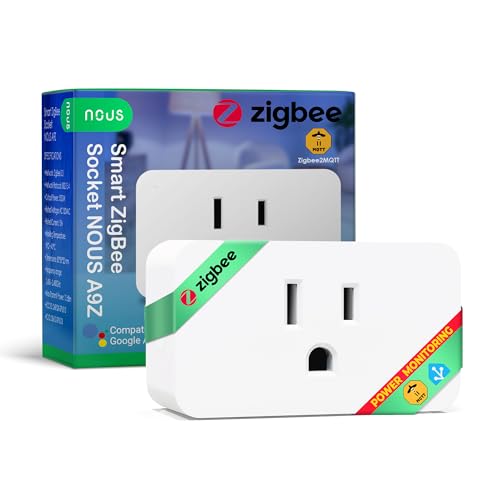
| Simple Energy Monitor | Connectivity Protocol: ZigBee 3.0 | Hub Requirement / Integration: ZigBee gateway/hub required | Energy Monitoring: Built-in real-time power consumption monitoring | VIEW LATEST PRICE | Read Our Analysis |
| Enbrighten Zigbee Dual Outlet Plug-In Switch |

| Dual-Outlet Powerhouse | Connectivity Protocol: Zigbee 3.0 | Hub Requirement / Integration: Works directly with some Echo/Eero with built-in Zigbee; otherwise Zigbee hub | Energy Monitoring: Not specified as energy-monitored (dual outlet switch; no per-outlet energy monitoring mentioned) | VIEW LATEST PRICE | Read Our Analysis |
| DOGAIN Zigbee Smart Plug Outlet (2-Pack) |
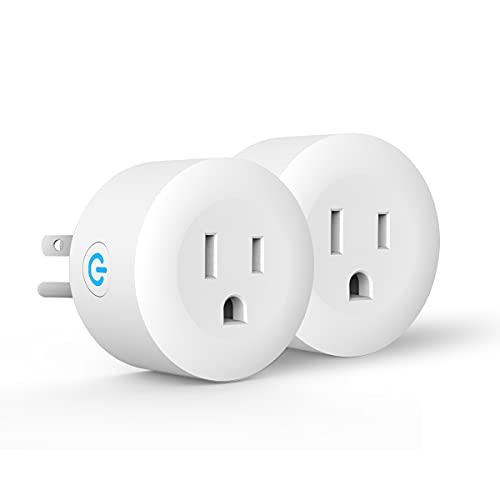
| Budget Zigbee Option | Connectivity Protocol: ZigBee (hub required) | Hub Requirement / Integration: ZigBee hub required | Energy Monitoring: Not explicitly stated (focus on on/off; no energy monitoring specified) | VIEW LATEST PRICE | Read Our Analysis |
| THIRDREALITY Zigbee Dual Smart Plug (2-Pack) |

| Best Dual-Control | Connectivity Protocol: Zigbee (compatible hubs listed) | Hub Requirement / Integration: ZigBee hub required (Smart Bridge optional for HomeKit) | Energy Monitoring: Real-time energy monitoring per outlet | VIEW LATEST PRICE | Read Our Analysis |
| Prakriti Zigbee Smart Plug 2-Pack (Alexa Google) |

| Compact & Reliable | Connectivity Protocol: Zigbee | Hub Requirement / Integration: ZigBee hub required | Energy Monitoring: Not specified (on/off, scheduling; no explicit energy monitoring) | VIEW LATEST PRICE | Read Our Analysis |
| Shelly 1 Gen4 Smart Relay Switch (Wi‑Fi/Zigbee/Matter) |

| Most Versatile Relay | Connectivity Protocol: Wi‑Fi / Zigbee / Matter (multi-protocol) | Hub Requirement / Integration: No hub required for core Wi‑Fi functions; can use Zigbee/Matter or Bluetooth gateway | Energy Monitoring: Not primarily an outlet monitor (relay supports power switching; monitoring depends on integration) | VIEW LATEST PRICE | Read Our Analysis |
More Details on Our Top Picks
THIRDREALITY ZigBee Smart Plug 4-Pack with Energy Monitoring
If you want simple, reliable smart plugs that also track how much energy your devices use, the THIRDREALITY ZigBee Smart Plug 4 Pack is a great fit. You get four compact plugs that fit typical outlets and report real time power use. They need a ZigBee hub like Echo 4th Gen, Eero 6, or Home Assistant to work. You can turn devices on and off, group plugs, and set automation for small appliances. They repeat ZigBee signals and handle 15 amps at 120 volts. They’re ETL certified, IP20 rated, and give reassuring energy visibility without fuss.
- Connectivity Protocol:ZigBee 3.0
- Hub Requirement / Integration:ZigBee hub required (works with many Zigbee hubs & some Echo/Eero with built-in Zigbee)
- Energy Monitoring:Real-time energy monitoring supported
- Voice Assistant Compatibility:Alexa and Google Home (via compatible hubs)
- Electrical Rating (Voltage / Current / Wattage):120 V; 15 A; 1800 W
- Certification / Safety Standard:ETL certified
- Additional Feature:ZigBee repeater functionality
- Additional Feature:Configurable power-loss restore
- Additional Feature:Real-time energy reporting
Kasa Smart Plug Mini 15A (EP25P4) – 4-Pack
You’ll love the Kasa Smart Plug Mini 15A 4-pack when you want reliable, high-power control for heavy-duty home devices without giving up compactness. You’ll plug in stronger appliances up to 15A and 1800W while keeping the second outlet free. You can set schedules and timers in the Kasa app, view real-time and past energy use, and track savings. You’ll talk to Alexa, Google Assistant, Siri via HomeKit, or use SmartThings. Setup is simple with Google Seamless or Amazon Frustration Free options or the Kasa app over 2.4 GHz Wi-Fi. It’s UL certified and backed by two-year warranty.
- Connectivity Protocol:2.4 GHz Wi‑Fi (Note: not Zigbee)
- Hub Requirement / Integration:No hub required (connects directly to Wi‑Fi; works with cloud voice services)
- Energy Monitoring:Energy monitoring (real-time + historical in app)
- Voice Assistant Compatibility:Alexa, Google Assistant, Siri/HomeKit
- Electrical Rating (Voltage / Current / Wattage):120 V implied; 15 A; 1800 W
- Certification / Safety Standard:UL-certified (flame retardant construction)
- Additional Feature:Apple HomeKit support
- Additional Feature:Compact outlet-friendly design
- Additional Feature:Amazon FFS / Google GSS
ZigBee Smart Plug with Energy Monitoring (Hub Required)
Smart plugs with ZigBee energy monitoring are perfect for people who want simple, reliable control and clear insight into household power use. You’ll need a ZigBee 3.0 hub like SmartThings or Home Assistant to connect the plug, and it works with Alexa and Google Home for voice control. The plug tracks real-time power and handles up to 15A 1500W, so you can monitor lights, heaters, and appliances without guesswork. It fits standard sockets without blocking neighbors, has IP20 protection, 10 dBm transmission power, and durable construction. You’ll also get ETL certification and NOUS app integration for easy automation.
- Connectivity Protocol:ZigBee 3.0
- Hub Requirement / Integration:ZigBee gateway/hub required
- Energy Monitoring:Built-in real-time power consumption monitoring
- Voice Assistant Compatibility:Alexa and Google Home
- Electrical Rating (Voltage / Current / Wattage):120 V; 15 A; 1500 W (listed)
- Certification / Safety Standard:ETL certified
- Additional Feature:NOUS app integration
- Additional Feature:10 dBm transmission power
- Additional Feature:Fits without blocking outlets
Enbrighten Zigbee Dual Outlet Plug-In Switch
Pick the Enbrighten Zigbee Dual-Outlet Plug-In Switch when you want a simple, reliable way to control two lamps or devices together and extend your Zigbee network at the same time. You’ll plug it in, pair with compatible Echo or Eero models or a Zigbee gateway, and use voice or app control. It runs Zigbee 3.0 and repeats signals up to 150 ft, so your mesh gets stronger as you add it. Both outlets switch and dim together, so pick shared loads like paired lamps. Note SmartThings needs a device-type change for full integration. It’s UL certified and backed by a five-year warranty.
- Connectivity Protocol:Zigbee 3.0
- Hub Requirement / Integration:Works directly with some Echo/Eero with built-in Zigbee; otherwise Zigbee hub
- Energy Monitoring:Not specified as energy-monitored (dual outlet switch; no per-outlet energy monitoring mentioned)
- Voice Assistant Compatibility:Alexa and Google Assistant (direct with some Echo/Eero; also SmartThings, Vera)
- Electrical Rating (Voltage / Current / Wattage):120 V; 15 A; 1800 W
- Certification / Safety Standard:UL certified
- Additional Feature:Dual-outlet (simultaneous)
- Additional Feature:150 ft range extender
- Additional Feature:5-year limited warranty
DOGAIN Zigbee Smart Plug Outlet (2-Pack)
If you want a simple, reliable smart plug that plays nicely with ZigBee hubs, the DOGAIN Zigbee Smart Plug Outlet 2-Pack is made for people who want less fuss and more stability. You’ll plug it in and let your hub discover it via Alexa or a compatible SmartThings setup. It uses ZigBee for steadier connections than Wi‑Fi when that signal is available. You can control lights and small appliances up to 1500 watts by voice or hub routines. The ABS casing feels solid. You’ll get two plugs, a 12‑month warranty, lifetime tech support, and IP40 protection.
- Connectivity Protocol:ZigBee (hub required)
- Hub Requirement / Integration:ZigBee hub required
- Energy Monitoring:Not explicitly stated (focus on on/off; no energy monitoring specified)
- Voice Assistant Compatibility:Alexa and Google Assistant (via ZigBee hub)
- Electrical Rating (Voltage / Current / Wattage):120 V; (current not explicitly listed) 1500 W
- Certification / Safety Standard:(Warranty noted) protection rating IP40; warranty; certification not explicitly named
- Additional Feature:Plug-and-play discovery
- Additional Feature:12-month warranty
- Additional Feature:ABS plastic construction
THIRDREALITY Zigbee Dual Smart Plug (2-Pack)
You’ll love the THIRDREALITY Zigbee Dual Smart Plug if you want simple, reliable control of two devices from one compact unit, especially when you use it with a Zigbee hub like Home Assistant or SmartThings. You plug it in, pair to your hub, and you’re ready to control each outlet independently. It reports real time energy use per outlet and acts as a Zigbee repeater to strengthen your network. It supports OTA updates and status monitoring via 3R-Installer or hubs like Hubitat. It’s ETL certified, uses zero crossing switching for safety, and comes as a two pack in white.
- Connectivity Protocol:Zigbee (compatible hubs listed)
- Hub Requirement / Integration:ZigBee hub required (Smart Bridge optional for HomeKit)
- Energy Monitoring:Real-time energy monitoring per outlet
- Voice Assistant Compatibility:Works via Zigbee hubs; HomeKit via Smart Bridge; Alexa/Google via hubs
- Electrical Rating (Voltage / Current / Wattage):120 V; 15 A total; 1800 W total
- Certification / Safety Standard:ETL certified
- Additional Feature:Independent dual outlets
- Additional Feature:Zero-cross switching safety
- Additional Feature:OTA firmware updates
Prakriti Zigbee Smart Plug 2-Pack (Alexa Google)
Homeowners who want simple, reliable smart control will love the Prakriti Zigbee Smart Plug 2-Pack because it connects to your existing Zigbee hub and lets you manage devices with voice or app commands. You’ll plug these white, copper-ready units into Type A or B sockets and pair them with Alexa, Google Assistant, or Hubitat. You can turn lamps and fans on or off from your phone, set schedules to save energy, and stop unplugging small appliances manually. Setup is straightforward, instructions are included, and the plugs extend your Zigbee network. Reviews are strong, so you’ll feel confident adding them to your home.
- Connectivity Protocol:Zigbee
- Hub Requirement / Integration:ZigBee hub required
- Energy Monitoring:Not specified (on/off, scheduling; no explicit energy monitoring)
- Voice Assistant Compatibility:Alexa and Google Assistant (via Zigbee hub)
- Electrical Rating (Voltage / Current / Wattage):120 V implied; (current/wattage not explicitly listed)
- Certification / Safety Standard:(No certification explicitly listed)
- Additional Feature:Copper material construction
- Additional Feature:Hub-based network expansion
- Additional Feature:Simple scheduling/timers
Shelly 1 Gen4 Smart Relay Switch (Wi‑Fi/Zigbee/Matter)
For anyone who wants a tiny, powerful relay that hooks into Wi‑Fi, Zigbee, and Matter with no hub needed, the Shelly 1 Gen4 fits perfectly into tight spaces and everyday routines. You’ll love how it slips behind switches, into sockets, or into a garage opener box while handling up to 16 A and 1920 W. It supports Alexa, Google, SmartThings, and HomeKit, and it can act as a Bluetooth gateway for added reach. You can schedule lights, build scenes, and monitor doors with reed sensors. It’s robust, certified, light at 26 g, and backed by a three year warranty.
- Connectivity Protocol:Wi‑Fi / Zigbee / Matter (multi-protocol)
- Hub Requirement / Integration:No hub required for core Wi‑Fi functions; can use Zigbee/Matter or Bluetooth gateway
- Energy Monitoring:Not primarily an outlet monitor (relay supports power switching; monitoring depends on integration)
- Voice Assistant Compatibility:Alexa, Google Home, HomeKit (native Matter/Zigbee/Wi‑Fi support)
- Electrical Rating (Voltage / Current / Wattage):16 A; 1920 W (relay device)
- Certification / Safety Standard:CE and RoHS certified
- Additional Feature:Multi-protocol (Matter)
- Additional Feature:Fits standard wall box
- Additional Feature:16A high-current rating
Factors to Consider When Choosing a Zigbee Smart Plug
When I pick a Zigbee smart plug I first check whether it works with my hub and voice assistant so everything talks to each other without fuss. I also look at energy monitoring accuracy and maximum load capacity because I want reliable readings and to avoid overloading devices. Finally I favor plugs that can act as Zigbee repeaters to strengthen my network while still meeting my compatibility and safety needs.
Compatibility With Hubs
Although matching a Zigbee smart plug to your hub can feel tricky, I’ll walk you through the key things to check so you don’t end up with a device that won’t play nice. First, make sure the plug and hub speak the same Zigbee version like Zigbee 3.0. That gives you better features and security. Next, check your hub’s device limits and mesh capacity so adding a plug won’t overload it or slow performance. Then confirm the hub actually exposes the plug’s functions such as on/off, per-outlet control and any settings you need via its app or API. Also find out if the hub needs custom drivers or treats devices generically, and if voice assistants or HomeKit require a bridge.
Energy Monitoring Accuracy
You’ve already checked hub compatibility, so now let’s talk about how well a Zigbee smart plug measures energy. I care about resolution and reporting interval because small steps and frequent updates cut quantization error. Check if watts show to 0.1 W and how often readings refresh. Also verify voltage and current ranges so the sensor stays in its linear zone and won’t saturate when a device draws more power. I look for stated accuracy like ±1 to ±3 percent or ±0.5 W and any calibration options or firmware fixes. Prefer plugs reporting real-time watts and cumulative kWh with timestamps and exportable logs. Finally, confirm true RMS sensing and fast sampling so motors and switching supplies don’t fool the meter.
Maximum Load Capacity
Because a smart plug has to carry real power, I like to start by checking its maximum load so I know the plug won’t get too hot or fail under steady use. I look at the amp rating first since many plugs list 15 A, which at 120 V equals about 1800 W. Then I verify the stated wattage and confirm it covers continuous duty, not just short surge figures. Appliances like space heaters and hair dryers often draw over 1500 W, so I pick plugs with extra headroom. I also check temperature and environment limits, because high ambient heat cuts effective capacity. Together, these checks keep your plug safe, reduce wear, and give peace of mind when you automate heavy-load devices.
Zigbee Repeater Functionality
When I pick a Zigbee smart plug, I pay close attention to whether it can act as a repeater because that feature changes how reliable my whole network will be. I look for mains power and explicit router or repeater support in the specs, since battery devices won’t forward traffic. A repeater plug increases mesh density and often cuts packet loss and delays, yet I place them evenly to avoid RF congestion from too many routers nearby. Antenna design and transmission power in dBm matter, so I favor plugs with solid antennas when walls are thick or mixed with metal. Indoors I plan repeaters roughly every 10 to 30 meters, adjusting for obstructions, to keep hops low and connections steady.
Voice Assistant Support
I like to think of voice assistant support as the bridge between my Zigbee smart plug and everyday convenience, especially after deciding where repeaters go to keep the mesh strong. I check which assistants work with the plug, like Alexa, Google Assistant, or Siri HomeKit, so nothing clashes with my setup. I also confirm if voice control needs a hub or can run natively, since that changes cost and latency. I want full voice features, such as on off, scenes, and energy queries, not just basic commands. I look for multi room or grouped command support so routines control several plugs together. Finally, I value secure account linking and local control for faster, more private responses.
Physical Size And Fit
A bulky smart plug can ruin a neat wall or make a power strip unusable, so I always start by measuring the plug against the outlet and nearby space. I check height, width, and depth to make sure it won’t block the next socket or clash with wall plates in a duplex receptacle. When space is tight I prefer compact or low profile designs since plugs taller than about 3.5 to 4 inches often obstruct neighbors. I also verify orientation and outlet spacing because horizontal plugs can interfere with stacked receptacles while slim vertical shapes fit better. I watch weight and how a heavy plug might hang below the outlet and strain it. Finally I allow clearance for baseboards, furniture, and any antennas or protrusions.
Safety Certifications Present
Because electrical safety isn’t something you should leave to guesswork, I always start by checking for recognized third party certifications like ETL, UL, or CE before I even plug a Zigbee smart plug into the wall. Those marks mean independent testing and regional compliance. I also match the certification to the plug’s rated current and wattage so the label really covers the load I plan to run. I check for flame retardant materials and the upper operating temperature to reduce fire risk. I look at ingress protection like IP20 or IP40 to see if the plug will tolerate dust or occasional moisture where I use it. Finally, I want clear safety paperwork from the maker, with installation steps, warranty details, and any configurable safety features that my hub supports.
Power‑Loss Restore Options
You checked certifications and materials to keep things safe, and now we need to look at how your plug behaves when power comes back on. I want you to pick a plug that lets you choose a restore state: on, off, or last state. That choice keeps appliances safe and avoids surprises. Also check that the setting survives firmware updates and repeated power cycles so you don’t lose preferences. Find out if the hub must store the preference, since some plugs only honor a gateway setting. Think about load and safety too. Automatic on can restart high wattage devices up to the plug rating, so set critical loads to off. Finally, confirm the plug exposes the Zigbee power on attribute and that your integrations can change it remotely.
Frequently Asked Questions
Can Zigbee Smart Plugs Work Without a Dedicated Hub?
Zigbee smart plugs typically require a hub to function. They do not connect directly to Wi-Fi. Use a compatible Zigbee hub, a smart speaker that includes Zigbee support, or a bridge to integrate them reliably into your home network.
Do These Plugs Support Apple Homekit Natively?
No. These Zigbee plugs do not support Apple HomeKit natively. To integrate them with HomeKit, use a compatible hub or bridge such as a HomeKit-enabled hub or a Homebridge setup. I can recommend specific hubs if you want.
Are Any of These Plugs Waterproof for Outdoor Use?
None of these Zigbee smart plugs are rated for outdoor use. Do not install them outside unless they are placed inside a weatherproof enclosure. For safety and long term reliability choose outdoor rated smart plugs or purpose made weatherproof covers.
How Do Firmware Updates Get Installed for Each Brand?
I update firmware using each brand’s specific app or hub. For Wi Fi plugs I apply over the air updates through the manufacturer’s app. For Zigbee devices I update firmware from the coordinator software such as Home Assistant or SmartThings. If an update recommends a reboot I schedule or perform a restart afterward.
Can I Schedule Energy-Based Automations With These Models?
Yes. Using a compatible hub or app I can create automations that trigger when a device’s power draw crosses a set threshold at a specific time or when a predefined amount of energy has been consumed. The automation can turn devices on or off, send notifications, or record usage data automatically.
Final Thoughts
I’ve tried and used many smart plugs, and I know how small choices matter. Pick a plug that fits your hub, checks safety ratings, and gives the control you need. Trust your gut, but measure twice and act once to avoid surprises. With the right plug, automation becomes a calm, helpful part of your day.



